Sketchup is Inacurrate???
-
@alan fraser said:
Another of the quirks of the Arc tool...which is why I tend to use circles for laying out stuff like this. I reserve the Arc Tool for rounding corners, turning block ends into bullnose or rectangles into lozenges....or when 'looking good' is good enough.
The accuracy is actually pretty impressive, but I find it very odd that you get an utterly different result depending on whether you type the radius into the VCB (Measurements) or Entity Info. It would be really useful if you could inference off an established centre...something it seems to recognise if you go the Entity Info route.Alan, I'm not quite sure what you are trying to explain.
First of all I can't get Entity Info to show the (any) arc's length with that number of digits in decimals. Probably my fault, I was pretty sure it could be done.
When I scale up by 100x and once again by 100x, then I get the value ~ 14398966,3mm which is (obviously) 100x100 times your values.
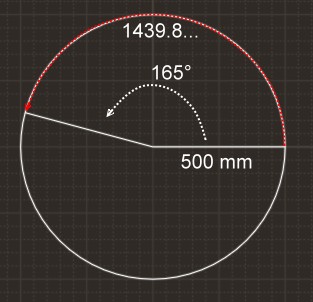
Not scaled I get an arc length of ~ 1439,9mmI draw a circle, second click (cardinal point on red). Then I take out a 165 degrees part. Result is arc A with incorrect chord length and correct arc length.
After rotating a copy of the circle by 0.5 degrees I'll get two endpoints lined up on same red value, to form the endpoints of the correct chord.If I then copy this chord to the side, I can use the arc tool directly to this edge to create a correct segmented arc: click first > click second point > either type the correct radius [Enter] or click third point and type the correct radius [Enter]
Like other dimension input you can override the current units. So (since I usually use mm) I can type 50cmr. The resulting arc when scaled up is ~ 14398966,3mmUsing the incorrect chord (from circles segments midpoints) would lead to an incorrect arc.
edit: Notice that you can input either the bulge or the radius (include the r)!
-
I was telling me we should stop arguing about arcs, circles and curves in SU as they do not exist... just polylines and polygones, kind of arcs, circles and curves tells entity info.
-
for info with cms as Unity at the maximum of its precision for a circle of 50 cms
a nurbs program gives 143.9 896 632 cms
with mms as unity 1 439.8 966 322 mms
-
@unknownuser said:
for info with cms as Unity at the maximum of its precision for a circle of 50 cms
a nurbs program gives 143.9 896 632 cmswith mms as unity 1 439.8 966 322 mms
My $1 calculator(*) reveals 1439.98966329mm.
But what about how to get Entity Info to show better than ~ ____.9mm
I mean more digits after decimal point.(*) apparently former owner had no use for the calculator anymore.

-
Gerrit, you can specify the number of decimal places in Model Info > Units.
You guys might find this handy.
-
@alan fraser said:
Gerrit, you can specify the number of decimal places in Model Info > Units.....
Yes, I know, and I've often set it to max decimals in mm (0.000000mm)
But it has no effect on what 'Entity Info' displays for the arc's length.
Only units does and I can't go "beyond" mm.Thank you for the link. I was just looking for this one that I don't have on the labtop that I'm working from. It's faster than setting up a program (and altering!) in Excel. Am I lazy or not?
As for your previous post:
@alan fraser said:
The accuracy is actually pretty impressive, but I find it very odd that you get an utterly different result depending on whether you type the radius into the VCB (Measurements) or Entity Info. **It would be really useful if you could inference off an established centre...**something it seems to recognise if you go the Entity Info route.
Isn't that done by entering the radius in the 'Arc' operation? Instaed of entering the bulge? If you already have the chord!
-
@unknownuser said:
My $1 calculator(*) reveals 1439.98966329mm.
hum hum first number after the decimal point?
1439.8966322 mm mine
it's because the arc or any curves in this prog is "unwraped" by a plugin for have the length
So from an existing curve and not from a "calculator"Maybe it's also an error of the "calculator"! Who knows?
I will investigate !
-
@alan fraser said:
@unknownuser said:
"DesertRaven"Alan, this thread is going exactly where it needs to go. If we keep saying we'll settle for "good enough", nothing will ever be gained to the better.
Where have I ever indicated that I'd settle for 'good enough'? I have pointed out several times now the shortcomings of the Offset Tool...in both exterior and more especially on interior offsets. I have also mentioned that Follow Me leaves much to be desired....
.....You can campaign for true curves from now till eternity...but you won't get them.
Alan, I have provided examples explaining to a "T" what I'm basing my criticism on, I have no problem with SU using facets vs real curves, as long as the result is what it is supposed to be and not some variation.
It is completely illogical that the end of an offset arch would result in a cut short end segment or elongated end segment - just for the sake of keeping it square.
The correct logical conclusion is:
That the offset arc follows the center to the edge in a line and all facets be consistent. Because I am starting with an equal sided arch so I expect an equal sided offset version of the arch. Plus an arch is a segment of a circle.
Why wouldn't the segments need to stay consistent in the offset version? -
@desertraven said:
The correct logical conclusion is:
i think, for the most part, we've moved past this part of the conversation.. the error is being realized by more people (and john didn't deny it
)so now.. it's- where do we go from here?
-
Currently if you draw an arc, copy it, group then paste in place you can offset the arc correctly using cardinal points.
So maybe extend the move tool by adding alt+move to perform a true offset on a selection of edges.
This doesn't completely fix the issue in all circumstances but does add the required meta data to the geometry.
The move tool with cardinal points is one of SketchUp's strongest modeling features for me.
But there maybe holes in my theory.....
-
right rich.. the cardinal point scales an arc and that's all that needs to happen when offsetting one..
(the resulting geometry needs to remain an arc and the central angle needs to stay the same so basically, the only thing you can do to change it's size without breaking it's inherent properties is scale it)
[EDIT] but that does bring up a good example of what should be happening..
draw a 90º arc whose endpoints are on the red axis and the green one.. using the scale tool, grab the handle opposite of the arc's center point and scale it.. that's offsetting of an arc.[/edit][edit2] oops.. cardinal points change the bulge of an arc.. it's when you put the move tool on the ends of an arc which scales it..
-
@desertraven said:
It is completely illogical that the end of an offset arch would result in a cut short end segment or elongated end segment - just for the sake of keeping it square.
No, it's not illogical, it's just inconvenient for offsetting arcs. There ought to be another tool (or at east an option) for doing that, based on offsetting the end points, not the facets. Calling it illogical implies there's no logic. There is...like I said, it's just not a logic that a lot of people find particularly useful in many circumstances, me included. If there isn't already a Ruby for doing this, there ought to be.
More correctly, it's more than inconvenient, it's misleading. The reason being that it's not really an Offset Tool at all when it comes to offsetting arcs...it's a Joint Push/Pull Tool. In other words, it pulls out the facets, the resulting new endpoints are simply where those extruded facets happen to intersect. As such, it's no surprise that they don't conform exactly to any expected increase in radius.
In fact if you pull an arc upwards into 3D and JPP it, you'll find you get exactly the same new 'arc' as if you'd 'offset' it.Gerrit, you're absolutely correct about the bulge/radius thing. I was having a senior moment.
There have been times when I simply can't persuade the Measurement box to say Radius instead of Bulge; I guess that's what prompted the remark. But of course I could always simply override that by typing value + r. -
@alan fraser said:
@desertraven said:
It is completely illogical that the end of an offset arch would result in a cut short end segment or elongated end segment - just for the sake of keeping it square.
No, it's not illogical, it's just inconvenient for offsetting arcs. There ought to be another tool (or at east an option) for doing that, based on offsetting the end points, not the facets. Calling it illogical implies there's no logic. There is...like I said, it's just not a logic that a lot of people find particularly useful in many circumstances, me included. If there isn't already a Ruby for doing this, there ought to be.
More correctly, it's more than inconvenient, it's misleading. The reason being that it's not really an Offset Tool at all when it comes to offsetting arcs...it's a Joint Push/Pull Tool. In other words, it pulls out the facets, the resulting new endpoints are simply where those extruded facets happen to intersect. As such, it's no surprise that they don't conform exactly to any expected increase in radius.
In fact if you pull an arc upwards into 3D and JPP it, you'll find you get exactly the same new 'arc' as if you'd 'offset' it.Gerrit, you're absolutely correct about the bulge/radius thing. I was having a senior moment.
There have been times when I simply can't persuade the Measurement box to say Radius instead of Bulge; I guess that's what prompted the remark. But of course I could always simply override that by typing value + r.Well your logic explains what happens through SU, but that does not make the end result a logic conclusion. And if the Joint push pull does the same thing then it needs fixing too.
Edit: I'm glad you are agreeing on the misleading part. Here another example how misleading this tool is: The arch and the 2 lines were offset in one go so they were all 3 selected the result speaks for it's self.

-
@Wo3Dan
Rhino and its Length command and it gives a result of:Command: Length
Length = 1439.8966 millimetersSo that seems to agree with MoI.
The formula for the circumference of a circle is 2 * PI * radius = circumference.
The 2 * PI is for a full circle, for an arc you replace this with the angle of the arc in radians. 165 in radians is 165 * PI / 180.
So the full formula is: (165 * PI / 180) * 500 =
On my calculator here that yields: **1439.8**966328953219009620448840031 mm
@unknownuser said:
My $1 calculator(*) reveals 1439.**9**8966329mm.
So what has your calculator with the first number after the decimal point?
Or do we not calculate the same thing ?
-
@wo3dan said:
First of all I can't get Entity Info to show the (any) arc's length with that number of digits in decimals. Probably my fault, I was pretty sure it could be done.
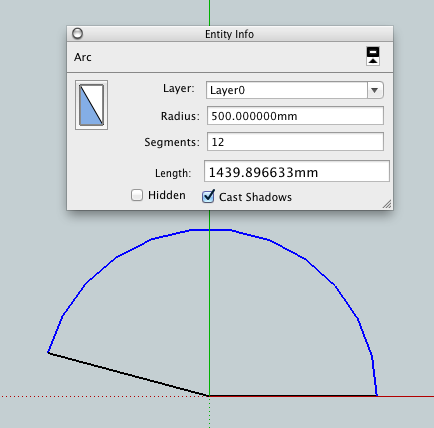
strange find.. on mac, the length precision coincides with the model precision..
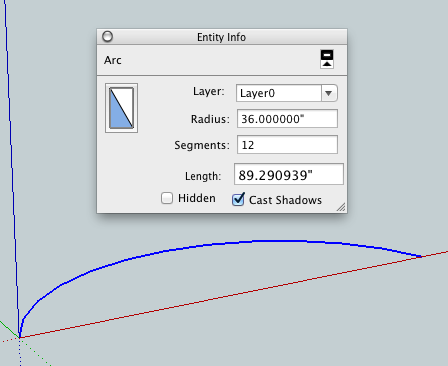
[edit-- checked it out in mm as well.. that works too on mac.. this is the R500mm @165º arc..
-
What is this prodigy ?
Unity in mm enable
On PC we have just ~1439.90mm even maxi precision decimal asked!
-
@desertraven said:
Well your logic explains what happens through SU, but that does not make the end result a logic conclusion. And if the Joint push pull does the same thing then it needs fixing too.
Edit: I'm glad you are agreeing on the misleading part. Here another example how misleading this tool is: The arch and the 2 lines were offset in one go so they were all 3 selected the result speaks for it's self.
I don't know how much more clearly I can put it; It's not my logic...it's just logic...the logical consequence of offsetting faces, not endpoints. The discrepancy shown in your illustration is the very logical consequence of offsetting a segment normal and not the end point. As long as arcs are measured based on centres and vertices, yet offsets are calculated from edge perpendiculars, that's going to be the result. They are fundamentally incompatible...which is why SU needs to treat arcs differently when offsetting.
It is misleading only in as much as many people might expect the rationale behind arc construction to be carried forward into offsetting...but it isn't.Fredo's JPP does not need fixing. It works exactly as any reasonable person would expect it to work. What do you propose Push/Pulling if not faces...remembering that there are only faces once you have entered 3D? My whole point in mentioning it was to illustrate that the Offset Tool, in it's present form, is actually an Extrude Tool...but working in 2D.
-
@unknownuser said:
@me said:
My $1 calculator(*) reveals 1439.98966329mm.
hum hum first number after the decimal point?
1439.8966322 mm mine ...You are right, my result has a typo
 . (lack of coffee?)
It should have been typed as: 1439.8966329mm -
@Wo3Dan
Cool! Else that was meaning that the plugin should to be rewrited !
-
@unknownuser said:
Unity in mm enable
On PC we have just ~1439.90mm even maxi precision decimal asked!Seems to be more complex than that...
Precision of arcs entity info does not seem to change when edited in "model info" - lines etc. are OK, precision changes immediately, but for arcs you need to close and re-open the file. So maybe 0.00 precision is what is loaded into your default template - and gets 'stuck' until the file is saved.
This seems a very consistent and repeatable bug - I can easily make the opposite effect of arcs showing more precision than other entities by changing/saving/loading.








Advertisement