sketchucation logo sketchucation
    • 登入
    Oops, your profile's looking a bit empty! To help us tailor your experience, please fill in key details like your SketchUp version, skill level, operating system, and more. Update and save your info on your profile page today!
    🔌 Smart Spline | Fluid way to handle splines for furniture design and complex structures. Download

    Vray for blender

    已排程 已置頂 已鎖定 已移動 V-Ray
    renderpluginsextensions
    38 貼文 8 Posters 5.0k 瀏覽 8 Watching
    正在載入更多貼文
    • 從舊到新
    • 從新到舊
    • 最多點贊
    回覆
    • 在新貼文中回覆
    登入後回覆
    此主題已被刪除。只有擁有主題管理權限的使用者可以查看。
    • andybotA 離線
      andybot
      最後由 編輯

      So I thought I would post a relatively simple 1 to 1 comparison of a scene in Sketchup and the same scene in Blender, both rendered with vray (different versions - the SU version is a year or so behind...) Here is the wireframe in SU. I exported as a 3ds mesh into blender. The camera views aren't exact matches, but oh well.
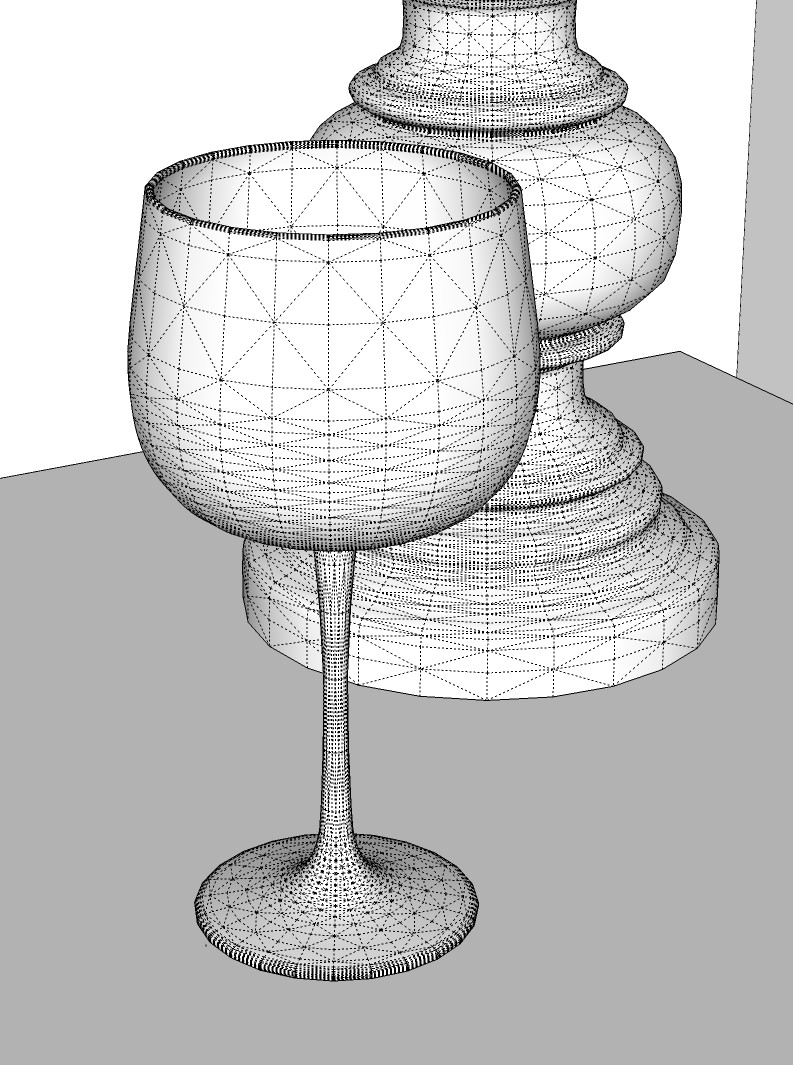
      SU wireframe view
      Here is the original photo I based the model on.

      photograph - taking camera exposure settings for the vray physical camera
      Next, I adjusted the materials as best I could in vfsu, set the lighting to real-world units (the bulb in the lamp is 1200 lumens)
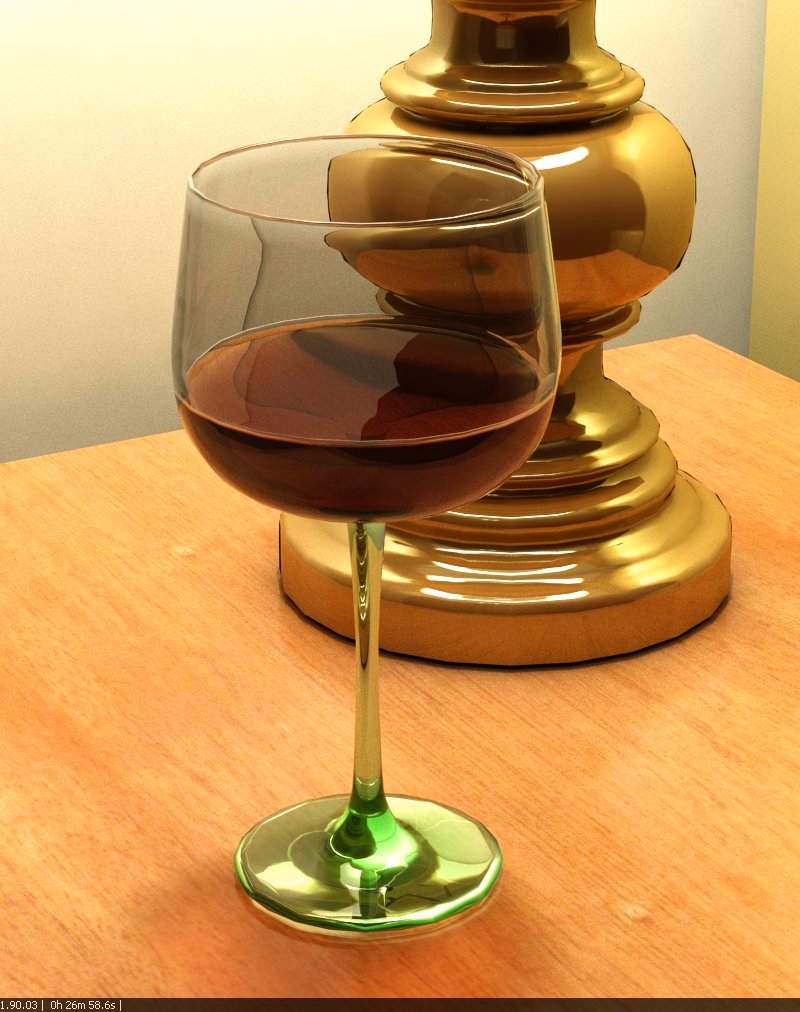
      Vray for Sketchup rendering
      Then, I did the same in Blender - except that I used a smooth and a subdivision modifier on the wineglass and the lamp to get the curves nice and clean. The lighting is the same, using the same exposure and light source. The material properties, even though I tried to match, the fog effect seems to be completely different in v/b - much closer to the photo. The colors, even with the same color mapping, etc, are quite different, and seem much more accurate.

      vray for blender - better match of exposure and viewpoint...

      http://charlottesvillearchitecturalrendering.com/

      1 條回覆 最後回覆 回覆 引用 0
      • andybotA 離線
        andybot
        最後由 編輯

        Pete- sure why not. Have fun! It's all modeled from scratch, so no reason not to share.


        sketchup file


        blender file with textures

        http://charlottesvillearchitecturalrendering.com/

        1 條回覆 最後回覆 回覆 引用 0
        • andybotA 離線
          andybot
          最後由 編輯

          @tomDC - yeah, I'm going to learn more about bmesh when I have a chance, looks really powerful. Right now the v/b build is with 2.62

          http://charlottesvillearchitecturalrendering.com/

          1 條回覆 最後回覆 回覆 引用 0
          • StinkieS 離線
            Stinkie
            最後由 編輯

            Yeah ... bmesh looks good. Its bevel tool still needs some work, though.

            1 條回覆 最後回覆 回覆 引用 0
            • andybotA 離線
              andybot
              最後由 編輯

              well, vray has a round edges. That's one thing I want to play with sometime.

              http://charlottesvillearchitecturalrendering.com/

              1 條回覆 最後回覆 回覆 引用 0
              • andybotA 離線
                andybot
                最後由 編輯

                quick DOF test.


                vb-test9.jpg

                http://charlottesvillearchitecturalrendering.com/

                1 條回覆 最後回覆 回覆 引用 0
                • holmes1977H 離線
                  holmes1977
                  最後由 編輯

                  Thanks Anybot
                  This is very exciting. Ive started to watch some video tutorials. Seem all very compatible to what we know in Vray4SU.
                  Have you already purchased the standalone or are you still using the demo versions.

                  Exaggeration makes a dull story better.

                  1 條回覆 最後回覆 回覆 引用 0
                  • andybotA 離線
                    andybot
                    最後由 編輯

                    Hey Jonathan - I did buy the license. Once I installed the vray for blender build and saw how good the integration is with vray, I knew right away it would be worth the purchase. I had been trying other blender rendering add-ons earlier - luxrender, thea, yafaray, cycles, but none of them were doing it for me. Also, I never did get indigo to work, nor renderman. Anyway, with vray, there's just no comparison.

                    http://charlottesvillearchitecturalrendering.com/

                    1 條回覆 最後回覆 回覆 引用 0
                    • eidam655E 離線
                      eidam655
                      最後由 編輯

                      i'm especially surprised by the looks of the rounded edges... but i guess that's a SketchUp thing, rather than VRay's, right?

                      I'm using SketchUp 2017, V-Ray 3.4

                      1 條回覆 最後回覆 回覆 引用 0
                      • andybotA 離線
                        andybot
                        最後由 編輯

                        @eidam655 said:

                        i'm especially surprised by the looks of the rounded edges... but i guess that's a SketchUp thing, rather than VRay's, right?

                        Well, now that I play with it more, that's actually mostly a subdivision issue. Here is the same vfsu scene with 2 iterations of SDS instead of one.


                        test5.jpg

                        http://charlottesvillearchitecturalrendering.com/

                        1 條回覆 最後回覆 回覆 引用 0
                        • holmes1977H 離線
                          holmes1977
                          最後由 編輯

                          I suppose blender/vray will really come into its own when dealing with heavy scenes. Have you played with proxies/instancing yet, or a textured model that would normally given you a hundred bug splats?

                          Exaggeration makes a dull story better.

                          1 條回覆 最後回覆 回覆 引用 0
                          • andybotA 離線
                            andybot
                            最後由 編輯

                            I'm working on a big scene as I have time. I'm finding it's quite a bit of cleanup to export something with a lot of components.

                            http://charlottesvillearchitecturalrendering.com/

                            1 條回覆 最後回覆 回覆 引用 0
                            • holmes1977H 離線
                              holmes1977
                              最後由 編輯

                              i suppose you will start collecting high poly better models to use anyway. Oh bring on evermotion models Yummmmmmmmmm

                              Exaggeration makes a dull story better.

                              1 條回覆 最後回覆 回覆 引用 0
                              • pugz1983P 離線
                                pugz1983
                                最後由 編輯

                                I've scratched the surface of blender to and the possibilities are good in my opinion. The only thing i havent figured oput yet is the best format to export to Blender. I don't want to spend a lot of time organising the model hierarchy in Blender. Love some pointer on the export to blender workflow.

                                Greetz Twan

                                1 條回覆 最後回覆 回覆 引用 0
                                • andybotA 離線
                                  andybot
                                  最後由 編輯

                                  @pugz1983 said:

                                  The only thing i havent figured oput yet is the best format to export to Blender. I don't want to spend a lot of time organising the model hierarchy in Blender. Love some pointer on the export to blender workflow.

                                  Hi Twan,

                                  I'm still trying to figure out the best methodology too. So far, the two options that have worked are using SU pro native 3ds exporter, and using TIG's object exporter

                                  My wineglass and lamp was brought in using the 3ds export. The group and component heirarchies are kept, and the shapes came in properly as meshes. I added smoothing and subdivisions, adjusted the materials to it to the render.

                                  The objexporter gets rid of the heirarchies and groups things by material. This is useful when there are lots of small groups and components that can make it hard to navigate the model. It's also helpful because you can easily replace material since there's one mesh per material (there may be a global way to replace, I just haven't figured it out yet.) The big issue I've run into is that duplicate vertices are exported, but that has a relatively easy fix thanks to michalis' tip

                                  There are still more parts of the workflow I am testing as I have time, but hope this gets you in the right direction.

                                  -Andy

                                  http://charlottesvillearchitecturalrendering.com/

                                  1 條回覆 最後回覆 回覆 引用 0
                                  • pugz1983P 離線
                                    pugz1983
                                    最後由 編輯

                                    Thanx for the tips Andy. I'll give it a go when I get back from work today. After looking at the trailer of the Nature Academy Tutorials I really started to get interested in Blender. Do you use Blendup to make the controls more like in SU?

                                    Greetz Twan

                                    1 條回覆 最後回覆 回覆 引用 0
                                    • dkendigD 離線
                                      dkendig
                                      最後由 編輯

                                      I'm surprised 3ds worked better than the collada format (*.dae), I thought that was supposed to be the end all be all format these days.

                                      Devin Kendig
                                      Developer

                                      1 條回覆 最後回覆 回覆 引用 0
                                      • andybotA 離線
                                        andybot
                                        最後由 編輯

                                        @dkendig said:

                                        I'm surprised 3ds worked better than the collada format (*.dae), I thought that was supposed to be the end all be all format these days.

                                        Collada just doesn't seem to be that well supported. It seems like it breaks regularly with Blender updates.

                                        @pugs1983 - I'm fine with the blender interface as it is v2.5 and higher. It's the rotate, zoom, pan that's been "fixed" from earlier versions that makes it easy to use.


                                        http://charlottesvillearchitecturalrendering.com/

                                        1 條回覆 最後回覆 回覆 引用 0
                                        • 1
                                        • 2
                                        • 2 / 2
                                        • 第一個貼文
                                          最後的貼文
                                        Buy SketchPlus
                                        Buy SUbD
                                        Buy WrapR
                                        Buy eBook
                                        Buy Modelur
                                        Buy Vertex Tools
                                        Buy SketchCuisine
                                        Buy FormFonts

                                        Advertisement