sketchucation logo sketchucation
    • 登入
    Oops, your profile's looking a bit empty! To help us tailor your experience, please fill in key details like your SketchUp version, skill level, operating system, and more. Update and save your info on your profile page today!
    ⚠️ Important | Libfredo 15.6b introduces important bugfixes for Fredo's Extensions Update

    [Tutorial] Modeling a Space Frame

    已排程 已置頂 已鎖定 已移動 SketchUp Tutorials
    sketchup
    25 貼文 14 Posters 10.2k 瀏覽 14 Watching
    正在載入更多貼文
    • 從舊到新
    • 從新到舊
    • 最多點贊
    回覆
    • 在新貼文中回覆
    登入後回覆
    此主題已被刪除。只有擁有主題管理權限的使用者可以查看。
    • tademaT 離線
      tadema
      最後由 編輯

      Eric,
      I could watch your videos all day long. You have a great way of modeling.
      John

      1 條回覆 最後回覆 回覆 引用 0
      • StinkieS 離線
        Stinkie
        最後由 編輯

        Yeah. 😲

        1 條回覆 最後回覆 回覆 引用 0
        • boofredlayB 離線
          boofredlay
          最後由 編輯

          Well thanks again guys. Sometimes I surprise myself.

          http://www.coroflot.com/boofredlay

          1 條回覆 最後回覆 回覆 引用 0
          • david_hD 離線
            david_h
            最後由 編輯

            Once again. . .you are engineered to amaze.

            If I make it look easy...It is probably easy

            1 條回覆 最後回覆 回覆 引用 0
            • mitcorbM 離線
              mitcorb
              最後由 編輯

              @Boofredlay: I suggest a warning label on all of your tutorials "Caution to learners: watching these tutorials may cause one of two things--it may stunt your growth, or it will inspire your inner artist. 💚

              I take the slow, deliberate approach in my aimless wandering.

              1 條回覆 最後回覆 回覆 引用 0
              • boofredlayB 離線
                boofredlay
                最後由 編輯

                😄 Thanks.

                http://www.coroflot.com/boofredlay

                1 條回覆 最後回覆 回覆 引用 0
                • L 離線
                  Late
                  最後由 編輯

                  Great and inspiring tutorial. But I'm totally hobbyist so how you moved the sphere from it's center point?

                  1 條回覆 最後回覆 回覆 引用 0
                  • boofredlayB 離線
                    boofredlay
                    最後由 編輯

                    When you use the sphere plugin, placement is at the center bottom of the sphere.
                    #1 in my example image.

                    Then get the move tool, click on the midpoint of one of the outside lines (midpoint on the sphere). I turned on the x-ray view style for this step. Start moving it in the blue direction, hold shift then click the reference point where you want the sphere to "land".
                    #2 in my example image.
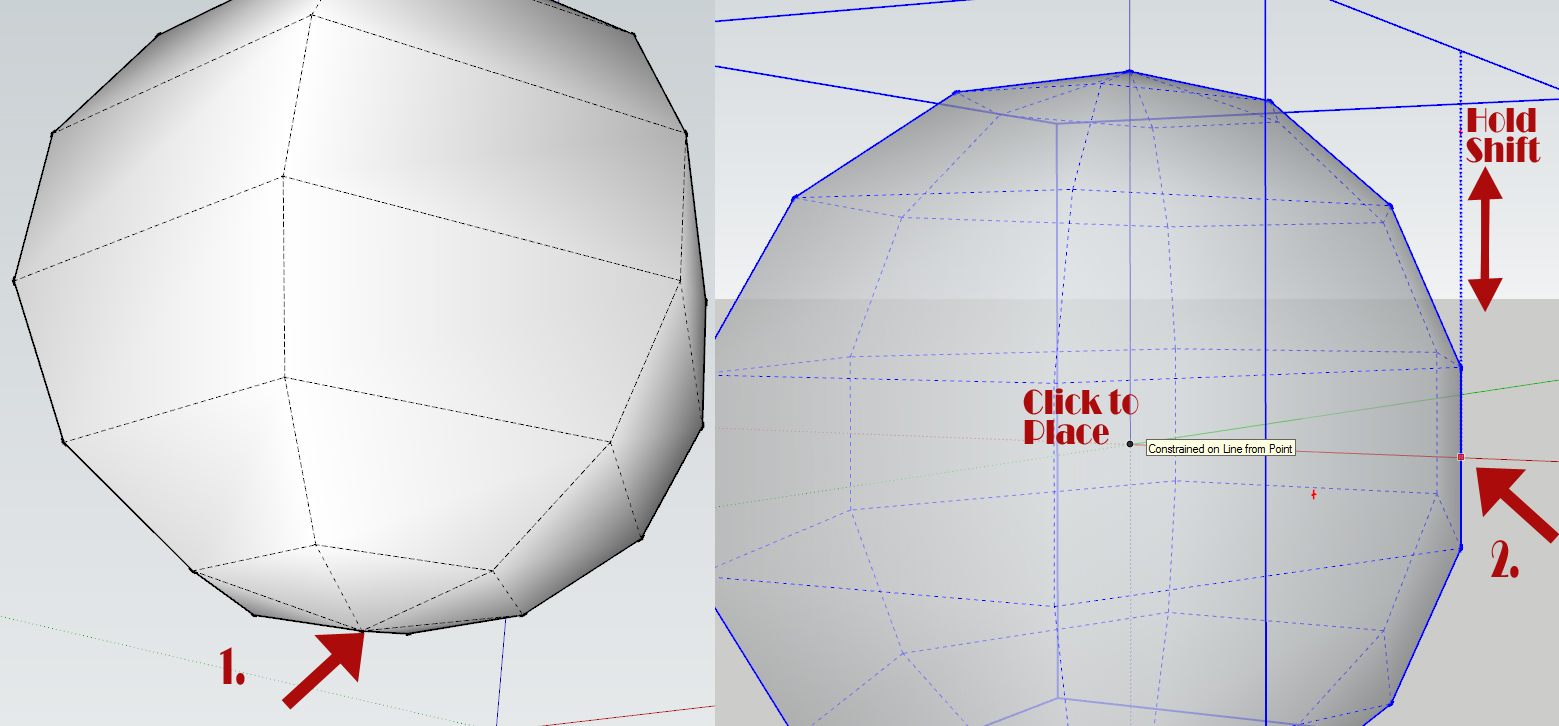

                    Sphere-Placement.jpg

                    http://www.coroflot.com/boofredlay

                    1 條回覆 最後回覆 回覆 引用 0
                    • L 離線
                      Late
                      最後由 編輯

                      Thanks. It's always fun to learn new things.

                      1 條回覆 最後回覆 回覆 引用 0
                      • utilerU 離線
                        utiler
                        最後由 編輯

                        @solo said:

                        Doh!!!

                        I just learned something new, almost embarrassed to say, I never knew about the additional setting with JPP, damn, if I knew this before I could've modeled even faster.

                        Thanks Eric.

                        Slaps head.

                        Nether did I, Pete!!!

                        BTW how do you upload a youtube video to here? And what software are you using to record?

                        Well done, Boo. Love your work!

                        Just Curious...

                        1 條回覆 最後回覆 回覆 引用 0
                        • boofredlayB 離線
                          boofredlay
                          最後由 編輯

                          Thanks Andrew.

                          I use Hypercam2
                          http://www.hyperionics.com/hc/

                          Make sure you change the keyboard shortcuts (Hot Keys) because they can interfere with your SU ones and mess up your video. I found that out the hard way.

                          After taking the video I used Windows Live Movie Maker to add text and edit it. Then uploaded to Youtube.

                          Both Hypercam and WLMM are free.

                          Attaching the Youtube to your post is best explained in Miguel's post here:
                          http://forums.sketchucation.com/viewtopic.php?p=144086#p144086

                          http://www.coroflot.com/boofredlay

                          1 條回覆 最後回覆 回覆 引用 0
                          • utilerU 離線
                            utiler
                            最後由 編輯

                            Cheers, Boo
                            👍

                            Just Curious...

                            1 條回覆 最後回覆 回覆 引用 0
                            • mitcorbM 離線
                              mitcorb
                              最後由 編輯

                              You think maybe Hypercam 2 will work on Win 7? The info stops at xp?

                              I take the slow, deliberate approach in my aimless wandering.

                              1 條回覆 最後回覆 回覆 引用 0
                              • boofredlayB 離線
                                boofredlay
                                最後由 編輯

                                Yep. I use it at home and work on Win7.

                                http://www.coroflot.com/boofredlay

                                1 條回覆 最後回覆 回覆 引用 0
                                • mitcorbM 離線
                                  mitcorb
                                  最後由 編輯

                                  Ok, thanks.

                                  I take the slow, deliberate approach in my aimless wandering.

                                  1 條回覆 最後回覆 回覆 引用 0
                                  • pilouP 離線
                                    pilou
                                    最後由 編輯

                                    Cool tut ☀

                                    Maybe you can use the Guides Tool by ThomThom for put the Spheres more quickly?

                                    Image by guanjin

                                    http://forums.sketchucation.com/download/file.php?id=84409

                                    Frenchy Pilou
                                    Is beautiful that please without concept!
                                    My Little site :)

                                    1 條回覆 最後回覆 回覆 引用 0
                                    • usenU 離線
                                      usen
                                      最後由 編輯

                                      Thanks. 👍

                                      http://www.sketchupturkiye.com/

                                      1 條回覆 最後回覆 回覆 引用 0
                                      • S 離線
                                        shahriyar
                                        最後由 編輯

                                        Thanks Again

                                        1 條回覆 最後回覆 回覆 引用 0
                                        • brookefoxB 離線
                                          brookefox
                                          最後由 編輯

                                          Thank you, Eric.

                                          Now if we could only get the size and res of embedded vids jacked up so we can see what the plugin settings are that are being used (JPP in this case). Alas, at present, there seems not to be a way.

                                          ~ Brooke

                                          1 條回覆 最後回覆 回覆 引用 0
                                          • Rich O BrienR 離線
                                            Rich O Brien Moderator
                                            最後由 編輯

                                            @brookefox said:

                                            Now if we could only get the size and res of embedded vids jacked up so we can see what the plugin settings are that are being used (JPP in this case). Alas, at present, there seems not to be a way.

                                            Why not go to Eric's YouTube page and watch it full screen?

                                            Download the free D'oh Book for SketchUp 📖

                                            1 條回覆 最後回覆 回覆 引用 0
                                            • 1
                                            • 2
                                            • 2 / 2
                                            • 第一個貼文
                                              最後的貼文
                                            Buy SketchPlus
                                            Buy SUbD
                                            Buy WrapR
                                            Buy eBook
                                            Buy Modelur
                                            Buy Vertex Tools
                                            Buy SketchCuisine
                                            Buy FormFonts

                                            Advertisement