sketchucation logo sketchucation
    • 登入
    Oops, your profile's looking a bit empty! To help us tailor your experience, please fill in key details like your SketchUp version, skill level, operating system, and more. Update and save your info on your profile page today!
    🔌 Smart Spline | Fluid way to handle splines for furniture design and complex structures. Download

    [Plugin] FullScreen v5.1.3 (25 April 2024)

    已排程 已置頂 已鎖定 已移動 Plugins
    285 貼文 79 Posters 411.6k 瀏覽 80 Watching
    正在載入更多貼文
    • 從舊到新
    • 從新到舊
    • 最多點贊
    回覆
    • 在新貼文中回覆
    登入後回覆
    此主題已被刪除。只有擁有主題管理權限的使用者可以查看。
    • A 離線
      Anton_S
      最後由 編輯

      Update 3.0.2: A bunch of minor fixes and improvements

      1 條回覆 最後回覆 回覆 引用 0
      • F 離線
        feodos
        最後由 編輯

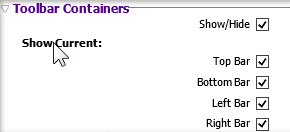
        • in the new dialog window there is no toolbar Containers
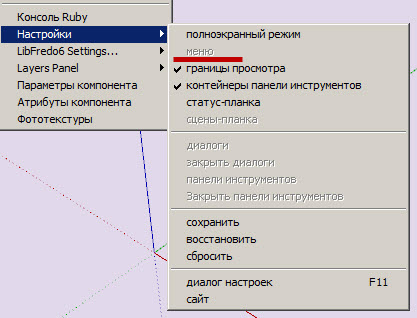
        • the button of the menu isn't active

        1.jpg


        2.jpg

        1 條回覆 最後回覆 回覆 引用 0
        • P 離線
          Pherim
          最後由 編輯

          Can this simply be updated via the Plugin store? It says in the description that the old version needs to be removed. And what about AMS Library, will this be installed by the Plugin Store, too? I Can't find it in there.

          1 條回覆 最後回覆 回覆 引用 0
          • A 離線
            Anton_S
            最後由 編輯

            @pherim said:

            Can this simply be updated via the Plugin store? It says in the description that the old version needs to be removed.

            I tested coping and pasting the new version over the original version and found that replacing the new plugin over the original one will not affect the plugin, but there will be unused content inside the plugin's folder. Deleting the original version is not required, but you may if you want to be organized. I changed the description back to normal.

            @pherim said:

            And what about AMS Library, will this be installed by the Plugin Store, too? I Can't find it in there.

            Added it to the plugin store.

            Thanks for suggestions.

            1 條回覆 最後回覆 回覆 引用 0
            • A 離線
              Anton_S
              最後由 編輯

              @feodos said:

              In the new dialog window there is no toolbar Containers

              What do you mean there is not toolbar containers, there is! I removed an option where you could show/hide current toolbar container because not much users use these options anyways. They just show/hide them all at once.

              @feodos said:

              the button of the menu isn't active

              The menubar can be shown/hidden only when SketchUp is fullscreen! Set SU fullscreen, and then you'll be able to show/hide menubar. Hover the cursor over the menu item, and the description will be displayed in the status bar. It clearly states that the option works with main window set fullscreen only!

              1 條回覆 最後回覆 回覆 引用 0
              • A 離線
                Anton_S
                最後由 編輯

                New update 3.0.3

                • Minor dialog and menu optimizations.
                • Added the set/remove menubar option back. Press the ALT key to set/remove menu bar.
                • Requires AMS Library 1.0.2 or later
                1 條回覆 最後回覆 回覆 引用 0
                • Rich O BrienR 線上
                  Rich O Brien Moderator
                  最後由 編輯

                  Nice one Anton.

                  Download the free D'oh Book for SketchUp 📖

                  1 條回覆 最後回覆 回覆 引用 0
                  • CadFatherC 離線
                    CadFather
                    最後由 編輯

                    Thank you for the update Anton - this plugin is fantastic.

                    but...could the ALT be optional (or assignable)? on my machine it conflicts with some native keyboard shortcuts (move, or follow me tool + alt) - of course also other custom ones.

                    1 條回覆 最後回覆 回覆 引用 0
                    • A 離線
                      Anton_S
                      最後由 編輯

                      I will add customizing shortcuts soon.

                      Sorry about the ALT thing 😆

                      1 條回覆 最後回覆 回覆 引用 0
                      • A 離線
                        Anton_S
                        最後由 編輯

                        Perhaps for now, you can change the shortcut yourself:

                        1. Open ams_WindowsSettings/main.rb
                        2. Scroll down to line 434
                        3. Change 'menu' to 'f12' or whatever key you prefer.
                        4. Save, and restart SU.
                        1 條回覆 最後回覆 回覆 引用 0
                        • CadFatherC 離線
                          CadFather
                          最後由 編輯

                          Thank You, Master Anton! 😄 ☀

                          1 條回覆 最後回覆 回覆 引用 0
                          • A 離線
                            Anton_S
                            最後由 編輯

                            3.5.0 Dec 15, 2013

                            • Added customizable shortcuts, thanks to CadFather.
                            • Added drag, clip, snap dialog.
                            • Added dialog clear borders option.
                            • Changed default set/remove menu shortcut key from ALT to F12.
                            1 條回覆 最後回覆 回覆 引用 0
                            • L 離線
                              laudhi
                              最後由 編輯

                              sketchup always freeze when i make a rectangle and select the face,right click and press R
                              I tried without any other plugin.......

                              (sketchup make,windows 7 x64)
                              btw,thanxz for the plugin..... 😄

                              1 條回覆 最後回覆 回覆 引用 0
                              • A 離線
                                Anton_S
                                最後由 編輯

                                Thank you for the report laudhi.

                                I found and fixed it. Download the latest version of AMS Library.

                                1 條回覆 最後回覆 回覆 引用 0
                                • L 離線
                                  laudhi
                                  最後由 編輯

                                  @anton_s said:

                                  Thank you for the report laudhi.

                                  I found and fixed it. Download the latest version of AMS Library.

                                  thanks Anton_S,now everything is running smoothly without any problems with other plugins 😍

                                  i love the floating window....

                                  1 條回覆 最後回覆 回覆 引用 0
                                  • A 離線
                                    Anton_S
                                    最後由 編輯

                                    3.6.0 Jan 29, 2014

                                    • Figured out a way to keep all shortcuts working while the menu bar is removed. The fancy shortcuts sections and the show/hide menu bar option were removed. They are no longer required! 😄
                                    • Fixed the get screen resolution function in AMS library. Now, it will return the size of all monitors combined. This fixes an issue where the dialog could not be moved to another screen.
                                    • Simplified and improved stuff.
                                    1 條回覆 最後回覆 回覆 引用 0
                                    • CadFatherC 離線
                                      CadFather
                                      最後由 編輯

                                      Master Anton strikes again - thanks!

                                      1 條回覆 最後回覆 回覆 引用 0
                                      • U 離線
                                        unearthed
                                        最後由 編輯

                                        Thanks for this plugin Anton, it's arguably the number 1 plugin for me as it enables me to quickly clear my screen for online client presentations. The only thing is could the floating black dialog be made smaller?

                                        Growplan - People ∩ Plants ∩ Place

                                        windows 7 64b, 4GB RAM, SU 8.0.16846
                                        Gimp, QGIS, Vectorworks 12, Bricscad 11

                                        1 條回覆 最後回覆 回覆 引用 0
                                        • A 離線
                                          Anton_S
                                          最後由 編輯

                                          @cadfather said:

                                          Master Anton strikes again - thanks!

                                          Thank you, CadFather!

                                          @unearthed said:

                                          Thanks for this plugin Anton, it's arguably the number 1 plugin for me as it enables me to quickly clear my screen for online client presentations. The only thing is could the floating black dialog be made smaller?

                                          I'm glad you like it. 😄 I've been thinking about making another collapsible on top, that would collapse/uncollapse all other collapsibles. Perhaps this feature could be available in the next release. Thanks for suggestion!

                                          1 條回覆 最後回覆 回覆 引用 0
                                          • V 離線
                                            vicxp0518
                                            最後由 編輯

                                            @unclex said:

                                            and i can not dare try the Menu Option, if i close it, how reopen it ??

                                            Yes i'm encountering with the problem 😞 It's bad to me, 'cos I've already hidden everything in the window include the menu bar, then, how can I bring it back again?? I've got nothing to do with my Sketchup now even if I reinstalled both SU and this plugin. Please tell me.


                                            1 條回覆 最後回覆 回覆 引用 0
                                            • 1
                                            • 2
                                            • 7
                                            • 8
                                            • 9
                                            • 10
                                            • 11
                                            • 14
                                            • 15
                                            • 9 / 15
                                            • 第一個貼文
                                              最後的貼文
                                            Buy SketchPlus
                                            Buy SUbD
                                            Buy WrapR
                                            Buy eBook
                                            Buy Modelur
                                            Buy Vertex Tools
                                            Buy SketchCuisine
                                            Buy FormFonts

                                            Advertisement