sketchucation logo sketchucation
    • 登入
    Oops, your profile's looking a bit empty! To help us tailor your experience, please fill in key details like your SketchUp version, skill level, operating system, and more. Update and save your info on your profile page today!
    🔌 Smart Spline | Fluid way to handle splines for furniture design and complex structures. Download

    [Plugin] FullScreen v5.1.3 (25 April 2024)

    已排程 已置頂 已鎖定 已移動 Plugins
    285 貼文 79 Posters 411.7k 瀏覽 80 Watching
    正在載入更多貼文
    • 從舊到新
    • 從新到舊
    • 最多點贊
    回覆
    • 在新貼文中回覆
    登入後回覆
    此主題已被刪除。只有擁有主題管理權限的使用者可以查看。
    • CadFatherC 離線
      CadFather
      最後由 編輯

      %(#BF0000)[phew, Master Anton is Back! 😎 👍 Thank you.]

      works well on win7 64bit - no lag or quirks so far.

      couple of thoughts for future dev - what do you think of a button to link the 'others' section (dialogs + floating bars), with toolbar containers - that way with one key you can hide both groups.
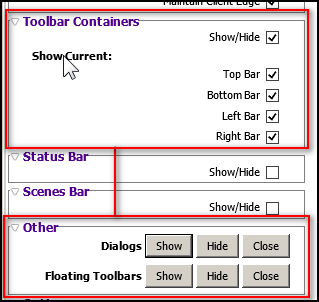
      fs.jpg


      this might be impossible: removing window strips from floating bars
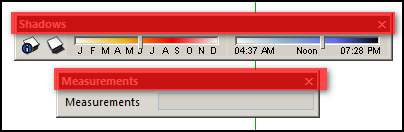
      ft.jpg


      now here's a mission - shrink that flipping floating measurement bar! 😒
      m.jpg

      1 條回覆 最後回覆 回覆 引用 0
      • A 離線
        Anton_S
        最後由 編輯

        @cadfather said:

        works well on win7 64bit - no lag or quirks so far

        Thanks, I love good news 😍

        @cadfather said:

        couple of thoughts for future dev - what do you think of a button to link the 'others' section (dialogs + floating bars), with toolbar containers - that way with one key you can hide both groups.

        +1

        @cadfather said:

        this might be impossible: removing window strips from floating bars

        Naked toolbars 😆, sure I'll try 👍

        @cadfather said:

        now here's a mission - shrink that flipping floating measurement bar!

        Hmm, this might be a challenge... Shrink means verticaly, horizontaly, or both?

        1 條回覆 最後回覆 回覆 引用 0
        • CadFatherC 離線
          CadFather
          最後由 編輯

          Hi Anton, personally i think the measurements toolbar is way too long (so horizontally), when all i need is the numbers inside it. between me and my laptop we agree, the text part must go! (though in reality this is probably impossible)

          i was thinking at least if it didn't have the frame (so vertically), one could leave it floating on the screen and not let it take all that space in a toolbar(!)

          but this moaning is nothing new, it's the thing i dislike most. especially now that your ruby works again 😛 - my laptop screen looks it's possible best, and then i see this dark cloud floating around! 😞

          i'm glad you got Full Screen working so fast! 👍 ☀

          1 條回覆 最後回覆 回覆 引用 0
          • renderizaR 離線
            renderiza
            最後由 編輯

            Hi,

            Recently I created a Website using Google Sites and a Blog with Blogger to share some of my interest regarding SketchUp. Apart form talking about my personal work I also want to share other authors plugins and I though yours was good starting point.

            I don't have lots of traffic or content since I just began but I hope to post more content soon. Here are the links...

            https://sites.google.com/site/renderizastudio/_/rsrc/1371422350032/news/untitledpost/ws-icons.png

            Google Sites

            Blogger

            Thanks,
            Renderiza

            [url=https://www.sketchupcode.com/:z3kqsidd]My Extensions ...[/url:z3kqsidd]

            1 條回覆 最後回覆 回覆 引用 0
            • P 離線
              Pherim
              最後由 編輯

              Great Plugin! Would have wished for this back in the days of my small 17'' screen... Now with my new 23'' FullHD screen this is not as useful as ist would have been otherwise, but still very nice, for example for exporting images in order to get a better view range.

              Works especially great with shortcuts!

              1 條回覆 最後回覆 回覆 引用 0
              • A 離線
                Anton_S
                最後由 編輯

                @renderiza said:

                Recently I created a Website using Google Sites and a Blog with Blogger to share some of my interest regarding SketchUp

                It looks great 👍
                Hope to see much more on your website and blog ❗

                @pherim said:

                Great Plugin! Would have wished for this back in the days of my small 17'' screen... Now with my new 23'' FullHD screen this is not as useful as 1st would have been otherwise, but still very nice, for example for exporting images in order to get a better view range

                Thanks for the reply. YE, this plugin comes in handy for those with 800x600 screens 😆

                1 條回覆 最後回覆 回覆 引用 0
                • Y 離線
                  youjirudao
                  最後由 編輯

                  你好:我来自中国,非常好的创意,很帮的插件 👍
                  在win7-32 SketchUp 2013工具栏、浮动窗口都无法隐藏,SketchUp 8 中很好用,希望解决SketchUp2013中问题,更感谢你的付出和创意造福大家。

                  1 條回覆 最後回覆 回覆 引用 0
                  • A 離線
                    Anton_S
                    最後由 編輯

                    Welcome to the forums Youjirudao,

                    I've tested show/hide floating toolbars on SU8 and SU13, and everything seems to work fine. Can you give me the name of the floating toolbar that doesn't hide? I will try to look into it...

                    • Anton

                    欢迎到论坛Youjirudao,

                    我测试显示/隐藏浮动工具栏上SU8和SU13,一切似乎做工精细。你能不能给我不隐藏浮动工具栏的名称?我会尽量把它看...

                    • 安东
                    1 條回覆 最後回覆 回覆 引用 0
                    • A 離線
                      Anton_S
                      最後由 編輯

                      New version 3.0.0!

                      • New self resizeable dialog. Credit to Aerilius for the code snippets in his ae_LaunchUp plugin.
                      • Added localization to the menu. Credit to Aerilius for original translate utility in his ae_LaunchUp plugin.
                      • Improved all function
                      • Added show/hide menubar. Now you can access all shortcuts while the menubar is hidden.
                      • Containers show-up properly if you add/remove toolbars while they are hidden.
                      • Moved all files to my library; this extension requires AMS_Library!
                      • Compatible SektchUp 7 or later + Windows XP or later
                        See first post ❗
                      1 條回覆 最後回覆 回覆 引用 0
                      • pilouP 離線
                        pilou
                        最後由 編輯

                        A futur hit! ☀

                        Frenchy Pilou
                        Is beautiful that please without concept!
                        My Little site :)

                        1 條回覆 最後回覆 回覆 引用 0
                        • A 離線
                          Anton_S
                          最後由 編輯

                          Update 3.0.2: A bunch of minor fixes and improvements

                          1 條回覆 最後回覆 回覆 引用 0
                          • F 離線
                            feodos
                            最後由 編輯

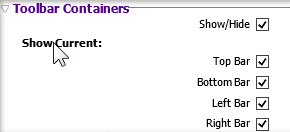
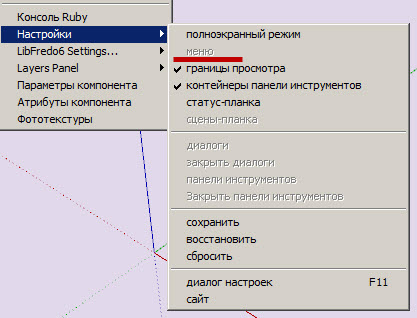
                            • in the new dialog window there is no toolbar Containers
                            • the button of the menu isn't active

                            1.jpg


                            2.jpg

                            1 條回覆 最後回覆 回覆 引用 0
                            • P 離線
                              Pherim
                              最後由 編輯

                              Can this simply be updated via the Plugin store? It says in the description that the old version needs to be removed. And what about AMS Library, will this be installed by the Plugin Store, too? I Can't find it in there.

                              1 條回覆 最後回覆 回覆 引用 0
                              • A 離線
                                Anton_S
                                最後由 編輯

                                @pherim said:

                                Can this simply be updated via the Plugin store? It says in the description that the old version needs to be removed.

                                I tested coping and pasting the new version over the original version and found that replacing the new plugin over the original one will not affect the plugin, but there will be unused content inside the plugin's folder. Deleting the original version is not required, but you may if you want to be organized. I changed the description back to normal.

                                @pherim said:

                                And what about AMS Library, will this be installed by the Plugin Store, too? I Can't find it in there.

                                Added it to the plugin store.

                                Thanks for suggestions.

                                1 條回覆 最後回覆 回覆 引用 0
                                • A 離線
                                  Anton_S
                                  最後由 編輯

                                  @feodos said:

                                  In the new dialog window there is no toolbar Containers

                                  What do you mean there is not toolbar containers, there is! I removed an option where you could show/hide current toolbar container because not much users use these options anyways. They just show/hide them all at once.

                                  @feodos said:

                                  the button of the menu isn't active

                                  The menubar can be shown/hidden only when SketchUp is fullscreen! Set SU fullscreen, and then you'll be able to show/hide menubar. Hover the cursor over the menu item, and the description will be displayed in the status bar. It clearly states that the option works with main window set fullscreen only!

                                  1 條回覆 最後回覆 回覆 引用 0
                                  • A 離線
                                    Anton_S
                                    最後由 編輯

                                    New update 3.0.3

                                    • Minor dialog and menu optimizations.
                                    • Added the set/remove menubar option back. Press the ALT key to set/remove menu bar.
                                    • Requires AMS Library 1.0.2 or later
                                    1 條回覆 最後回覆 回覆 引用 0
                                    • Rich O BrienR 離線
                                      Rich O Brien Moderator
                                      最後由 編輯

                                      Nice one Anton.

                                      Download the free D'oh Book for SketchUp 📖

                                      1 條回覆 最後回覆 回覆 引用 0
                                      • CadFatherC 離線
                                        CadFather
                                        最後由 編輯

                                        Thank you for the update Anton - this plugin is fantastic.

                                        but...could the ALT be optional (or assignable)? on my machine it conflicts with some native keyboard shortcuts (move, or follow me tool + alt) - of course also other custom ones.

                                        1 條回覆 最後回覆 回覆 引用 0
                                        • A 離線
                                          Anton_S
                                          最後由 編輯

                                          I will add customizing shortcuts soon.

                                          Sorry about the ALT thing 😆

                                          1 條回覆 最後回覆 回覆 引用 0
                                          • A 離線
                                            Anton_S
                                            最後由 編輯

                                            Perhaps for now, you can change the shortcut yourself:

                                            1. Open ams_WindowsSettings/main.rb
                                            2. Scroll down to line 434
                                            3. Change 'menu' to 'f12' or whatever key you prefer.
                                            4. Save, and restart SU.
                                            1 條回覆 最後回覆 回覆 引用 0
                                            • 1
                                            • 2
                                            • 11
                                            • 12
                                            • 13
                                            • 14
                                            • 15
                                            • 14 / 15
                                            • 第一個貼文
                                              最後的貼文
                                            Buy SketchPlus
                                            Buy SUbD
                                            Buy WrapR
                                            Buy eBook
                                            Buy Modelur
                                            Buy Vertex Tools
                                            Buy SketchCuisine
                                            Buy FormFonts

                                            Advertisement