sketchucation logo sketchucation
    • 登入
    Oops, your profile's looking a bit empty! To help us tailor your experience, please fill in key details like your SketchUp version, skill level, operating system, and more. Update and save your info on your profile page today!
    🔌 Smart Spline | Fluid way to handle splines for furniture design and complex structures. Download

    Making tyres in SU

    已排程 已置頂 已鎖定 已移動 Newbie Forum
    sketchup
    65 貼文 11 Posters 4.8k 瀏覽 11 Watching
    正在載入更多貼文
    • 從舊到新
    • 從新到舊
    • 最多點贊
    回覆
    • 在新貼文中回覆
    登入後回覆
    此主題已被刪除。只有擁有主題管理權限的使用者可以查看。
    • L 離線
      lecra
      最後由 編輯

      Hi guy's,

      Need your support making tires with sketchup. There was am older thread early in 2009 in the forum but the YouTube movie is not available anymore. I can build the rim as well as the tire as showed in the sketchup file attached. The problem that I have is making the profile looking like the attached image.

      Somebody that can point me on the right direction or having some awesome tutorials? Need that for car tires as well as for tractor tires. This means completely different profiles.

      Thank you in advance for your answer.
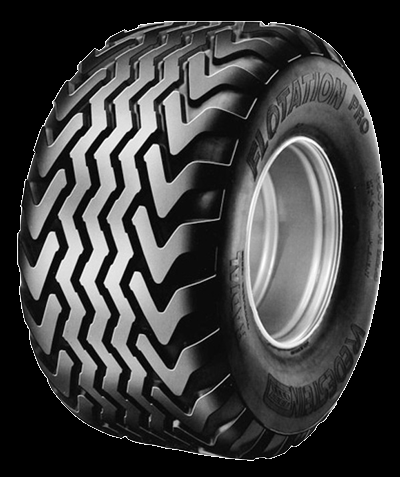
      LecraTyre.skp

      Tyre1.png

      KR; Lecra

      I'm new to SU but so thirstily to learn all the stuff. Help me fighting against my thirst

      1 條回覆 最後回覆 回覆 引用 0
      • D 離線
        driven
        最後由 編輯

        wellcome,

        a common way is to make a small section then use rotate-copy to give you both the round edges and the cut profiles.

        look up the rotate-copy you tube bits and have a look at this thread about treads.

        I like helnbak's obsession with small file sizes....http://forums.sketchucation.com/viewtopic.php?f=15&t=33124&hilit=wheels+tyres&start=15#p292303

        his finished tyre is a smaller file than your is already.

        good luck

        john

        learn from the mistakes of others, you may not live long enough to make them all yourself...

        1 條回覆 最後回覆 回覆 引用 0
        • boofredlayB 離線
          boofredlay
          最後由 編輯

          solo did a nice video tutorial of the making of a tyre here:
          http://forums.sketchucation.com/viewtopic.php?p=293345#p293345

          http://www.coroflot.com/boofredlay

          1 條回覆 最後回覆 回覆 引用 0
          • L 離線
            lecra
            最後由 編輯

            Hi,

            @unknownuser said:

            solo did a nice video tutorial of the making of a tyre here:
            http://forums.sketchucation.com/viewtopic.php?p=293345#p293345

            I had a look at the video but the quality of the movie is really bad and It is not clearly what solo is clicking in the menus. Seems also that he use a lot of plugins to do this work which are unknown to me. A great tutorial for sure but not for noobs like me!

            As I said in my first post, the rim as well as the tyre itself is not a huge problem. The most problem I have is to incorporate the profile and finally revolve it in an object looking like a tyre.

            Some other suggestions?

            KR; Lecra

            I'm new to SU but so thirstily to learn all the stuff. Help me fighting against my thirst

            1 條回覆 最後回覆 回覆 引用 0
            • Alan FraserA 離線
              Alan Fraser
              最後由 編輯

              There's another relevant thread here.

              3D Figures
              Were you required to walk 500 miles? Were you advised to walk 500 more?
              You could be entitled to compensation. Call the Pro Claimers now!

              1 條回覆 最後回覆 回覆 引用 0
              • L 離線
                lecra
                最後由 編輯

                Hi Alan,

                @alan fraser said:

                There's another relevant thread here.

                Thank you so much for your reply. That's exactly the way I would prefer in order to not blown up the size of the wheel as this is needed on a game environment and we all fight against high poly models.

                Unfortunately I cannot figure out how you have mapped the image on the model. I tried drawing a circle, push-pull out this to the width of the tire (tyre) and then making two other circles with the offset tool. Then I moved the outer circle with the move tool in order to have a small round edge. Mapping then the image as a material on the tire would work but after that I cannot position the picture anymore!!??
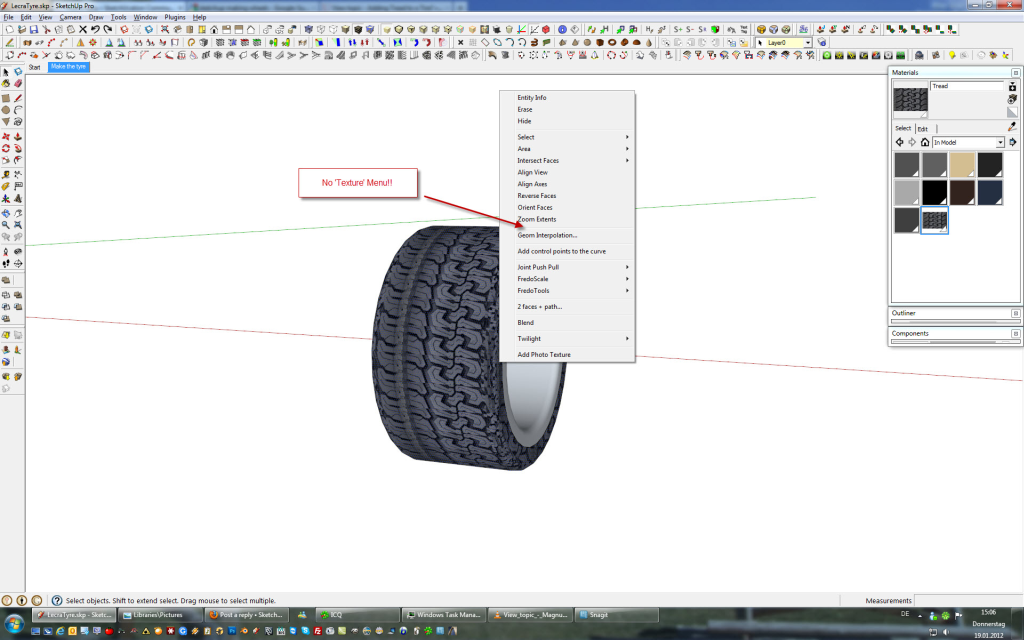
                LecraTyre.png
                Can you explain me a bit more how to do that? Would be much appreciated from my side as well as for a lot of people modeling for the game community.

                KR; Lecra

                I'm new to SU but so thirstily to learn all the stuff. Help me fighting against my thirst

                1 條回覆 最後回覆 回覆 引用 0
                • Alan FraserA 離線
                  Alan Fraser
                  最後由 編輯

                  Hi Lecra,
                  Well, it was a while ago, so I can't guarantee this is the way i did it; but if I was doing it now, I'd do it like this:-
                  Work out the circumference of the tyre then use that to determine the length of the image that you import...which will need to be an exact fraction of it. That way, you are not going to end up with a nasty mismatched seam somewhere on the tread. The image was imported as an image, not a texture...then exploded and grouped. It's a personal preference, as I find I can position stuff easier that way.

                  Position the image as shown so that it is exactly the width of the tread and shoulder. Then sample it and paint it onto a face (You need to have hidden geometry showing). Because you have sampled the image itself, not used the material browser, it will paint on in Projected mode and will probably look quite distorted...especially if you paint it onto one of the top faces which are at pretty much rt. angles to the sampled image. No worry, just r-click the face and go to Texture > Position and uncheck the Projected entry. The painted face will correct itself. Now sample that face and paint all the others right around the tyre.

                  You can use the same technique to put a label on a bottle. The sides of the tyre are just standard grey colour, but you could use a map for that as well, I suppose.

                  3D Figures
                  Were you required to walk 500 miles? Were you advised to walk 500 more?
                  You could be entitled to compensation. Call the Pro Claimers now!

                  1 條回覆 最後回覆 回覆 引用 0
                  • L 離線
                    lecra
                    最後由 編輯

                    Alan,

                    This sentence is not quit clear for me. What do you mean with

                    @alan fraser said:

                    Hi Lecra,
                    Then sample it and paint it onto a face (You need to have hidden geometry showing). Because you have sampled the image itself, not used the material browser, it will paint on in Projected mode and will probably look quite distorted...especially if you paint it onto one of the top faces which are at pretty much rt. angles to the sampled image. No worry, just r-click the face and go to Texture > Position and uncheck the Projected entry. The painted face will correct itself. Now sample that face and paint all the others right around the tyre.

                    Could you explain me (noobs) what you mean with 'sample'? I don't understand this technique.

                    Sorry to bother you Alan, but this kind of tires building is exactly that was I was searching for months!

                    Many thanks in advance for your support!

                    KR; Lecra

                    I'm new to SU but so thirstily to learn all the stuff. Help me fighting against my thirst

                    1 條回覆 最後回覆 回覆 引用 0
                    • Alan FraserA 離線
                      Alan Fraser
                      最後由 編輯

                      Use the Paint tool in conjunction with Alt on any painted surface. It acts like an eye-dropper and samples that texture or colour...ie. loads it ready to paint onto another surface.

                      3D Figures
                      Were you required to walk 500 miles? Were you advised to walk 500 more?
                      You could be entitled to compensation. Call the Pro Claimers now!

                      1 條回覆 最後回覆 回覆 引用 0
                      • L 離線
                        lecra
                        最後由 編輯

                        Alan,

                        @alan fraser said:

                        Use the Paint tool in conjunction with Alt on any painted surface. It acts like an eye-dropper and samples that texture or colour...ie. loads it ready to paint onto another surface.

                        Finally I got it!! Thank you so much. Now I'm only fighting calculating how big the image should be in order to match!

                        Many thanks for your great help!

                        KR; Lecra

                        I'm new to SU but so thirstily to learn all the stuff. Help me fighting against my thirst

                        1 條回覆 最後回覆 回覆 引用 0
                        • GaieusG 離線
                          Gaieus
                          最後由 編輯

                          Look at the image and see how the pattern repeats. Count how many times it could be repeated all around and make the base circle of the same amount of segments. Crop the image accordingly and now you only need to position it on one segment to fully cover it and then you can go around and meet the other side perfectly.

                          Once you are done it, we can show easier ways, too but first you must learn it this way as I see in your signature: "I'm new to SU but so thirstily to learn all the stuff. Help me fighting against my thirst".
                          😉

                          Gai...

                          1 條回覆 最後回覆 回覆 引用 0
                          • L 離線
                            lecra
                            最後由 編輯

                            Gaieus,

                            I got the hint 😳

                            @gaieus said:

                            Once you are done it, we can show easier ways, too but first you must learn it this way as I see in your signature: "I'm new to SU but so thirstily to learn all the stuff. Help me fighting against my thirst".
                            😉

                            Thank you for your tips!

                            I'm still thirsty, yes! 😆

                            Hope really that you show me an easier way after i learned this stony way.

                            I'm there now. The problem that I see now is the rounded shoulder of the tire. Is there a way to make this edge after have textured them a bit rounder?
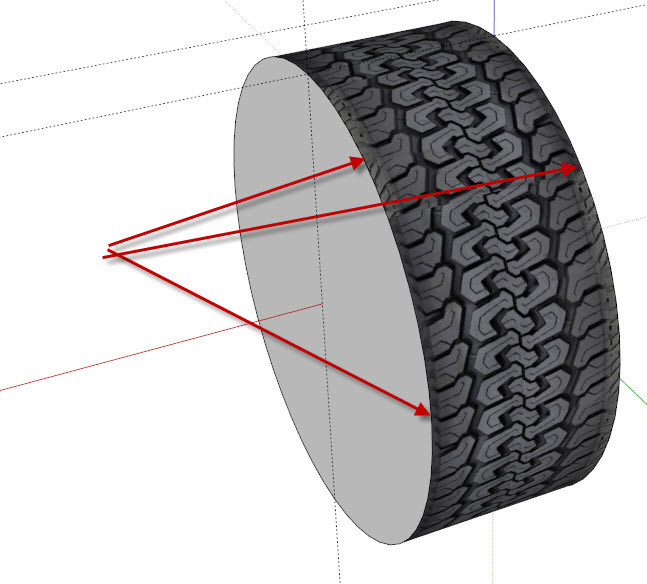
                            LecraTyre2.jpg

                            KR; Lecra

                            I'm new to SU but so thirstily to learn all the stuff. Help me fighting against my thirst

                            1 條回覆 最後回覆 回覆 引用 0
                            • KrisidiousK 離線
                              Krisidious
                              最後由 編輯

                              Lecra is this for rFactor2?

                              By: Kristoff Rand
                              Home DesignerUnique House Plans

                              1 條回覆 最後回覆 回覆 引用 0
                              • L 離線
                                lecra
                                最後由 編輯

                                Kris,

                                @krisidious said:

                                Lecra is this for rFactor2?

                                You mean what kind of game? Farming Simulator 2011.

                                KR; Lecra

                                I'm new to SU but so thirstily to learn all the stuff. Help me fighting against my thirst

                                1 條回覆 最後回覆 回覆 引用 0
                                • KrisidiousK 離線
                                  Krisidious
                                  最後由 編輯

                                  I thought you might be modding this game, like I am...

                                  By: Kristoff Rand
                                  Home DesignerUnique House Plans

                                  1 條回覆 最後回覆 回覆 引用 0
                                  • GaieusG 離線
                                    Gaieus
                                    最後由 編輯

                                    @lecra said:

                                    I'm there now. The problem that I see now is the rounded shoulder of the tire. Is there a way to make this edge after have textured them a bit rounder?

                                    I can't really see where the problem exactly is. Can you attach the wheel (model) itself, too?

                                    Gai...

                                    1 條回覆 最後回覆 回覆 引用 0
                                    • L 離線
                                      lecra
                                      最後由 編輯

                                      Gaieus,

                                      @gaieus said:

                                      @lecra said:

                                      I'm there now. The problem that I see now is the rounded shoulder of the tire. Is there a way to make this edge after have textured them a bit rounder?

                                      I can't really see where the problem exactly is. Can you attach the wheel (model) itself, too?

                                      Look at the edges of the tire. I don't know how to round the the edge so that the tire looks realistic and not in the shape of a square (at the end of the texture on the right and left side)!

                                      Below the attached file:
                                      LecraTyre_2.skp

                                      Many thanks for your help Gaieus. Much appreciated.

                                      KR; Lecra

                                      I'm new to SU but so thirstily to learn all the stuff. Help me fighting against my thirst

                                      1 條回覆 最後回覆 回覆 引用 0
                                      • GaieusG 離線
                                        Gaieus
                                        最後由 編輯

                                        Something like this?


                                        LecraTyre_2.skp

                                        Gai...

                                        1 條回覆 最後回覆 回覆 引用 0
                                        • gillesG 離線
                                          gilles
                                          最後由 編輯

                                          Have a look at this if it can help.
                                          step by step.


                                          LecraTyre.skp

                                          " c'est curieux chez les marins ce besoin de faire des phrases "

                                          1 條回覆 最後回覆 回覆 引用 0
                                          • L 離線
                                            lecra
                                            最後由 編輯

                                            Gaieus,

                                            @gaieus said:

                                            Something like this?

                                            Exactly that! Tell me!

                                            KR; Lecra

                                            I'm new to SU but so thirstily to learn all the stuff. Help me fighting against my thirst

                                            1 條回覆 最後回覆 回覆 引用 0
                                            • 1
                                            • 2
                                            • 3
                                            • 4
                                            • 1 / 4
                                            • 第一個貼文
                                              最後的貼文
                                            Buy SketchPlus
                                            Buy SUbD
                                            Buy WrapR
                                            Buy eBook
                                            Buy Modelur
                                            Buy Vertex Tools
                                            Buy SketchCuisine
                                            Buy FormFonts

                                            Advertisement



