sketchucation logo sketchucation
    • Login
    Oops, your profile's looking a bit empty! To help us tailor your experience, please fill in key details like your SketchUp version, skill level, operating system, and more. Update and save your info on your profile page today!
    ⚠️ Update | Sketchucation Tools 5.0.8 released with licensing improvements and bugfixes Download

    [Plugin] Slicer5

    Scheduled Pinned Locked Moved Plugins
    338 Posts 83 Posters 394.1k Views 82 Watching
    Loading More Posts
    • Oldest to Newest
    • Newest to Oldest
    • Most Votes
    Reply
    • Reply as topic
    Log in to reply
    This topic has been deleted. Only users with topic management privileges can see it.
    • TIGT
      TIG Moderator @martinguillermo11
      last edited by

      @martinguillermo11 Failing to export DXFs at all is a symptom of something other than Slicer5 !
      Have you tried repairing SketchUp/Layout ?
      Doing this will not affect your extensions, other settings, licenses etc.
      Follow these steps...
      Close SketchUp/Layout.
      Find the SketchUp installer's exe file - usually in Downloads, but if you have deleted it you can always download another copy from sketchup.com.
      Select the installer's exe file's icon, right-click > context-menu > "Run as administrator"
      When prompted choose "Repair"
      After it completes restart you computer and see if anything has improved...

      Installing a complex app in Windows by double-clicking on its icon to "Run" it is not the same as doing it as I described - even if you have admin powers - it can cause all kinds of unpredictable weirdness, perhaps including your DXF exporter missing...

      TIG

      M 1 Reply Last reply
      Reply Quote 0
      • M
        martinguillermo11 Newcomers @TIG
        last edited by

        @TIG de acuerdo , probare a ver que pasa , cuando encuentre el problema y lo solucione lo pondre por aqui , por si a algun otro neofito en el tema le sirve jajajaj

        gracias

        1 Reply Last reply
        Reply Quote 0
        • K
          kokolokoman Newcomers
          last edited by

          hey im using slicer but and its working good but when i check yes on adding outline to adjacent part its crashes on export to dxf any idea why?

          TIGT 1 Reply Last reply
          Reply Quote 0
          • TIGT
            TIG Moderator @kokolokoman
            last edited by

            @kokolokoman

            No.
            But please repeat this with the Ruby Console open and report any messages...

            If you don't export to DXF are the pieces made as you expect, with the outlines etc ?

            TIG

            1 Reply Last reply
            Reply Quote 0
            • N
              navywings Newcomers
              last edited by

              So I know this is an old topic but maybe someone can help me. I have a solid entity with 1440 cu ft of volume shown when I check on entity info.

              I need to adjust this volume along a specific axis maintaining relative dimensions so slicer seemed like a perfect tool to do this. It worked great slicing up the volume along the axis in 2" slices.

              I then wanted to get the volume of each slice. No can do. All the slices are grouped as a component so I exploded that component. I clicked on one and no volume information. So I thought, well maybe it's got to be a group. I exploded the individual slice and then grouped it. Still no volume info. So one more try I exploded once more, selected all connected and grouped again. Still no volume information.

              Am I missing something?

              1 Reply Last reply
              Reply Quote 0
              • T
                The_Guru Newcomers
                last edited by

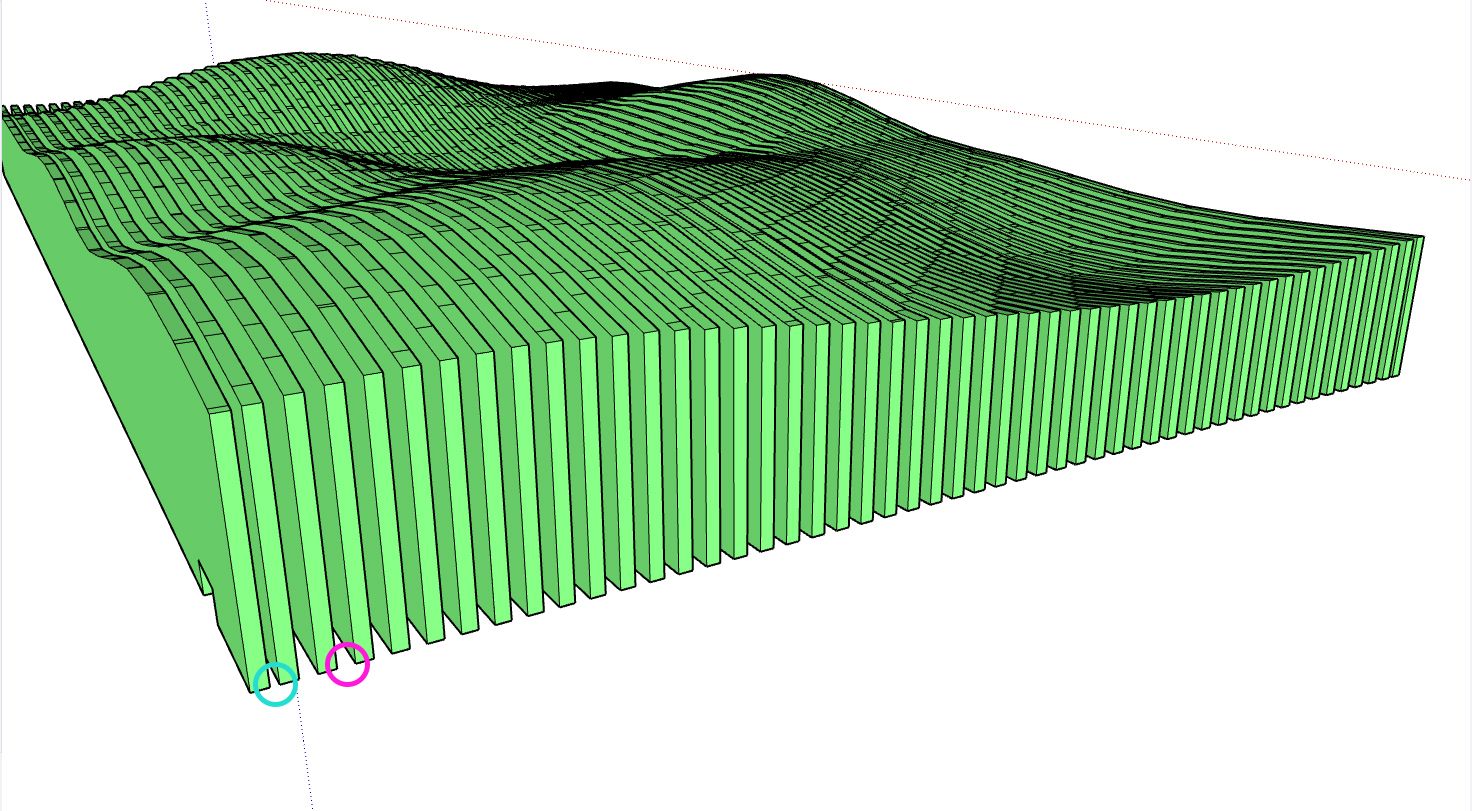
                I'm having an issue with the plugin and trying to figure out what I'm doing wrong.
                The first two and last two slices always seem to have a smaller gap than the rest, sometimes they'll even overlap. Is there a way around this?
                Screenshot 2025-01-24 103153.png
                Screenshot 2025-01-24 103226.jpg

                1 Reply Last reply
                Reply Quote 0
                • TIGT
                  TIG Moderator
                  last edited by

                  If you object's overall size is not an exact multiple of the spacing & thickness [allowing for the last-most slice/gap], then this will occur.
                  It looks like the start/end gaps are 1/2 a gap ?

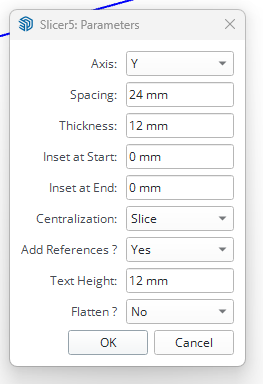
                  Also choosing to centralize the slice can exacerbate this result - try centralizing the gap ?
                  You can also tweak the start/end insets to adjust the sliced result.

                  Supplying the model would help us see what's what...

                  TIG

                  T 1 Reply Last reply
                  Reply Quote 0
                  • T
                    The_Guru Newcomers @TIG
                    last edited by

                    @TIG Ah, the multiples will be the issue then, I was just throwing random shapes and spacings and seeing what came out.

                    Thanks for the help!

                    1 Reply Last reply
                    Reply Quote 0
                    • C
                      Chelmite
                      last edited by

                      Will this take slices along a curve, perpendicular to the path? I.e., take cross-sections along a snake.

                      Dave RD 1 Reply Last reply
                      Reply Quote 0
                      • C
                        Chelmite
                        last edited by

                        Can you take slices along a curved path, perpendicular to the path, for a given increment? I want to model a snake.

                        1 Reply Last reply
                        Reply Quote 0
                        • Dave RD
                          Dave R @Chelmite
                          last edited by

                          @Chelmite no. It makes parallel slices.

                          For your snake you could create a plane component and use Copy Along Path to do what you are looking for.

                          Etaoin Shrdlu

                          %

                          (THERE'S NO PLACE LIKE)

                          G28 X0.0 Y0.0 Z0.0

                          M30

                          %

                          C 1 Reply Last reply
                          Reply Quote 0
                          • C
                            Chelmite
                            last edited by

                            This post is deleted!
                            1 Reply Last reply
                            Reply Quote 0
                            • C
                              Chelmite
                              last edited by

                              This post is deleted!
                              1 Reply Last reply
                              Reply Quote 0
                              • C
                                Chelmite
                                last edited by

                                This post is deleted!
                                1 Reply Last reply
                                Reply Quote 0
                                • C
                                  Chelmite @Dave R
                                  last edited by

                                  @Dave-R said in [Plugin] Slicer5:

                                  l

                                  Please explain.
                                  Thanks,
                                  Steve

                                  1 Reply Last reply
                                  Reply Quote 0
                                  • B
                                    brague Newcomers
                                    last edited by

                                    Hi guys, Mac usuer I can't download the TXT ttf font, all the link aren't working no more. Can someone tell how to donwloadd it ?

                                    1 Reply Last reply
                                    Reply Quote 0
                                    • TIGT
                                      TIG Moderator
                                      last edited by TIG

                                      The link in the very first thread in this topic contains the working url to download the zip file containing the txt font's ttf file.
                                      https://community.sketchucation.com/uploads/imported_attachments/pdqA_txt_____.zip
                                      I just used it.
                                      I can't see what your issue might be...

                                      TIG

                                      1 Reply Last reply
                                      Reply Quote 0

                                      Hello! It looks like you're interested in this conversation, but you don't have an account yet.

                                      Getting fed up of having to scroll through the same posts each visit? When you register for an account, you'll always come back to exactly where you were before, and choose to be notified of new replies (either via email, or push notification). You'll also be able to save bookmarks and upvote posts to show your appreciation to other community members.

                                      With your input, this post could be even better 💗

                                      Register Login
                                      • 1
                                      • 2
                                      • 13
                                      • 14
                                      • 15
                                      • 16
                                      • 17
                                      • 17 / 17
                                      • First post
                                        Last post
                                      Buy SketchPlus
                                      Buy SUbD
                                      Buy WrapR
                                      Buy eBook
                                      Buy Modelur
                                      Buy Vertex Tools
                                      Buy SketchCuisine
                                      Buy FormFonts

                                      Advertisement