[Plugin] Slicer5
-
Great plugin TIG, thanks !
I've done a lot of tests and it took me a while to understand how to generate exactly the number of slices I needed (by leaving the spaces value at zero at first and choosing number of spaces afterward)
The only thing I can't figure out so far is how to NOT generate start and end slices.
Tried negative value for offset without success.
What should the settings look like to generate just a central slice ?
For example to generate just one central slice in X and one in Y (resulting in a 2 pieces X shaped object when seen from above).Is this possible with the actual version ?
Cheers !
-
Thanks TIG, for this plugin ! It's really good BUT... There is a recurent bug i can't fix. After my settings finished, the tool runs but at the end the whole model disappears. I tried to uninstall it, and retried many times, in vain. One or two times, it worked correctly on a test ( a simple cube), but not on my model. I don't understand, it's really a shame ! Could you help me please ? Thanks a lot !
-
Hi Tig, I just submitted a message, and I just realize I wrote "it's a shame" ! So sorry, I'm french, and exhausted : I wanted to say "It's a pity", of course !!!
 Apologise...
 -
@jago25_98 said:
Great extension!
Slicer5 is a bit more picky than SliceModeller regarding Solid Manifold requirements.
My model is a STL exported from another program called BoardCAD. It has 900 short edges, 66 internal faces and 3 surface borders which I will need to correct to use this plugin. SlicerModeller doesn't need me to do this. [attachment=1:2cvc0050]<!-- ia1 -->sliced3.skp<!-- ia1 -->[/attachment:2cvc0050] [attachment=0:2cvc0050]<!-- ia0 -->sliced when should not be possible.PNG<!-- ia0 -->[/attachment:2cvc0050]
If you are trying to correct a model I suggest to use MeshMixer because it has many functions specifically designed for this purpose. I spent weeks trying to fix these mesh to solid problems (SOlidSolver, FixSolid, SolidInspector) until I found this! Also bear in mind that many tutorials for it are out of date - the tool now is much better. Bear in mind that it's designed with mm scale in mind... whereas sketchup needs metre scale really due to it's own shortcomings. Still, you can export and import with STL import/export sketchup plugins and work between the both.
Hi jago, Slicer5 doesn't work correctly anymore, after many tries. So I Just see your post, and looked for slice modeller and Mesh mixer (cause as you, solid inspector and edge inspector from fredotools can't save me). I can't find those plugins, neither on extension store, nor extension warehouse, nor in google. Could you give me a lead, please ? Thanks !
-
@cacommenceamefairechier said:
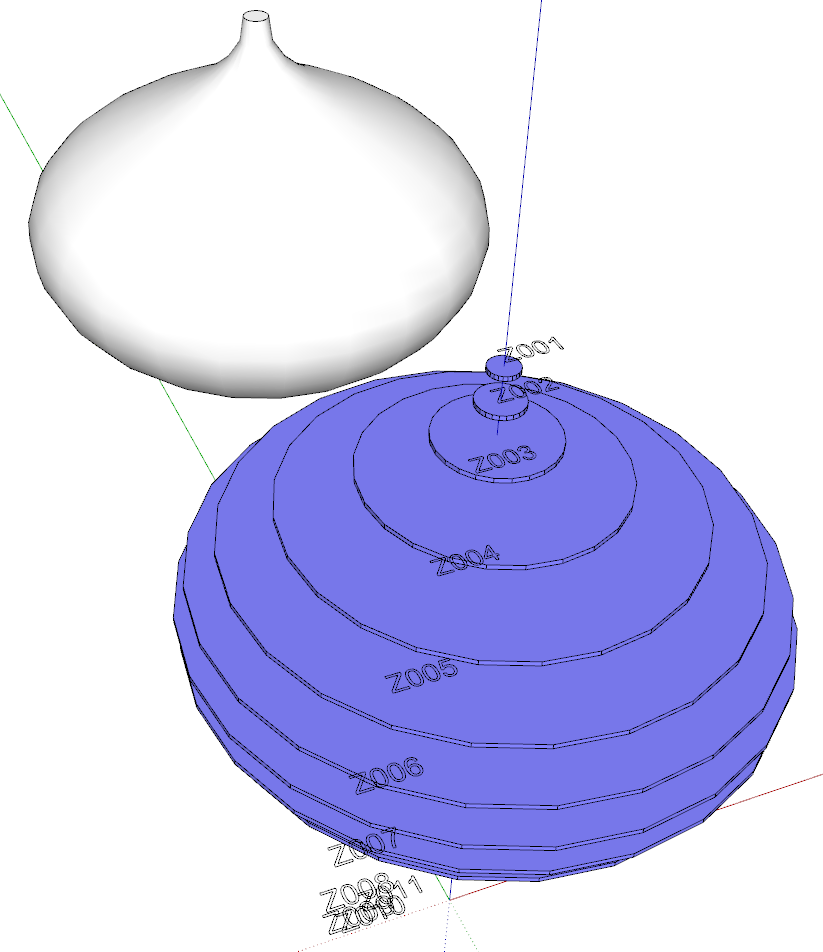
Hi jago, Slicer5 doesn't work correctly anymore, after many tries.
What do you mean it doesn't work anymore? I just installed it and it works just as it should.
-
@dave r said:
@cacommenceamefairechier said:
Hi jago, Slicer5 doesn't work correctly anymore, after many tries.
What do you mean it doesn't work anymore? I just installed it and it works just as it should.
[attachment=0:31yy8x49]<!-- ia0 -->Screenshot - 7_18_2016 , 9_42_14 AM.png<!-- ia0 -->[/attachment:31yy8x49]I mean the program either runs and bugs with no answer,or the whole model disappears at the end of the slice. I did tests with a same simple shape (a cube),and sometimes the work is done but very rarely. I tried to uninstall and reinstall it, in vain. However when i installed it for the first time, it worked correctly. It camed suddenly. Could it be a competition with another plugin ?
-
It could be you have a conflicting extension or something else causing the problem. Or it could have something to do with the way you are using it. There haven't been any other recent reports of problems.
-
Ok thanks ! I will try to clean my plugins files, and will report here if it's ok. And I ask for again concerning mesh mixer plugin. Is it still available ?
-
I'm using Windows Vista with SketchUp Ver. 8.0.14346(>=Ver. 8). Can't install SketchUp update because of Vista. I have Slicer5 installed but I keep getting the error "Object is not manifold". I've check for problems in Blender and in MeshLab, my mesh is manifold. I'm just testing with a simple cylinder. Any ideas or help appreciated, thanks.
-
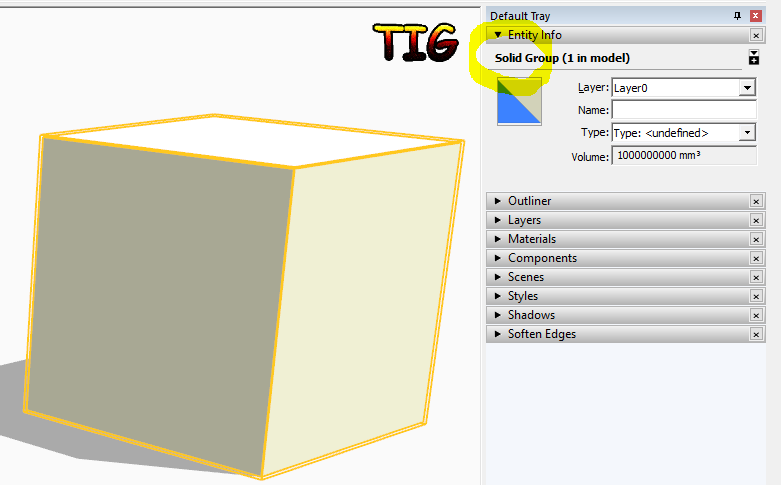
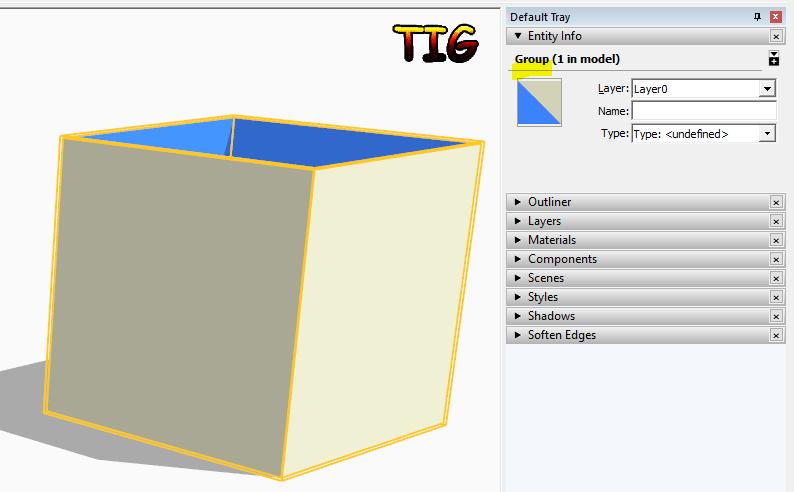
Let's assume you have made a group or a component-instance that you want to slice...
Select it and look at Entity Info...
If it is a manifold solid then it will say 'Solid' in the description in the top bar, it will also show a volume.
Slicer needs a solid to process, so it can make proper slices through it.
-
I did not have a solid component. I just right clicked on the mesh, selected 'edit component' and that made the mesh a solid based on the Entity Info box.
I've been able to make single axis slices(x or y or z) but not able to make multi axis slices with slots. Except for on simple meshes like a cube or cylinder created in SketchUp. On the more complex models I get a Bug Splat error in SketchUp.
-
@andre205th said:
I did not have a solid component. I just right clicked on the mesh, selected 'edit component' and that made the mesh a solid based on the Entity Info box.
It sounds like you have a nested component. If it isn't nested, Entity Info won't show it as solid if it's open for editing because you'd have raw geometry selected.
-
I was in the process of learning how to write and code for something just like this, and behold...TIG
 You are a genius man. I did my first model of a cape cod that I used the solid inspector on to make it solid for this plugin and it works well! There are a few missing parts/sheets here and there but I will do the scaling up x10 or x100 again with different settings to see how that works then scale back as suggested and maybe it will become flawless! I have spent many months doing this by hand this past year so donations will be on the way, and possibly more steady if I can get my models consistent
  I was able to get down to 1/32" (about 0.79mm (thickness of my watercolor paper for 3d modeling real-time) and I am going to make a paper model of this soon!
By far one of the best additions to V8+ I have encountered as an artist! Hats off, and models on!
Flaws so far (either my user error or just fyi that may already be noted(:
- When processing, flattening says fattening
 minor I know but it is something to help
 - Skipped slices. Maybe due to my scale, Ill keep working
- zooming (maybe major?) sometimes when finished, the model disappears all together from any view and camera settings. zoom does not work or possibly too sensitive due to my scale? Not sure but just something I found that had me saving and reloading SU to get it back. The undo saves as expected, but still nothing to show. Not happening often, rare.
The guts of this are extreme and amazing! I will make sure within the next few months (remind me lol) that you are compensated for saving me so much time with something I have extreme passion for!
- When processing, flattening says fattening
-
Hi there ,
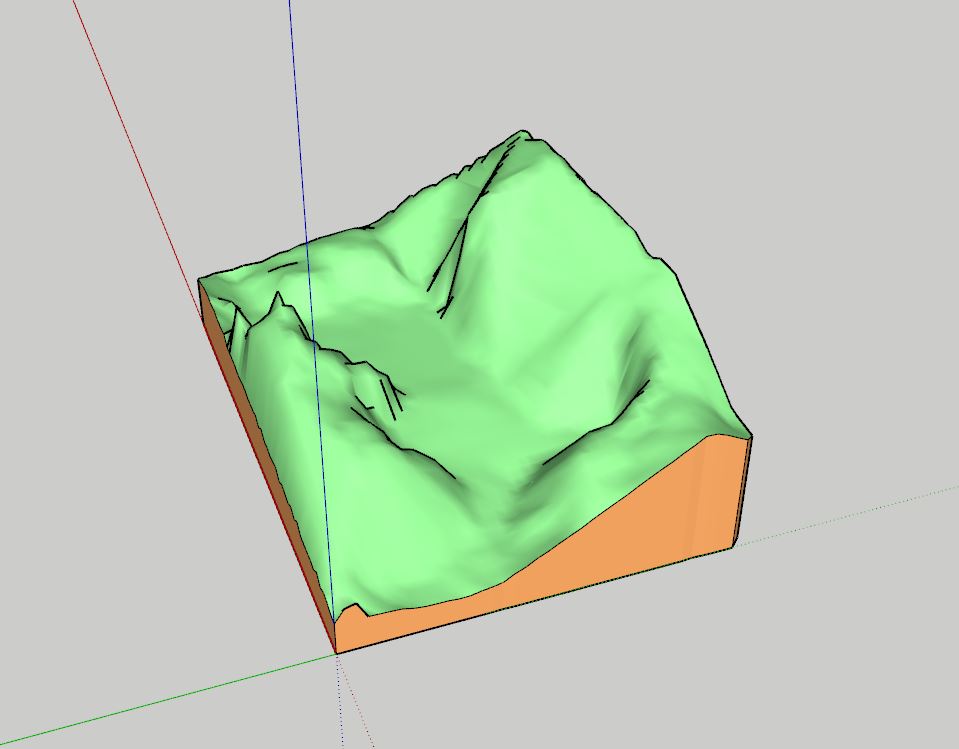
I have just installed the slicer 5 to have it to help me to slice up a site topography model for lazer cutting purposes .I wanted to slice the site model up vertically with having cardboard material of 3 mm thick for it . I have tried various way to get the model slice up but it always end up missing.
I have attached the sit model image below. I tried to upload the file but the file size is too big , so here is the link for it : https://drive.google.com/file/d/0Bzbv-1flN2CiNzg3OGoxamx2enM/view?usp=sharing . Any help will be much appreciated !
-
SketchUp treats points within 1/1000" of each other as coincident, therefore tiny edges don't get made and the faces relying on those edges don't get formed.
Consider doing it this way...
Add the site geometry group into a component.
Make a copy of that component-instance off to one side.
Scale that copy up by x1000.
Edit the copy and slice the group inside it - using 3000mm cuts rather than 3mm ones.
When you are done exit the edit.
You should now have a set of slices with retained geometry inside both the original sized and giant version of the component.
Select and delete the giant version.
Within the original version you should still have the slices with their tiny edges etc intact.
Tiny edges and related faces can exist, but they cannot be created from scratch. -
Hi TIG ,
Thanks you for the fast response . I tried to do as according to what you said, however , i try creating over more than 100 ++ planes , the file would start to load and the same thing would happen again ( the model inside would be missing ) . Is there anything that i would have done wrong in the process ?
-
I finally got a chance to download your SKP.
I sliced it at 35mm thickness - so it was quicker x10 !
It seems OK, even at the original size ?
The reason the original 'disappears' is that it's assigned to a HIDN layer...Can you supply a screenshot of your Slicer dialog, so I can see your actual settings...
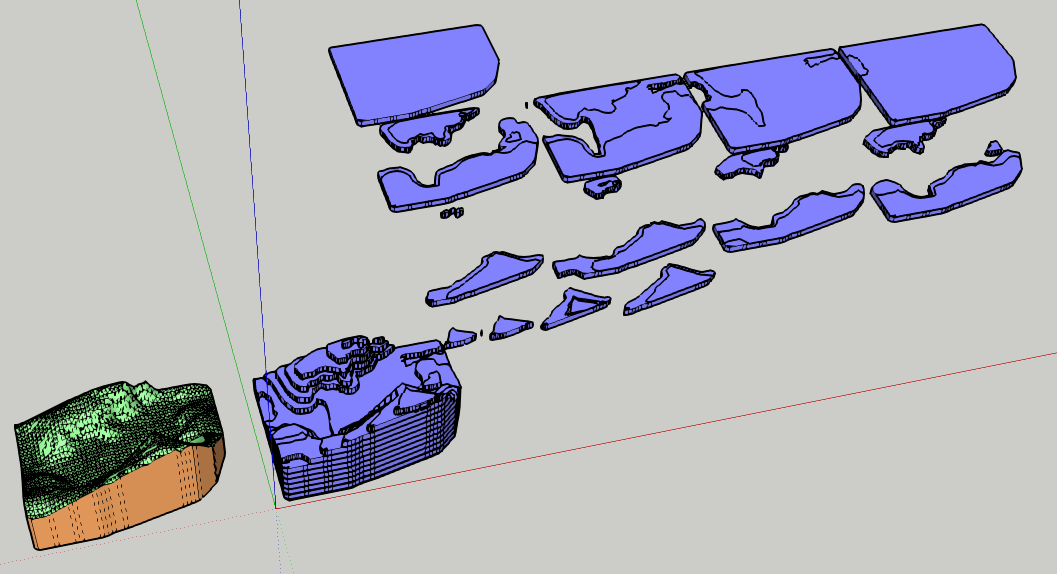
-
TIG,
Yida requested "VERTICAL" slices.
Is there a reason you sliced "HORIZONTAL"? -
When making a topo model it's usual to use horizontal sheets - say 3 or 6mm thick.
Cut along 'contours'.
These are overlaid on top of each other to make a surface in 3d.
Note how I chose the option to imprint the outline of the next sheet above onto each sheet, that is for easier alignment when assembling the cutout sheets in 3d...The wording of 'vertical' slices is ambiguous.
It could mean what I showed, or mean one of several other slicing options - X, Y, X+Y etc...
If the OP wants one of those alternatives, then it should work much the same.That's one reason I asked for a screenshot of the Slicer dialog - otherwise we must guess...
It worked for me, but not for the OP, so something is awry. -
Tig,
Thank you for the tip!"...Note how I chose the option to imprint the outline of the next sheet above onto each sheet,
that is for easier alignment when assembling the cutout sheets in 3d ..."I was not aware of this option, it will certainly help in the fabrication of a
contour model. Well done!






Advertisement