sketchucation logo sketchucation
    • 登入
    Oops, your profile's looking a bit empty! To help us tailor your experience, please fill in key details like your SketchUp version, skill level, operating system, and more. Update and save your info on your profile page today!
    🔌 Smart Spline | Fluid way to handle splines for furniture design and complex structures. Download

    [Plugin] FredoTools - v4.5c - 24 Jun 24


    已排程 已置頂 已鎖定 已移動 Plugins
    463 貼文 123 Posters 710.8k 瀏覽 121 Watching
    正在載入更多貼文
    • 從舊到新
    • 從新到舊
    • 最多點贊
    回覆
    • 在新貼文中回覆
    登入後回覆
    此主題已被刪除。只有擁有主題管理權限的使用者可以查看。
    • Dave RD 離線
      Dave R
      最後由 編輯

      @dangeruss03 said:

      i try to make ramp for my basement but it seems like something wrong.

      Your image doesn't show. Please attach the SKP file so we can see what you are trying to do and exactly how you have it set up.

      Etaoin Shrdlu

      %

      (THERE'S NO PLACE LIKE)

      G28 X0.0 Y0.0 Z0.0

      M30

      %

      1 條回覆 最後回覆 回覆 引用 0
      • D 離線
        dangeruss03
        最後由 編輯

        Ramp_Trial.skpthis is the file thanks
        @dave r said:

        @dangeruss03 said:

        i try to make ramp for my basement but it seems like something wrong.

        Your image doesn't show. Please attach the SKP file so we can see what you are trying to do and exactly how you have it set up.

        1 條回覆 最後回覆 回覆 引用 0
        • Dave RD 離線
          Dave R
          最後由 編輯

          I'm not sure what you are doing wrong. I do see that all of your curves are exploded to their individual segments. I welded the curves back together and ran Curvishear. It worked fine for me.
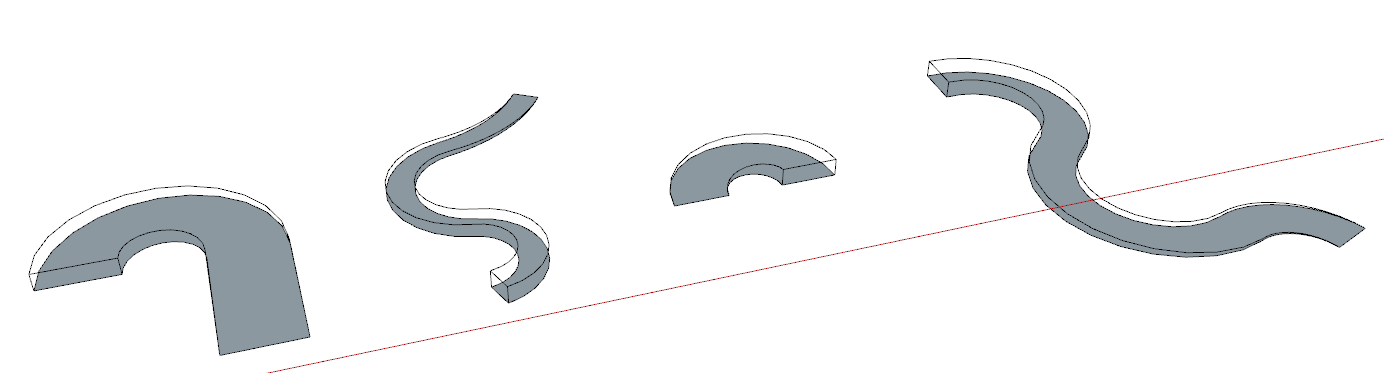
          Screenshot - 12_1_2019 , 8_07_53 AM.png

          Maybe you can review the usage instructions here and try again. It would also be helpful if you outline the exact steps you are using as you are setting up for and running Curvishear.

          Etaoin Shrdlu

          %

          (THERE'S NO PLACE LIKE)

          G28 X0.0 Y0.0 Z0.0

          M30

          %

          1 條回覆 最後回覆 回覆 引用 0
          • D 離線
            dangeruss03
            最後由 編輯

            @dave r said:

            I'm not sure what you are doing wrong. I do see that all of your curves are exploded to their individual segments. I welded the curves back together and ran Curvishear. It worked fine for me.
            [attachment=0:2rb4kko1]<!-- ia0 -->Screenshot - 12_1_2019 , 8_07_53 AM.png<!-- ia0 -->[/attachment:2rb4kko1]

            Maybe you can review the usage instructions here and try again. It would also be helpful if you outline the exact steps you are using as you are setting up for and running Curvishear.

            But how to weld all the lines, i tried to use super weld plugin and it work just like that

            1 條回覆 最後回覆 回覆 引用 0
            • Dave RD 離線
              Dave R
              最後由 編輯

              I used TIG-Weld to do it but I only welded the curves. I did not weld the entire perimeter. Why are the curves exploded in the first place? Maybe you should redraw them so they aren't exploded.

              Etaoin Shrdlu

              %

              (THERE'S NO PLACE LIKE)

              G28 X0.0 Y0.0 Z0.0

              M30

              %

              1 條回覆 最後回覆 回覆 引用 0
              • O 離線
                oo7wazzy
                最後由 編輯

                HI Fredo

                I downloaded the LibFredo6 package for Sketchup 19 on MAC. It is loaded and installed, but I can't see any of the tools. It is showing in the Window drop down menu but nowhere else that I can see. Have I done something wrong in the installation ? In the extension manager it is Enabled. Any help would be appreciated.
                Thanks

                1 條回覆 最後回覆 回覆 引用 0
                • Dave RD 離線
                  Dave R
                  最後由 編輯

                  Have you quit and restarted SketchUp after installing?

                  Fredo Tools shows in the Tools menu. Do you see that?

                  Etaoin Shrdlu

                  %

                  (THERE'S NO PLACE LIKE)

                  G28 X0.0 Y0.0 Z0.0

                  M30

                  %

                  1 條回覆 最後回覆 回覆 引用 0
                  • R 離線
                    rv1974
                    最後由 編輯

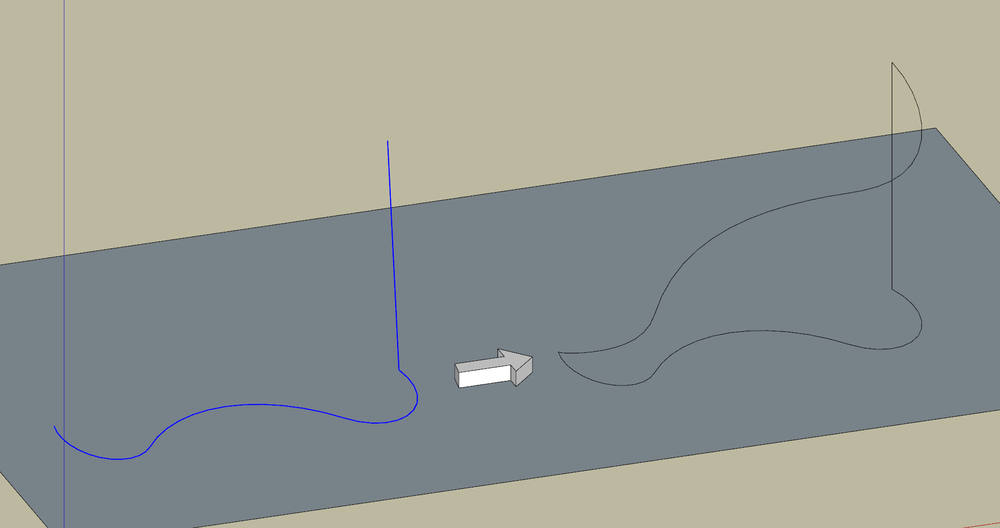
                    Many years I dream of ability to explicitly move the end vertex, run CurviShear and get desired slope (it means curve as required condition has to be ditched).

                    Capture.PNG-kkk.PNG

                    1 條回覆 最後回覆 回覆 引用 0
                    • fredo6F 離線
                      fredo6
                      最後由 編輯

                      @rv1974 said:

                      Many years I dream of ability to explicitly move the end vertex, run CurviShear and get desired slope (it means curve as required condition has to be ditched).

                      Unless I am wrong, you can do it natively

                      1. Launch the Move tool with no selection

                      2. Hover an extremity, click and drag vertically.

                      3. The curve should deform itself

                      1 條回覆 最後回覆 回覆 引用 0
                      • R 離線
                        rv1974
                        最後由 編輯

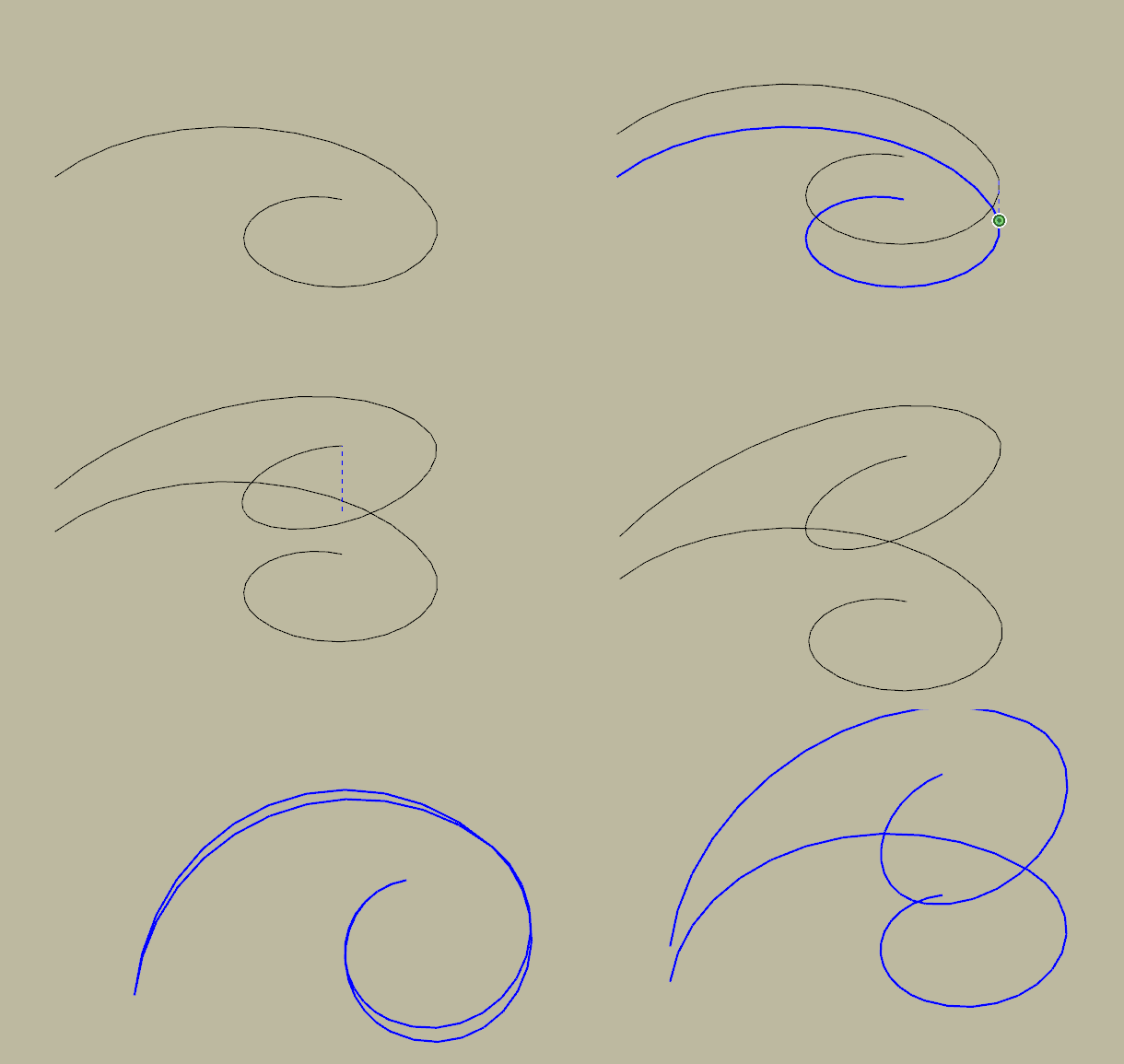
                        It won't happen (the curve will be deformed in plan view and it won't even remotely resemble a ramp). That's why CurviShear was created.

                        GIF 1-2-2020 2-00-55 PM.gif

                        1 條回覆 最後回覆 回覆 引用 0
                        • fredo6F 離線
                          fredo6
                          最後由 編輯

                          @rv1974 said:

                          It won't happen (the curve will be deformed in plan view and it won't even remotely resemble a ramp). That's why CurviShear was created.

                          In short, you would like an interactive version of CurviShear....

                          1 條回覆 最後回覆 回覆 引用 0
                          • R 離線
                            rv1974
                            最後由 編輯

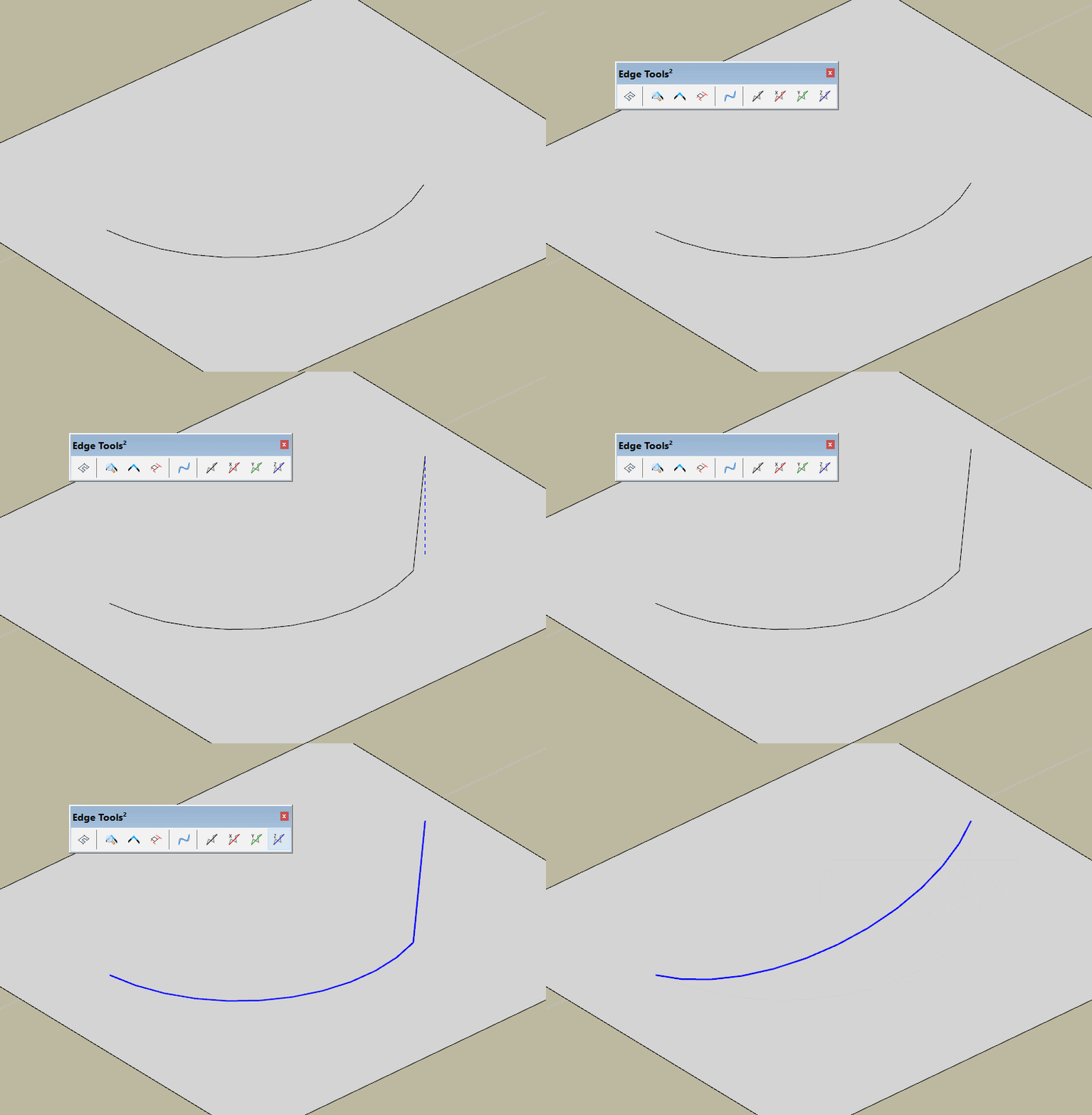
                            No (although I wouldn't disagree). Take a look at TT's Edge tools (last 5 commands).
                            https://sketchucation.com/pluginstore?pln=tt_edgetools
                            I'm talking of CurviShear to adopt the similar way of input.
                            I wouldn't call it interactive. I just feed Curvishear real geometry (bunch of connected edges or polyline) and get result without any input in modal window.

                            GIF 1-2-2020 4-43-26 PM.gif

                            1 條回覆 最後回覆 回覆 引用 0
                            • fredo6F 離線
                              fredo6
                              最後由 編輯

                              @rv1974 said:

                              Take a look at TT's Edge tools (last 5 commands).
                              https://sketchucation.com/pluginstore?pln=tt_edgetools

                              But then tt_edgetools does the job.

                              Do I miss something?

                              Or do you want to keep the original curve?

                              1 條回覆 最後回覆 回覆 引用 0
                              • R 離線
                                rv1974
                                最後由 編輯

                                CurviShear generates right 'ramp' curve, TT's 'Make colinear' doesn't. That's the main difference 🙂
                                The only CurviShear's weak link is UI.


                                Group_728.skp

                                1 條回覆 最後回覆 回覆 引用 0
                                • fredo6F 離線
                                  fredo6
                                  最後由 編輯

                                  @rv1974 said:

                                  CurviShear generates right 'ramp' curve, TT's 'Make colinear' doesn't. That's the main difference 🙂
                                  The only CurviShear's weak link is UI.

                                  Ok. Understood. I put it on my list, but this is what I mean by 'interactive'.

                                  1 條回覆 最後回覆 回覆 引用 0
                                  • D 離線
                                    dalenster
                                    最後由 編輯

                                    Hello, Not sure if I'm posting in the correct location. I have a shape with an image as the face. I'm trying to round the corners and have a smooth transition. However, I'm getting the following results. Is there a workaround, I'm I doing something wrong. I don't think this was a problem in the previous version.
                                    https://muzeoprints.com/wp-content/uploads/2020/01/Rounded-corner-with-image-fail.jpg

                                    1 條回覆 最後回覆 回覆 引用 0
                                    • fredo6F 離線
                                      fredo6
                                      最後由 編輯

                                      @dalenster said:

                                      I'm trying to round the corners and have a smooth transition. However, I'm getting the following results. Is there a workaround, I'm I doing something wrong. I don't think this was a problem in the previous version.

                                      It would be helpful to say which tool you use (RoundCorner, FredoCorner, or something else).

                                      None of these tools have the objective to ensure texture continuity. In general, texture application should be done after the geometry is generated.

                                      Anyway, posting the model would help.

                                      1 條回覆 最後回覆 回覆 引用 0
                                      • K 離線
                                        kubap
                                        最後由 編輯

                                        Hi Fredo,
                                        It's a great plugin, especially ThruPaint. Thank you 😄

                                        Is it possible to add an option to paint algong the shortest/lognest sides when painting whole groups/components?

                                        It would be great for example for wood furniture so the texture always goes along the long side of a plank. For example when you have a cupboard made of many planks every plank is textured along the longer sides automatically, as it is in real furniture.

                                        Now it's kind of random and the only way is to correct it manually face after face.

                                        1 條回覆 最後回覆 回覆 引用 0
                                        • fredo6F 離線
                                          fredo6
                                          最後由 編輯

                                          @kubap said:

                                          Is it possible to add an option to paint along the shortest/longest sides when painting whole groups/components?

                                          Unfortunately, Sketchup does not provide any UV control for painting objects (groups or components). The positioning of textures is based on axes and position of the objects.

                                          So, if you want control of orientation, you have to paint at the face level.

                                          Fredo

                                          1 條回覆 最後回覆 回覆 引用 0
                                          • fredo6F 離線
                                            fredo6
                                            最後由 編輯

                                            NEW RELEASE: FredoTools v3.8b - 05 Feb 20

                                            Requirement: LibFredo6 v9.5e or above

                                            FredoTools 3.8b is a minor release for ReportLabelArea, allowing to count the material coming from object containers, when faces are painted with the dedfault material.:


                                            See FredoTools plugin home page for Download.

                                            See also main post of this thread for User Discussion.

                                            Fredo

                                            1 條回覆 最後回覆 回覆 引用 0
                                            • 1
                                            • 2
                                            • 20
                                            • 21
                                            • 22
                                            • 23
                                            • 24
                                            • 23 / 24
                                            • 第一個貼文
                                              最後的貼文
                                            Buy SketchPlus
                                            Buy SUbD
                                            Buy WrapR
                                            Buy eBook
                                            Buy Modelur
                                            Buy Vertex Tools
                                            Buy SketchCuisine
                                            Buy FormFonts

                                            Advertisement