sketchucation logo sketchucation
    • 登入
    Oops, your profile's looking a bit empty! To help us tailor your experience, please fill in key details like your SketchUp version, skill level, operating system, and more. Update and save your info on your profile page today!
    🔌 Smart Spline | Fluid way to handle splines for furniture design and complex structures. Download

    [Plugin] FredoTools - v4.5c - 24 Jun 24


    已排程 已置頂 已鎖定 已移動 Plugins
    463 貼文 123 Posters 711.1k 瀏覽 121 Watching
    正在載入更多貼文
    • 從舊到新
    • 從新到舊
    • 最多點贊
    回覆
    • 在新貼文中回覆
    登入後回覆
    此主題已被刪除。只有擁有主題管理權限的使用者可以查看。
    • fredo6F 離線
      fredo6
      最後由 編輯

      @cadmunkey
      You are right. Actually, the result is correct mathematically. In the algorithm, negative volumes are normally used for holes in solids. But intuitively, we are not used to negative volumes.

      So, I fixed it, and it will go in the next release.

      Fredo

      1 條回覆 最後回覆 回覆 引用 0
      • C 離線
        cadmunkey
        最後由 編輯

        @fredo6 said:

        @cadmunkey
        You are right. Actually, the result is correct mathematically. In the algorithm, negative volumes are normally used for holes in solids. But intuitively, we are not used to negative volumes.

        So, I fixed it, and it will go in the next release.

        Fredo

        These are not holes in solids, if you want I can email you my model for analysis.
        Its a marble stone cut list, and some of the stones are reporting back as negative volumes.

        1 條回覆 最後回覆 回覆 引用 0
        • fredo6F 離線
          fredo6
          最後由 編輯

          I mean that when you flip along a group or component instances, you actually transform their axes and mathematically, this gives a negative volume, as it does for holes in the solid.

          Anyway, many thanks for signalling the problem.

          Fredo

          1 條回覆 最後回覆 回覆 引用 0
          • R 離線
            rv1974
            最後由 編輯

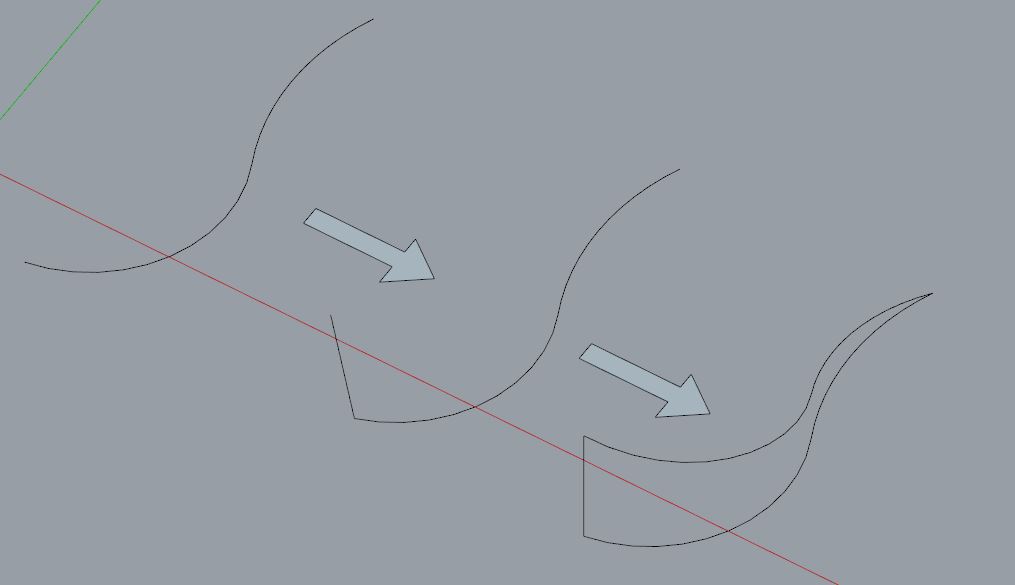
            I wish Curvishear could be become way more usable by
            letting user 'in-vivo' move a vertex (and thus setting desired height and slope direction)

            Capture.JPG

            1 條回覆 最後回覆 回覆 引用 0
            • B 離線
              bharralure
              最後由 編輯

              Bonjour Dave
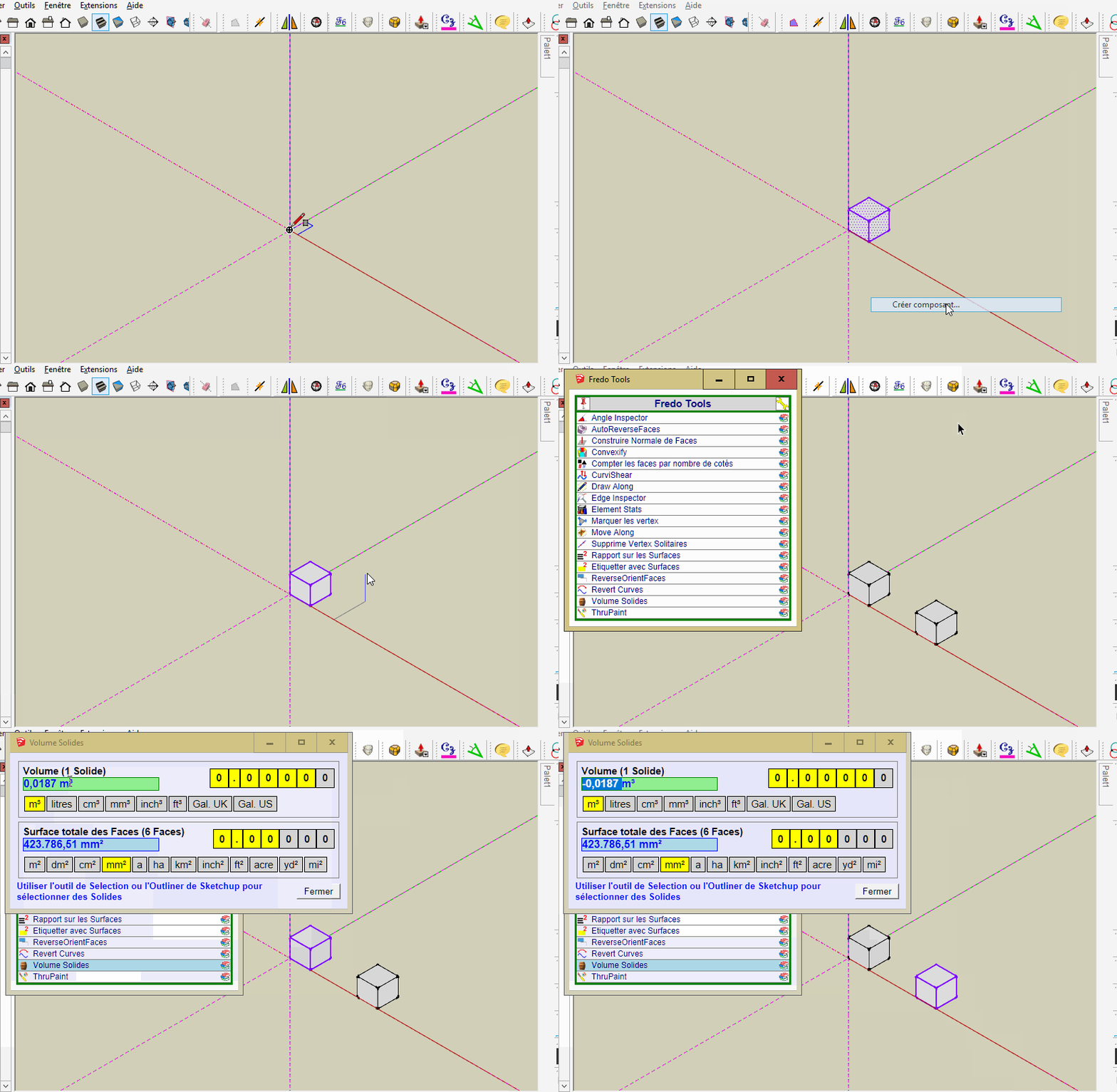
              Je confirme que "Volume Solides" affiche une valeur négative pour toute instance crée en miroir.
              Ce problème n'est pas spécifique à SU 2017, l'ayant déjà constaté sous SU 2016 et SU 2015.
              Je joint un Gif crée sous SU 2017.
              FredoTools_VolumeSolides.gif

              1 條回覆 最後回覆 回覆 引用 0
              • fredo6F 離線
                fredo6
                最後由 編輯

                NEW RELEASE: FredoTools v3.1a - 09 Jul 17

                Requirement: LibFredo6 v7.7a

                FredoTools 3.1a introduces a new plugin, called DivideEdges. It also supports hi-resolution screens and fixes some bugs.

                See FredoTools home page for Download.

                Fredo

                1 條回覆 最後回覆 回覆 引用 0
                • JClementsJ 離線
                  JClements
                  最後由 編輯

                  Divide Edges (DE) is a nice new addition to your toolset. Thank you!

                  Perhaps a version of DE could be adapted to produce dashed lines? When selected only an ODD number of segments would be available, then every-other-segment after the first segment would be deleted or hidden (not sure which would be the best to go). Maybe it could be "parametric" in the sense that the user could restore the original at later time and apply and different number of segments.

                  John | Illustrator | Beaverton, Oregon

                  1 條回覆 最後回覆 回覆 引用 0
                  • fredo6F 離線
                    fredo6
                    最後由 編輯

                    NEW RELEASE: FredoTools v3.1b - 11 Jul 17

                    FredoTools 3.1b fixes a bug in FredoTools::SolidVolume, as signaled by Alex37550. See this post.

                    See FredoTools plugin home page for Download.

                    See also main post of this thread for User Discussion.

                    Fredo

                    1 條回覆 最後回覆 回覆 引用 0
                    • R 離線
                      rv1974
                      最後由 編輯

                      MoveAlong question:
                      How difficult would it be to implement
                      a Multiple objects move (rotate?) by their local axes?

                      1 條回覆 最後回覆 回覆 引用 0
                      • fredo6F 離線
                        fredo6
                        最後由 編輯

                        @rv1974 said:

                        MoveAlong question:
                        How difficult would it be to implement
                        a Multiple objects move (rotate?) by their local axes?

                        Should be a dedicated tool.

                        MoveAlong is already complex, and I did not add the move along local axes (there are inferences however), as I did in Animator.

                        That's not a matter of programming ; Putting too many features in a plugin defeats the purpose, as then it is judged cluttered with options that nobody really uses.

                        Fredo

                        1 條回覆 最後回覆 回覆 引用 0
                        • fredo6F 離線
                          fredo6
                          最後由 編輯

                          NEW RELEASE: FredoTools v3.1c - 18 Aug 17

                          FredoTools 3.1c fixes problems with non-ascii usernames and provides verious bug fixing.

                          See FredoTools plugin home page for Download.

                          See also main post of this thread for User Discussion.

                          Fredo

                          1 條回覆 最後回覆 回覆 引用 0
                          • fredo6F 離線
                            fredo6
                            最後由 編輯

                            NEW RELEASE: FredoTools v3.1d - 28 Sep 17

                            FredoTools 3.1d fixes potential bugsplat in ThruPaint. Thanks to report if you have any.

                            See FredoTools plugin home page for Download.

                            See also main post of this thread for User Discussion.

                            Fredo

                            1 條回覆 最後回覆 回覆 引用 0
                            • ecatiE 離線
                              ecati
                              最後由 編輯

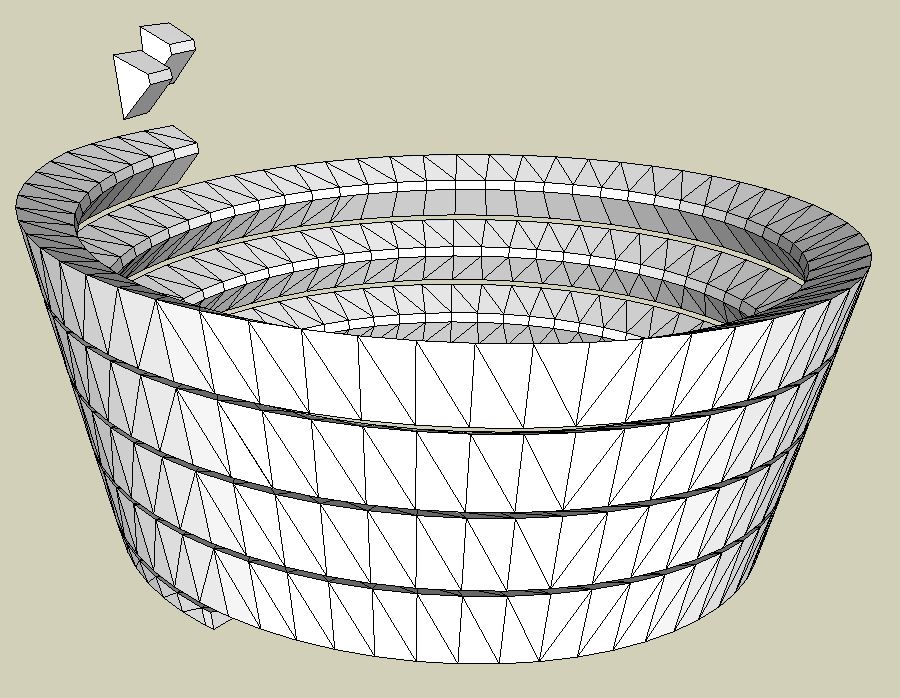
                              For Msphysics, I used "Convexify" to divide the object shown in the figure into convex pieces, but I did not create the division process. What would be the reason?

                              1.JPG


                              1.skp

                              1 條回覆 最後回覆 回覆 引用 0
                              • fredo6F 離線
                                fredo6
                                最後由 編輯

                                @ecati said:

                                For Msphysics, I used "Convexify" to divide the object shown in the figure into convex pieces, but I did not create the division process. What would be the reason?

                                I tried, and it's probably too much for the algorithm.
                                And on a portion of it, the convexification won't give you something 'nice as expected', because the the triangulation makes most individual edges concave, with relatively large angles.

                                I guess you have to find another way to generate the shape directly into small bits.

                                Fredo

                                1 條回覆 最後回覆 回覆 引用 0
                                • fredo6F 離線
                                  fredo6
                                  最後由 編輯

                                  NEW RELEASE: FredoTools v3.1e - 01 Oct 17

                                  FredoTools 3.1e fixes a major bug preventing the correct load under Mac OSX High Sierra. So you really need to upgrade if you have upgraded or plan to upgrade to High Sierra.

                                  See FredoTools plugin home page for Download.

                                  See also main post of this thread for User Discussion.

                                  Fredo

                                  1 條回覆 最後回覆 回覆 引用 0
                                  • mariochaM 離線
                                    mariocha
                                    最後由 編輯

                                    Hi Mac users. A litlle survey.
                                    Lately I'm having a small annoyance with this extension.
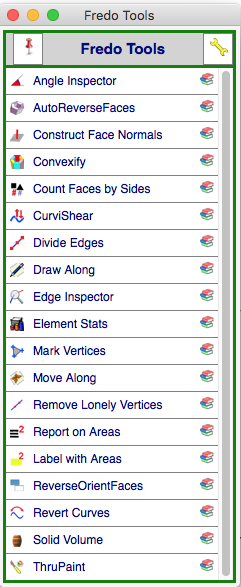
                                    If I open the pane for the tools (see image) once in a session, then SU cannot quit normally. Beachball.
                                    I removed all the other extension leaving only it and the Lib. Still bug.
                                    Anyone else ?
                                    update: Just did it with Curvizard.

                                    Fredotools.png

                                    %(#008000)[Mario C.
                                    Every rule has exceptions, but some.]

                                    1 條回覆 最後回覆 回覆 引用 0
                                    • Mousa_SAM 離線
                                      Mousa_SA
                                      最後由 編輯

                                      @fredo6 said:

                                      NEW RELEASE: FredoTools v3.1d - 28 Sep 17

                                      FredoTools 3.1d fixes potential bugsplat in ThruPaint. Thanks to report if you have any.

                                      See FredoTools plugin home page for Download.

                                      See also main post of this thread for User Discussion.

                                      Fredo

                                      Hello Fredo,

                                      Firstly, thanks for all of your plugins.
                                      I get a bugsplat when I enable Thrupaint, please check the attachment to see the bug report.


                                      Thrupaint bug

                                      1 條回覆 最後回覆 回覆 引用 0
                                      • fredo6F 離線
                                        fredo6
                                        最後由 編輯

                                        @mousa_sa said:

                                        I get a bugsplat when I enable Thrupaint, please check the attachment to see the bug report.

                                        Yes, there are cases of bugsplat, and for what whatever reason, they may occur systematically for some users. I did not find the reason and fix yet, but I am trying...

                                        Fredo

                                        1 條回覆 最後回覆 回覆 引用 0
                                        • Mousa_SAM 離線
                                          Mousa_SA
                                          最後由 編輯

                                          @fredo6 said:

                                          Yes, there are cases of bugsplat, and for what whatever reason, they may occur systematically for some users. I did not find the reason and fix yet, but I am trying...

                                          Fredo

                                          I have made some tests and found that this issue occur when Profile builder 2 and SubD is enabled, but I installed SketchUp 2017, Profile Builder 2 and SubD on another machine and Thrupaint worked fine!

                                          1 條回覆 最後回覆 回覆 引用 0
                                          • OxerO 離線
                                            Oxer
                                            最後由 編輯

                                            Hi, I found a minor issue with Thrupaint on OS X 10.11.6 & SU2017, when you make click to enter in Visual edition, the gizmo and the options window disappear immediately but "right click ->Contextual menu->Enter in Visual edition" or "Enter" work fine, for this reason for me is a minor issue.


                                            "The result is the end what is important is the process" by Oxer
                                            http://www.oxervision.blogspot.com/

                                            1 條回覆 最後回覆 回覆 引用 0
                                            • 1
                                            • 2
                                            • 3
                                            • 4
                                            • 5
                                            • 23
                                            • 24
                                            • 2 / 24
                                            • 第一個貼文
                                              最後的貼文
                                            Buy SketchPlus
                                            Buy SUbD
                                            Buy WrapR
                                            Buy eBook
                                            Buy Modelur
                                            Buy Vertex Tools
                                            Buy SketchCuisine
                                            Buy FormFonts

                                            Advertisement