[Plugin] FredoTools - v4.5c - 24 Jun 24




-

谢谢你
Thank -
Hello, I love Freddo plug ins, but I installed SketchUp 13 and these plug ins do not work ... you plan to make it compatible soon??
-
@asaavedra said:
Hello, I love Freddo plug ins, but I installed SketchUp 13 and these plug ins do not work ... you plan to make it compatible soon??
They do work. Update your Fredo6 Library file.
-
Devo studiare tutto in inglese, Fredo!! Ma la installazione è stata perfetta! Complimenti e grazie!

-
thank you very much!
-
Thank you so much sir

-
Fredo,
I have installed Sketchup 2013 Make on a Linux instance and it seems to be working well. Unfortunately I have a problem loading FredoTools 1.2a. The error message I receive is:
Error Loading File C:/Program Files/SketchUp/SketchUp 2013/Plugins/FREDOTOOLS_Dir_12/__loader.rb
can't convert nil into StringI have tried disabling my other plugins to isolate the cause and then adding them back one at a time and when FredoTools is enabled I start having this problem. I'm happy to assist you in any tracing, since I'm aware that SketchUp itself is not supported on Linux. This is a brand new install and all plugins packages have been downloaded within the past 24 hours.
I am also encountering the same problem in Sketchup 8 on the same machine.
Kind Regards,
Tom
-
Ensure that the SketchUp Plugins folder AND all of its contents [subfolders/files] have FULL Read/Write security permissions set.
On Windows existing contents typically adopt the settings of their parent.
Properties > Security > Edit... each user/group in the list > FULL... Apply/OKOn a MAC you need to deliberately tell the OS to apply the changes to contents.
On Linux it may be the same...Also set Sketchup.exe to 'always run as administrator' [if you can] ...
Do you have that .rb file in the named subfolder
C:/Program Files/SketchUp/SketchUp 2013/Plugins/FREDOTOOLS_Dir_12/__loader.rbIf not, then it suggests you had limited permissions and the have not installed the files as you think you have... -
@tolson68 said:
Fredo,
I have installed Sketchup 2013 Make on a Linux instance and it seems to be working well. Unfortunately I have a problem loading FredoTools 1.2a. The error message I receive is:
Error Loading File C:/Program Files/SketchUp/SketchUp 2013/Plugins/FREDOTOOLS_Dir_12/__loader.rb
can't convert nil into StringTom,
Strange message. Not sure it is related to your Linux installation.
Could you check that the file __loader.rb contains a single line:
Traductor::Plugin.myplugin('FredoTools').effective_loadFredo
-
TIG, The __loader.rb does exist in the .../FREDOTOOLS_Dir_12/ folder and has it's permissions set to -rw-r--r-- and all other *.rb files have the same permissions.
Fredo, The __loader.rb file does contain the line:
Traductor::Plugin.myplugin('FredoTools').effective_load
...and nothing else.
If I rename the 000_AdditionalPluginFolders.rb file the error appears to go away, which seems like an acceptable workaround. I am unable to use WebDialog for that add-on for somereason. All other WebDialogs are working, but that one just displays raw HTML, but does not generate any exceptions other than when FredoTools is loaded, curious.
Thanks,
Tom
-
Fredo,
I stand corrected renaming the 000_AdditionalPluginsFolder.rb did not resolve the problem, but it did expose a different/extended message:
Error Loading File C:/Program Files/SketchUp/SketchUp 2013/Plugins/FREDOTOOLS_Dir_12/__loader.rb
can't convert nil into String
Error Loading File ZLoader__GhostComp.rb
can't convert nil into String -
 thank you very much
 -
-
@dedmin said:
Very strange.
Can come from 2 possible causes:-
MaxwellFire modifies the SU model and the texturing (does it?), and then ThruPaint or MaxWellFire script crashes when it is used (could be related to observers)
-
or there is a more traditional plugin conflict
Could you send me a model where you do the rendering, but just before you try to apply the TrhruPaint texturing.
Fredo
-
-
There is no model - just a simple rectangle, then push-pull to a 3D box.
-
@dedmin said:
There is no model - just a simple rectangle, then push-pull to a 3D box.
That was just in case MaxwellFire modifies the texture. So just the model after you do the rendering.
Otherwise, this may simply come from a plugin conflict, either at code level, or due to handling of observers in MaxwellFire.
Fredo
-
The material was just default sketchup material. This file was rendered with Maxwell:
Buro_11.skp -
@dedmin said:
The material was just default sketchup material. This file was rendered with Maxwell:
[attachment=0:2047gaia]<!-- ia0 -->Buro_11.skp<!-- ia0 -->[/attachment:2047gaia]I get NO crash when using ThurPaint.
So it must be another conflict between scripts (There was one for Vray Beta 1.6).
Maybe some other users have found a similar problem.
fredo
-
@tolson68 said:
Fredo,
I have installed Sketchup 2013 Make on a Linux instance and it seems to be working well. Unfortunately I have a problem loading FredoTools 1.2a. The error message I receive is:
Error Loading File C:/Program Files/SketchUp/SketchUp 2013/Plugins/FREDOTOOLS_Dir_12/__loader.rb
can't convert nil into StringI have tried disabling my other plugins to isolate the cause and then adding them back one at a time and when FredoTools is enabled I start having this problem. I'm happy to assist you in any tracing, since I'm aware that SketchUp itself is not supported on Linux. This is a brand new install and all plugins packages have been downloaded within the past 24 hours.
I am also encountering the same problem in Sketchup 8 on the same machine.
Kind Regards,
Tom
Hi, Tom,
I have the same problem on my nature windows machine and on linux/ubuntu machine through wine. The workaround is very simple. I moved all Fredo6 plugins to default sketchup plugins folder and now all they works as expected. Probably problem occurs on AdditionalPluginFolders.rb level.
-
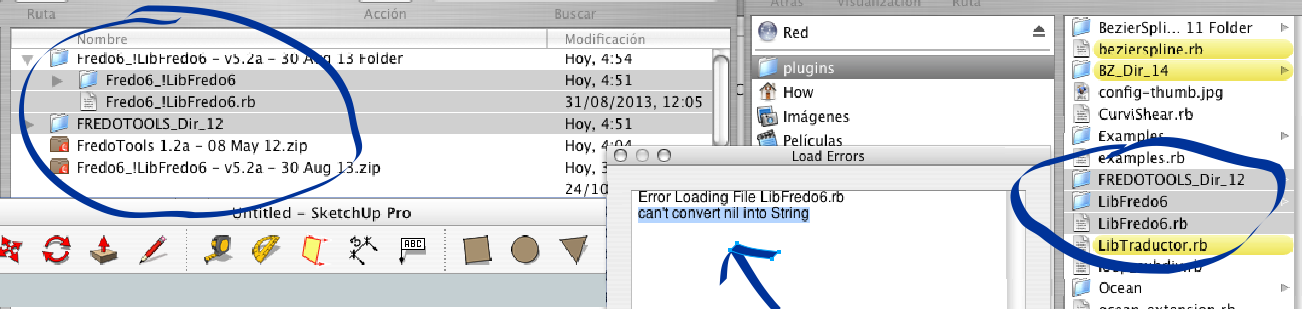
Hi fredo.. I´ms sure you and all around are bored of answering the same questions.. but i read thoroughly and couldn't find an answer....
I work on an old PowerPc G5 (pre-Intel) and SketchUp 7 (7.1.6859)
i copy the plugins in the right place
mac hd >library > application support > google sketchup 7 > sketchip > pluginstryed to change names, place them in original folders, change the web browser (downloader as safari was giving funny names), change the un-compressor.. every thing to no luck
Here is an image where u see shaded all the info
thanx for any help in advance...
PD congratulations other plugins i tryed, are fantastic!!



Hello! It looks like you're interested in this conversation, but you don't have an account yet.
Getting fed up of having to scroll through the same posts each visit? When you register for an account, you'll always come back to exactly where you were before, and choose to be notified of new replies (either via email, or push notification). You'll also be able to save bookmarks and upvote posts to show your appreciation to other community members.
With your input, this post could be even better 💗
Register Login


Advertisement