sketchucation logo sketchucation
    • 登入
    Oops, your profile's looking a bit empty! To help us tailor your experience, please fill in key details like your SketchUp version, skill level, operating system, and more. Update and save your info on your profile page today!
    🔌 Smart Spline | Fluid way to handle splines for furniture design and complex structures. Download

    Maxwell for SU VS Twilight

    已排程 已置頂 已鎖定 已移動 Extensions & Applications Discussions
    extensions
    121 貼文 25 Posters 20.6k 瀏覽 25 Watching
    正在載入更多貼文
    • 從舊到新
    • 從新到舊
    • 最多點贊
    回覆
    • 在新貼文中回覆
    登入後回覆
    此主題已被刪除。只有擁有主題管理權限的使用者可以查看。
    • L 離線
      lwbscenic
      最後由 編輯

      Jason

      If I purchased the paid plugin would there be a upgrade to the suite, or is it still a full purchase?

      1 條回覆 最後回覆 回覆 引用 0
      • jason_marantoJ 離線
        jason_maranto
        最後由 編輯

        I'm not sure on that -- you would probably need to contact Next Limit directly to find out... although I cannot imagine them not offering some upgrade path.

        Best,
        Jason.

        I create video tutorial series about several 2D & 3D graphics programs.

        1 條回覆 最後回覆 回覆 引用 0
        • L 離線
          lwbscenic
          最後由 編輯

          So Next Limit Replied to let me know that they would only charge me the difference between the cost of the plug-in and the cost of the suite should I decide to upgrade.

          Nice

          LB

          1 條回覆 最後回覆 回覆 引用 0
          • jason_marantoJ 離線
            jason_maranto
            最後由 編輯

            That's good to hear, though I'm not surprised -- they are generally one of the best companies when it comes to their (IMO) liberal licensing policies (cross-platform, cross-product).

            Best,
            Jason.

            I create video tutorial series about several 2D & 3D graphics programs.

            1 條回覆 最後回覆 回覆 引用 0
            • soloS 離線
              solo
              最後由 編輯

              Tested this scene with Thea.

              Firstly we must not forget that everyone's computers are different, even if you have identical rigs the difference could be in seconds or minutes.

              I tested on a first generation i7 with 24GB ram

              First we have biased tests (like Vray)

              First is the default Thea BSD setting, it is by default set to use maximum cores and normal super-sampling, This was pretty fast at 58 seconds but quality is questionable IMO:
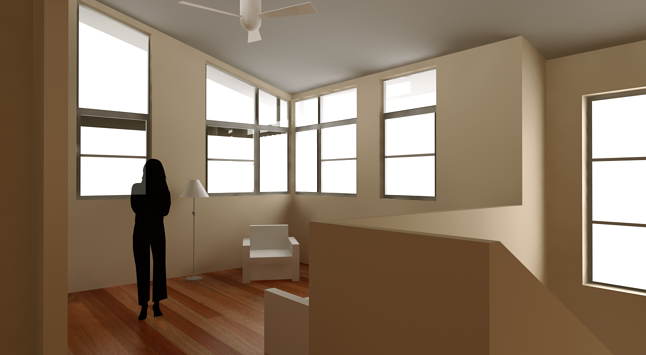
              bsd default normal supersample 58s.png

              Then I upped the super-sampling to high and it took 2m21 secs:
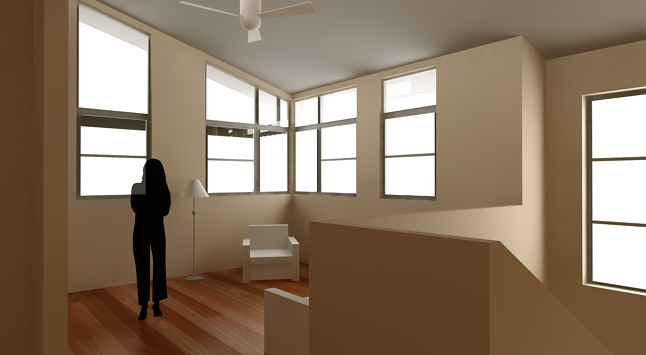
              bsd default high supersample 2m21.png

              Here I used one of my own presets, used for actual work when I need to get lots of renders out fast and client does not need unbiased level quality, yet still getting a decent result, 3m34 sec:
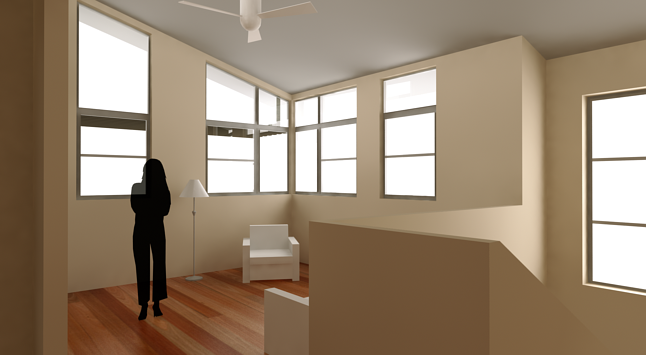
              BSD preset solo interior good 3m34.png

              And lastly the unbiased version, for when you want a good result, note, I never needed to change a thing in order to render biased or unbiased just a matter of choosing before hitting render.
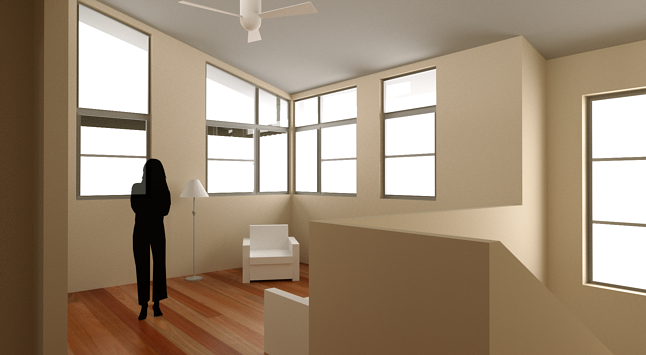
              TR1 30 mins high sampling.png

              http://www.solos-art.com

              If you see a toilet in your dreams do not use it.

              1 條回覆 最後回覆 回覆 引用 0
              • E 離線
                Ecuadorian
                最後由 編輯

                Pete, there are two basic types of biased settings in Thea...

                -Bucket rendering, which finishes one square at a time and has a well defined "completion" point (Works similar to Vray and Mental Ray)
                Examples in Thea:
                Adaptive BSD
                Photon Mapping
                Final Gather

                -Progressive rendering, which you can stop anytime when satisfied (Works similar to unbiased modes, but is "biased" instead of "unbiased"... Can't tell the difference by just looking at the result.)
                Examples in Thea:
                Progressive BSD, which for me looks like a biased version of TR1
                Adaptive (AMC), which seems to be a biased version of TR2

                All these five biased modes are present in Thea. Which ones did you use for the test?

                -Miguel Lescano
                Subscribe to my house plans YouTube channel! (30K+ subs)

                1 條回覆 最後回覆 回覆 引用 0
                • soloS 離線
                  solo
                  最後由 編輯

                  BSD.

                  http://www.solos-art.com

                  If you see a toilet in your dreams do not use it.

                  1 條回覆 最後回覆 回覆 引用 0
                  • E 離線
                    Ecuadorian
                    最後由 編輯

                    There's two BSD modes:
                    Progressive BSD (progressive) and Adaptive BSD (bucket rendering).

                    I guess it must be Progressive BSD, right?

                    -Miguel Lescano
                    Subscribe to my house plans YouTube channel! (30K+ subs)

                    1 條回覆 最後回覆 回覆 引用 0
                    • soloS 離線
                      solo
                      最後由 編輯

                      Ah, sorry, I used adaptive for these tests

                      http://www.solos-art.com

                      If you see a toilet in your dreams do not use it.

                      1 條回覆 最後回覆 回覆 引用 0
                      • N 離線
                        nomeradona
                        最後由 編輯

                        im sold out with BSD now Pete.. nice tests... i came for thea for the unbiased and handling of multi-poly models, but seeing your Biased render, it made me rethink twice and thrice.. thanks for putting this gallery.

                        visit my blog: http://www.nomeradona.blogspot.com

                        1 條回覆 最後回覆 回覆 引用 0
                        • PixeroP 離線
                          Pixero
                          最後由 編輯

                          @Pete: I would be interested in seeing your tweaked settings.

                          1 條回覆 最後回覆 回覆 引用 0
                          • J 離線
                            jpalm32
                            最後由 編輯

                            I don't understand the window reflection on her shirt.

                            1 條回覆 最後回覆 回覆 引用 0
                            • Rich O BrienR 離線
                              Rich O Brien Moderator
                              最後由 編輯

                              @jpalm32 said:

                              I don't understand the window reflection on her shirt.

                              She's a semi opaque 2d face me. You're a seeing through her.

                              Download the free D'oh Book for SketchUp 📖

                              1 條回覆 最後回覆 回覆 引用 0
                              • F 離線
                                Fletch
                                最後由 編輯

                                For future reference on the Twilight Render website there is a "Tutorials" link.
                                There you will find the video tutorials for Twilight Render SketchUp plugin. They are made in such a way that people that do not understand spoken English so well can still learn how to use the plugin. (Videos are also available in Spanish and Japanese)
                                The next place to go for beginners would naturally be the FAQ section of the user forum. In this case, it is not a list of some odd made-up words that no one actually ever asks about. No, it's actually a list of the most frequently asked 'beginner' questions.

                                Warming up the sky: There are many controls for physical sky, and color of sun, sun radius (how soft the sun shadows are) in the Light Editor dialog for Twilight. Check these tips for beginners wanting to warm up the sun and sky, and speed up renderings and general working in SketchUp:
                                Default Sky Setting for Twilight... and speed up SU (includes an excellent default sun and sky .skp template file)
                                First thing to do to warm up the Sun and Sky
                                In addition of course you can use any spherical sky image in .hdr or .jpg format.

                                If somehow the User Manual (comprehensive, fully hyper-linked, well organized, and searchable) does not have an answer to your question, you can check out the Best Of Tips and Tricks - The Master List

                                Lastly the Twilight Render community forum is very friendly, helpful, and welcoming to all. It is very similar to the lovely folks here at the SketchUcation forum. ☀

                                Finally, users of the free trial still get free support from our user forum. People who purchase a Twilight Render license get access to the Red Carpet Section of the user forum, a lot of free advanced video tutorials, user content, scenes, etc.

                                Fletch
                                Twilight Render Cross-platform Plugin for SketchUp on PC or Mac

                                1 條回覆 最後回覆 回覆 引用 0
                                • 1
                                • 2
                                • 3
                                • 4
                                • 5
                                • 6
                                • 7
                                • 4 / 7
                                • 第一個貼文
                                  最後的貼文
                                Buy SketchPlus
                                Buy SUbD
                                Buy WrapR
                                Buy eBook
                                Buy Modelur
                                Buy Vertex Tools
                                Buy SketchCuisine
                                Buy FormFonts

                                Advertisement

