How to use emitters in Maxwell Standalone for Sketchup
-
Well Maxwell is the render engine for perfectionists by perfectionists -- the reason for it's reputed lack of speed (which I think is blown way out of proportion) is because they refuse to compromise in any way from their ideals... Which they say right up front on their website.
There will be no biased engine added to Maxwell, FIRE is it for previews... any speed improvements will come from upgrading to more powerful hardware and possibly some code optimization.
I respect that approach since I take a very similar one to my work -- however everyone has different priorities and it's nice that there is an option to fit just about everyone.
Best,
Jason. -
I had the same problem, but I applyed the light material on both faces, but some times it did't work, so finally I figured out that after put the material in both faces, I had to group it ( the light source, using emitter material) and the problem solved. No more black faces on emitters.
-
Speed might not be such a big issue once I upgrade my computer (i7 overclocked to about 4.5GHz) but not being able to add spotlights easily is an important issue. Do you know when they are planning to change this?
-
There will be an IES material character in the next build.
-
@jd hill said:
There will be an IES material character in the next build.
Great news! Any estimate about when the next build will be out? Are we talking about days, weeks or months?
-
I don't mean to seem evasive, but as a matter of policy, I never answer that question with any precision. I plan on putting up some pre-release bits for customers pretty soon (the plan for this is on the order of days, not weeks), but I won't make any estimate on timing for a public release.
-
I don't think there's any specific plan that's been made known. If you're really interested you could email Jeremy who's the creator of the plugin and very helpful. If he has anything in the works I'm sure he'd be happy to let you know.
-Brodie
-
This is excellent news. Thanks
-
mmh, I still have trouble getting emitters to work. I turned the enviroment settings to none and either changed sketchup materials in the maxwell scene manager to have max watts etc. or used mxm files that suppose to have emitter lights but none of them will glow! The scene will render dark and you see the material but it will not be a light source. What am I doing wrong?
-
@markewi said:
mmh, I still have trouble getting emitters to work. I turned the enviroment settings to none and either changed sketchup materials in the maxwell scene manager to have max watts etc. or used mxm files that suppose to have emitter lights but none of them will glow! The scene will render dark and you see the material but it will not be a light source. What am I doing wrong?
Hi, make the surface with emitter material a group, then rerender it again.
Bravoddb
-
@markewi said:
mmh, I still have trouble getting emitters to work. I turned the enviroment settings to none and either changed sketchup materials in the maxwell scene manager to have max watts etc. or used mxm files that suppose to have emitter lights but none of them will glow! The scene will render dark and you see the material but it will not be a light source. What am I doing wrong?
What are your camera settings (what's the EV) and what are your emitter settings and what size is the emitter?
If you have realistic emitter settings and the emitter isn't too big and you've got a realistic EV (for interior scenes with emitters you're usually looking at 7ish) you should be good.
-Brodie
-
Also, Emitters are only going to emit in the direction of the normals -- which means the "front" of the polygon.
So to recap, the short checklist for emitters working right is:
- Is the geometry to real-world scale?
- Is the camera exposure value realistic?
- Are the surface normals pointing in the direction you want light to emit?
In addition to that there are also some limits to emitters as far as their use in components -- However, there are a number of emitter related changes availible in the the latest pre-release preview (2.6.3) on the Maxwell forums and I do recommend you download that and see if that fixes the issue.
Best,
Jason. -
Thanks to all! I'll give it a try.....
-
are there MXM files with IES in the maxwell material gallery? this far i haven't figuered out how to create a spot light with the maxwell standalone sketchup plugin

-
@carloh said:
are there MXM files with IES in the maxwell material gallery? this far i haven't figuered out how to create a spot light with the maxwell standalone sketchup plugin
The newest version of the plugin supports creating IES materials directly within SketchUp (as an embedded character type material) -- I would re-download the plugin (from the Maxwell website) to get the new features. Also, I would check the Maxwell forum regularly for the latest pre-release version (which right now is 2.6.11) because often they will be newer than what is available from the Maxwell website: http://www.maxwellrender.com/forum/viewforum.php?f=107
Best,
Jason. -
thank you very much jason! wooohooo finally the possibility to put IES in my scenes!
and i was this close to buying the full render suite just for IES lights

-
I'v been reading all the previous, but I'm still having problems with my lights. I'm using Sketchup pro 8 an the Maxwell plugin only. I added a test-render (attachment: test 7), in which I used no artificial light. Obviously, it needs some artificial light, but I've been trying emitters (on a rectangle) and an IES (on as spere) but it keeps on turning black. I've tried reversing the material, but nothing worked so far.
Stupid thing though: in a test-setup I made (attachment: test 2), the lighst do work (although I'm still struggling with the settings)
Please help!!!
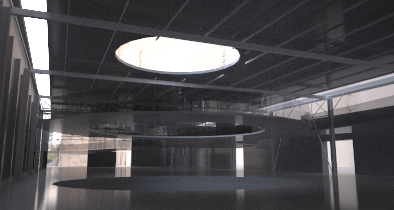
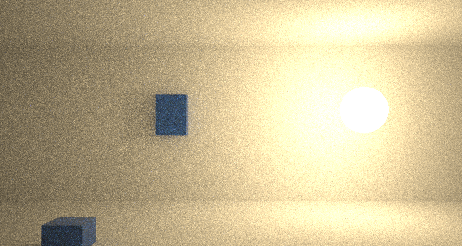
-
intensity too low? Maybe try with multilight.
Did you try bouth face orientations? Some time ago a had the problem that emitter faces got reversed on export.
-
Hi, I am a newbie to Maxwell - I have the free Maxwell render plug-in for SU.
I have read all the above posts and I appear to have the same problem as many.
I am working in an outdoor scene.
I read the whole of the manual that is relevant to the above and followed the guidelines, but I'm not getting any light emission from geometrical objects created. I applied light emitters to each face of planar emitters and then made them a group but still no light. I tried various means: such as IES lights, customised emitters, daylight and 1000W lighting.
I have HDRI loaded as background and also in associated channels, reflectance, etc. Can this affect the light emitters? But I did disable the HDR at one point.
Many thanks in anticipation for help with this.
-
Sketchfield, check units and scale of the objects in your 3d model, make sure that you are working with real scale and the size of objects correspond with units used...
best
V







Advertisement