sketchucation logo sketchucation
    • Login
    Oops, your profile's looking a bit empty! To help us tailor your experience, please fill in key details like your SketchUp version, skill level, operating system, and more. Update and save your info on your profile page today!
    Mac User? | Join the Rayscaper Beta for Mac Learn More

    Print to scale.....but its big

    Scheduled Pinned Locked Moved SketchUp Discussions
    sketchup
    8 Posts 6 Posters 734 Views 6 Watching
    Loading More Posts
    • Oldest to Newest
    • Newest to Oldest
    • Most Votes
    Reply
    • Reply as topic
    Log in to reply
    This topic has been deleted. Only users with topic management privileges can see it.
    • D
      deanlegg
      last edited by

      Hi All

      I'm trying to print some ribs out to scale but they are way bigger than A4
      See attachment
      Anyone have any idea how I can do it
      The ribs are for a boat we are making so the carpenter needs the profile to make the shape
      There are 13 ribs all together
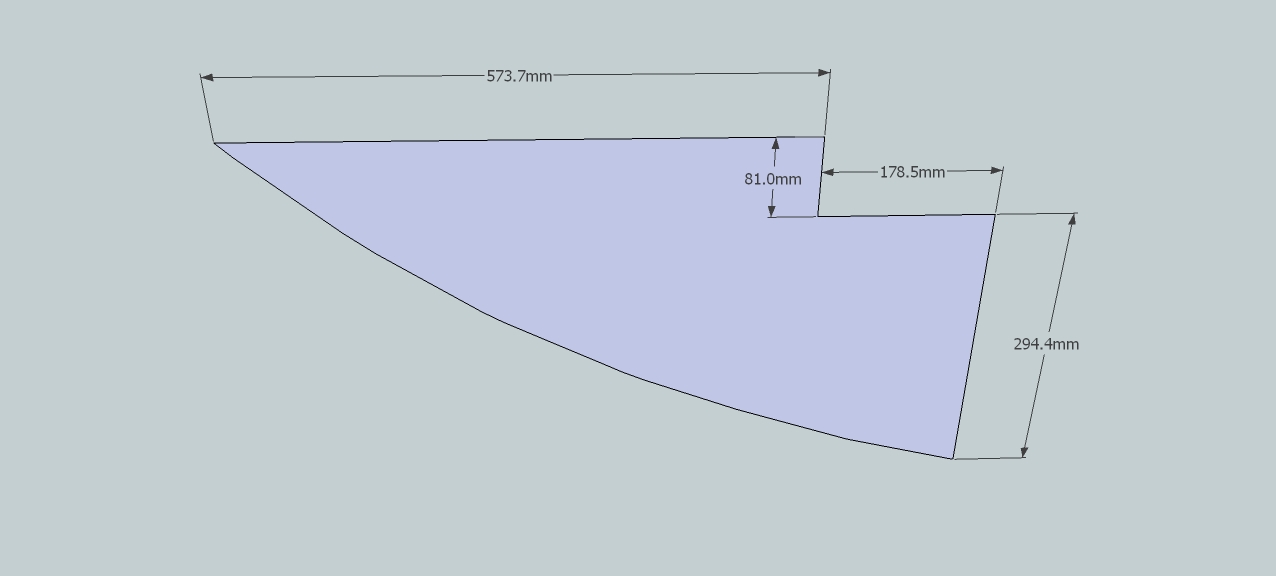

      yatch club rib layout.jpg

      1 Reply Last reply
      Reply Quote 0
      • GaieusG
        Gaieus
        last edited by

        Does he need it at 1:1? You can print it on several sheets (and glue them together) or if he does not need it at 1:1, print it at a smaller scale.

        Gai...

        1 Reply Last reply
        Reply Quote 0
        • D
          david.
          last edited by

          On way to get good results is using Layout. Import the parallel line mode scenes to scale into Layout. Then, export those to PDF files. The PDF files can then be used by a print shop (around me that would be Fedex/Kindos) to print scale drawings. However, only SU Pro includes Layout.

          1 Reply Last reply
          Reply Quote 0
          • TIGT
            TIG Moderator
            last edited by

            Set view to Parallel, Top, Zoom Extents, Pan so as near edge as possible
            Export > 2d > PDF > Full Size 1:1 etc.
            Then open the PDF it's made and then Print it 'as a PDF' [e.g. using PDF995] - set Page Size to A4, Tile Large Pages > Cut Marks etc.
            The Output will be 2x3 or 2x4 or 3x4 pages at 'full size' in a single PDF.
            If you print those to a printer [Full size = NO Scaling] you should be able to then reassemble them on a table-top and with some tape join them into a single sheet...
            IF you have access to a commercial Print-Shop send them the first PDF and they'll print it at A2/A1/A0 depending on how it fits on a sheet...

            TIG

            1 Reply Last reply
            Reply Quote 0
            • D
              deanlegg
              last edited by

              Thanks for the replies
              I'll give it a shot and let you know

              1 Reply Last reply
              Reply Quote 0
              • M
                mac1
                last edited by

                @deanlegg said:

                Thanks for the replies
                I'll give it a shot and let you know

                Why not give them a few more dimensions so template is not needed.Probably more accurate any way? The arc can be laid out by simple lofting approach and he should know how to do that > IE use chord vs radius( really bulge and chord)

                1 Reply Last reply
                Reply Quote 0
                • Dave RD
                  Dave R
                  last edited by

                  If the "carpenter" is a boat builder and worth his salt, he should be able to loft the curves from a proper table of offsets. the curves he winds up with should be nice and fair which the curve on your drawing is not.

                  Etaoin Shrdlu

                  %

                  (THERE'S NO PLACE LIKE)

                  G28 X0.0 Y0.0 Z0.0

                  M30

                  %

                  1 Reply Last reply
                  Reply Quote 0
                  • D
                    deanlegg
                    last edited by

                    Hi All

                    I used TIG's explanation and it worked a treat
                    The cut marks didn't line up perfect so I measured the pieces together and then taped them together

                    Thanks again Dean

                    1 Reply Last reply
                    Reply Quote 0

                    Hello! It looks like you're interested in this conversation, but you don't have an account yet.

                    Getting fed up of having to scroll through the same posts each visit? When you register for an account, you'll always come back to exactly where you were before, and choose to be notified of new replies (either via email, or push notification). You'll also be able to save bookmarks and upvote posts to show your appreciation to other community members.

                    With your input, this post could be even better đź’—

                    Register Login
                    • 1 / 1
                    • First post
                      Last post
                    Buy SketchPlus
                    Buy SUbD
                    Buy WrapR
                    Buy eBook
                    Buy Modelur
                    Buy Vertex Tools
                    Buy SketchCuisine
                    Buy FormFonts

                    Advertisement

