PLEASE HELP! Error Loading File vfs.rb undefined method `fil
-
did you use the Vray for SU installer? Perhaps try installing again. Make sure you select the right version of sketchup (if you have more than one version installed)
-
It's a bug in VfS. The problem is how the
vfs.rbfile begins:<span class="syntaxdefault"><br /></span><span class="syntaxkeyword">if(</span><span class="syntaxdefault"> not file_loaded</span><span class="syntaxkeyword">?(</span><span class="syntaxstring">"vfs.rb"</span><span class="syntaxkeyword">)</span><span class="syntaxdefault"> </span><span class="syntaxkeyword">)<br /></span><span class="syntaxdefault">puts </span><span class="syntaxstring">"vfs.rb loaded"<br /><br /></span><span class="syntaxdefault">require </span><span class="syntaxstring">'sketchup.rb'<br /></span><span class="syntaxdefault">require </span><span class="syntaxstring">'extensions.rb'<br /></span><span class="syntaxdefault"> </span>file_loaded?is a method ofsketchup.rb. In vfs.rb it tries to use the method before it's been loaded. Since VfSU loads first on your machine you run into this problem. Others that have other plugins installed that loads sketchup.rb before VfSU loads will not see this problem.To correct the error, edit the vfs.rb file to look like this in the beginning:
<span class="syntaxdefault"><br />puts </span><span class="syntaxstring">"vfs.rb loaded"<br /><br /></span><span class="syntaxdefault">require </span><span class="syntaxstring">'sketchup.rb'<br /></span><span class="syntaxdefault">require </span><span class="syntaxstring">'extensions.rb'<br /></span><span class="syntaxkeyword">if(</span><span class="syntaxdefault"> not file_loaded</span><span class="syntaxkeyword">?(</span><span class="syntaxstring">"vfs.rb"</span><span class="syntaxkeyword">)</span><span class="syntaxdefault"> </span><span class="syntaxkeyword">)<br /></span><span class="syntaxdefault"> </span>(I reported the bug to the VfS developers.)
-
I'm surprised we've not heard from more people about this. I guess most VfS users have other plugins installed that loads before VfS.
-
wacky! So how is it determined which plugin loads first???
-
Alphabetically by filename. V comes pretty late...
It's a silly bug. Devin...
 It warrants a facepalm.
 -
@sarahbbg said:
now i am getting this error
Error Loading File #.rb
Is a directory - /Users/sarahsaada/Library/Application Support/Google SketchUp 8/SketchUp/Plugins/#.rbError Loading File vfs.rb
undefined method `file_loaded?' for main:Objectmaybe the plugins folder is in the wrong place?
You're right! It's not your personal 'users' folder path, but the central library one...
Type this is the Window > Ruby Console
Sketchup.find_support_file("Plugins")
It will return the correct path.
I hadn't realized you were on MAC.
When I said edit the new#.rbfile with Notepad I hope you understood I meant a 'plain text editor' - do not use a word processor, it will add formatting and break the script.
Have you seen thomthom's explanation? about how thevfs.rbfile itself has a mis-ordering of lines and how moving the two 'require' lines to the start will fix it... -
I have the same problem; when I copy folder [skp]'plugins' from work to my house ..

-
Sorry , I have fixed the ruby line as Thomthom recommended.
But I've still gotten an error."Error Loading File vfs.rb
no such file to load -- sketchup.rb"please help , thank in advance
-
IF the very first line of this script reads:
require 'sketchup.rb'
or
require "sketchup.rb"
Then it should work.I suspect a misplaced
"or a missing'?If you still get an error, then check that there is a file in the SketchUp '
Tools' folder called 'sketchup.rb'.If NOT then you must reinstall SketchUp!
If it's in the 'Plugins' folder then you must remove it.If it is in the '
Tools' folder then type$LOAD_PATH...
If if doesn't include the 'Tools' folder then something is badly adrift... -
Its Possible to upload the file vfs.rb fixed..
I have the same problem loading it.. -
I am having this issue after installing Vray1.49. This error shows up when I activate (check-mark) the Vray extension. I am using SketchupPro2015. Any help? Thanks. (Very frustrated with Vray.)
Error Loading File /Users/edgaralbandoz/Library/Application Support/SketchUp 2015/SketchUp/Plugins/RubyToPython/VfS/Ruby/R2P.rb
Error: #<LoadError: dlopen(/Users/edgaralbandoz/Library/Application Support/SketchUp 2015/SketchUp/Plugins/RubyToPython/RubyToPython.bundle, 9): no suitable image found. Did find:
/Users/edgaralbandoz/Library/Application Support/SketchUp 2015/SketchUp/Plugins/RubyToPython/RubyToPython.bundle: mach-o, but wrong architecture - /Users/edgaralbandoz/Library/Application Support/SketchUp 2015/SketchUp/Plugins/RubyToPython/RubyToPython.bundle>
/Applications/SketchUp 2015/SketchUp.app/Contents/Frameworks/Ruby.framework/Versions/2.0/lib/ruby/2.0.0/rubygems/core_ext/kernel_require.rb:45:inrequire' /Applications/SketchUp 2015/SketchUp.app/Contents/Frameworks/Ruby.framework/Versions/2.0/lib/ruby/2.0.0/rubygems/core_ext/kernel_require.rb:45:inrequire'
/Users/edgaralbandoz/Library/Application Support/SketchUp 2015/SketchUp/Plugins/RubyToPython/VfS/Ruby/R2P.rb:75:in<top (required)>' /Applications/SketchUp 2015/SketchUp.app/Contents/Resources/Content/Tools/extensions.rb:197:inrequire'
/Applications/SketchUp 2015/SketchUp.app/Contents/Resources/Content/Tools/extensions.rb:197:inload' /Users/edgaralbandoz/Library/Application Support/SketchUp 2015/SketchUp/Plugins/vfs.rb:59:inregister_extension'
/Users/edgaralbandoz/Library/Application Support/SketchUp 2015/SketchUp/Plugins/vfs.rb:59:in `<top (required)>' -
Hello There,
I am getting the attached Error message while loading the Sketchup. Please help.
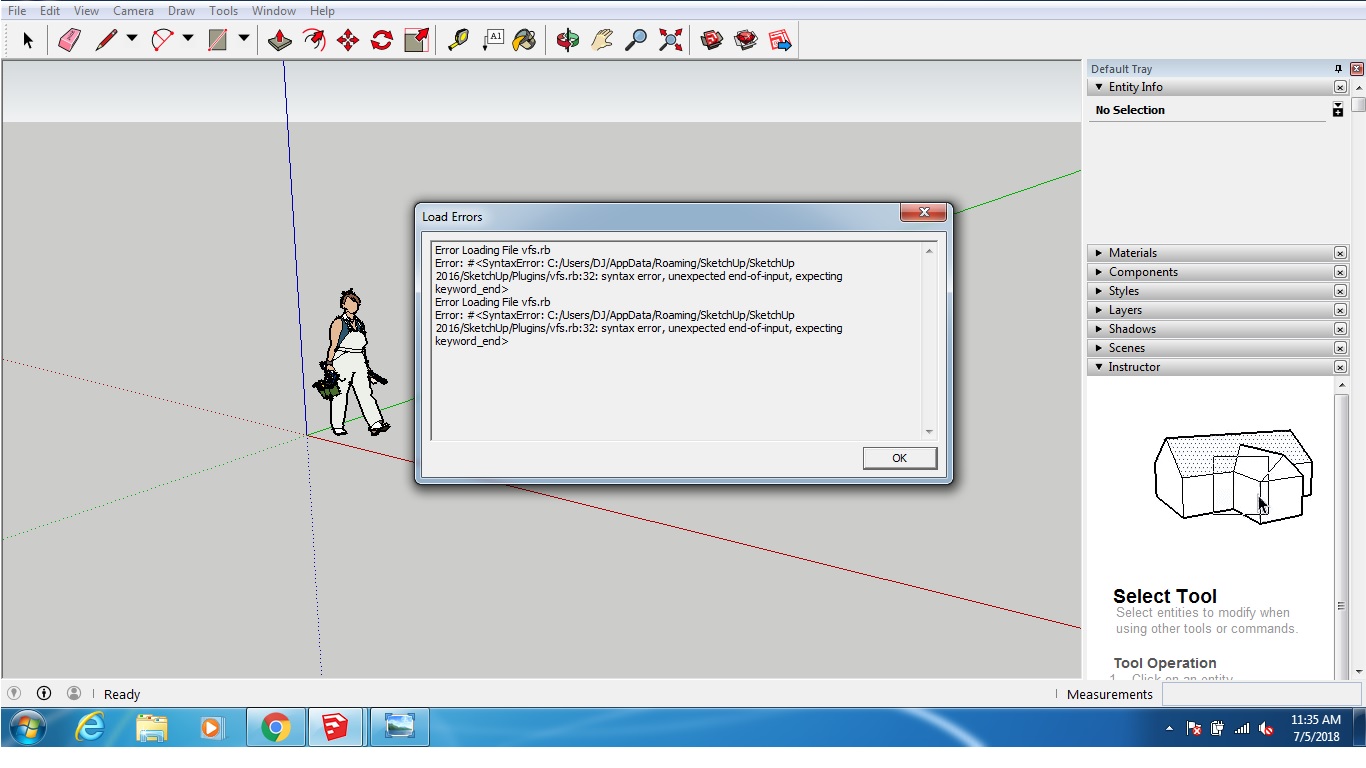
-
How old of a version are you trying to use?
-
My Sketchup is 2016 with Vray 3.4 and my operating system is Windows 7.




Hello! It looks like you're interested in this conversation, but you don't have an account yet.
Getting fed up of having to scroll through the same posts each visit? When you register for an account, you'll always come back to exactly where you were before, and choose to be notified of new replies (either via email, or push notification). You'll also be able to save bookmarks and upvote posts to show your appreciation to other community members.
With your input, this post could be even better 💗
Register Login


Advertisement