Add vertex on curve at length - or edge on surface at length
-
You can make a list of the new_vertices and then move the old_vertices to their locations [vector_from old_to_new?], using a transform_by_vectors on the new_vertices...
PS: Glad someone can understand what I'm a saying...

-
@jclements said:
Very nice. Thank you.
Could a similar script add points at Equal Intervals? Perhaps leave the points selected or grouped after being created?
It could select and/or group the construction points but not the individual vertices added to the curve.
thomthom, what kind of "extruded surface" are we talking about? Curved or straight?
-
Hi,
I had in mind the construction points; the user would input how many equal intervals, contruction points would be placed and then grouped.
-
@sdmitch said:
ThomThom,
The attached plugin will add a vertex at a given interval along a selected curve.
hmm.. i don't think that's quite right. (or at least what i'm talking about.. maybe i'm mis-understanding TT's question ?)
it's just placing a point along the curve but it's not actual moving the vertex into it's proper place..
as an exaggeration, here's a picture showing an arc with 3 segments.. then it shows how it should look after running the script..
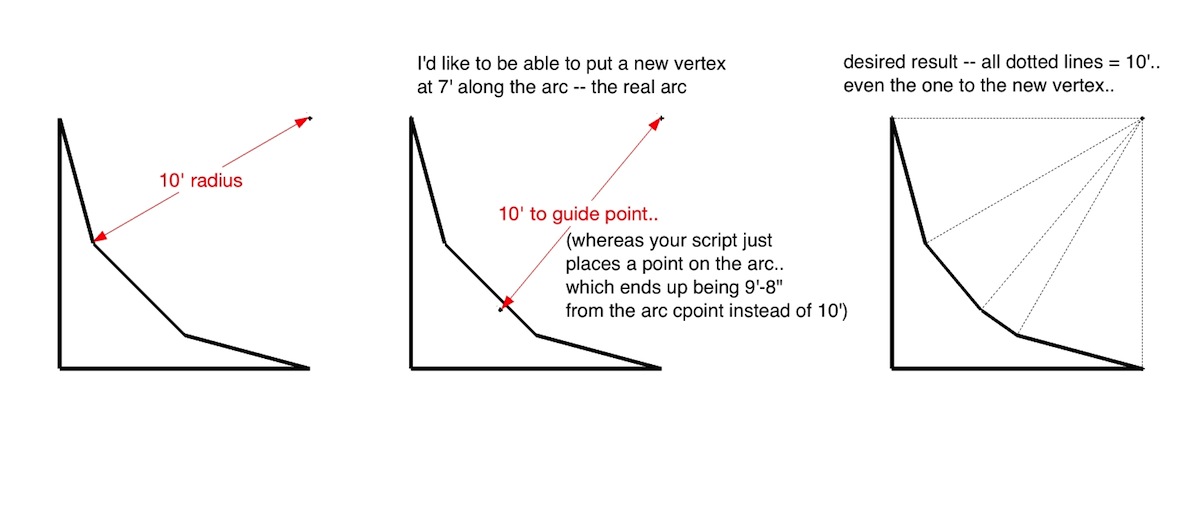
[EDiT].. well, i reread thomas' original post and i think i'm misunderstanding him

it looks as if the script you (sam) wrote is what he's looking for -
Jeff, You are right regarding the arc, the point added is on the existing segment.
-
@unknownuser said:
hmm.. i don't think that's quite right. (or at least what i'm talking about.. maybe i'm mis-understanding TT's question ?)
it's just placing a point along the curve but it's not actual moving the vertex into it's proper place..
You understood me correctly.

@sdmitch said:
thomthom, what kind of "extruded surface" are we talking about? Curved or straight?
An extruded surface from the 2D profile of a curve. It's the shape of a building constant of several curves.
-
@sdmitch said:
Jeff, You are right regarding the arc, the point added is on the existing segment.
But as I said in my diatribe... if it's a Arc you can do the Math to work out where the swept start-point will be to become the new point where the new vertex ought to be on the true circumference, so you add the new vertex on the segment as normal then apply an entities transformation on the new vertex to relocate it at that new point that lies on the circumference... The Arc will become a Curve... -
@tig said:
@sdmitch said:
Jeff, You are right regarding the arc, the point added is on the existing segment.
But as I said in my diatribe... if it's a Arc you can do the Math to work out where the swept start-point will be to become the new point where the new vertex ought to be on the true circumference, so you add the new vertex on the segment as normal then apply an entities transformation on the new vertex to relocate it at that new point that lies on the circumference... The Arc will become a Curve...Are we now talking about a new topic?
(Just trying to catch up to the post since last evening.) -
No - same topic.
Adding a new vertex on a curve splits a segment.
If the curve is an Arc then we have been considering if the vertex should split a segment AND adjust the vertex so it is on the true circumference too... -
I see. In terms of what I needed to, no adjustments can be done. But I can see the use of this option.
Just had to check if there was existing plugins I'd missed out of. -
I have modified the plugin so that, if the the selected entity is an arc, the point is placed in its true position instead of on the segment as before.
Should this be an option?





Hello! It looks like you're interested in this conversation, but you don't have an account yet.
Getting fed up of having to scroll through the same posts each visit? When you register for an account, you'll always come back to exactly where you were before, and choose to be notified of new replies (either via email, or push notification). You'll also be able to save bookmarks and upvote posts to show your appreciation to other community members.
With your input, this post could be even better 💗
Register Login


Advertisement