[Plugin] K2WS_Tools a joint tool set for SU
-
Dave: Which tool do you use for the second end of the strecher?
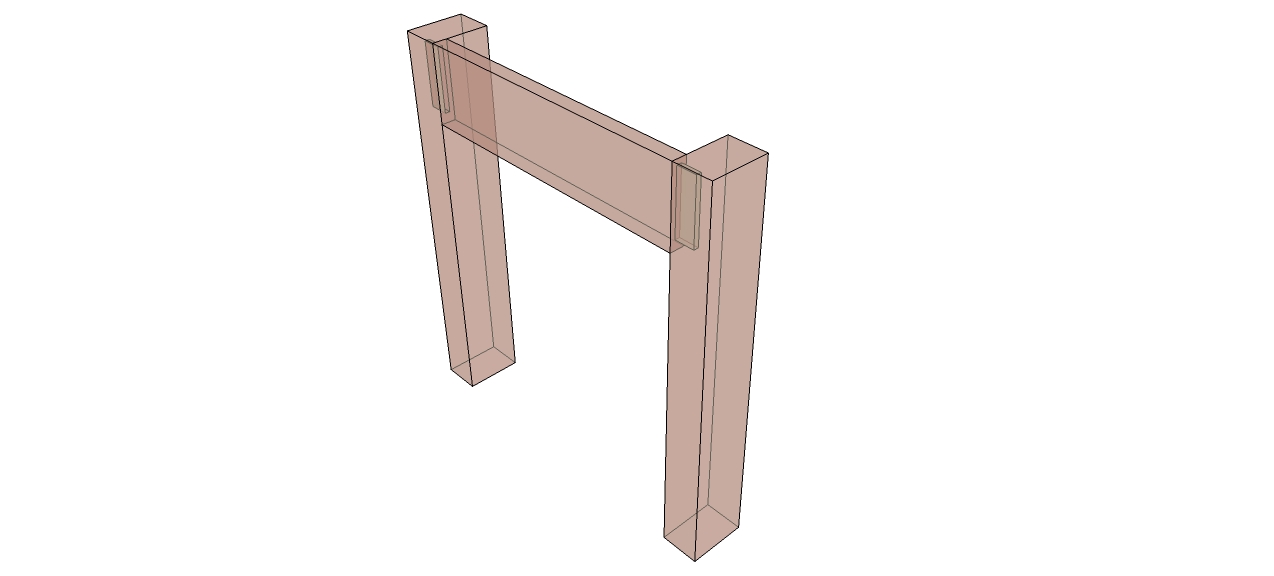
Here is a picture of the M&T Joint tool on the Right end which makes the tenon on the strecher and the mortise in the leg. The legs are the same component flipped so the other leg has the mortise. Next I use the Tenon tool and added a tenon to the left end of the strecher. This is a picture of the results.
When using the loose tenon tool use the loose tenon Joint first then the mortise tool on the other end of the strecher and see if that gives the same resultsI removed all the test directories the file and dir from the plugins dir restarted my computer and downloaded the zip file and installed it on my computer. So far no problems with any programs. Is there a better way to test?
Keith
-
The \ OR the / work on a PC - but a MAC wants a /

-
Keith, I see what you're doing, I think. As I said, I used the Loose Tenon tool. It isn't logical to me to have to use different tools on opposite ends of the rail. It does work that way, though. I'm not real keen on having to hide the second leg before cutting that mortise in the end of the rail but I couldn't select the top edge of the rail without doing so.
Also, while I've got you, could things like the dominoes and loose tenons be inserted as instances of the same component? You can see in the attached screen grab what happen in a cut list.
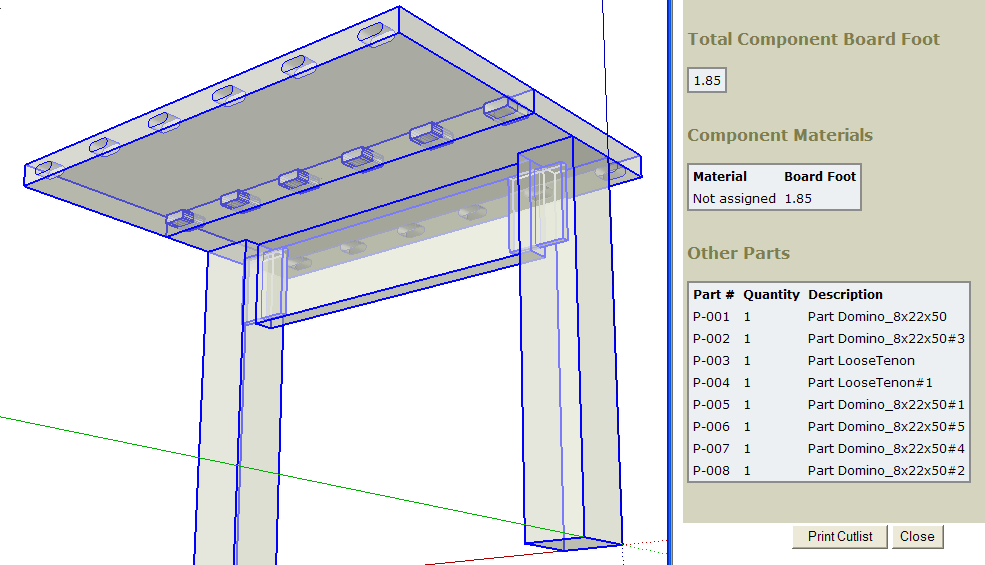
It's getting there, though.
-
Dave: I know you might need to hide the other component some times it seems to depend on what view you are looking at. You can do this without leaving the tool with a right click on the component and select hide the tool should stay active.
At this time I don't know of a way to add copies of an component in a plugin. If I find a way to do this I can update later. That was why when I first sent you this it only added one component and it seemed you felt the joint was not complete.
Mac users: I replaced the \ with / so the files should work on your systems.
I did find that the M&T Joint tool still had require pointin to my dir so I also changed that. The zip file has been revised.
Keith
-
Perfect plugin! Thank you!
-
Hello.
Anyone who uses this plugin could tell me how the board is at 45?
(Spline Joint)Make a video for all functions would be best.
thanks
sorry my English is google translator
-
Thanks for the really nice plug-in. I use it often. It saves me a lot of time.
I just downloaded Sketchup 2013 on both my Mac and PC. The tool still works just fine on the Mac, but I've run into an issue on the PC. When making a M/T joint, for instance, it won't save any edits to the parameters. And it won't do anything if I click "Save". If I click "Cancel", at least it lets me put in the mortise depth parameter, but then it won't do anything after that.
Like I said, no issue on the Mac!
Wonder!
-
What version is your OS? Perhaps you need to set the permissions for the Plugins folder for SU2013 to allow access.
-
I can't get the tools to work. I see them in the tool menu but nothing happens. I am using the free version of SU2013, is that the problem?
Thanks -
Dave, you were correct about the permission issue.
After I posted my note, I did some digging around on the internet and saw that permissions can be a problem for some of the plugins. I could see the file where the preferences were being kept could not get updated.
I recently got a new laptop and it has Windows 7 installed. So I did some more web surfing and figured out how to get the permissions set properly. Basically, I had to make myself the owner of the CREATOR OWNER group.
All works well now!
-
Ed, thanks for letting us know. Maybe that will help someone else down the road.
-
I've just upgrade to 2013 and it does not work, is there a solution, I've try a lot of things without success
Alain
-
Have you double-checked the security permissions issues and running as administrator etc, as outlined earlier?
Then...
Exactly 'how' is it not working ?Not installing at all?
Not installing properly?
Not loading?
Not making menu entries?
No doing what you expect?
Generating error message dialogs?
Generating error messages in the Ruby Console?
Causing bugsplats/crashes?From this quick list you can see that there is considerably more information you could offer us, which might then help us to help you...
-
I missed the security permission, lowered it and the program now works.
Thank you very much
Alain
-
I am not able to get the tool to load in SU 2013 pro. The menu shows up but none of the joint tools work. I have tried to load thru window preferences renaming from zip to RBZ but still does not work?
 Any help would be appreciated.
 -
I am using SU2013 and I downloaded the K2Tools file from the Ruby Depot and changed the .zip extension to .rbz and installed it as a extension from the preferences menu and the tools worked for me.
As stated above file permissions are the first thing to check when a plugin fails to do anything.
Keith
-
I changed permissions on the folder and it now works. Thanks
-
Anyone having problems loading K2WS_Tools with Sketchup 2014? I keep getting an error message on my Mac:
"Error Loading File loadK2WS_Tools.rb
Error: #<LoadError: cannot load such file -- K2WS_Tools\K2_ToolsLoader.rb>I've downloaded the .zip file twice tonight from the SketchUCation site. No luck either time. I used the load extensions option from SketchUps preferences. It told me each time the load was successful, but when I re-open SketchUp I get the error message.
Any help would be appreciated. This is a great set of tools!!
-
The error is self-explanatory !
The ZIP file contains a single .rb file and a subfolder of many helper files.
The ZIP's contents need extracting into your Plugins folder [if you completed your User profile with OS & Version we might be able to advise better on where that is, and if security permissions need resetting to FULL etc - see earlier posts in this thread about that].
The .rb file and the subfolder need to end up in the Plugins folder with the same relationship intact as they have in the ZIP itself.
When the fileloadK2WS_Tools.rbloads it does a require [like 'load'] on a file in the subfolder
K2WS_Tools\K2_ToolsLoader.rb
If it's missing you get theError: #<LoadError: cannot load such file!
If successful that will load other files etc until the toolset is assembled for use...
But when it fails it stops, so nothing gets finished !If you have NOT got the subfolder with its contents intact inside Plugins then add it.
If you have managed to put the contents of the subfolder directly into Plugins then you need to tidy things up and remove them.
You ought to know that RBZ archives can be AutoInstalled using Preferences > Extensions > Install... button, you can add .rbz onto the end of a ZIP file's name to achieve this too as an RBZ is just a renamed ZIP file...
SketchUcation Plugin Store toolset also has submenu item to AutoInstall Archives - RBZ & ZIP formats are supported. -
Thanks for the feedback, TIG.
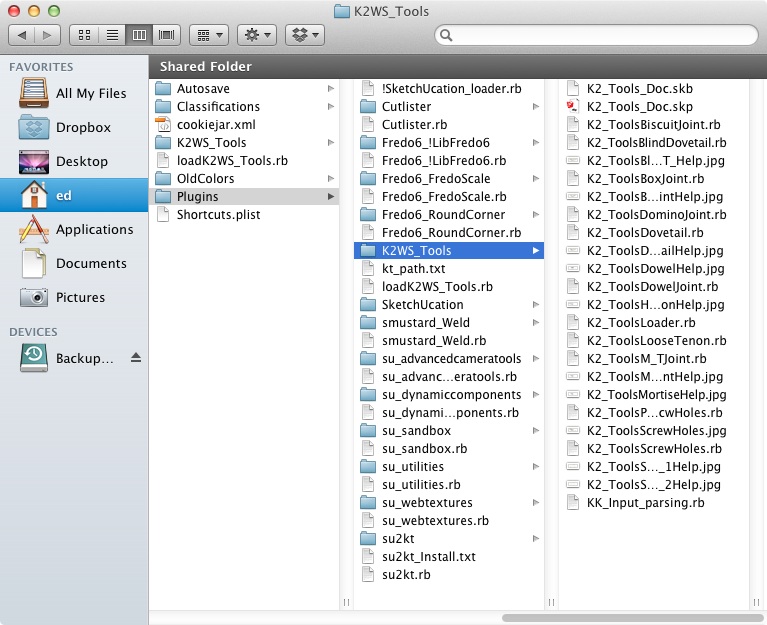
The first two times I attempted to install K2WS I used the method of changing the .zip extension to .rbz. I got the file error. Tonight, I manually un-zipped the file and put the folder K2WS_Tools and the loadK2WS_Tools.rb file directly into my Plug-Ins folder.
I verified all files and folders retained the same order as in the .zip file, just as you indicated. Attached is a jpg file showing the content and structure of my Plug-In folder.
I still get the same load error.
I'm running a Mac with OSX 10.7.5. Permissions for Plug-In folder and all contained files and folders is write & read.





Advertisement