Drawing Scale (not the scale tool)
-
Hello all,
I use SketchUp periodically and just when I get used to everything I stop using it for a while. I'm airbrushing some geometric shapes on a wall and I want to produce a scale drawing first. This is a two dimensional drawing. The area is approximately 8' x 8' and if I construct a rectangle (8' x 8') and them print it, it's to small. So I want to increase the scale of the drawing so it will still fit on a 8.5 x 11" piece of paper. I would like to change the scale to 1"=1'. Help!
Thanks.
-
Hi PastaDNA, hi folks.
From within SketchUp (SU): Help Menu --> Help center.
Type "printing to scale" in the search box on top (without the quotes).
Click on first hit which shall be:
http://sketchup.google.com/support/bin/answer.py?answer=36227
SU's help is quite complete.
Just ideas.
-
I appreciate your help but I'm still a bit confused. I created the SU model which is an 8' x 8' rectangle representing the wall I'm painting with a few geometric shapes within it. So the SU drawing is to scale and I want to print the SU drawing to scale. Ideally, the printed version would be 8"x8" so the scale would be 1' (SU)=1"(printed). I'm a Mac so when I enter these values (1" Drawing and 1' Model) in Print Scale section of the Document Set Up the printer output is 6 pages. I'm obviously doing something wrong.
-
The SKP is full size.
You zoom extents of the 'flat' view, with perspective 'off'.
If the wall is 8' and you scale the print so that's then 8" 'printed', and the view will be fitted onto a standard sheet [OR sheets] of paper 8.5"x11".
Your printer will probably have some 'margins' which mean that there's barely 8" printing space anyway at landscape or portrait.
Also the view probably has some white margins around the 'wall' so these will be taken to be 'printed' too - even if they are empty!
So chances are that the 8"x8" printed-wall will get spread over the 6 pages - the bit you want on pages 2 and 5, with 1, 3, 4 and 6 being 'blank'... If you got it to fit on 4 pages it'd be approx. a quarter of the image on each sheet.
The best you can do is ensure that your printer has its minimum margins set AND that the 'wall' is zoomed to it's maximum - zoom window rather than extents so there's as little 'white' showing to the top/bottom that might mess with the printer's logic
-
I'm starting to see what you're saying. Zoom is affecting the print. Is there a way to not print this blue background?
-
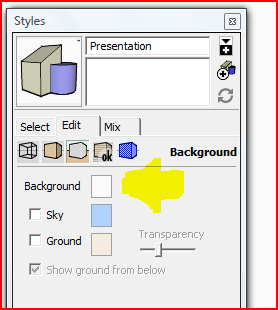
Change the style to white background under the Edit tab in the Styles dialog.
-
When you turn perspective off, you should be able to edit the Scale settings in the Print dialog box. Uncheck the Fit to Page, check Use model extents, and change the scale to 1:1. To get rid of the blue background, open the Styles dialog (Window>Styles)>Edit Tab>BackgroundSettings (the 3rd icon) and uncheck Sky and Ground.
Tig is correct that an 8' box won't fit on an 8.5x11 sheet, but you could take the image into an image editor and put the two pieces back together. Alternatively, if you have a PDF printer, you could print to an 11x17 PDF and crop it in Photoshop down to 8.5x11. You might have more options to adjust print margins from there than you do natively out of Sketchup.
-
I appreciate your comment Wyatt but your instructions are for for a PC user and I'm a Mac. I have access to a PC and may try to do this. I simply can not get anything to print remotely close to a scale drawing and it's very bothersome. I have perspective off, "Fit to View Page" is unchecked and have played endlessly with print scale settings. Nothing is working.
-
I did miss that you were on a Mac, but the Mac instructions look very similar to what I described. Sorry I couldn't be more help.
-
When you are at the proper view (Parallel projection, on o the standard views), also make sure to zoom extents (Shift+Z) on your screen. For some reason, this is important for SU to print properly (still you may have issues with the margins in case of a 8" piece in a 8.5" paper although it may fit).
(And I am also on PC)
-
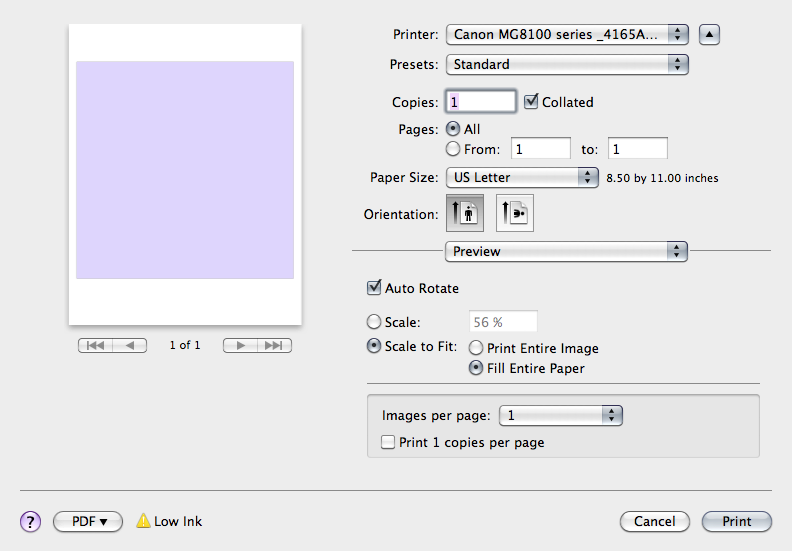
In this case I would bypass SU printing, draw your square, export and print from Mac Preview. Choose scale to fit and fill entire paper.
without tweaking printer settings
using zoom window as suggested by TIG I was able to get a square printed at 7 15/16" x 7 15/16"
zoom extents printed 7 9/16" x 7 9/16"
-
I can print exactly 8" wide if I use SU Print (which also allows for setting line-weight), then select Open PDF in Preview and then use the crop to the side edges before printing.
my printer is set up for border-less [photo] printing.
john -
All of these suggestions are excellent and I will sampe them. The combination of being a Mac user with a Lexmark (friend is executive) printer forces this issue through a very narrow window. I believe my issue lies with the printer limitations. I've talked with Lexmark CS and they freaked out when I said I'm a Mac user.
I use VMware Fusion which allows me to run PC based software on my Mac (some programs actually run faster that on the PC) and the PC version of SU is the same - it's the printer margins alright. If Lexmark can't show how to adjust the margins then I'll try selecting boarder less photo paper.
Thanks all.
-
I talked with Lexmark and have resolved the issue. Can any tell me how to prevent the background from printing? For those following my predicament I've been using front view and the blue background is not helping matters.
Thanks again.
-
Edit the current Style - background >>> white
-
Yep, that's it Thanks again.
-
Glad you got the margin thing sorted out. I thought I'd answered your question about the blue background already. Of course I didn't provide the nice screen grab as TIG has done.

-
You probably did - I probably was just pre-occupied with scaling issue. Thanks.





Hello! It looks like you're interested in this conversation, but you don't have an account yet.
Getting fed up of having to scroll through the same posts each visit? When you register for an account, you'll always come back to exactly where you were before, and choose to be notified of new replies (either via email, or push notification). You'll also be able to save bookmarks and upvote posts to show your appreciation to other community members.
With your input, this post could be even better 💗
Register Login


Advertisement