sketchucation logo sketchucation
    • 登入
    Oops, your profile's looking a bit empty! To help us tailor your experience, please fill in key details like your SketchUp version, skill level, operating system, and more. Update and save your info on your profile page today!
    🔌 Smart Spline | Fluid way to handle splines for furniture design and complex structures. Download

    [Plugin] QuadFaceTools

    已排程 已置頂 已鎖定 已移動 Plugins
    673 貼文 116 Posters 545.0k 瀏覽 116 Watching
    正在載入更多貼文
    • 從舊到新
    • 從新到舊
    • 最多點贊
    回覆
    • 在新貼文中回覆
    登入後回覆
    此主題已被刪除。只有擁有主題管理權限的使用者可以查看。
    • TIGT 離線
      TIG Moderator
      最後由 編輯

      @jaopedro

      Have you installed the latest versions of the toolset from the PluginStore, AND the latest version of thomthom's Lib ?

      The error message suggests that something is not up to date.

      How are you installing them ?
      From the downloaded RBZ files using Window > Preferences > Extensions > Install Extension... button ?
      Or using the 'Auto-install' feature of the SketchUcation ExtensionStore³ dialog ??

      Have you restarted SketchUp after the two installations to ensure that the latest Lib code is in use ?

      TIG

      1 條回覆 最後回覆 回覆 引用 0
      • thomthomT 離線
        thomthom
        最後由 編輯

        If you enter this into the Ruby Console and restart - does that fix things?

        
        TT;;Plugins;;QuadFaceTools.settings[;uv_u_scale] = 1.0
        TT;;Plugins;;QuadFaceTools.settings[;uv_v_scale] = 1.0


        Thomas Thomassen — SketchUp Monkey & Coding addict
        List of my plugins and link to the CookieWare fund

        1 條回覆 最後回覆 回覆 引用 0
        • tuna1957T 離線
          tuna1957
          最後由 編輯

          Thomas, The help you gave me on my pillow model over on the SubD forum got me thinking. I have run the sandbox to quads function on proxies after doing various adjustments. I'm now wondering if I'm using the tool correctly. ( I'm sure I forgot or didn't think I needed to do it to the pillow ) I've been triple clicking to select all in the group or component then clicking the sandbox to quads button. Is that correct ? Also I've noticed there is no outward indication it's doing anything. For example some plugins will turn the curser into the spinning beachball until the've done their thing. Short of running the analyze color to quads is their another indication it's done the job that I'm just missing. ?

          1 條回覆 最後回覆 回覆 引用 0
          • thomthomT 離線
            thomthom
            最後由 編輯

            I'm afraid there is not other indication right now. I have been toying with the idea of making a function that will update the face color based on whether its a triangle, quad or n-gone.

            Thomas Thomassen — SketchUp Monkey & Coding addict
            List of my plugins and link to the CookieWare fund

            1 條回覆 最後回覆 回覆 引用 0
            • tuna1957T 離線
              tuna1957
              最後由 編輯

              Thomas , thanks for the quick response and I'll keep forging ahead and try and learn from my mistakes. 👍

              1 條回覆 最後回覆 回覆 引用 0
              • thomthomT 離線
                thomthom
                最後由 編輯

                I plan to make improvements to this - but I probably won't get around to do anything until after the summer.

                Thomas Thomassen — SketchUp Monkey & Coding addict
                List of my plugins and link to the CookieWare fund

                1 條回覆 最後回覆 回覆 引用 0
                • tuna1957T 離線
                  tuna1957
                  最後由 編輯

                  👍 It's all good Thomas. Amazed you do all the stuff you do. You must have some hidden super powers ! Definitely making progress with your tools. Heck messing about late last night and figured out how to get rid of the triangles I always end up with in the corners of those pillows. 😮

                  1 條回覆 最後回覆 回覆 引用 0
                  • tuna1957T 離線
                    tuna1957
                    最後由 編輯

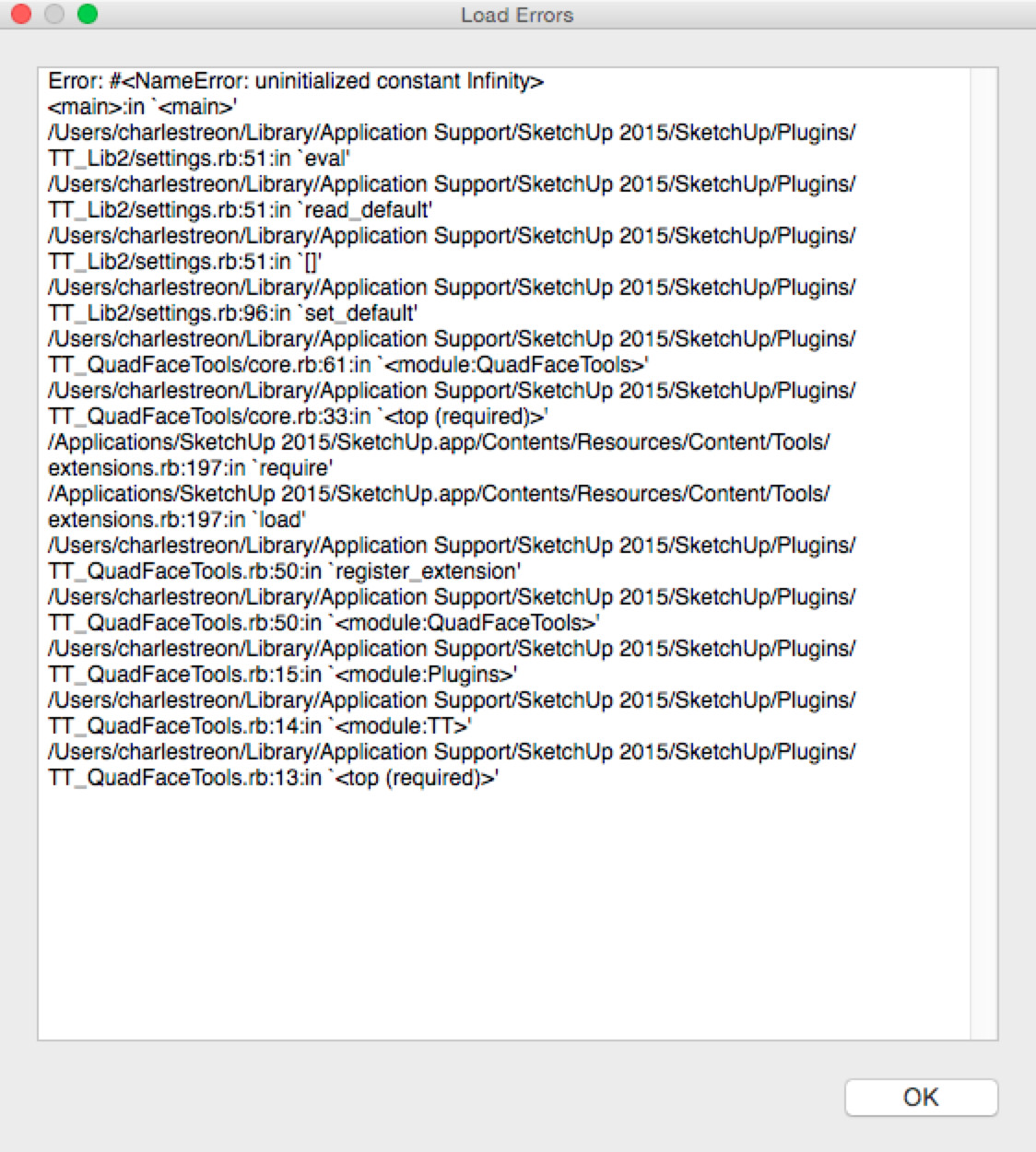
                    Thomas, Geez I feel like I'm turning into a pain in your arse. Started to get this load error tonight. Only pops up if I open a fresh SU window. Tried a few times , the error popped up every time. Opened a couple of existing models and didn't get the error? Any idea what this is about ? What did I break ? 😲


                    load error.jpg

                    1 條回覆 最後回覆 回覆 引用 0
                    • thomthomT 離線
                      thomthom
                      最後由 編輯

                      That's a pesky bug I've not been able to squash yet: https://bitbucket.org/thomthom/tt-library-2/issues/18/tt-settings-with-length-cause-errors

                      Try this in the Ruby Console as a workaround:

                      
                      TT;;Plugins;;QuadFaceTools.settings[;uv_u_scale] = 1.0
                      TT;;Plugins;;QuadFaceTools.settings[;uv_v_scale] = 1.0


                      Thomas Thomassen — SketchUp Monkey & Coding addict
                      List of my plugins and link to the CookieWare fund

                      1 條回覆 最後回覆 回覆 引用 0
                      • tuna1957T 離線
                        tuna1957
                        最後由 編輯

                        👍 👍

                        1 條回覆 最後回覆 回覆 引用 0
                        • thomthomT 離線
                          thomthom
                          最後由 編輯

                          I'll try to find a fix that doesn't break other extensions. The challenge with this is that is happening inside of TT_Lib2 - which is shared my most of my other extensions. 😕

                          Thomas Thomassen — SketchUp Monkey & Coding addict
                          List of my plugins and link to the CookieWare fund

                          1 條回覆 最後回覆 回覆 引用 0
                          • thomthomT 離線
                            thomthom
                            最後由 編輯

                            Hi everyone

                            I have uploaded a new version of QFT - 0.10.0. It doesn't have new end-user features, but I implemented the error handler which Solid Inspector, SUbD and Vertex Tools already use. This means that if you run into Ruby errors you will get a dialog that let you submit it back to me.

                            Please upgrade and make sure you hit submit when you run into errors. I'm trying to map out the various bugs in the extension. "Got to catch them all!" 😛

                            Thomas Thomassen — SketchUp Monkey & Coding addict
                            List of my plugins and link to the CookieWare fund

                            1 條回覆 最後回覆 回覆 引用 0
                            • plot-parisP 離線
                              plot-paris
                              最後由 編輯

                              Hey guys,

                              I run into this problem quite often, where I model a shape, making sure, every surface is a quad.

                              But when I use SUbD to subdivide, it looks wrong.

                              When I then use the "Flip Triangulation Tool" of QuadFaceTools, I can see that some faces (marked red in the model below) are not being recognized as quads.

                              Does any one know how this happens? And more importantly, how to fix it?

                              Cheers,
                              Jakob

                              QuadProblem_v01.skp

                              1 條回覆 最後回覆 回覆 引用 0
                              • BoxB 離線
                                Box
                                最後由 編輯

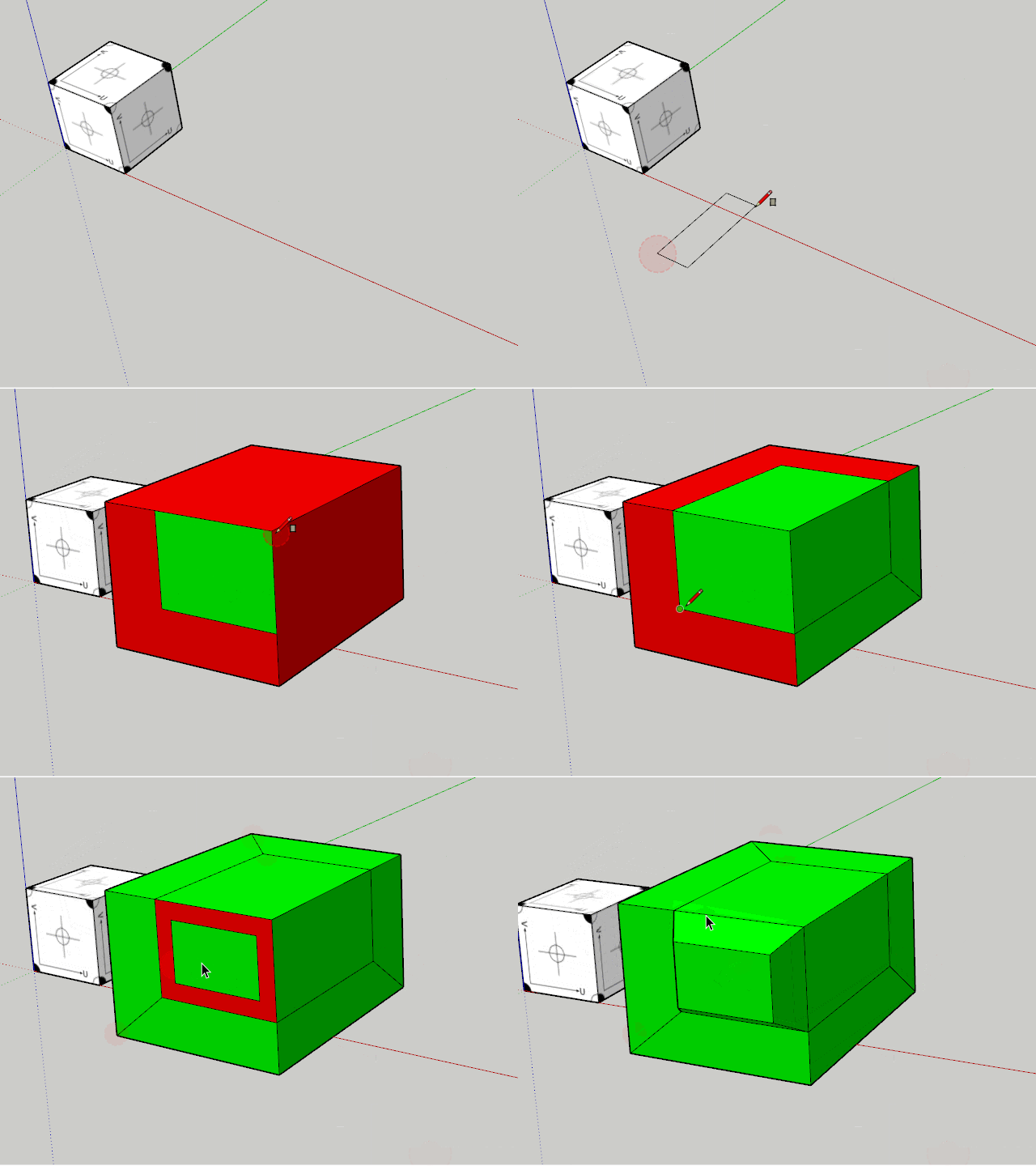
                                Sometimes you just need to tell it to make quads.
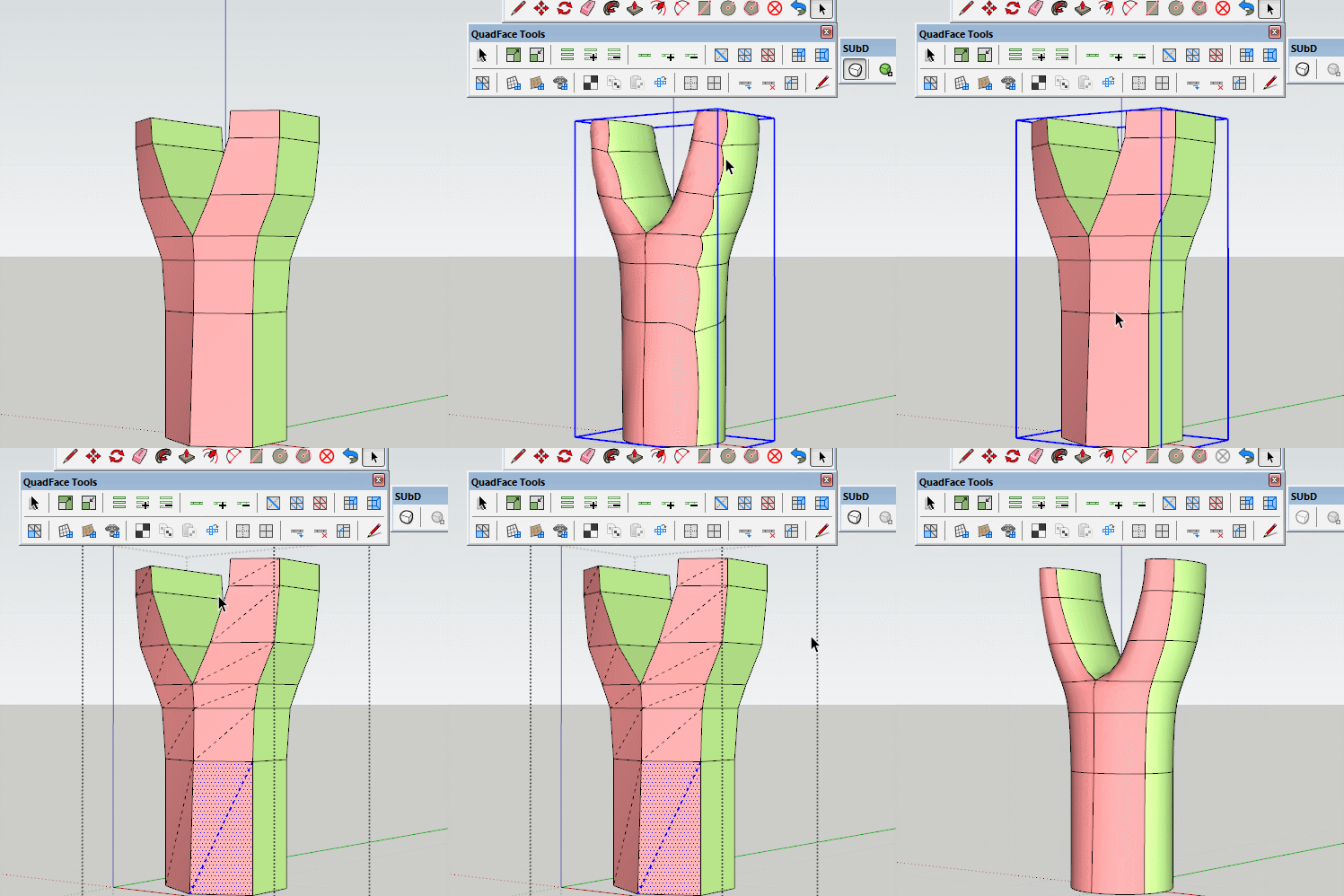

                                Tri.gif

                                1 條回覆 最後回覆 回覆 引用 0
                                • plot-parisP 離線
                                  plot-paris
                                  最後由 編輯

                                  haha, I could have sworn I tried that. But obviously I didn't. 😳

                                  Thanks a lot

                                  1 條回覆 最後回覆 回覆 引用 0
                                  • thomthomT 離線
                                    thomthom
                                    最後由 編輯

                                    That reminds me - I had this idea for a function that would automatically color the faces as you modelled. I added an issue to track this: https://bitbucket.org/thomthom/quadface-tools/issues/98/live-quad-validation

                                    Thomas Thomassen — SketchUp Monkey & Coding addict
                                    List of my plugins and link to the CookieWare fund

                                    1 條回覆 最後回覆 回覆 引用 0
                                    • thomthomT 離線
                                      thomthom
                                      最後由 編輯

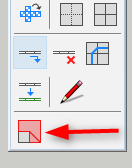
                                      Just need an icon...


                                      QFT-LiveAnalysis.gif

                                      Thomas Thomassen — SketchUp Monkey & Coding addict
                                      List of my plugins and link to the CookieWare fund

                                      1 條回覆 最後回覆 回覆 引用 0
                                      • thomthomT 離線
                                        thomthom
                                        最後由 編輯

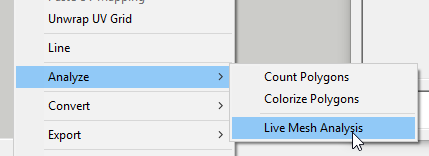
                                        Version 0.11.0 is out.

                                        2016-08-01_23h07_36.png

                                        2016-08-01_23h08_26.png

                                        Thomas Thomassen — SketchUp Monkey & Coding addict
                                        List of my plugins and link to the CookieWare fund

                                        1 條回覆 最後回覆 回覆 引用 0
                                        • N 離線
                                          numerobis
                                          最後由 編輯

                                          😎 👍

                                          1 條回覆 最後回覆 回覆 引用 0
                                          • cottyC 離線
                                            cotty
                                            最後由 編輯

                                            👍 and 👍

                                            my SketchUp gallery

                                            1 條回覆 最後回覆 回覆 引用 0
                                            • 1
                                            • 2
                                            • 3
                                            • 4
                                            • 5
                                            • 33
                                            • 34
                                            • 2 / 34
                                            • 第一個貼文
                                              最後的貼文
                                            Buy SketchPlus
                                            Buy SUbD
                                            Buy WrapR
                                            Buy eBook
                                            Buy Modelur
                                            Buy Vertex Tools
                                            Buy SketchCuisine
                                            Buy FormFonts

                                            Advertisement