sketchucation logo sketchucation
    • 登入
    Oops, your profile's looking a bit empty! To help us tailor your experience, please fill in key details like your SketchUp version, skill level, operating system, and more. Update and save your info on your profile page today!
    🔌 Smart Spline | Fluid way to handle splines for furniture design and complex structures. Download

    [Plugin] Shell

    已排程 已置頂 已鎖定 已移動 Plugins
    93 貼文 33 Posters 61.7k 瀏覽 34 Watching
    正在載入更多貼文
    • 從舊到新
    • 從新到舊
    • 最多點贊
    回覆
    • 在新貼文中回覆
    登入後回覆
    此主題已被刪除。只有擁有主題管理權限的使用者可以查看。
    • D 離線
      Dentice
      最後由 編輯

      Hi there,
      when selecting the group / component and then selecting the shell from the list of plugins, I do get the temporary shell. I can also type in the dimension but as soon as I double click or press enter, nothing happens. I do not know how I can terminate the command. please can you help?? thanks a lot.

      1 條回覆 最後回覆 回覆 引用 0
      • mitcorbM 離線
        mitcorb
        最後由 編輯

        I think the Spacebar works in most cases. See if that is correct.

        I take the slow, deliberate approach in my aimless wandering.

        1 條回覆 最後回覆 回覆 引用 0
        • tt_suT 離線
          tt_su
          最後由 編輯

          @dentice said:

          Hi there,
          when selecting the group / component and then selecting the shell from the list of plugins, I do get the temporary shell. I can also type in the dimension but as soon as I double click or press enter, nothing happens. I do not know how I can terminate the command. please can you help?? thanks a lot.

          Double-click or hit Return. It's described in the first post of this thread.

          1 條回覆 最後回覆 回覆 引用 0
          • Randy HutniakR 離線
            Randy Hutniak
            最後由 編輯

            I've used the plugin for a few years very successfully but in SU17 I can't seem to get it to commit by using the Enter key and a set distance, in this case 1".

            I even drew a 1" line to try with the mouse and curser but that didn't work either. dbl click, triple, didn't matter. It did work with larger offsets, 4"+.

            any thoughts?

            1 條回覆 最後回覆 回覆 引用 0
            • thomthomT 離線
              thomthom
              最後由 編輯

              If you open the Ruby Console, is there any errors appearing?

              Thomas Thomassen — SketchUp Monkey & Coding addict
              List of my plugins and link to the CookieWare fund

              1 條回覆 最後回覆 回覆 引用 0
              • Randy HutniakR 離線
                Randy Hutniak
                最後由 編輯

                Hi Tomas

                Today its working fine...the Ruby Console says that Points are not planar.

                I've been having a few problems with SU17. 'Out of Memory' freeze and Move/Ctrl place crashes. maybe be it has something to do with those things. see my post: http://sketchucation.com/forums/viewtopic.php?f=11%26amp;t=66314%26amp;e=0

                thanx for the quick reply!

                1 條回覆 最後回覆 回覆 引用 0
                • thomthomT 離線
                  thomthom
                  最後由 編輯

                  Do you have a sample model that reproduce this?

                  Thomas Thomassen — SketchUp Monkey & Coding addict
                  List of my plugins and link to the CookieWare fund

                  1 條回覆 最後回覆 回覆 引用 0
                  • em3diE 離線
                    em3di
                    最後由 編輯

                    Hey thomthom, Thank's for this great plugin! But I instaled it and it doesn't show up on tools menu!
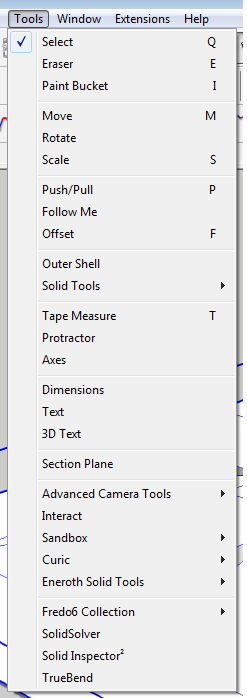
                    https://cdn.steemitimages.com/DQmYNmtuA2NTauttxNz8Qu9MVq8oqdjXQcoQ165pZQYpHeR/1.png

                    but when i go to "Extensions -> SketchUcation -> SketchUcation Plugins Manager" the "tt_shell" is there!
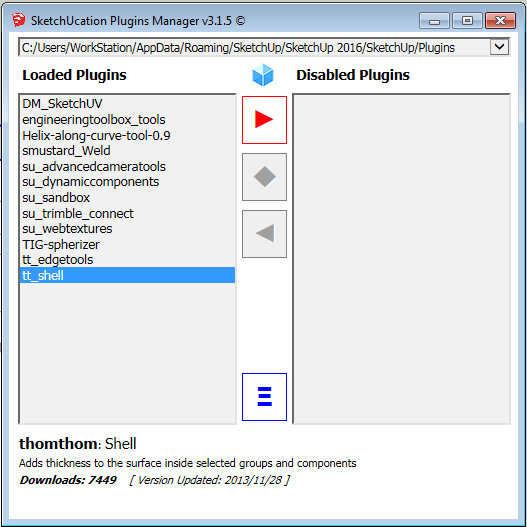
                    https://cdn.steemitimages.com/DQmQAggY21so6ryCL1BT3TqQVKjQkJJA4UD9TbBor6WXgAm/2.png

                    How can I acesse the Shell Plugin?

                    1 條回覆 最後回覆 回覆 引用 0
                    • Dave RD 離線
                      Dave R
                      最後由 編輯

                      @em3di said:

                      How can I acesse the Shell Plugin?

                      What version of SketchUp are you using? Your profile indicates 2016 Make but your screen shot shows Solid Tools and Eneroth Solid Tools which aren't available for Make.

                      Do you have the current version of TTLib installed?

                      Etaoin Shrdlu

                      %

                      (THERE'S NO PLACE LIKE)

                      G28 X0.0 Y0.0 Z0.0

                      M30

                      %

                      1 條回覆 最後回覆 回覆 引用 0
                      • em3diE 離線
                        em3di
                        最後由 編輯

                        Hey Dave, thank's for the feedback!

                        @unknownuser said:

                        Do you have the current version of TTLib installed?

                        Nop! And that was it! I installed, and work's fine now!

                        Thank You Dave!

                        1 條回覆 最後回覆 回覆 引用 0
                        • 1
                        • 2
                        • 3
                        • 4
                        • 5
                        • 1 / 5
                        • 第一個貼文
                          最後的貼文
                        Buy SketchPlus
                        Buy SUbD
                        Buy WrapR
                        Buy eBook
                        Buy Modelur
                        Buy Vertex Tools
                        Buy SketchCuisine
                        Buy FormFonts

                        Advertisement