[Plugin] Drop Vertices
-
Copyright 2011, TIG (c)
Permission to use, copy, modify, and distribute this software for any
purpose, and currently without fee, is hereby granted, provided that
this text and the above copyright (c) notice appear in all copies.
This software is provided "as is" and without any express or implied
warranties, including, without limitation, the implied warranties of
merchantability and fitness for a particular purpose.Name: dropverts.rb
Menu: 'Plugins' > 'Drop Vertices...' >
'To Nearest Object'
'To Nearest Below'
'To Nearest Above'
'To Nearest+Z=?'
'To Lowest'
'To Highest'
'To Middle'
'To Average'
'To Z=?'
'To Z=%'Usage:
Preselect the edges where you want vertices to 'adjust', choose tool...
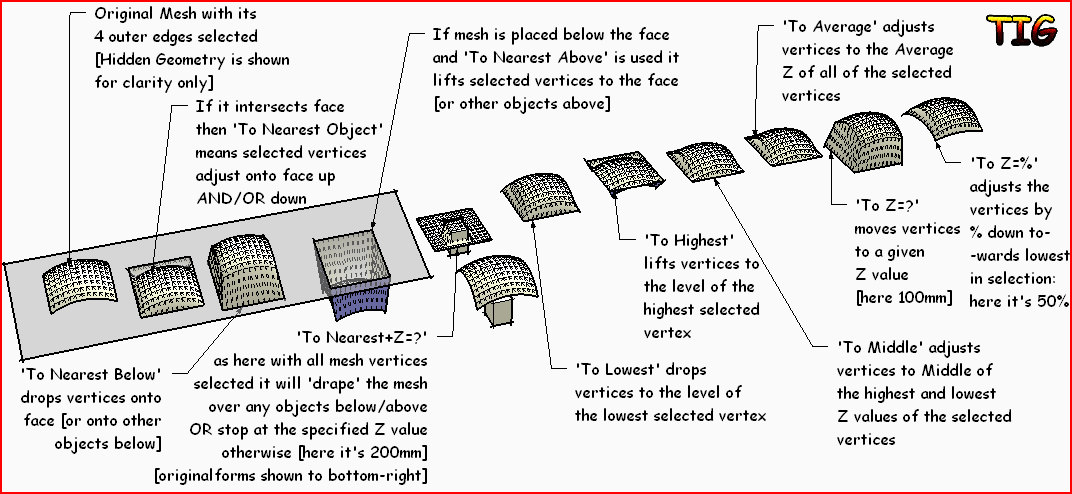
'To Nearest Object' means all of the edges' vertices will 'drop' on to
the 'objects' below them, OR 'lift' to the 'objects' above them if there
was nothing below, or to Z=0 if there is nothing above/below.'To Nearest Below' means all of the edges' vertices will 'drop' on to
the next 'object' below them, or to Z=0 if there is nothing below.'To Nearest Above' means all of the edges' vertices will 'lift' up to
the next 'object' above them, or to Z=0 if there is nothing above.'To Nearest+Z=?' means you enter the default drop Z value in a dialog
and it then does the equivalent of 'To Nearest Object' BUT stops at
the specified Z value [rather than Z=0] is nothing is above/below.'To Lowest' means all of the edges' vertices will 'drop' to match the
Z value of the lowest selected vertex.'To Highest' means all of the edges' vertices will 'lift' to match the
Z value of the highest selected vertex.'To Middle' means all of the edges' vertices will 'adjust' to match the
mid Z value between the highest and lowest selected vertices.'To Average' means all of the edges' vertices will 'adjust' to match the
average Z value of all of the selected vertices; this is not necessarily
the same as 'To Middle' as a disproportionate number of low vertices
in the selection will reduce the average but not affect the mid value.'To Z=?' means a dialog asks for the Z value; enter a number to use
current-units e.g. 123 might be 123" or 123mm depending on the model's
current units; to use something other than the current units suffix the
number thus '123mm' to use 123mm when your units might be in 'meters':
the vertices will all adjust to that specified Z value: default Z=0.'To Z=%' means that a dialog asks for the % [Percentage]; enter a
value: the default is 100 which means 'no change': entering a smaller
value, say 50, will adjust each selected vertex to be 50% its height
above the lowest selected vertex [i.e. the mesh is 'deflated']; entering
a higher value, say 150, will adjust each selected vertex to be 150%
its height above the lowest selected vertex [i.e. the mesh is
'inflated']; entering 0 will completely 'flatten' the mesh to the level
of the lowest selected vertex [equivalent to using 'To Lowest'];
entering negative values will 'flip' the mesh - so -100 will invert it,
-50 will invert it and deflate it, and -150 will invert it and inflate
it.Donations: PayPal.com to info @ revitrev.org
 ###
###
Version:
1.0 20110806 First issue.
1.1 20110807 Nearest-Below/-Above, Middle/Average and Z=% options added.
1.2 20110807 Nearest+Z=? option added.
1.3 20110810 Glitch with Lowest/Highest/Middle fixed.
2.0 20150422 Glitches with dropping curves resolved.Put into the Plugins folder and restart Sketchup [read the instructions!]...
-
Excellent
-
[flash=800,600:1cf7fpkt]http://www.youtube.com/v/vD8DBSvtLcU[/flash:1cf7fpkt]
-
Thanks Rich [he's now my official my publicist!
 ]
]

That's also a nifty tool you have that's showing the Tools being used 'on-screen' - what is it?
Hope this is a useful tool - feedback please... Incidentally... when a mesh's 'corner' drops as a 'flat-square', whilst some other seemingly identical corners drop to a nice 'point' it's because the mesh's diagonal at that corner is 'across' the corner so it is the correct result. If you don't want that you can undo the 'drop' and then set "View > Hidden Geometry > ON" and use the 'Sandbox Tool' > 'Flip Edges' to swap the problem diagonal[s] to arrive at the 'apex' of the corner[s]; then just redo the 'Drop Vertices' to get all 'pointy' corners [OR of course do the reverse to avoid any 'pointy' corners at all
  ]...
]... -
This deserved a little video I thought. Especially for those inclined not to read your blurb.
@unknownuser said:
That's also a nifty tool you have that's showing the Tools being used 'on-screen'
Something I cobbled together called 'Onscreen Rolling Reel' but it's very buggy at the moment and being unemployed I've no time to sort the code
You actually missed the other hidden gem I used in there....SplitUp
again a nifty tool that's buggy as bejaysus -

-
-
These 'flat' corners are simply a result of the mesh's diagonals at its corners.
My 'flip' tip was how to avoid it [or indeed ensure it]... and 'cut off the complainers at the pass...' - because it's only doing what it's been told... -
Very nice TIG!!!! This is a much needed plugin!
 As soon as I get some paying work again, I'll definitely drop a ten spot in your paypal account!
 -
Thanks for this new tool, Mr. tig, is very useful.
Mr. Rich O'Brien.
Where I can download the plugin split up? -
You can't
-
Excuse me, but I do not understand.
Does not exist plugins? payment is a plugin? -
Sorry, but it's not available. Maybe in the future?
-
And practically, what one could model with this ruby?
What's the aim? -
-
Here's v1.1 http://forums.sketchucation.com/viewtopic.php?p=346754#p346754
Several additional features added - please read first post... -
TIG, would it be possible to add an option which is drop verts to =Z /to intersect. Meaning if you had the subdivided plane above, let's say a smaller box, then all verts would drop to the specified Z, except where they intersected with the box. Perhaps adding a "Drape Verts" choice to the submenu. It would essentially do what drape Cpoints and triangulate does, but with a predefined mesh.
Thanks for your work on this again. The new features are great.
-
I'll look at adding 'To Nearest + Z = ?' too... It should be too difficult...
-
Here's v1.2 http://forums.sketchucation.com/viewtopic.php?p=346754#p346754
'To Nearest+Z=?' option added for 'draping' whole mesh over objects. -
Wow, that was fast! I'll give it whirl and let you know how it works.








Advertisement