sketchucation logo sketchucation
    • Login
    Oops, your profile's looking a bit empty! To help us tailor your experience, please fill in key details like your SketchUp version, skill level, operating system, and more. Update and save your info on your profile page today!
    Mac User? | Join the Rayscaper Beta for Mac Learn More

    [Plugin] !AdditionalPluginFolders - v5.4a - 27 Sep 20

    Scheduled Pinned Locked Moved Plugins
    156 Posts 51 Posters 262.1k Views 51 Watching
    Loading More Posts
    • Oldest to Newest
    • Newest to Oldest
    • Most Votes
    Reply
    • Reply as topic
    Log in to reply
    This topic has been deleted. Only users with topic management privileges can see it.
    • A
      addy
      last edited by

      How about design a "Loader" ?
      Launch a menu and shift the plugin folder to the one you need then load SU...

      1 Reply Last reply
      Reply Quote 0
      • fredo6F
        fredo6
        last edited by

        @unknownuser said:

        How about design a "Loader" ?
        Launch a menu and shift the plugin folder to the one you need then load SU...

        I think you have the standard Plugin extensions for that.

        Fredo

        1 Reply Last reply
        Reply Quote 0
        • A
          addy
          last edited by

          Sorry for my poor Englsh ...
          Because I hope I can divide my work into some sessions: modeling,texturing, rendering ...etc
          I am thinking if we can make a "standard plugin" each time that contains only the plugins we need before we launch SU.
          Actually I am doing this by a batch file now (I know the interface is ugly):

          \Google SketchUp 8\Plugins
          \plugins_modeling
          \plugins_texturing
          \plugins_vray
          \plugins_test
          ------------------- .....etc
          for example, if I need to do a render work,
          I run the batch file to rename "plugins" to "plugins_00"
          and rename "plugins_vray" to "plugins"
          and call Sketchup.exe
          after the work, I leave SU, the folder will rename back.

          I know that is not a ruby issue, but I think maybe it's not a bad idea .. 😄

          Addy

          1 Reply Last reply
          Reply Quote 0
          • M
            matt.gordon320
            last edited by

            Hey guys, I could use some advice. I removed all my plugins from my folder because I'm reinstalling all of them from scratch (I'm having something create a bunch of help menus and can't pin down the problem). However, after I've removed all plugins from the plugins folder, I still get missing plugin warnings from 000_AdditionalPlugins - even though I don't use it or have it installed on my system. Any idea what's going on?

            1 Reply Last reply
            Reply Quote 0
            • thomthomT
              thomthom
              last edited by

              I'm going to guess you're using Windows (Could you please fill out your profile with SU version and OS?) and that you're running into problems with Virtual Store.
              Have a look at this utility to help you locate files that's strayed into Virtual Store: http://sketchucation.com/forums/viewtopic.php?f=180&t=48399

              Thomas Thomassen — SketchUp Monkey & Coding addict
              List of my plugins and link to the CookieWare fund

              1 Reply Last reply
              Reply Quote 0
              • M
                matt.gordon320
                last edited by

                @thomthom said:

                I'm going to guess you're using Windows (Could you please fill out your profile with SU version and OS?) and that you're running into problems with Virtual Store.
                Have a look at this utility to help you locate files that's strayed into Virtual Store: http://sketchucation.com/forums/viewtopic.php?f=180&t=48399

                I will both update my info (apologies) and try that. Thank you sir! I'll get back to you.

                EDIT Ok, it looks like there's a whole bunch of plugins that I had removed saved to the Virtual Store. I'm guessing I need to purge that file, and then re-install the plugins I'm going to use?

                1 Reply Last reply
                Reply Quote 0
                • thomthomT
                  thomthom
                  last edited by

                  @matt.gordon320 said:

                  EDIT Ok, it looks like there's a whole bunch of plugins that I had removed saved to the Virtual Store. I'm guessing I need to purge that file, and then re-install the plugins I'm going to use?

                  Yea, Windows will place files in Virtual Store when you have UAC enabled, I think. I don't have this issue, but I'm running as administrator with UAC disabled because I muck about the system a lot when programming. It's not recommended for regular users to do so.
                  Instead give yourself full access to the Plugins folder.

                  When you look in a folder and some files have ended up in Virtual Store there should be a "Compatibility Files" button that does pretty much the same as that utility I linked to.

                  Thomas Thomassen — SketchUp Monkey & Coding addict
                  List of my plugins and link to the CookieWare fund

                  1 Reply Last reply
                  Reply Quote 0
                  • M
                    matt.gordon320
                    last edited by

                    @thomthom said:

                    Yea, Windows will place files in Virtual Store when you have UAC enabled, I think. I don't have this issue, but I'm running as administrator with UAC disabled because I muck about the system a lot when programming. It's not recommended for regular users to do so.
                    Instead give yourself full access to the Plugins folder.

                    When you look in a folder and some files have ended up in Virtual Store there should be a "Compatibility Files" button that does pretty much the same as that utility I linked to.

                    Thanks Thomthom. Yes, I'm running in an office setup with IT Management, and though they've granted full access to my plugins and installation rights, I'd never heard of VirtualStore until now. Thanks for bringing it to my attention. I've never had the issue before, but I always like to know the reason I get errors as well as how to resolve them. Thanks agian mate!

                    1 Reply Last reply
                    Reply Quote 0
                    • B
                      baiduaiya
                      last edited by

                      Thank you very much!

                      1 Reply Last reply
                      Reply Quote 0
                      • W
                        water520
                        last edited by

                        thank you

                        1 Reply Last reply
                        Reply Quote 0
                        • Z
                          Zonicn2t
                          last edited by

                          Thank you

                          1 Reply Last reply
                          Reply Quote 0
                          • D
                            dante115
                            last edited by

                            what is this error ?
                            https://lh6.googleusercontent.com/-dOZUFuLXLfU/UXGSl-DA0JI/AAAAAAAAAZI/hBaTZFLedC4/s1361/Untitled.jpg

                            1 Reply Last reply
                            Reply Quote 0
                            • S
                              scott216
                              last edited by

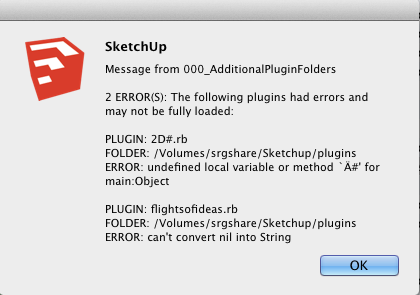
                              I have a plugin that doesn't run if I put it in the additional plugin folder. This is the plugin: http://code.google.com/p/sketchup-svg-outline-plugin/downloads/list

                              Attached is a screenshot of the errors I get.

                              I'd appreciate any suggestions that will get this to work.

                              Screen Shot 2013-04-22 at 5.03.32 PM.png

                              1 Reply Last reply
                              Reply Quote 0
                              • fredo6F
                                fredo6
                                last edited by

                                Scott,

                                Never heard of these plugins.

                                Anyway, they may not be able to run in another directory than the native Sketchup Plugins folder.

                                Or they may have bug. Keep in mind that 000_AdditionalPluginFolders just reports in clear what Ruby would find as an error at startup time, but without showing it to the user. And also, trapping the errors, avoid that the whole load process stops.

                                Fredo

                                1 Reply Last reply
                                Reply Quote 0
                                • TIGT
                                  TIG Moderator
                                  last edited by

                                  The 2D#.rb file is the initial-loader for my 2Dtools.
                                  It will try to load a file in the 2DTools subfolder that is named 2D#loader.rb.
                                  This 2D#.rb file and its 2DTools folder must be in the same directory - which is usually Plugins. but as long as it is on the $LOAD_PATH list it should be OK.
                                  This 2D#loader file in turn loads various 2d tools rb files from the subfolder to make a single submenu and the 2Dtools toolbar.

                                  Fredo's tool can generate some odd errors, e.g. if you have 'dislocated' a loader rb and its subfolder of scripts.
                                  This error message bears no resemblance to anything that this particular file does, so either it is this dislocation issue [which I suspect], OR you have somehow corrupted the rb file - perhaps you have opened it in a wordprocessor rather than a plain-text editor, which would have then added formating to the text that will break SketchUp when it tries to load it...

                                  TIG

                                  1 Reply Last reply
                                  Reply Quote 0
                                  • irwanwrI
                                    irwanwr
                                    last edited by

                                    I've been using this plugin for long and haven't found any problem yet.
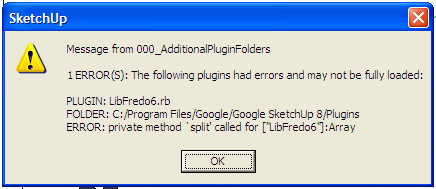
                                    Until now. I installed SketchUp in this PC of a friend along with the plugin I've been using too in the PC at home.
                                    But it gave me this message and I don't understand what it means;
                                    SketchUp Add Plugins Error.png

                                    I've tried to reinstall the LibFredo.

                                    1 Reply Last reply
                                    Reply Quote 0
                                    • fredo6F
                                      fredo6
                                      last edited by

                                      @irwanwr
                                      Which version of LibFredo6 are you installing?

                                      Fredo

                                      1 Reply Last reply
                                      Reply Quote 0
                                      • mitcorbM
                                        mitcorb
                                        last edited by

                                        @dante: your error message appears to be about VRay, not Additional Plugins Folder by Fredo6. Or, do you mean that your Vray is contained there?

                                        I take the slow, deliberate approach in my aimless wandering.

                                        1 Reply Last reply
                                        Reply Quote 0
                                        • irwanwrI
                                          irwanwr
                                          last edited by

                                          It was 4.7a, then last night just downloaded 4.9b.

                                          Edit:
                                          Hi, Fredo6
                                          Everything works fine now with the recent LibFredo 4.9 👍 😄

                                          1 Reply Last reply
                                          Reply Quote 0
                                          • fredo6F
                                            fredo6
                                            last edited by

                                            NEW RELEASE 3.2a - 12 Jun 2013

                                            Minor update giving more detail when errors are encountered during the Plugin load process (exect file and line in the Ruby code)

                                            Also available on the SCF Plugin Store.
                                            http://sketchucation.com/resources/pluginstore?pln=000_AdditionalPluginFolders

                                            See first post of this thread for downloading the script.

                                            1 Reply Last reply
                                            Reply Quote 0

                                            Hello! It looks like you're interested in this conversation, but you don't have an account yet.

                                            Getting fed up of having to scroll through the same posts each visit? When you register for an account, you'll always come back to exactly where you were before, and choose to be notified of new replies (either via email, or push notification). You'll also be able to save bookmarks and upvote posts to show your appreciation to other community members.

                                            With your input, this post could be even better 💗

                                            Register Login
                                            • 1
                                            • 2
                                            • 3
                                            • 4
                                            • 5
                                            • 6
                                            • 7
                                            • 8
                                            • 8 / 8
                                            • First post
                                              Last post
                                            Buy SketchPlus
                                            Buy SUbD
                                            Buy WrapR
                                            Buy eBook
                                            Buy Modelur
                                            Buy Vertex Tools
                                            Buy SketchCuisine
                                            Buy FormFonts

                                            Advertisement