[Plugin] !AdditionalPluginFolders - v5.4a - 27 Sep 20
-
Thank you Fredo this is amazing...

couldn't you a have an input box when sketchup starts so you could include/exclude some user directories
- then you can have custom setups..
-
Wonderful
how many plugins catalog could add in?
-
@cadfather said:
couldn't you a have an input box when sketchup starts so you could include/exclude some user directories
- then you can have custom setups..
Good idea. I think this is manageable.
Fredo
-
@unclex said:
how many plugins catalog could add in?
You should limit the number of directories, because SU uses this list to serach for files. So the shorter the faster.
Fredo
-
@unknownuser said:
Good idea. I think this is manageable.Fredo
wow Fredo, that's a dream come true (no more different sketchup installs and batch files to control them!)

-
@cadfather said:
@unknownuser said:
Good idea. I think this is manageable.Fredo
wow Fredo, that's a dream come true (no more different sketchup installs and batch files to control them!)
The issue I see is that Sketchup toolbar might become messy if you alternately start it with some plugins and then later some others.
Fredo
-
yes..that is true - so the way out of that would be for the plugin to run a reg file before SU loads.. (and this only on pc) still as messy as the batch files..
 back to toolbar madness....
 -
So as far as I understand this...I could put all of my plugins in an external directory and leave SketchUps full of only the defaults. Are there settings where, say for instance, the next time I wanted SketchUp to start with default plugins, I could just turn the directory lookup off. In other words, I could toggle between plugins/no plugins every time I start up?
Is that right?
Matt
-
I made a few tests to see what happens when you disable and then renable a plugin that has a toolbar
On SU6 and SU7, you may get a reordering of toolbars, with a serious risk of total mess
on SU8, the plugin toolbar will be restored as 'detached' so that it does not mess up the existing configuration, but you have to manually replace it in the fixed toolbar area.
So, although it is possible to ask for a selection of plugin families to load at startup of Sketchup, it may not be very convenient if alternate configurations are used on a regular basis. And this independent from the mechanism to select and load plugins and the Plugin Manager tool.
Currently, there is little that can be done because Ruby has no control over the position and display of toolbars.
Only an external toolbar manager could possibly do something (there is one based on a ribbon metaphor).
I am sure the Google SU Team will make a big improvement in SU9 (either in the toolbar, or plugin management or both)
Fredo
-
Hi
if it is useful for those who dont have administrator rights, how are they able to add this into the Plugins folder in the first place? if they could add this in then surely they could add anything in?
its taken me 6 months plus to get I.T. to allow me access to my plugins folder and i am one of many. the other 40 or so users still dont have access. This would have been perfect only for the initial restriction..
Cheers
nigel
-
Nigel
I have used something similar with my University Architecture Students who want to try scripting. They can't access the Programs Files folders for security reasons, so they can't add, adjust or reload scripts from the Plugins folder. They have a 'personal space' on the network that is mapped as they log in [as the H: drive].
I wrote a short script that I got the IT-guys to put into the Plugins folder[s] for all Sketchup installations, it loads all scripts it finds in their H:/Sketchup_Plugins/ folder as Sketchup starts, and also appends that folder path into $LOAD_PATH. Then they can do what they want with scripts on any machine, changing scripts and reloading etc just as if they were in the Plugins folder and they had full permissions.
All that Fredo's tool does is let the user specify the folder path that's to be added to the load paths in a dialog: admittedly that may well fall foul of access rights, but it would be easy enough to recast it with a fixed path hard coded into the script, based on a folder that is accessible to the user... That way your IT-guys only need add one tiny .rb file to Plugins to adjust the list of folders used for loading scripts... and you are sorted AND no permissions need changing at all... Everyone stays happy -
@tig said:
All that Fredo's tool does is let the user specify the folder path that's to be added to the load paths in a dialog: admittedly that may well fall foul of access rights, but it would be easy enough to recast it with a fixed path hard coded into the script, based on a folder that is accessible to the user... That way your IT-guys only need add one tiny .rb file to Plugins to adjust the list of folders used for loading scripts... and you are sorted AND no permissions need changing at all... Everyone stays happy
TIG,
Thanks for the clarification. It is indeed up to each user to specify the right path (either a local drive or a network drive with full access rights). For massive setup of this path (say for 40 machines or so), the code would have to be tweaked in several places however (currently the paths are stored in the SU Registry).
Fredo
-
The user might be prevented from writing to the Registry at all [although on a current-user basis it is 'personal' to that user's login anyway...]... so then the alternative of a hard-coded version is needed, which is OK as long as the specified folder always exists on every PC and it is fully accessible to every user...

-
I keep trying to download it but when I try to click on the download link, it logs me out . I get the following error "You are not authorised to download this attachment". It even happens when I'm already logged in. Is there a way to fix it?
@unknownuser said:
000RedirectPlugins is a small standalone script providing the capability to define an additional user-defined directory to load plugins in Sketchup.
This can be useful in some situations, such as:
- Restricted access to System folder (C:\program files...) without administrator rights
- Sharing plugins across different versions of Sketchup
- Sharing plugins amongst users on a network
The plugin adds a menu in Sketchup Windows > Plugin Additional Directory. This command pops up a dialog box where you can enter the path of an additional directory where Sketchup should load the plugin from, in addition to the default directories used by Sketchup.
[attachment=1:c9l41n07]<!-- ia1 -->000RedirectPlugins - Dialog.jpg<!-- ia1 -->[/attachment:c9l41n07]
The additional directory is stored across SU Sessions. So you will do it once for all**IMPORTANT:
-
Plugins will be loaded first from the additional directory and then from the SU standard plugin folders(/Plugins and /Tools). So you don’t need that all plugins reside in the additional directory.
-
Some plugins do NOT work when loaded from a directory which is not the standard SU plugins directory. However, most new plugins should normally be OK. You can leave these plugins in the Sketchup…/Plugins folder, and they will be loaded.
-
000RedirectPlugins.rb is totally independent from LibFredo6. You don’t need to have LibFredo6 installed and it applies to any plugin.
-
000Redirect.rb does not make any particular assumption on the plugins structure or installation. Just make sure that you have the same footprint in the additional directory as you would have in the standard SU plugins folder.
-
000RedirectPlugins.rb allows defining several additional directories (paths must be separated by a semicolumn) but you should try to limit this number for performance reasons.
-
It is indeed advised that plugins resides in either the additional directory or in the standard Plugins folder of Sketchup, but not in both.**
No user manual (see section Quick Startbelow)
- Language: English and French
- Menus: by default, it is installed in Windows > Plugins Additional Directory
- Icon toolbar: No icon provided
- The plugin is free, for private and commercial usage.
Download and drop the attached 000RedirectPlugins.rb file into the SU Plugins directory (it MUST be in the SU Plugins directory)
On Mac the SU plugin directory should be:
Macintosh HD/Library/Application Support/Google SketchUp 7/SketchUp/plugins000RedirectPlugins.rb – 30 Jul 11 - 08:45 CET
[attachment=0:c9l41n07]<!-- ia0 -->000_RedirectPlugins.rb<!-- ia0 -->[/attachment:c9l41n07]
IMPORTANT: this plugin does NOT require to install LibFredo6.No video
To Set or Unset an Additional Directory
- Select menu Windows > Plugin Additional Directory
- A dialog box appear
[attachment=1:c9l41n07]<!-- ia1 -->000RedirectPlugins - Dialog.jpg<!-- ia1 -->[/attachment:c9l41n07] - Type the full path of the directory. Both / and \ are accepted, on Windows or Mac
- To remove additional directories, just make the field empty
- You will need to close and start Sketchup again to use the additional directory
Notes:
- You can enter several directories by typing their path separated by a semi-colon (;)
- The validity and the existence of the directory are checked when you enter the path in the dialog box. You will get a message in case of problem.
- The existence of the directory is also checked when starting Sketchup
000RedirectPlugins.rb 1.1a - 30 Jul 11: Initial public release
-
****NEW RELEASE AND CHANGE OF NAME, now 000_AdditionalPluginFolders.rb - v2.0a - 11 Aug 11
000_AdditionalPluginFolders.rb 2.0a - 11 Aug 11: Some enhancements and a change of name of the plugin
- More explicit capability for specifying several directories
- Protection against errors when loading plugins. This does not interrupt the whole load process and the errors are signaled
- Possibility to specify a confirmation for loading a directory when Sketchup starts up
See Main Post for more info and download
Fredo
-
NEW RELEASE
000_AdditionalPluginFolders.rb 3.0a - 23 Aug 11: major enhancements
- 000_AdditionalPluginFolders now loads plugins from the standard directory, with protection against errors. So even if you do not use additional folders, 000_AdditionalPluginFolders can help you to avoid errors at load time.
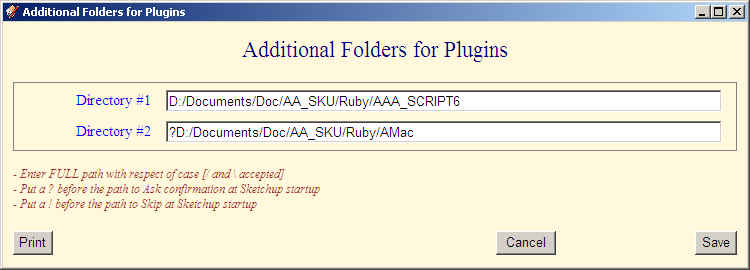
- New dialog box for specifying additional directories (in particular for Mac users)
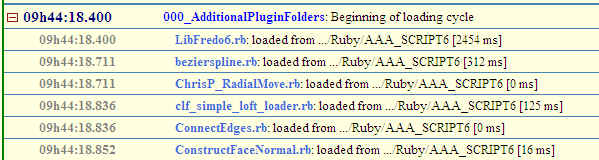
Note: if you have LibFredo6 v4.0 (or above) installed, 000_AdditionalPluginFolders will log the status of the load cycle in the Tracelog utility of LibFredo6.
See Main Post for more info and download
-
Nice update. I got a similar script - also tracks loading performance.
(looking at your screenshot, why does your libfredo take 2.5 seconds to load?)
-
@thomthom said:
(looking at your screenshot, why does your libfredo take 2.5 seconds to load?)
This is the time to load LibFredo6 but also all of my scripts (FredoScale, etc...). If you install LibFredo6 4.0, you'll get details in the Performance dialog box.
My scripts are very verbose, but what I found out is that most time is taken in creating the toolbars, rather than loading ruby files.
Fred
-
So creating toolbars are a heavy penalty?
I've recently started to profile my plugins, I get the last load time as well as the average. Trying to work out which ones loads slower and why.
Toolbars are a good clue.Have you noticed if it's building the toolbar or actually displaying it that consumes time?
-
@thomthom said:
Have you noticed if it's building the toolbar or actually displaying it that consumes time?
I think the toolbars are displayed after the whole load sequence. I infer this from the fact that when you have an error in one script, you get an error message box, and you can observe that the SU toolbar is not yet updated.
On my PC with Windows 7, I get very fast load times, including for Toolbar creation. On XP, it is much slower, but still around 2 seconds for all my plugins
Fredo






Advertisement