Issue with dialog resize [MAC]
-
Hi
I have a problem with dialogs such as my entity info dialog. It seems to not show all the information (as in the picture) and there's two checkboxes I can't quite read/get to. Can you have a look at the enclosed image and let me know what's causing this? The covered boxes are just above the 'cast shadows' checkbox and I can't resize the dialog. HELP!
Thanks
Mark
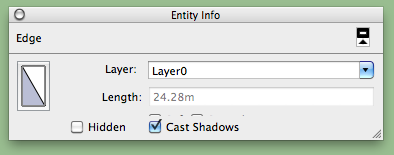
-
I've approved and retitled your post so it more obviously about the topic.
I recall someone with a similar problem on MAC.
I'll search to see what it was...
Meanwhile a MAC user might already know and sort this sooner... -
Check these tips:
http://www.google.com/support/forum/p/sketchup/thread?tid=2733854a0f39a6e9&hl=en
I think it's resetting the workspace that solves it. -
Thankyou
Resetting the workspace has fixed it.
Mark
-
There!
Much easier than it looked at first
-
Ya I had that problem a while back. Just restarted puter and its better now.

Hello! It looks like you're interested in this conversation, but you don't have an account yet.
Getting fed up of having to scroll through the same posts each visit? When you register for an account, you'll always come back to exactly where you were before, and choose to be notified of new replies (either via email, or push notification). You'll also be able to save bookmarks and upvote posts to show your appreciation to other community members.
With your input, this post could be even better 💗
Register Login


Advertisement