Registry Equivalent on Mac?
-
I just got an e-mail from a friend who uses a Mac. He said the boxes like entity Info and Components are off the screen and he can't get hold of them to drag them back. I suggested he try increasing resolution if he can to make everything appear smaller to see if he can then get hold of them. On the PC, I might also opt to either delete the SketchUp Registry entiries or at least edit them. Is there an equivalent sort of thing on the Mac that one can access?
-
It's the MAC's Plist and he'd need something like PlistEdit to find/change the entry...
-
Thank you TIG.
-
have him try resetting the workspace.
(sketchup->preferences->workspace->reset workspace)that should bring the panels back.
-
FWIW, adjusting screen res temporarily allowed him to get hold of the boxes and move them back to where he could deal with them.
-
@unknownuser said:
have him try resetting the workspace.
(sketchup->preferences->workspace->reset workspace)that should bring the panels back.
Thank you, Jeff! I've been having a recurring problem of the Entity Info box shrinking so you can't see more than the layer name, and even reinstalling SU only fixed it for a few operations. Reset Workspace was the cure.
-
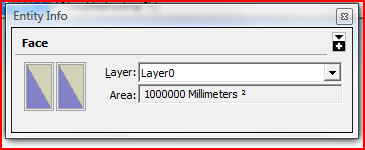
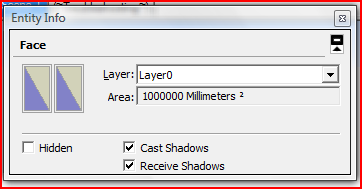
On a PC there's a hide/show button [top-right] to expand some dialogs - is there the MAC equivalent ?
-
Yeah, that option is on Mac too but occasionally, the SU entity info will get this little glitch in it and some of the info is seeming stuck to the edge. Expanding the dialog box doesn't help.



Hello! It looks like you're interested in this conversation, but you don't have an account yet.
Getting fed up of having to scroll through the same posts each visit? When you register for an account, you'll always come back to exactly where you were before, and choose to be notified of new replies (either via email, or push notification). You'll also be able to save bookmarks and upvote posts to show your appreciation to other community members.
With your input, this post could be even better 💗
Register Login


Advertisement