sketchucation logo sketchucation
    • Login
    Oops, your profile's looking a bit empty! To help us tailor your experience, please fill in key details like your SketchUp version, skill level, operating system, and more. Update and save your info on your profile page today!
    Mac User? | Join the Rayscaper Beta for Mac Learn More

    Material Problem in TheaRender

    Scheduled Pinned Locked Moved Extensions & Applications Discussions
    extensions
    25 Posts 10 Posters 14.4k Views 10 Watching
    Loading More Posts
    • Oldest to Newest
    • Newest to Oldest
    • Most Votes
    Reply
    • Reply as topic
    Log in to reply
    This topic has been deleted. Only users with topic management privileges can see it.
    • C
      cadmunkey
      last edited by

      Tried the beta version and still the same result.
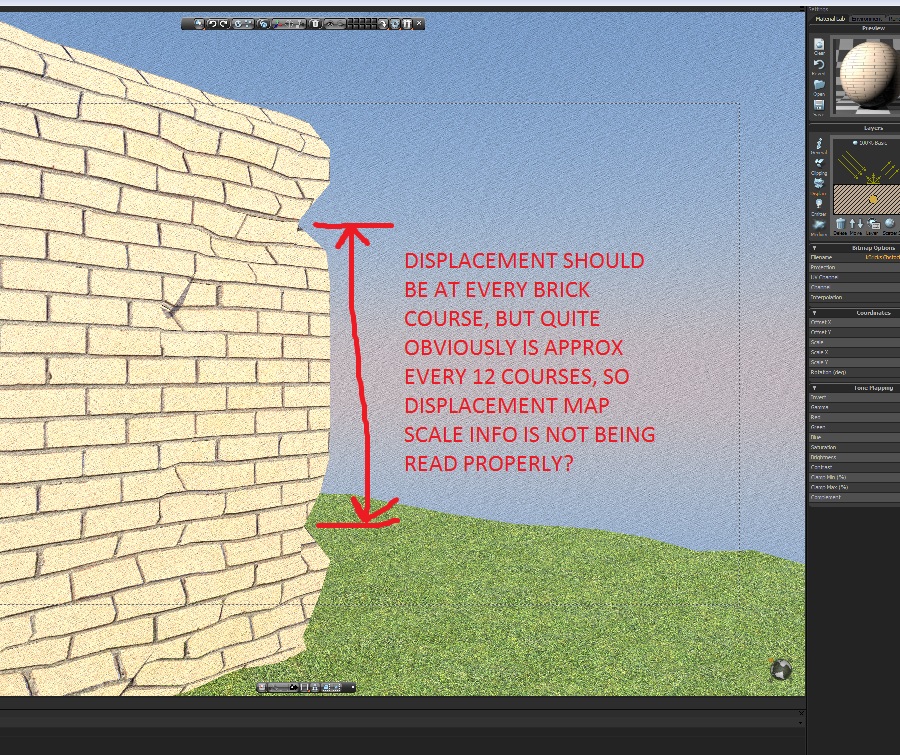
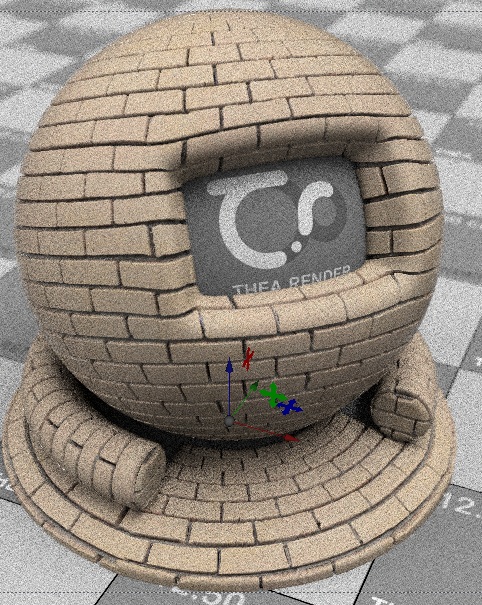
      Here are screenies to show the result:
      First screenshot in the material editor, quite clearly shows displacement correctly. Second showing what happens when exporting into Thea from sketchup using the same material.
      The brick texture is fine, but the displacement map just completely goes nuts...

      Screen1


      Screen2

      1 Reply Last reply
      Reply Quote 0
      • N
        notareal
        last edited by

        It's hard to say what's going on by just looking the picture. Maybe sub division is too low... but that does not explain why displacement is in that scale.
        Have you used any subdivision for the wall mesh (in SU)? Maybe you could post the Thea scene as pack.thea.

        Welcome to try Thea Render, Thea support | kerkythea.net -team member

        1 Reply Last reply
        Reply Quote 0
        • C
          cadmunkey
          last edited by

          I tried subdividing the scene but it made no difference to the brickwork at all. On the grass all it did was introduce artifacts. The test scene I have emailed to the Thea developers doesnt have subdivided geometry as it didnt change the outcome.
          Cheers.

          1 Reply Last reply
          Reply Quote 0
          • N
            notareal
            last edited by

            Had no change to look on that yet, but giannis will look on it. Here is a quick test, using flagstone texture for the test.

            Workflow like described before.
            Model, import bitmap as texture, apply/scale texture (I used projected texture in example, but it's fine without it).
            Apply Thea material with SU2Thea and export.
            In attached render I emphasis displacement a bit.
            Note: set model geometry to "smooth" (right click, Geometry > Smoothing) when using displacement. Also for angular objects, it's good turn off "Normal Smoothing" under displacement properties.
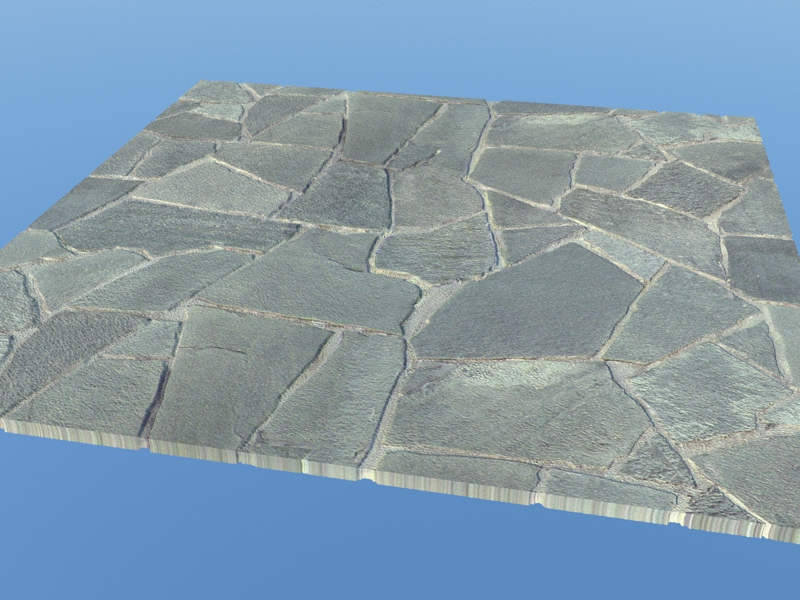

            Flagstone_test.jpg


            Flagstone_test.skp


            Contains Flagstone_test.pack.thea and Flagstone.mat.pack

            Welcome to try Thea Render, Thea support | kerkythea.net -team member

            1 Reply Last reply
            Reply Quote 0
            • N
              nursill
              last edited by

              People pls help. I have a problem, when i do model in SU and export to the the THEA, add material and then look likes... on the wall build lines


              http://s018.radikal.ru/i513/1301/8b/023a18de3f31.jpg

              1 Reply Last reply
              Reply Quote 0
              • T
                tomasz
                last edited by

                In general it is better to apply all textures inside SketchUp.

                If you have to do it in Thea Studio, then use cubic mapping for the piece of the model you have applied the new material (Tools/Transform Tool/Mapping Icon/Cubic).

                I suggest you checking new integrated Thea for SketchUp!

                Author of Thea Render for SketchUp

                1 Reply Last reply
                Reply Quote 0
                • G
                  gafia
                  last edited by

                  I have problem in scatter part in Thea Render Material Lap
                  i cant see it and it not working
                  i am asking if i need some program for make it working right

                  please answer me πŸ˜„


                  Capture.PNG

                  1 Reply Last reply
                  Reply Quote 0
                  • soloS
                    solo
                    last edited by

                    @gafia said:

                    I have problem in scatter part in Thea Render Material Lap
                    i cant see it and it not working
                    i am asking if i need some program for make it working right

                    please answer me πŸ˜„

                    You have a blank scene, try adding the material to a shape, a plane or something then check again.

                    http://www.solos-art.com

                    If you see a toilet in your dreams do not use it.

                    1 Reply Last reply
                    Reply Quote 0
                    • G
                      gafia
                      last edited by

                      i did that
                      and not working it was working before i recover the laptop i guess its about the system files

                      1 Reply Last reply
                      Reply Quote 0
                      • N
                        notareal
                        last edited by

                        I'd try to reinstall Thea if you have not done so. Are you using latest RV
                        http://www.thearender.com/cms/index.php/downloads/thea-render.html remember also get latest presto GPU (if you have nvidia GPU) http://www.thearender.com/cms/index.php/downloads/presto-gpu.html

                        Welcome to try Thea Render, Thea support | kerkythea.net -team member

                        1 Reply Last reply
                        Reply Quote 0
                        • G
                          gafia
                          last edited by

                          i have the latest version and i tried all versions
                          not working right " sorry about my english "

                          i have this problem in other CPU and this LapTop
                          but it work right in other LapTop
                          and i am afraid to uninstall it from it cause if i re install and get that am going to be disappoints

                          1 Reply Last reply
                          Reply Quote 0
                          • G
                            gafia
                            last edited by

                            Note : i have registration but i didnt put it
                            i tried ro recover laptop and have same problem
                            i tried to update windows and the same thing and graphics card too

                            i tried many things nothing work
                            i need solution


                            ssss.PNG

                            1 Reply Last reply
                            Reply Quote 0
                            • G
                              gafia
                              last edited by

                              Thanks for all and especially "notareal"
                              it work now i download the links and it working very good thanks again


                              ssssssss.PNG

                              1 Reply Last reply
                              Reply Quote 0
                              • C
                                Cittizewn
                                last edited by

                                cadmunkey... did you fix you problem with displacement map?

                                1 Reply Last reply
                                Reply Quote 0
                                • C
                                  cadmunkey
                                  last edited by

                                  @cittizewn said:

                                  cadmunkey... did you fix you problem with displacement map?

                                  Hi, that was over 4 years ago! I didnt sort it at the time but I know displacement works well in Thea now, but to be honest I never use it anymore.

                                  1 Reply Last reply
                                  Reply Quote 0
                                  • JQLJ
                                    JQL
                                    last edited by

                                    @cittizewn said:

                                    cadmunkey... did you fix you problem with displacement map?

                                    Are you having trouble with displacement yourself Cittizewn?

                                    www.casca.pt
                                    Visit us on facebook!

                                    1 Reply Last reply
                                    Reply Quote 0
                                    • C
                                      Cittizewn
                                      last edited by

                                      Yes, my difuse map scale and displacemente map scale are not de same somehow. if i change the texture scale in sketchup somehow the displacemente scale of my displacemente map dont match afterwards.
                                      How should i do do get same scales in dif and displa? change scales in sketchup first or in thea material studio?

                                      1 Reply Last reply
                                      Reply Quote 0
                                      • JQLJ
                                        JQL
                                        last edited by

                                        Verify if the following settings are the same with that material for both diffuse, displacement, and all other maps:

                                        (click the gif)
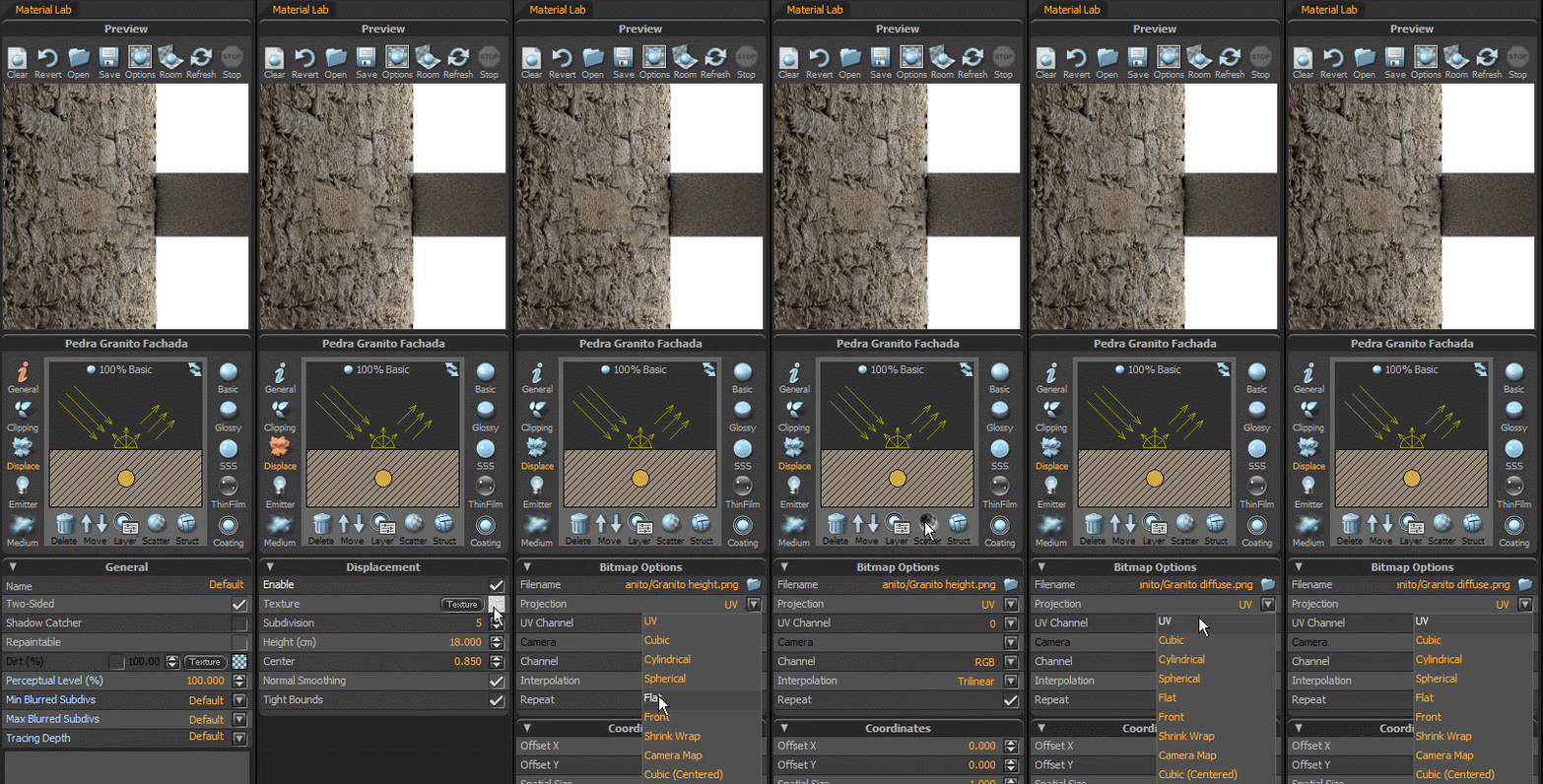
                                        Verify this settings.gif

                                        www.casca.pt
                                        Visit us on facebook!

                                        1 Reply Last reply
                                        Reply Quote 0
                                        • JasonWDJ
                                          JasonWD
                                          last edited by

                                          JQL That is super useful! Thanks

                                          SketchUp, Thea Render, Vectorworks PC and Mac - Full LayOut workflow Concept>Production

                                          1 Reply Last reply
                                          Reply Quote 0
                                          • JQLJ
                                            JQL
                                            last edited by

                                            @unknownuser said:

                                            JQL That is super useful! Thanks

                                            I'm glad it was helpful!

                                            www.casca.pt
                                            Visit us on facebook!

                                            1 Reply Last reply
                                            Reply Quote 0

                                            Hello! It looks like you're interested in this conversation, but you don't have an account yet.

                                            Getting fed up of having to scroll through the same posts each visit? When you register for an account, you'll always come back to exactly where you were before, and choose to be notified of new replies (either via email, or push notification). You'll also be able to save bookmarks and upvote posts to show your appreciation to other community members.

                                            With your input, this post could be even better πŸ’—

                                            Register Login
                                            • 1
                                            • 2
                                            • 1 / 2
                                            • First post
                                              Last post
                                            Buy SketchPlus
                                            Buy SUbD
                                            Buy WrapR
                                            Buy eBook
                                            Buy Modelur
                                            Buy Vertex Tools
                                            Buy SketchCuisine
                                            Buy FormFonts

                                            Advertisement