[Plugin] TextureTools
-
Well TIG in SU it's always comma or semicolon (for example when drawing a rectangle) for me, even the plugins, while in CAD, for example, it's always dot...
Anyway here is what i get in the ruby console:1.23.class Float -
@massimo said:
Well TIG in SU it's always comma or semicolon (for example when drawing a rectangle) for me, even the plugins, while in CAD, for example, it's always dot...
Anyway here is what i get in the ruby console:1.23.class > Float >I'd like the whole list please ?
I know in EU etc in the SKP's UI the '.' swaps with the ',' and then the ',' with the ';' BUT in the Ruby API I must always use a '.' as the decimal-separator, ',' as the list-separator and ';' as a line-break...
However I'd have expected that the SUp UI would seamlessly swap float '.' for ',' when displayed inputed in a UI.inputbox() to suit the locale, as it seems to take ',' in strings to convert to 'lengths' ?? -
@unknownuser said:
I'd like the whole list please ?
I've copied and pasted ALL the text you posted, sorry...


Here you have the results of every single line1.23.class Float 1,23.class Error; #<SyntaxError; (eval);894; compile error (eval);894; syntax error 1,23.class ^> (eval);894 1.23.to_l 1.23 1,23.to_l Error; #<SyntaxError; (eval);894; compile error (eval);894; syntax error 1,23.to_l ^> (eval);894 '1.23'.to_l Error; #<ArgumentError; (eval);894;in `to_l'; Cannot convert "1.23" to Length> (eval);894 '1,23'.to_l 0.484251968503937 -
Hi TIG,
I had probe to type the text in Ruby Console and this the result:
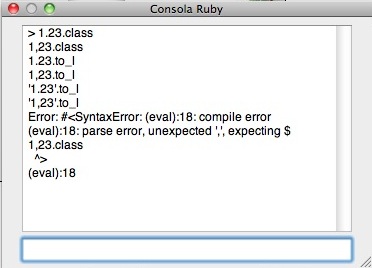
I'm in Spain (EU) and i use metric units.
-
So, as I suspected...
I'll reissue a trapped version that will take '.' or ',' as the decimal-separator in the inputbox for every tool, BUT it will if it's a string value it'll convert it to ',' to suit your locale and make a length from it if it has to... entering a number with a ',' it WILL work without failing [IF the locale supports] BUT it'll convert it back into a '.' when you OK the dialog...
Watch for an update... -
Ah yes, A period is as important to a programmer as it is to his girlfriend.

-
@tig said:
Massimo
I hadn't anticipated you weird Eurpoeans using a ',' as a decimal point rather than a sensible '.'
I can easily trap that in the code... I'll release an update later today - it should also have new tools added - TextureScale and TextureTweak...
 ...waiting for the fix.
 -
Here's v1.5 http://forums.sketchucation.com/viewtopic.php?p=329765#p329765
Irrespective of their locale, users may now type a '.' OR a ',' as a decimal-separator, depending on their preference, for any of the tools' dialogs - issues with conversion of strings to lengths from potential locale-wrong input is addressed in the code, 'behind the scenes'.Feedback please...
-
@tig said:
Here's v1.5 http://forums.sketchucation.com/viewtopic.php?p=329765#p329765
Irrespective of their locale, users may now type a '.' OR a ',' as a decimal-separator, depending on their preference, for any of the tools' dialogs - issues with conversion of strings to lengths from potential locale-wrong input is addressed in the code behind the scenes.Feedback please...
Just tried it, win7 64 bit skp 8... works fine and I must say this is one of the best plugins ever made!!!
-
Hi TIG,
all functionality working very well on the Mac, except toolbar tooltips.
They work if I put the icons in the custom toolbar but not on the standard, floating toolbar.
not a big issue here, just thought I'd mention it.
john
-
-
@driven said:
Hi TIG,
all functionality working very well on the Mac, except toolbar tooltips.
john
The same, it works perfect on Mac.

-
-
TIG, i have tried this:
-painted a surface with a material;
-used one texture tool on the texture;
-picked the texture with the sample tool and painted other surfaces with different orientations.
Only with the "tweak" tool i get a strange behaviour following that workflow on connected faces. The texture looks a lot different on each plane... But if the planes are not connected it works just fine...
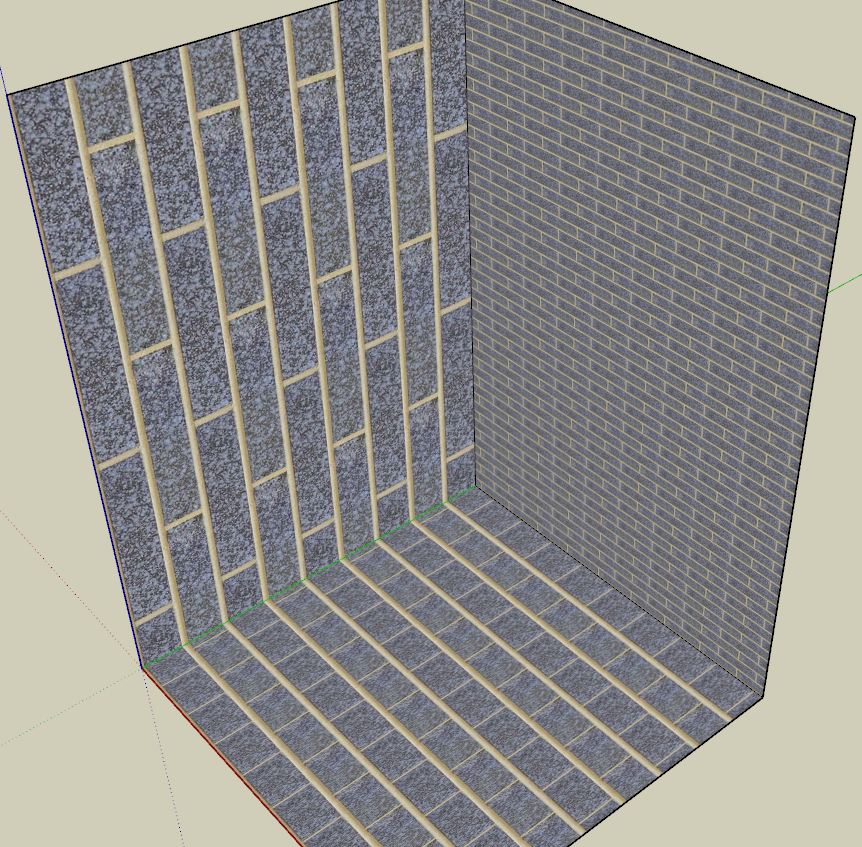
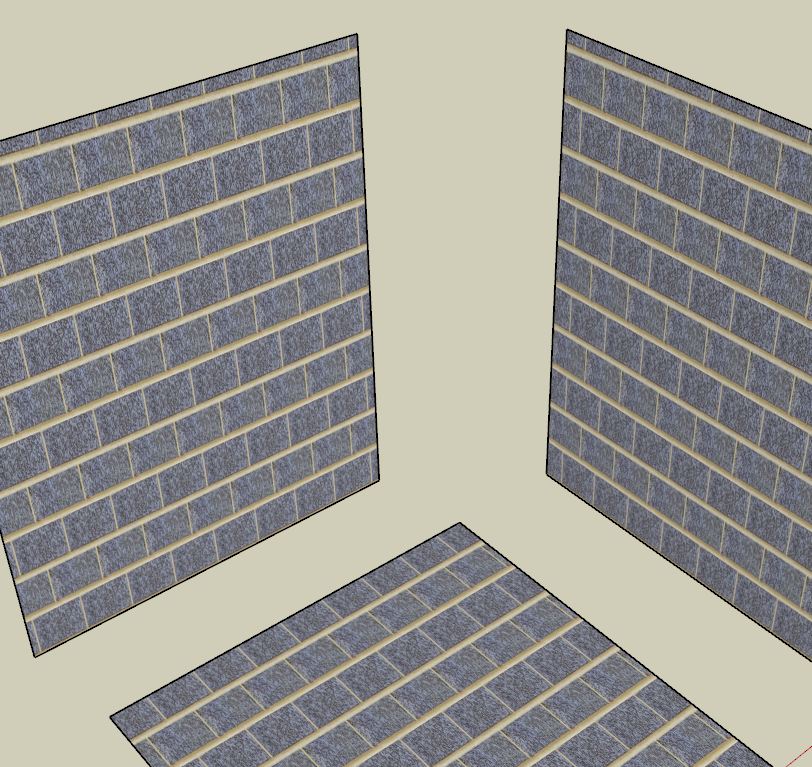
-
I think the built-in UV-mapping of connected-faces assumes a certain 'flow' of the material across their shared edges...
If you have separate faces then their textures are arranged logically on a per-surface basis.
Hence the different behavior of textures on separate and connected faces... -
Hmmm...That happens also with the "texture scale" tool if you input different values for U and V. But that doesn't happen if you use the native "edit" and input different values for length and width. (picture below)
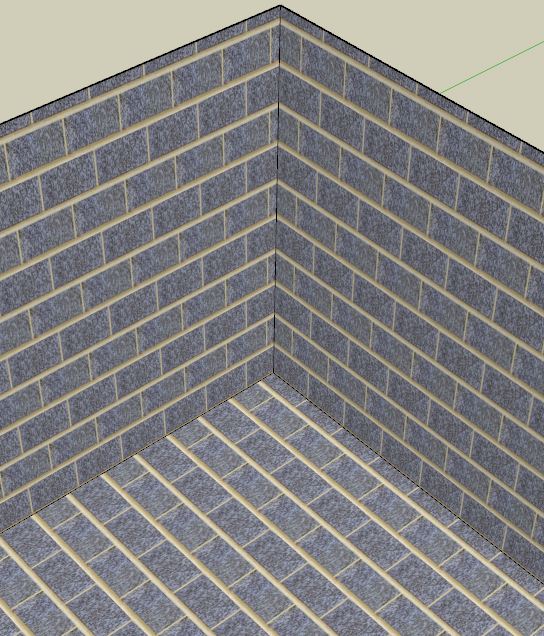
-
Hmmm... this is v1... perhaps there's more to do...
-
No worries it's already a wonderful set of tools.
-
Thanks TIG! Most helpful plugin of the year!
-
Thank you so much for this, it is very helpful!






Hello! It looks like you're interested in this conversation, but you don't have an account yet.
Getting fed up of having to scroll through the same posts each visit? When you register for an account, you'll always come back to exactly where you were before, and choose to be notified of new replies (either via email, or push notification). You'll also be able to save bookmarks and upvote posts to show your appreciation to other community members.
With your input, this post could be even better 💗
Register Login


Advertisement