sketchucation logo sketchucation
    • Login
    Oops, your profile's looking a bit empty! To help us tailor your experience, please fill in key details like your SketchUp version, skill level, operating system, and more. Update and save your info on your profile page today!
    Mac User? | Join the Rayscaper Beta for Mac Learn More

    [Plugin] Pen Tool +

    Scheduled Pinned Locked Moved Plugins
    126 Posts 40 Posters 121.5k Views 40 Watching
    Loading More Posts
    • Oldest to Newest
    • Newest to Oldest
    • Most Votes
    Reply
    • Reply as topic
    Log in to reply
    This topic has been deleted. Only users with topic management privileges can see it.
    • Rich O BrienR
      Rich O Brien Moderator
      last edited by

      @schnydix said:

      Great Pen Tool Thanks for this nice work
      Can you integrate an constr. Point

      Yes, v1.4 will have this and another tool πŸ˜’

      Download the free D'oh Book for SketchUp πŸ“–

      1 Reply Last reply
      Reply Quote 0
      • Rich O BrienR
        Rich O Brien Moderator
        last edited by

        Pen Tools + v1.4 updated with 2 new tools and some bug fixes.

        For latest version go here

        EDIT: I corrected this link, TIG
        [get a direct page link from right-clicking over the small 'post' icon under the post's title, and not from the top-bar html which leads to the page of posts containing the post]...

        Download the free D'oh Book for SketchUp πŸ“–

        1 Reply Last reply
        Reply Quote 0
        • H
          hebeijianke
          last edited by

          @unknownuser said:

          Pen Tools + v1.4 updated with 2 new tools and some bug fixes.

          For latest version go here

          EDIT: I corrected this link, TIG
          [get a direct page link from right-clicking over the small 'post' icon under the post's title, and not from the top-bar html which leads to the page of posts containing the post]...

          weld draw error message

          Error; #<NoMethodError; undefined method `GetString' for nil;NilClass>
          F;/Google SketchUp 8/Plugins/PenTool+.rb;771;in `activate'
          F;/Google SketchUp 8/Plugins/PenTool+.rb;1802;in `select_tool'
          F;/Google SketchUp 8/Plugins/PenTool+.rb;1802
          Error; #<NoMethodError; undefined method `add' for nil;NilClass>
          F;/Google SketchUp 8/Plugins/PenTool+.rb;756;in `getExtents'
          Error; #<NoMethodError; undefined method `add' for nil;NilClass>
          F;/Google SketchUp 8/Plugins/PenTool+.rb;756;in `getExtents'
          
          1 Reply Last reply
          Reply Quote 0
          • Rich O BrienR
            Rich O Brien Moderator
            last edited by

            From starting to use the tool? From performing certain actions?

            Download the free D'oh Book for SketchUp πŸ“–

            1 Reply Last reply
            Reply Quote 0
            • TIGT
              TIG Moderator
              last edited by

              That sounds like a language-handler issue - do you have the standard files like sketchup.rb and langhandler.rb in the Tools folder ?
              If you type [copy+paste] $exStrings in the Ruby Console it should return this

              #<LanguageHandler;0xb7d5f2c @strings={"Select first end"=>"Select first end", "Point at Center"=>"Point at Center", "Box"=>"Box", "Create Box"=>"Create Box", "Material"=>"Material", "Adds examples of tools created in Ruby to the SketchUp interface.  The example tools are Draw->Box, Plugins->Cost and Camera->Animations."=>"Adds examples of tools created in Ruby to the SketchUp interface.  The example tools are Draw->Box, Plugins->Cost and Camera->Animations.", "Select By Material"=>"Select By Material", "Select By Layer"=>"Select By Layer", "Select second end"=>"Select second end", "Box Dimensions"=>"Box Dimensions", "Cost"=>"Cost", "Total Cost Estimate"=>"Total Cost Estimate", "Stop Spinning"=>"Stop Spinning", "Spin View"=>"Spin View", "Animations"=>"Animations", "Default"=>"Default", "Assign Estimate to Material"=>"Assign Estimate to Material", "Cost Estimate"=>"Cost Estimate", "Ruby Script Examples"=>"Ruby Script Examples", "Layer"=>"Layer", "Width"=>"Width", "Compute Estimate"=>"Compute Estimate", "Assign Estimate to Faces"=>"Assign Estimate to Faces", "Hide Rest"=>"Hide Rest", "Depth"=>"Depth", "Height"=>"Height", "Cost By Material"=>"Cost By Material", "Create Cylinder"=>"Create Cylinder", "Could not find Material named"=>"Could not find Material named", "Cost per sq. foot"=>"Cost per sq. foot", "FPS"=>"FPS"}>
              

              If not then that's the issue... not this actual tool per se, but your setup πŸ˜•

              TIG

              1 Reply Last reply
              Reply Quote 0
              • S
                SketchUpNoobie
                last edited by

                @tig said:

                type $exStrings in the Ruby Console

                😲

                🀣

                Seriously though, thanks for the update Rich. Construction points should be nice.

                --

                SketchUpNoobie: the complete noob in all things SketchUp.

                1 Reply Last reply
                Reply Quote 0
                • TIGT
                  TIG Moderator
                  last edited by

                  Unfortunately ' $exStrings' is what @Last/Google decided to call it years ago πŸ˜„ πŸ˜’

                  TIG

                  1 Reply Last reply
                  Reply Quote 0
                  • Rich O BrienR
                    Rich O Brien Moderator
                    last edited by

                    nothing like a bit of nostrings$ex πŸ‘

                    Download the free D'oh Book for SketchUp πŸ“–

                    1 Reply Last reply
                    Reply Quote 0
                    • B
                      Ben Ritter
                      last edited by

                      Rich, thank you very much. By the way, why was the pen to draw an edge with a face included,if it does the same thing as the line command?

                      Ben

                      1 Reply Last reply
                      Reply Quote 0
                      • Rich O BrienR
                        Rich O Brien Moderator
                        last edited by

                        Yes it's the same but you can toggle inference locking with the shift key. The native Line tool requires you to hold the shift.

                        By having the toggle option you can orbit with inference lock is toggled on whilst the native tool would cause you to pan. Csaba asked for this function in another thread.

                        Download the free D'oh Book for SketchUp πŸ“–

                        1 Reply Last reply
                        Reply Quote 0
                        • TIGT
                          TIG Moderator
                          last edited by

                          The 'edge' tools doesn't form faces like the 'pen' tool [or for that matter the other line drawing tools].. The 'pen' tool is like native 'Line'... BUT it has some different inferencing etc... Try the different ones to see what I mean... πŸ€“

                          TIG

                          1 Reply Last reply
                          Reply Quote 0
                          • utilerU
                            utiler
                            last edited by

                            Hey, I've missed this so far!!!!! haven't you got enough to do, Rich?
                            Well done mate!

                            Just Curious...

                            1 Reply Last reply
                            Reply Quote 0
                            • D
                              driven
                              last edited by

                              hi Rich,

                              this is great, works on the mac except the

                               ###new_toolbar.show ### ONLY show if was visible before...
                                  new_toolbar.restore if new_toolbar.get_last_state==TB_VISIBLE
                              

                              [this may be due to the slightly different RUBY_VERSION i.e. 1.8.5]
                              however it does work if I cut and paste it to line 1175, directly under

                              new_toolbar = UI;;Toolbar.new("Pen Tool +")
                              

                              tooltips, custom menu items and the tools themselves all work as advertised...

                              well done

                              john

                              learn from the mistakes of others, you may not live long enough to make them all yourself...

                              1 Reply Last reply
                              Reply Quote 0
                              • Rich O BrienR
                                Rich O Brien Moderator
                                last edited by

                                Thanks for the Mac feedback John. Glad you got it to work πŸ‘

                                Download the free D'oh Book for SketchUp πŸ“–

                                1 Reply Last reply
                                Reply Quote 0
                                • yellow perilY
                                  yellow peril
                                  last edited by

                                  I have just downloaded your pen tool, i am working on mac, it appears to workfine but with no icons.....any ideas?

                                  1 Reply Last reply
                                  Reply Quote 0
                                  • D
                                    driven
                                    last edited by

                                    hi,
                                    if the icons folder named, rob_hsltool is in your plugins folder, then you might just need to turn on the menu in View >> Tool Palettes >> Pen Tool +

                                    john

                                    learn from the mistakes of others, you may not live long enough to make them all yourself...

                                    1 Reply Last reply
                                    Reply Quote 0
                                    • boofredlayB
                                      boofredlay
                                      last edited by

                                      BTW, TIG solved my problem stated earlier in this thread. Thanks TIG.

                                      It turns out if you click the "Compatibility Files" button between Burn and New Folder it showed up.
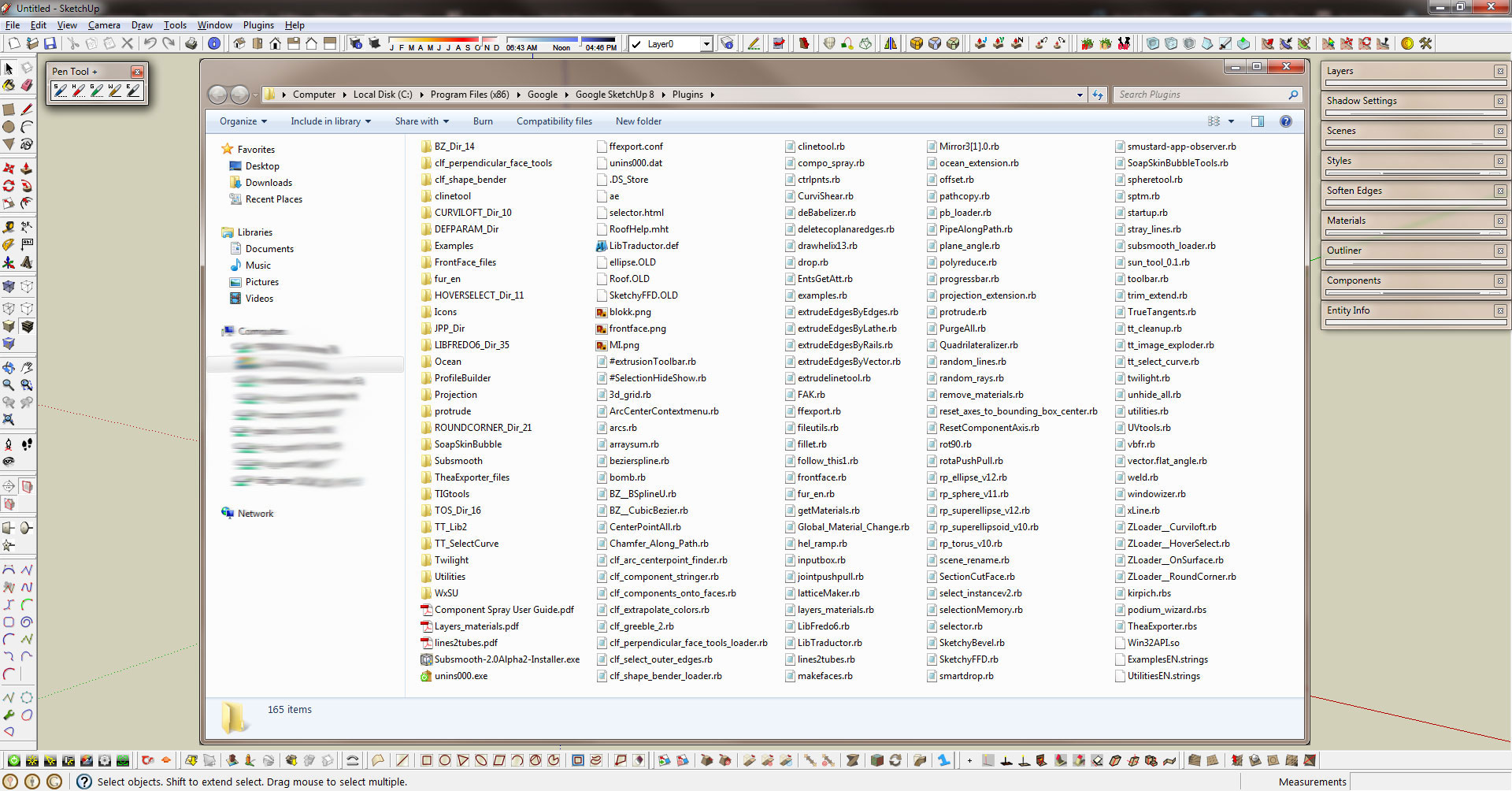

                                      PenToolOdd.jpg

                                      http://www.coroflot.com/boofredlay

                                      1 Reply Last reply
                                      Reply Quote 0
                                      • H
                                        hungnguyenpham
                                        last edited by

                                        Thank you!

                                        1 Reply Last reply
                                        Reply Quote 0
                                        • P
                                          Panga
                                          last edited by

                                          Thanks a lot for this usefull plugins !! πŸ‘

                                          1 Reply Last reply
                                          Reply Quote 0
                                          • jgbJ
                                            jgb
                                            last edited by

                                            @dave r said:

                                            Comes of drinking American beer at high elevations for a week when you're not used to either. πŸ˜„

                                            Canadian beer will do that at sea level in less than a day. 🀣


                                            jgb

                                            1 Reply Last reply
                                            Reply Quote 0

                                            Hello! It looks like you're interested in this conversation, but you don't have an account yet.

                                            Getting fed up of having to scroll through the same posts each visit? When you register for an account, you'll always come back to exactly where you were before, and choose to be notified of new replies (either via email, or push notification). You'll also be able to save bookmarks and upvote posts to show your appreciation to other community members.

                                            With your input, this post could be even better πŸ’—

                                            Register Login
                                            • 1
                                            • 2
                                            • 3
                                            • 4
                                            • 5
                                            • 6
                                            • 7
                                            • 4 / 7
                                            • First post
                                              Last post
                                            Buy SketchPlus
                                            Buy SUbD
                                            Buy WrapR
                                            Buy eBook
                                            Buy Modelur
                                            Buy Vertex Tools
                                            Buy SketchCuisine
                                            Buy FormFonts

                                            Advertisement