sketchucation logo sketchucation
    • 登入
    Oops, your profile's looking a bit empty! To help us tailor your experience, please fill in key details like your SketchUp version, skill level, operating system, and more. Update and save your info on your profile page today!
    🔌 Smart Spline | Fluid way to handle splines for furniture design and complex structures. Download

    [Plugin] Pen Tool +

    已排程 已置頂 已鎖定 已移動 Plugins
    126 貼文 40 Posters 103.7k 瀏覽 40 Watching
    正在載入更多貼文
    • 從舊到新
    • 從新到舊
    • 最多點贊
    回覆
    • 在新貼文中回覆
    登入後回覆
    此主題已被刪除。只有擁有主題管理權限的使用者可以查看。
    • Dave RD 離線
      Dave R
      最後由 編輯

      Eric, that's very weird. 😕

      Etaoin Shrdlu

      %

      (THERE'S NO PLACE LIKE)

      G28 X0.0 Y0.0 Z0.0

      M30

      %

      1 條回覆 最後回覆 回覆 引用 0
      • boofredlayB 離線
        boofredlay
        最後由 編輯

        I know right!?

        One thought, since I am on a network here it might have been installed somewhere other than my machine and is pointing there...? Just a thought.

        http://www.coroflot.com/boofredlay

        1 條回覆 最後回覆 回覆 引用 0
        • S 離線
          schnydix
          最後由 編輯

          Great Pen Tool Thanks for this nice work
          Can you integrate an constr. Point

          1 條回覆 最後回覆 回覆 引用 0
          • Rich O BrienR 離線
            Rich O Brien Moderator
            最後由 編輯

            @schnydix said:

            Great Pen Tool Thanks for this nice work
            Can you integrate an constr. Point

            Yes, v1.4 will have this and another tool 😒

            Download the free D'oh Book for SketchUp 📖

            1 條回覆 最後回覆 回覆 引用 0
            • Rich O BrienR 離線
              Rich O Brien Moderator
              最後由 編輯

              Pen Tools + v1.4 updated with 2 new tools and some bug fixes.

              For latest version go here

              EDIT: I corrected this link, TIG
              [get a direct page link from right-clicking over the small 'post' icon under the post's title, and not from the top-bar html which leads to the page of posts containing the post]...

              Download the free D'oh Book for SketchUp 📖

              1 條回覆 最後回覆 回覆 引用 0
              • H 離線
                hebeijianke
                最後由 編輯

                @unknownuser said:

                Pen Tools + v1.4 updated with 2 new tools and some bug fixes.

                For latest version go here

                EDIT: I corrected this link, TIG
                [get a direct page link from right-clicking over the small 'post' icon under the post's title, and not from the top-bar html which leads to the page of posts containing the post]...

                weld draw error message

                Error; #<NoMethodError; undefined method `GetString' for nil;NilClass>
                F;/Google SketchUp 8/Plugins/PenTool+.rb;771;in `activate'
                F;/Google SketchUp 8/Plugins/PenTool+.rb;1802;in `select_tool'
                F;/Google SketchUp 8/Plugins/PenTool+.rb;1802
                Error; #<NoMethodError; undefined method `add' for nil;NilClass>
                F;/Google SketchUp 8/Plugins/PenTool+.rb;756;in `getExtents'
                Error; #<NoMethodError; undefined method `add' for nil;NilClass>
                F;/Google SketchUp 8/Plugins/PenTool+.rb;756;in `getExtents'
                
                1 條回覆 最後回覆 回覆 引用 0
                • Rich O BrienR 離線
                  Rich O Brien Moderator
                  最後由 編輯

                  From starting to use the tool? From performing certain actions?

                  Download the free D'oh Book for SketchUp 📖

                  1 條回覆 最後回覆 回覆 引用 0
                  • TIGT 離線
                    TIG Moderator
                    最後由 編輯

                    That sounds like a language-handler issue - do you have the standard files like sketchup.rb and langhandler.rb in the Tools folder ?
                    If you type [copy+paste] $exStrings in the Ruby Console it should return this

                    #<LanguageHandler;0xb7d5f2c @strings={"Select first end"=>"Select first end", "Point at Center"=>"Point at Center", "Box"=>"Box", "Create Box"=>"Create Box", "Material"=>"Material", "Adds examples of tools created in Ruby to the SketchUp interface.  The example tools are Draw->Box, Plugins->Cost and Camera->Animations."=>"Adds examples of tools created in Ruby to the SketchUp interface.  The example tools are Draw->Box, Plugins->Cost and Camera->Animations.", "Select By Material"=>"Select By Material", "Select By Layer"=>"Select By Layer", "Select second end"=>"Select second end", "Box Dimensions"=>"Box Dimensions", "Cost"=>"Cost", "Total Cost Estimate"=>"Total Cost Estimate", "Stop Spinning"=>"Stop Spinning", "Spin View"=>"Spin View", "Animations"=>"Animations", "Default"=>"Default", "Assign Estimate to Material"=>"Assign Estimate to Material", "Cost Estimate"=>"Cost Estimate", "Ruby Script Examples"=>"Ruby Script Examples", "Layer"=>"Layer", "Width"=>"Width", "Compute Estimate"=>"Compute Estimate", "Assign Estimate to Faces"=>"Assign Estimate to Faces", "Hide Rest"=>"Hide Rest", "Depth"=>"Depth", "Height"=>"Height", "Cost By Material"=>"Cost By Material", "Create Cylinder"=>"Create Cylinder", "Could not find Material named"=>"Could not find Material named", "Cost per sq. foot"=>"Cost per sq. foot", "FPS"=>"FPS"}>
                    

                    If not then that's the issue... not this actual tool per se, but your setup 😕

                    TIG

                    1 條回覆 最後回覆 回覆 引用 0
                    • S 離線
                      SketchUpNoobie
                      最後由 編輯

                      @tig said:

                      type $exStrings in the Ruby Console

                      😲

                      🤣

                      Seriously though, thanks for the update Rich. Construction points should be nice.

                      --

                      SketchUpNoobie: the complete noob in all things SketchUp.

                      1 條回覆 最後回覆 回覆 引用 0
                      • TIGT 離線
                        TIG Moderator
                        最後由 編輯

                        Unfortunately ' $exStrings' is what @Last/Google decided to call it years ago 😄 😒

                        TIG

                        1 條回覆 最後回覆 回覆 引用 0
                        • Rich O BrienR 離線
                          Rich O Brien Moderator
                          最後由 編輯

                          nothing like a bit of nostrings$ex 👍

                          Download the free D'oh Book for SketchUp 📖

                          1 條回覆 最後回覆 回覆 引用 0
                          • B 離線
                            Ben Ritter
                            最後由 編輯

                            Rich, thank you very much. By the way, why was the pen to draw an edge with a face included,if it does the same thing as the line command?

                            Ben

                            1 條回覆 最後回覆 回覆 引用 0
                            • Rich O BrienR 離線
                              Rich O Brien Moderator
                              最後由 編輯

                              Yes it's the same but you can toggle inference locking with the shift key. The native Line tool requires you to hold the shift.

                              By having the toggle option you can orbit with inference lock is toggled on whilst the native tool would cause you to pan. Csaba asked for this function in another thread.

                              Download the free D'oh Book for SketchUp 📖

                              1 條回覆 最後回覆 回覆 引用 0
                              • TIGT 離線
                                TIG Moderator
                                最後由 編輯

                                The 'edge' tools doesn't form faces like the 'pen' tool [or for that matter the other line drawing tools].. The 'pen' tool is like native 'Line'... BUT it has some different inferencing etc... Try the different ones to see what I mean... 🤓

                                TIG

                                1 條回覆 最後回覆 回覆 引用 0
                                • utilerU 離線
                                  utiler
                                  最後由 編輯

                                  Hey, I've missed this so far!!!!! haven't you got enough to do, Rich?
                                  Well done mate!

                                  Just Curious...

                                  1 條回覆 最後回覆 回覆 引用 0
                                  • D 離線
                                    driven
                                    最後由 編輯

                                    hi Rich,

                                    this is great, works on the mac except the

                                     ###new_toolbar.show ### ONLY show if was visible before...
                                        new_toolbar.restore if new_toolbar.get_last_state==TB_VISIBLE
                                    

                                    [this may be due to the slightly different RUBY_VERSION i.e. 1.8.5]
                                    however it does work if I cut and paste it to line 1175, directly under

                                    new_toolbar = UI;;Toolbar.new("Pen Tool +")
                                    

                                    tooltips, custom menu items and the tools themselves all work as advertised...

                                    well done

                                    john

                                    learn from the mistakes of others, you may not live long enough to make them all yourself...

                                    1 條回覆 最後回覆 回覆 引用 0
                                    • Rich O BrienR 離線
                                      Rich O Brien Moderator
                                      最後由 編輯

                                      Thanks for the Mac feedback John. Glad you got it to work 👍

                                      Download the free D'oh Book for SketchUp 📖

                                      1 條回覆 最後回覆 回覆 引用 0
                                      • yellow perilY 離線
                                        yellow peril
                                        最後由 編輯

                                        I have just downloaded your pen tool, i am working on mac, it appears to workfine but with no icons.....any ideas?

                                        1 條回覆 最後回覆 回覆 引用 0
                                        • D 離線
                                          driven
                                          最後由 編輯

                                          hi,
                                          if the icons folder named, rob_hsltool is in your plugins folder, then you might just need to turn on the menu in View >> Tool Palettes >> Pen Tool +

                                          john

                                          learn from the mistakes of others, you may not live long enough to make them all yourself...

                                          1 條回覆 最後回覆 回覆 引用 0
                                          • boofredlayB 離線
                                            boofredlay
                                            最後由 編輯

                                            BTW, TIG solved my problem stated earlier in this thread. Thanks TIG.

                                            It turns out if you click the "Compatibility Files" button between Burn and New Folder it showed up.
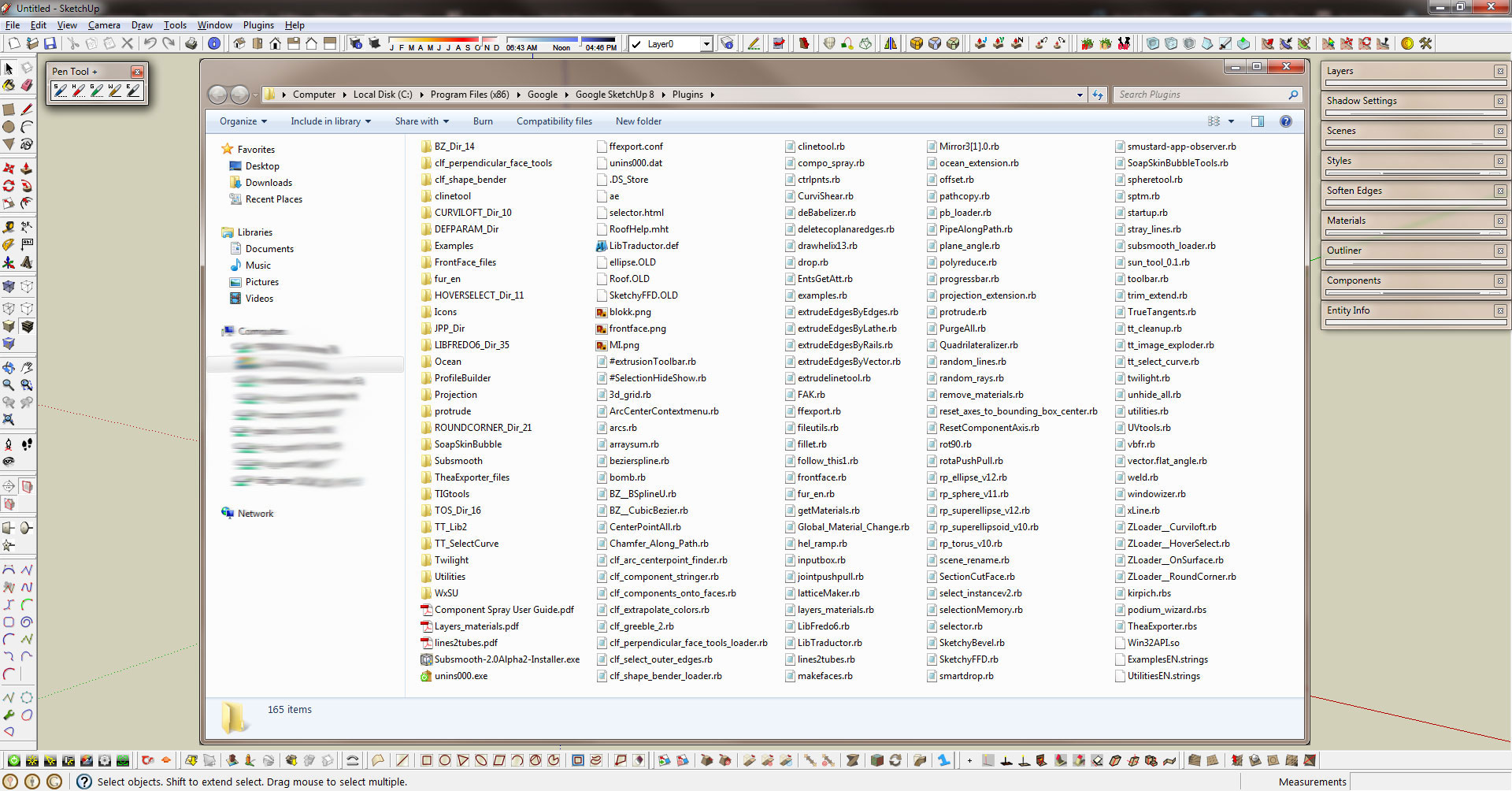


                                            PenToolOdd.jpg

                                            http://www.coroflot.com/boofredlay

                                            1 條回覆 最後回覆 回覆 引用 0
                                            • 1
                                            • 2
                                            • 3
                                            • 4
                                            • 5
                                            • 6
                                            • 7
                                            • 1 / 7
                                            • 第一個貼文
                                              最後的貼文
                                            Buy SketchPlus
                                            Buy SUbD
                                            Buy WrapR
                                            Buy eBook
                                            Buy Modelur
                                            Buy Vertex Tools
                                            Buy SketchCuisine
                                            Buy FormFonts

                                            Advertisement