sketchucation logo sketchucation
    • Login
    Oops, your profile's looking a bit empty! To help us tailor your experience, please fill in key details like your SketchUp version, skill level, operating system, and more. Update and save your info on your profile page today!
    πŸ”Œ Smart Spline | Fluid way to handle splines for furniture design and complex structures. Download

    Making Faces from unconnected lines

    Scheduled Pinned Locked Moved SketchUp Discussions
    sketchup
    13 Posts 5 Posters 665 Views 5 Watching
    Loading More Posts
    • Oldest to Newest
    • Newest to Oldest
    • Most Votes
    Reply
    • Reply as topic
    Log in to reply
    This topic has been deleted. Only users with topic management privileges can see it.
    • M Offline
      MartinK
      last edited by

      What I'd like to be able to do is select all the lines at once and, if possible, have the faces created as a group independent of the lines. I've tried Skin and ExtrudeByVector and can't get them to do what I want.

      Thanks.

      1 Reply Last reply Reply Quote 0
      • mitcorbM Offline
        mitcorb
        last edited by

        The tools used on imported 2d graphics, I believe, are Make Faces and Close Opens? Find them at Smustard and/or Ruby Library Depot. These still may not be what you want considering the vertical orientation of your subject. Just trying to help.

        I take the slow, deliberate approach in my aimless wandering.

        1 Reply Last reply Reply Quote 0
        • M Offline
          MartinK
          last edited by

          Mitcorb, thanks for the suggestions. I found MakeFaces and CloseOpens and they would probably work...but I was trying to avoid spending $20 for CloseOpens.

          1 Reply Last reply Reply Quote 0
          • pilouP Offline
            pilou
            last edited by

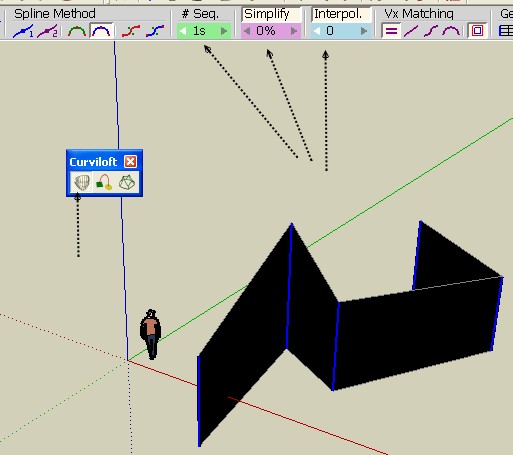
            Curviloft by Fredo 6 seems perfect for that! πŸ˜‰
            Select all lines then Call the plug πŸ˜‰
            Re-order if necessary (you never find a plug who makes a magic order selection from a randomly number of lines in any positions as many ways are possible) πŸ˜’
            Apply regulates

            For face as group you must use some Special Selection Selection Toy by Thomthom
            Then call Face(s) to group(s) by Bentleyfrog
            Not a big deal πŸ˜„
            curvi.jpg

            Frenchy Pilou
            Is beautiful that please without concept!
            My Little site :)

            1 Reply Last reply Reply Quote 0
            • M Offline
              MartinK
              last edited by

              Pilou, Thanks, which method of Curviloft do I use? I tried Loft by Spline, but it locks up the model. Do I use Skin Contours? Thanks again.

              1 Reply Last reply Reply Quote 0
              • jeff hammondJ Offline
                jeff hammond
                last edited by

                Use the first icon in the toolbar (on a phone and can't remember what it's called πŸ˜„ )

                Set the segments to 1
                Done

                (edit. Just saw pilou's image. Do that)

                dotdotdot

                1 Reply Last reply Reply Quote 0
                • Rich O BrienR Online
                  Rich O Brien Moderator
                  last edited by

                  @unknownuser said:

                  Use the first icon in the toolbar (on a phone and can't remember what it's called πŸ˜„ )

                  Set the segments to 1
                  Done

                  (edit. Just saw pilou's image. Do that)

                  That's dedication

                  Download the free D'oh Book for SketchUp πŸ“–

                  1 Reply Last reply Reply Quote 0
                  • jeff hammondJ Offline
                    jeff hammond
                    last edited by

                    @unknownuser said:

                    @unknownuser said:

                    Use the first icon in the toolbar (on a phone and can't remember what it's called πŸ˜„ )

                    Set the segments to 1
                    Done

                    (edit. Just saw pilou's image. Do that)

                    That's dedication

                    What? From a phone?

                    Nah, I'm sitting in my girlfriends illegally parked car til 10. Only 35 more minutes to go πŸ˜„

                    dotdotdot

                    1 Reply Last reply Reply Quote 0
                    • pilouP Offline
                      pilou
                      last edited by

                      @unknownuser said:

                      which method of Curviloft do I use?

                      Seems I had drawn an arrow on the face's tool? πŸ˜‰

                      Frenchy Pilou
                      Is beautiful that please without concept!
                      My Little site :)

                      1 Reply Last reply Reply Quote 0
                      • M Offline
                        MartinK
                        last edited by

                        Thanks everyone. I got Loft by Spline to work. That's exactly what I needed. I appreciate all the help. πŸ‘

                        1 Reply Last reply Reply Quote 0
                        • 1 / 1
                        • First post
                          Last post
                        Buy SketchPlus
                        Buy SUbD
                        Buy WrapR
                        Buy eBook
                        Buy Modelur
                        Buy Vertex Tools
                        Buy SketchCuisine
                        Buy FormFonts

                        Advertisement


