[Plugin] Sketchup Ivy
-
@solo said:
Sure.
I opened the UI (from plugin menu) I started creating ivy but decided my ball (wanted it to grow over ball) was too big, so I exited by clicking the close X, resized the ball and tried to start Ivy again, it was checked in menu by no matter what I did the UI did not show again.
Same here,
I do like the way this Ivy plugin is going. Nice interface, and I thank you are on the right track. Simple Ivy can be made, and i did a few testrenders with indigo and the results are nice. But for large walls covering Ivy you have to make several seperaty ivy bushes I think because of bugsplat when going over 150 branches. But thanxs for the hard work so far, Keep it up and this wil be a very welcome plugin

Greetz Pugz
-
Great work!!!
-
reported the same problem as Solo, this problem appears only when you try to put leaves on the vine
-
Hi, i work on Mac and Sketchup reads the plugin but when i run the plugin the Ivy parameters window appears and immediately disappears, for this i can't use it.
-
woow.. this getting to be more and more interesting...
thanks pierre..regards
-
This is heading towards being an epic plugin...similar to what 'Fur' achieved IMo.
-
Thanks for the thumbs up and critics everyone!
I have fixed solo's bug, will upload i fix later today

@oxer: This is not good. I'm really struggling with mac support. Will fix as soon as i can! Any error messages in the console?
@solo said:
This is heading towards being an epic plugin...similar to what 'Fur' achieved IMo.
Thank you! Really hope its of use. When i get time i will release additional plugins based on the same principles as this one. Have working proof of concepts for Cloth, fur and a simple particle flow system, all which i hope to develop further in the long run.
Peace
Pierre -
Any chance of using existing components as leaves (preferable several different simultaneously) as a compliment to the "built in"?
-
@pixero said:
Any chance of using existing components as leaves (preferable several different simultaneously) as a compliment to the "built in"?
+1
-
@thomthom said:
@pixero said:
Any chance of using existing components as leaves (preferable several different simultaneously) as a compliment to the "built in"?
+1
yes, this would be a welcome adittion to the plugin. Like in the component spray plugin. The textures that come with the original Ivy Generator Script have a young and old leaf texture. These can be used to make components.
Greetz Pugz
-
Thanks Pierreden for your efforts!!
Nothing in the Ruby Console. I'll try to uninstall others plugins perhaps there is an incompatible plugin.
EDIT:
I have probed to uninstall all the plugins but it happen the same, the SketchupIvy window appears and disappears immediately. -
hi Pierreden,
I finally got the dialog to stay open on mac, which then allows for console errors to show.
Error: #<NoMethodError: undefined method
face' for nil:NilClass> /Library/Application Support/Google SketchUp 8/SketchUp/Plugins/SIvy/LiveIvy_tool.rb:45:inonLButtonDown'
/Library/Application Support/Google SketchUp 8/SketchUp/Plugins/SIvy/LiveIvy_tool.rb:45
Error: #<NoMethodError: undefined methodvalid?' for nil:NilClass> /Library/Application Support/Google SketchUp 8/SketchUp/Plugins/SIvy/LiveIvy_tool.rb:73:indraw'hope this helps
john
-
Hi,
Is it me or something went wrong: after finishing the ivy, I'm getting 2 black materials 'Ivy_stem' (no texture) and 'Ivy_leaf' (no texture too) and that is not used on leaves ?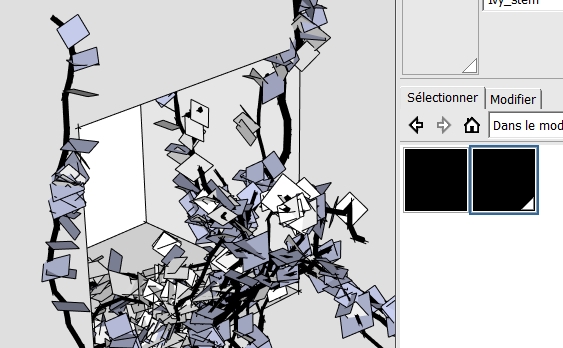
-
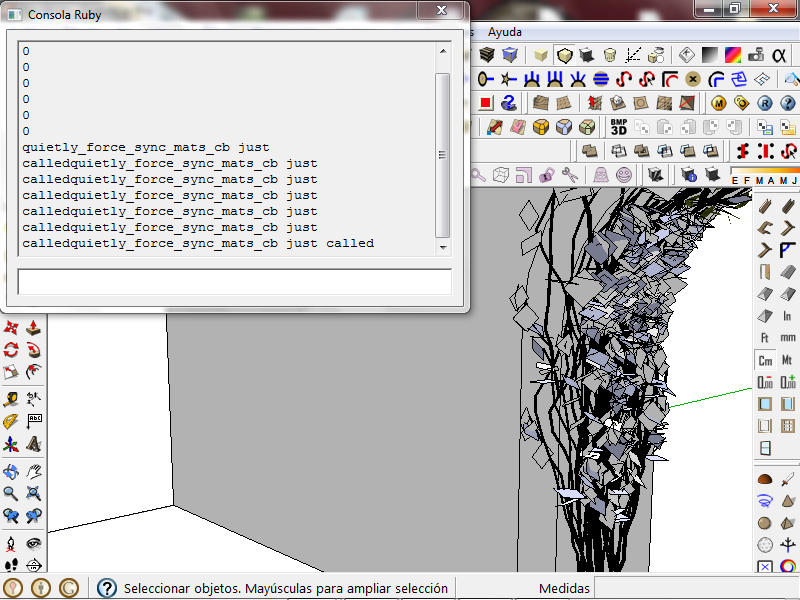
I have the same results.. black stem texture and default texture on the leaves.
-
Me too. Without textures and black faces
-
Thanks for the replies everyone!
@pixero/thomthom/pugz: This is a brilliant idea. This wont be first priority, but will look into it after bug fixes and the mac issues
@oxero/driven: Thank you! Will look at it and hope to release a fix later today (saturday)
@didier/dbalex/gaonirico: Looks like the textures isnt applied to the material... Are you using SU8 (im actually not sure if this is an requirement)? Mac Windows? Any console messages when you start a new model and then starts the plugin?
Thank you for your patience and coops everyone!
Peace
Pierre -
Hi Pierreden,
@unknownuser said:
@didier/dbalex/gaonirico: Are you using SU8 (im actually not sure if this is an requirement)? Mac Windows? Any console messages when you start a new model and then starts the plugin?
I'm using SU8 Pro on Windows XP and 7. No console message at startup.
Maybe there's a problem within the Pdn Materials class/module ?
Keep on the good work !
Regards -
Hi Pierreden. I am using SU8 on Windows 7. Not appears me messages of console when beginning.
-
same as the others: sketchup 8 and windows 7, Thanks for your work on this one, it's getting better and better!
-
I like how fast the plugin is already developing, thanks for the hard work.
Any reason Ivy keeps growing on all my unresolved design spots? Maybe a bug








Hello! It looks like you're interested in this conversation, but you don't have an account yet.
Getting fed up of having to scroll through the same posts each visit? When you register for an account, you'll always come back to exactly where you were before, and choose to be notified of new replies (either via email, or push notification). You'll also be able to save bookmarks and upvote posts to show your appreciation to other community members.
With your input, this post could be even better 💗
Register Login


Advertisement