[Plugin] Sketchup Ivy
-
TIG, thanks for you advice! All fine!
Perhaps you should make the default setting not "0"? -
@maxosmedia said:
TIG, thanks for you advice! All fine!
Perhaps you should make the default setting not "0"?
I'm looking at it right now ! -
This updated version [0.6.8x] is "fool-proofed" !
It prevents you entering zero values etc as settings which could break the code [it usually defaults to 0.1 if < 0.1 etc ]
http://sketchucation.com/pluginstore?pln=SketchupIvy -
Thanks, TIG! Works fine!

-
@tig said:
This updated version [0.6.8x] is "fool-proofed" !
It prevents you entering zero values etc as settings which could break the codeYou meant Full-Proofed right?

-
Hi!
Thanks for that amazing plugintool.
I have skp2015x64, i install de .rbz file with custom>extension..but when i open skp the subfolder menu doesn´t appear, only the Liveivy icon, but don´t work, don´t do anything. Does it works in skp2015?
Thanks a lot!
Jesus. -
@jesgargo said:
Hi!
Thanks for that amazing plugintool.
I have skp2015x64, i install de .rbz file with custom>extension..but when i open skp the subfolder menu doesn´t appear, only the Liveivy icon, but don´t work, don´t do anything. Does it works in skp2015?
Thanks a lot!
Jesus.
Have you installed it properly from the RBZ using SketchUp's Window > Preferences > Extensions > Install... button ?
Was the installation reported as successful ?
Have you restarted SketchUp since then ?Note that it is NOT an Extension - it's just a Plugin - so it is NOT in the Preferences > Extensions list.
It appears in 'Toolbars' list as 'LiveIvy' - activate it if necessary - launch the tool by clicking the one button on its toolbar.
It also appears under the 'Draw' menu as 'Live Ivy Tool', that item also launches the tool...
Follow the instructions in its dialog.
It has different tabs which allow you to choose different Parameters, Ivy Settings, Leaf Types, and its last two tabs are the 'Help' section - guidance on Usage and the Key presses to modify the results.
Although the latest version is now trapped to prevent you completely breaking it - for the avoidance of doubt, the original default settings screen-shots are reprised in this post: http://sketchucation.com/forums/viewtopic.php?p=556406#p556406
-
Wow. This is awesome. Thanks so much.
Two questions:- Maxing "Adhesion" still leaves a significant amount of branches moving away from a wall surface. Is there any way to make the branches stay in contact more? Or to have a may zone that the branches may occupy (say, 6" thick, like real ivy)
- Is it possible to add user-defined jpegs for leaves and bark textures?
-
@blackdogsketch said:
Wow. This is awesome. Thanks so much.
Two questions:- Maxing "Adhesion" still leaves a significant amount of branches moving away from a wall surface. Is there any way to make the branches stay in contact more? Or to have a may zone that the branches may occupy (say, 6" thick, like real ivy)
- Is it possible to add user-defined jpegs for leaves and bark textures?
I only made 'compatibility' revisions to the OP's code...
If you a look at the code in the various files, then you can try adjust a few things and see what happens...
You can add your own leaf component cutouts - based on your own image textures...
Save them as SKP files in the subfolder ..Plugins//LiveIvy/Textures...
They are available when the tool is first used.
The 'stem.jpg' is used for the stalks' textures, so if you replace that with another it changes in your future ivies...
-
Thanks TIG
Sounds like there's no clear method of getting more ivy to "stick" to the wall.
Hey-While I'm here...thank you for all your incredible work for the SU community!
You make my workflow and professional results better. -
Perhaps I missed the option, but is it possible to make branches less angular/zip-zappy? The Quality slider adds only more parallel faces, not perpendicular segments
 I'd like to make ivy looking better at close ups.
EDIT: If there's no option for that, I guess I could try smoothing/subdividing tools.
-
Dude, that plugin is trully amazing! Congratulations!

Sadly, I wasn't able to use it within SU2015. The following is the Ruby error log:Error: #<Encoding::UndefinedConversionError: "\x8D" to UTF-8 in conversion from Windows-1252 to UTF-8>
C:/Users/ÍtallodeAndrade/AppData/Roaming/SketchUp/SketchUp 2015/SketchUp/Plugins/LiveIvy/LiveIvy_tool.rb:10:inexist?' C:/Users/ÍtallodeAndrade/AppData/Roaming/SketchUp/SketchUp 2015/SketchUp/Plugins/LiveIvy/LiveIvy_tool.rb:10:intidyup'
C:/Users/ÍtallodeAndrade/AppData/Roaming/SketchUp/SketchUp 2015/SketchUp/Plugins/LiveIvy/LiveIvy_tool.rb:18:in<module:LiveIvy>' C:/Users/ÍtallodeAndrade/AppData/Roaming/SketchUp/SketchUp 2015/SketchUp/Plugins/LiveIvy/LiveIvy_tool.rb:5:in<top (required)>'
D:/Program Files/SketchUp/SketchUp 2015/Tools/RubyStdLib/rubygems/core_ext/kernel_require.rb:45:inrequire' D:/Program Files/SketchUp/SketchUp 2015/Tools/RubyStdLib/rubygems/core_ext/kernel_require.rb:45:inrequire'
C:/Users/ÍtallodeAndrade/AppData/Roaming/SketchUp/SketchUp 2015/SketchUp/Plugins/LiveIvy.rb:6:in `<top (required)>'I really hope it helps.
Thanks!
-
Thank you !, for this plugins.
Nice work.( i had too these idea a lot of time in the mind,--years--
but i know nothing about Programing-actions).Best regards,
Claudio -
Using Sketchup 2015 and the plugin forms the branches but will not form the leaves at all. When I CTRL + Click no leaves are generated, there are no placemarkers for them either.....

-
First you can select one or more leaves in the Leaves Tab
-
You must select one or more leave types in the dialog... They highlight blue when selected
-
Sorry guys but I have the same problem, After selecting leaves in the tab it will not generate them in sketchup 2015. I have the latest version of the plugin too. I have also reset all the parameters to their default values as suggested by TIG.Any ideas?
-
When you select the Leaves images in the dialog are they highlighted in 'blue frames' [see the image].
One click on it selects it, click on it again to deselect it.
As you click in the model the ivy stems grow [in red lines].
To grow towards the cursor use Alt+click.
To add leaves you Ctrl+click [green stars are added as leaf proxies].
To complete that piece of ivy do a Shift-click...
It is made.
To start new ivy press 'i'
Please read the dialog's Usage and Keys tabs...
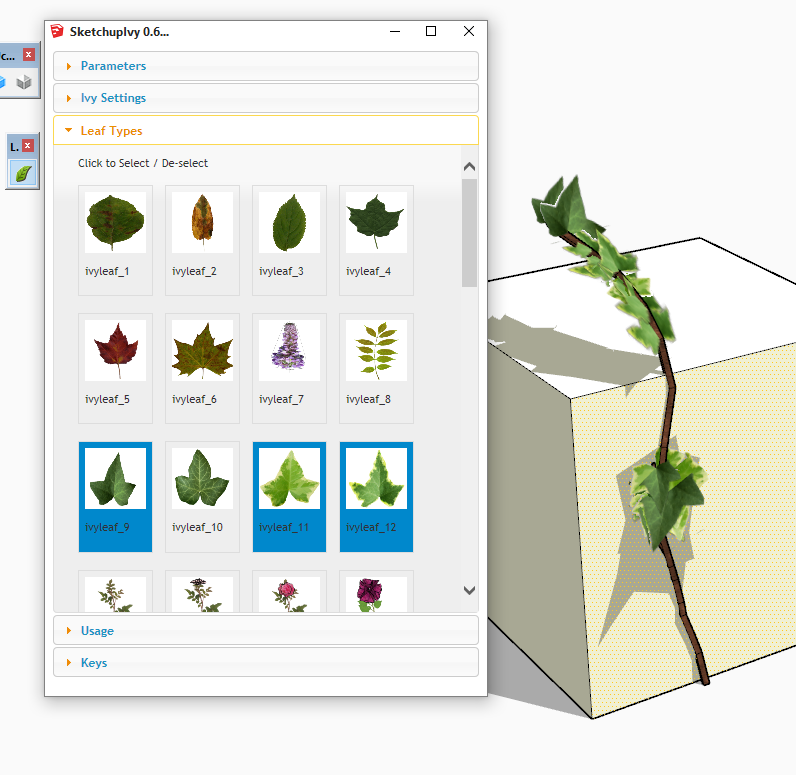
-
I got the plugin to work in sketchup 2015 at last. The problem I found is that for the ivy to work, the faces of the surface where you want it to grow have to be oriented correctly. It will not work if you try it on a reversed face. I hope this help other users as well. Once again many thanks to those involved in its development.
-
Does this plugin still work? All I get is the parameters tab and no other tabs as in the screenshot a few posts above?






Advertisement