[Plugin] Sketchup Ivy
-
@thomthom said:
Have you taken into account the transformation of the group? If you pick a point on a face inside a group you get a point for the current context, and then you need to apply the transformation for the group(s) which the face is within.
No I haven't. If i make a single face and grows an ivy on it, without grouping the face first, there's no problem at all. But if i group the face before growing an ivy on it, adhesion doesn't work, a consequence of classify_point not returning 1. Unless a transformation is applied to a group by the very act of grouping, transformations itself cant explain this behaviour.
Can it be that Sketchup interprets this situation as if the point not being on the face itself, but "on" the group?

@thomthom said:
I'm not sure if Selection Toys does it 100% correct. I can have a look in the code and compare against Vertex Tools (which I have tested on Windows and OSX).
PM

-
@pierreden said:
No I haven't. If i make a single face and grows an ivy on it, without grouping the face first, there's no problem at all. But if i group the face before growing an ivy on it, adhesion doesn't work, a consequence of classify_point not returning 1. Unless a transformation is applied to a group by the very act of grouping, transformations itself cant explain this behaviour.
I couldn't find
classify_pointanywhere in the code... not in the current version?How do you obtain the point you test against
classify_point, anInputPoint? -
@thomthom said:
@pierreden said:
No I haven't. If i make a single face and grows an ivy on it, without grouping the face first, there's no problem at all. But if i group the face before growing an ivy on it, adhesion doesn't work, a consequence of classify_point not returning 1. Unless a transformation is applied to a group by the very act of grouping, transformations itself cant explain this behaviour.
I couldn't find
classify_pointanywhere in the code... not in the current version?How do you obtain the point you test against
classify_point, anInputPoint?Look in livevector_core.rb. line 187.
classify_point is used to find the closest face to a new node on a branch, so the points tested against classify_point is the last point on each branch.
-
When you test your point against a face nested inside groups/faces you must trasnform that point to the co-ordinates of the face's containing face.
So if you have a face nested inside a
Group1 > ComponentInstance1 > Face, then you must add up the transformation ofGroup1andComponentInstance1and apply that to the point to send toface.classifypoint. -
@thomthom said:
When you test your point against a face nested inside groups/faces you must trasnform that point to the co-ordinates of the face's containing face.
So if you have a face nested inside a
Group1 > ComponentInstance1 > Face, then you must add up the transformation ofGroup1andComponentInstance1and apply that to the point to send toface.classifypoint.Thank you, get it! But i dont understand what transformations are applied to a new group (aka what happens when you group entities)?
-
When you group, or make a component, out of existing entities they get their own local co-ordinates within the new group/component. (Within the
ComponentDefinition)
The group/component is inserted at the bottom front left corner of the boundingbox of the selected entities. To the grouped entities, this point becomes [0,0,0].
(Though, when you add a group via Ruby API I think the group's origin is set to the current context's origin.) -
Here is an English Ivy leaf that works well.

-
This is probably a ridiculously stupied question but how do I get the ivy leafs to actually show up?! What am I doing wrong?!
-
CTRL click to bring up the red "+" symbols to indicate where the leaves will go and then SHIFT click to apply and create the leaves.
Instructions are in the last section of the User Interface.
-
i dont knoe why i have this
Error Loading File LiveIvy.rb
Can't insert empty component. -
nomeradona
go to textures folder and convert skp files to version 7. That worked for me... -
i need help with ivy
why my ivy ( picture 01) is not same as this good ivy ( picture 02)
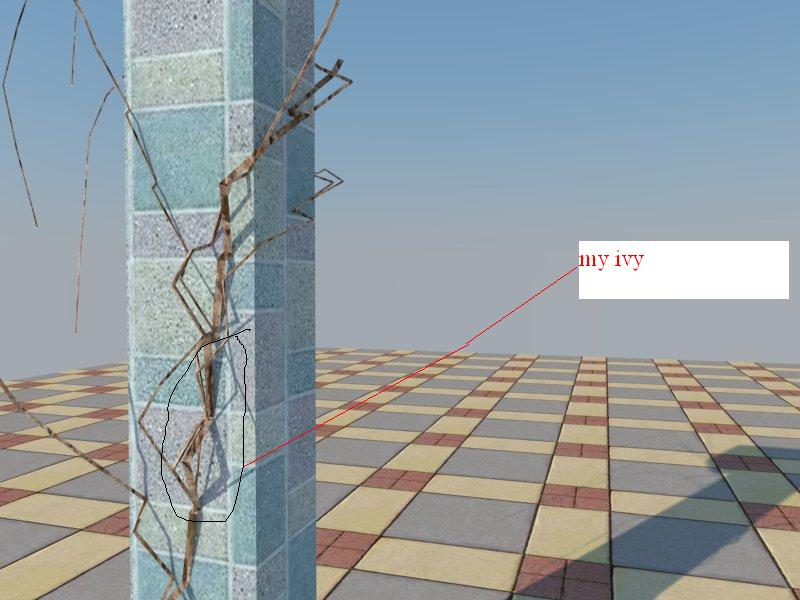

-
thanks srx. good point. iam actually using su7
-
@srx said:
When I start SU it begins with this:
Error Loading File LiveIvy.rb
Can't insert empty component.This is solved with replacing version 8 leaf components with version 7 in Textures folder...
but still not working:Error: #<NoMethodError: undefined method
-' for nil:NilClass> C:/Program Files (x86)/Google/Google SketchUp 7/Plugins/LiveIvy/LiveIvy_tool.rb:241:inbirth_stem'
C:/Program Files (x86)/Google/Google SketchUp 7/Plugins/LiveIvy/LiveIvy_tool.rb:234:ineach' C:/Program Files (x86)/Google/Google SketchUp 7/Plugins/LiveIvy/LiveIvy_tool.rb:234:inbirth_stem'
C:/Program Files (x86)/Google/Google SketchUp 7/Plugins/LiveIvy/LiveIvy_tool.rb:223:inbirth' C:/Program Files (x86)/Google/Google SketchUp 7/Plugins/LiveIvy/LiveIvy_tool.rb:99:inonLButtonDown'
C:/Program Files (x86)/Google/Google SketchUp 7/Plugins/LiveIvy/LiveIvy_tool.rb:234me to only version 5.04 worked a bit untill the shift click part
i got this in SU 6Error; #<ArgumentError; wrong number of arguments (2 for 1)> /Library/Application Support/Google SketchUp 6/SketchUp/Plugins/LiveIvy/LiveIvy_tool.rb;233;in `start_operation' /Library/Application Support/Google SketchUp 6/SketchUp/Plugins/LiveIvy/LiveIvy_tool.rb;233;in `birth_stem' /Library/Application Support/Google SketchUp 6/SketchUp/Plugins/LiveIvy/LiveIvy_tool.rb;223;in `birth' /Library/Application Support/Google SketchUp 6/SketchUp/Plugins/LiveIvy/LiveIvy_tool.rb;98;in `onLButtonDown' /Library/Application Support/Google SketchUp 6/SketchUp/Plugins/LiveIvy/LiveIvy_tool.rb;233 -
I try to install the last two version but i still have the same problem.
This message appears when i open sketchup: Error Loading File LiveIvy.rb Can't insert empty component.
Than i'm able to use correctly the plug-in untill the last step.
If i hold click+shift nothing happens. It the same when i only click (generate ivy)Can you help me?
thanks a lot. Very good work, great idea
-
Shift+Click still not work on My SketchupIvy.0.6.3.beta

is there something i should do beside waiting for the next release? -
@rabba89 said:
I try to install the last two version but i still have the same problem.
This message appears when i open sketchup: Error Loading File LiveIvy.rb Can't insert empty component.
Than i'm able to use correctly the plug-in untill the last step.
If i hold click+shift nothing happens. It the same when i only click (generate ivy)Can you help me?
thanks a lot. Very good work, great idearabba the components inside the texture pluggin two of them were done in sketchup 8. download the su8 free and resaved the file to su7 or su 6 depends on what version you are using,
-
just to say a thousand thanx to you Pierre
-
hi guyz
how is it do this plugin ?
I downloaded it but can not use it
-
There are a number of hiccups in each new Ruby that need to be sorted out. I'm sure that will happen. With many thanks to Pierreden for taking on this task.

I have only 2 plugins currently installed, Vray demo, and Ivy under SU8. I also resaved the 3 ivyleaf_x.skp file to my SU8 version.
v.0.5.4 : only produces one statement in the Ruby Console after it installs the Ivy leaves.
quietly_force_sync_mats_cb just calledbut otherwise works flawlessly.
v.0.6.2.beta : after 2 clicks, the following is noted in the Ruby Console.
(eval);1; warning; Float 0.05 out of range
Error; #<TypeError; nil can't be coerced into Fixnum>
C;/Program Files (x86)/Google/Google SketchUp 8/Plugins/LiveIvy/LiveIvy_branch.rb;20;in `-'
C;/Program Files (x86)/Google/Google SketchUp 8/Plugins/LiveIvy/LiveIvy_branch.rb;20;in `initialize'
C;/Program Files (x86)/Google/Google SketchUp 8/Plugins/LiveIvy/LiveIvy_branch.rb;49;in `new'
C;/Program Files (x86)/Google/Google SketchUp 8/Plugins/LiveIvy/LiveIvy_branch.rb;49;in `grow_stem'
C;/Program Files (x86)/Google/Google SketchUp 8/Plugins/LiveIvy/LiveIvy_branch.rb;38;in `each'
C;/Program Files (x86)/Google/Google SketchUp 8/Plugins/LiveIvy/LiveIvy_branch.rb;38;in `grow_stem'
C;/Program Files (x86)/Google/Google SketchUp 8/Plugins/LiveIvy/LiveIvy_tool.rb;203;in `grow_stem'
C;/Program Files (x86)/Google/Google SketchUp 8/Plugins/LiveIvy/LiveIvy_tool.rb;202;in `each'
C;/Program Files (x86)/Google/Google SketchUp 8/Plugins/LiveIvy/LiveIvy_tool.rb;202;in `grow_stem'
C;/Program Files (x86)/Google/Google SketchUp 8/Plugins/LiveIvy/LiveIvy_tool.rb;201;in `times'
C;/Program Files (x86)/Google/Google SketchUp 8/Plugins/LiveIvy/LiveIvy_tool.rb;201;in `grow_stem'
C;/Program Files (x86)/Google/Google SketchUp 8/Plugins/LiveIvy/LiveIvy_tool.rb;96;in `onLButtonDown'
crashed!
v.0.6.3.beta : after 2 clicks, the following is noted in the Ruby Console.
(eval);1; warning; Float 0.05 out of range
Error; #<TypeError; nil can't be coerced into Fixnum>
C;/Program Files (x86)/Google/Google SketchUp 8/Plugins/LiveIvy/LiveIvy_branch.rb;20;in `-'
C;/Program Files (x86)/Google/Google SketchUp 8/Plugins/LiveIvy/LiveIvy_branch.rb;20;in `initialize'
C;/Program Files (x86)/Google/Google SketchUp 8/Plugins/LiveIvy/LiveIvy_branch.rb;49;in `new'
C;/Program Files (x86)/Google/Google SketchUp 8/Plugins/LiveIvy/LiveIvy_branch.rb;49;in `grow_stem'
C;/Program Files (x86)/Google/Google SketchUp 8/Plugins/LiveIvy/LiveIvy_branch.rb;38;in `each'
C;/Program Files (x86)/Google/Google SketchUp 8/Plugins/LiveIvy/LiveIvy_branch.rb;38;in `grow_stem'
C;/Program Files (x86)/Google/Google SketchUp 8/Plugins/LiveIvy/LiveIvy_tool.rb;204;in `grow_stem'
C;/Program Files (x86)/Google/Google SketchUp 8/Plugins/LiveIvy/LiveIvy_tool.rb;203;in `each'
C;/Program Files (x86)/Google/Google SketchUp 8/Plugins/LiveIvy/LiveIvy_tool.rb;203;in `grow_stem'
C;/Program Files (x86)/Google/Google SketchUp 8/Plugins/LiveIvy/LiveIvy_tool.rb;202;in `times'
C;/Program Files (x86)/Google/Google SketchUp 8/Plugins/LiveIvy/LiveIvy_tool.rb;202;in `grow_stem'
C;/Program Files (x86)/Google/Google SketchUp 8/Plugins/LiveIvy/LiveIvy_tool.rb;90;in `onLButtonUp'
crashed!
cheers










Advertisement