sketchucation logo sketchucation
    • 登入
    Oops, your profile's looking a bit empty! To help us tailor your experience, please fill in key details like your SketchUp version, skill level, operating system, and more. Update and save your info on your profile page today!
    ⚠️ Important | Libfredo 15.6b introduces important bugfixes for Fredo's Extensions Update

    Hornbeam hedges - SketchUp 8 model

    已排程 已置頂 已鎖定 已移動 SketchUp Components, Materials & Styles
    sketchup
    30 貼文 22 Posters 14.8k 瀏覽 22 Watching
    正在載入更多貼文
    • 從舊到新
    • 從新到舊
    • 最多點贊
    回覆
    • 在新貼文中回覆
    登入後回覆
    此主題已被刪除。只有擁有主題管理權限的使用者可以查看。
    • PixeroP 離線
      Pixero
      最後由 編輯

      Here is a couple of hornbeam hedges I made.
      -Bare
      -Young untrimmed
      -Mature trimmed one layer
      -Mature trimmed two layers (for less see through but heavier.)
      Sketchup 8.
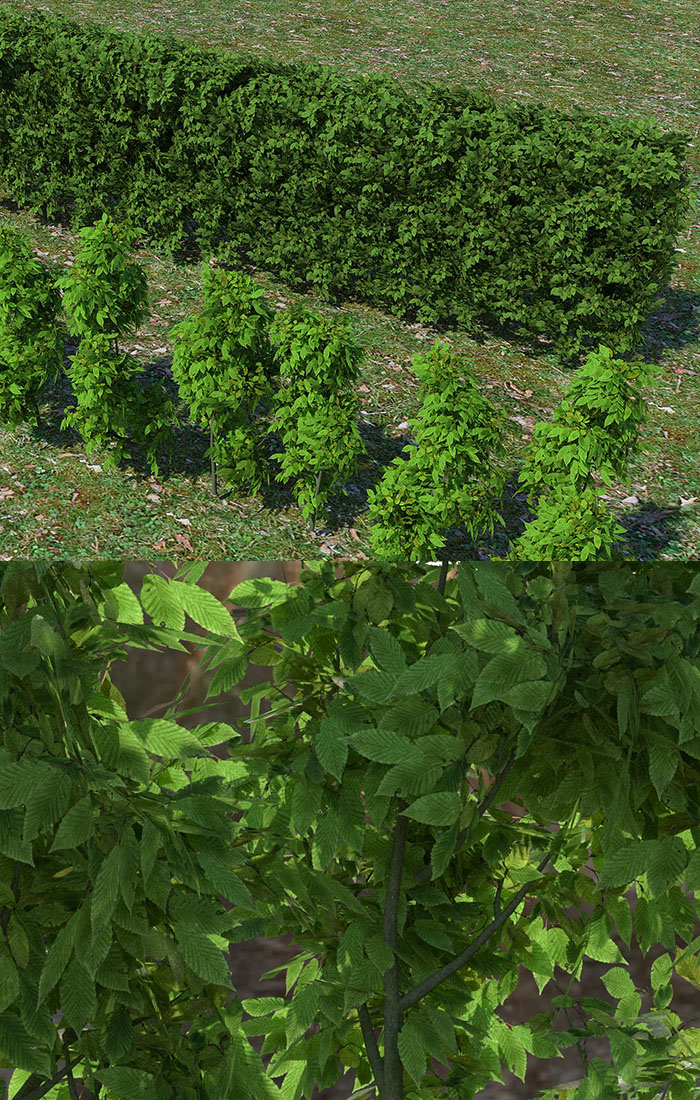
      Hornbeamhedge_by_Pixero.jpg

      For the technique I used for the trimmed hedge see my post in this topic: http://www.thearender.com/forum/viewtopic.php?f=21&t=5352
      The randomizer script is my modified version of Jim Foltz randomize_tin script.
      All credits to him. I just added displacment in x, y as well as z axis. Renamed to avoid naming conflicts with both installed. Put script in SketchUp's plugins folder for installation.
      Remember to triangulate before randomizing.
      randomizer.rb

      And here is the skp file zipped.
      http://www.filesonic.com/file/499537714

      Enjoy!

      1 條回覆 最後回覆 回覆 引用 0
      • daleD 離線
        dale
        最後由 編輯

        I've been following this on the Thea site, and I think this is the most natural, real plant I've seen modeled in SketchUp.
        Plus a very useful Tut on how you accomplished this.
        Thanks so much for sharing.
        Cheers

        Just monkeying around....like Monsanto

        1 條回覆 最後回覆 回覆 引用 0
        • R 離線
          rspierenburg
          最後由 編輯

          Pixero,
          These are AMAZING! I've been trying so so so so hard to make half decent looking box-hedges and they always looked very ugly and unrealistic. But this blows my mind away! Thanks.

          Rob

          1 條回覆 最後回覆 回覆 引用 0
          • thomthomT 離線
            thomthom
            最後由 編輯

            This is looking very nice! 👍

            Thomas Thomassen — SketchUp Monkey & Coding addict
            List of my plugins and link to the CookieWare fund

            1 條回覆 最後回覆 回覆 引用 0
            • honoluludesktopH 離線
              honoluludesktop
              最後由 編輯

              Agreed, very nice. Pixero, do you have links to hedge, and bushes that can be used at the level of a four acre overall site plan view?

              1 條回覆 最後回覆 回覆 引用 0
              • bazB 離線
                baz
                最後由 編輯

                Thanks Pixero, great stuff.
                baz

                1 條回覆 最後回覆 回覆 引用 0
                • P 離線
                  pibuz
                  最後由 編輯

                  Pixero, this is really a nice hedge you're giving to us!
                  I hope I can someday return the favour, I'm working a little with trees in treeD and sketchup at the moment, so I think I'm gonna share them as well as a big thank you!

                  WEB (ita) - https://filipposcarso.wixsite.com/ordinentropico

                  1 條回覆 最後回覆 回覆 引用 0
                  • broomstickB 離線
                    broomstick
                    最後由 編輯

                    Most impressive work. I'll try to use them with vray also, and see if they work 😄

                    1 條回覆 最後回覆 回覆 引用 0
                    • EarthMoverE 離線
                      EarthMover
                      最後由 編輯

                      Been thinking about making more 3D plants. Thanks for the insight and sharing your model. Agreed on the best I've seen out of Sketchup. 👍 👍 👍

                      3D Artist at Clearstory 3D Imaging
                      Guide Tool at Winning With Sketchup
                      Content Creator at Skapeup

                      1 條回覆 最後回覆 回覆 引用 0
                      • G 離線
                        goodstuff64
                        最後由 編輯

                        Hi all,
                        a complete novice to most people on this forum although i've used SU since v3. I need to build a 'green wall' and the shape that Pixero had created would be a great start, but get unstuck once i try and apply the randomizer. i've got a triangulated box but aboslutely nothing happens when i try the randomizer. i'm obviously doing something wrong, but what?

                        1 條回覆 最後回覆 回覆 引用 0
                        • boofredlayB 離線
                          boofredlay
                          最後由 編輯

                          Thanks again for these Pixero.

                          http://www.coroflot.com/boofredlay

                          1 條回覆 最後回覆 回覆 引用 0
                          • L 離線
                            lapx
                            最後由 編輯

                            Pixero,

                            What command did you use to get your rectangle to a tin map. Is there such a way just by selecting a face or multiple faces.

                            1 條回覆 最後回覆 回覆 引用 0
                            • R 離線
                              rvdkruk
                              最後由 編輯

                              download link is dead. Anyone have alternative?

                              1 條回覆 最後回覆 回覆 引用 0
                              • brookefoxB 離線
                                brookefox
                                最後由 編輯

                                @rvdkruk said:

                                download link is dead. Anyone have alternative?

                                Meaning for the model, as in:

                                @unknownuser said:

                                All sharing functionality on FileSonic is now disabled. Our service can only be used to upload and retrieve files that you have uploaded personally.

                                If this file belongs to you, please login to download it directly from your file manager.

                                ~ Brooke

                                1 條回覆 最後回覆 回覆 引用 0
                                • EdsonE 離線
                                  Edson
                                  最後由 編輯

                                  I am afraid the link for the skp file is no longer valid for other than you.

                                  Screen shot 2012-03-14 at 8.28.37 AM.png

                                  edson mahfuz, architect| porto alegre • brasil
                                  http://www.mahfuz.arq.br

                                  1 條回覆 最後回覆 回覆 引用 0
                                  • RichardR 離線
                                    Richard
                                    最後由 編輯

                                    Yeah wow this hedge is amazing!!!!!!

                                    I'd love to find the file too, as I have one of those rare for us here, classical renders to do and hedges are definately the call for the landscape. If anyone who had this file originally - it would be great if you could post! Please and a thanks well in advance!

                                    [BUILTBRAND.COM.AU](http://builtbrand.com.au/)

                                    1 條回覆 最後回覆 回覆 引用 0
                                    • bazB 離線
                                      baz
                                      最後由 編輯

                                      hedge 1 layer


                                      Hornbeam-hedge-1layer.zip

                                      1 條回覆 最後回覆 回覆 引用 0
                                      • bazB 離線
                                        baz
                                        最後由 編輯

                                        hedge 2 layers


                                        Hornbeam-hedge-2 layer.zip

                                        1 條回覆 最後回覆 回覆 引用 0
                                        • bazB 離線
                                          baz
                                          最後由 編輯

                                          hedge, young, untrimmed
                                          (hope you can show us the render Richard).


                                          Hornbeam-hedge-young-untrimmed.skp

                                          1 條回覆 最後回覆 回覆 引用 0
                                          • bazB 離線
                                            baz
                                            最後由 編輯

                                            Here ya go Richard.
                                            edit: whoops didnt upload, too big, will try again as three separate files.

                                            1 條回覆 最後回覆 回覆 引用 0
                                            • 1
                                            • 2
                                            • 1 / 2
                                            • 第一個貼文
                                              最後的貼文
                                            Buy SketchPlus
                                            Buy SUbD
                                            Buy WrapR
                                            Buy eBook
                                            Buy Modelur
                                            Buy Vertex Tools
                                            Buy SketchCuisine
                                            Buy FormFonts

                                            Advertisement









