sketchucation logo sketchucation
    • Login
    Oops, your profile's looking a bit empty! To help us tailor your experience, please fill in key details like your SketchUp version, skill level, operating system, and more. Update and save your info on your profile page today!
    Mac User? | Join the Rayscaper Beta for Mac Learn More

    [Plugin]T2H_BuildingStructureTools2.2.4 in20141207

    Scheduled Pinned Locked Moved Plugins
    337 Posts 108 Posters 544.9k Views 108 Watching
    Loading More Posts
    • Oldest to Newest
    • Newest to Oldest
    • Most Votes
    Reply
    • Reply as topic
    Log in to reply
    This topic has been deleted. Only users with topic management privileges can see it.
    • R
      Ryucarlos
      last edited by

      esta merda não estar completo com,o o da video aula

      1 Reply Last reply
      Reply Quote 0
      • E
        Esense3d
        last edited by

        Hello
        The Newest German Translation
        Roland F. Swiss

        and Thank you very much


        German Files Feb 2015

        1 Reply Last reply
        Reply Quote 0
        • A
          AcesHigh
          last edited by

          It simply doesn´t work for me in Sketchup 2015.

          nothing happens when I click the Show Tools Icon (the one with the magnifying glass).

          In fact, nothing happens when I click any icon, except the "Profile Schema" icon.

          ps: nothing changes if I use the "Change the Profiles List File" option in the extensions menu. I can choose the profiles file, but still no icon of the tools functions...

          edit: it worked on Sketchup 8, which I still have installed.

          1 Reply Last reply
          Reply Quote 0
          • C
            cadmunkey
            last edited by

            Hi,
            run into a problem, not sure if its 2105 specific as I no longer have 14 and before installed.
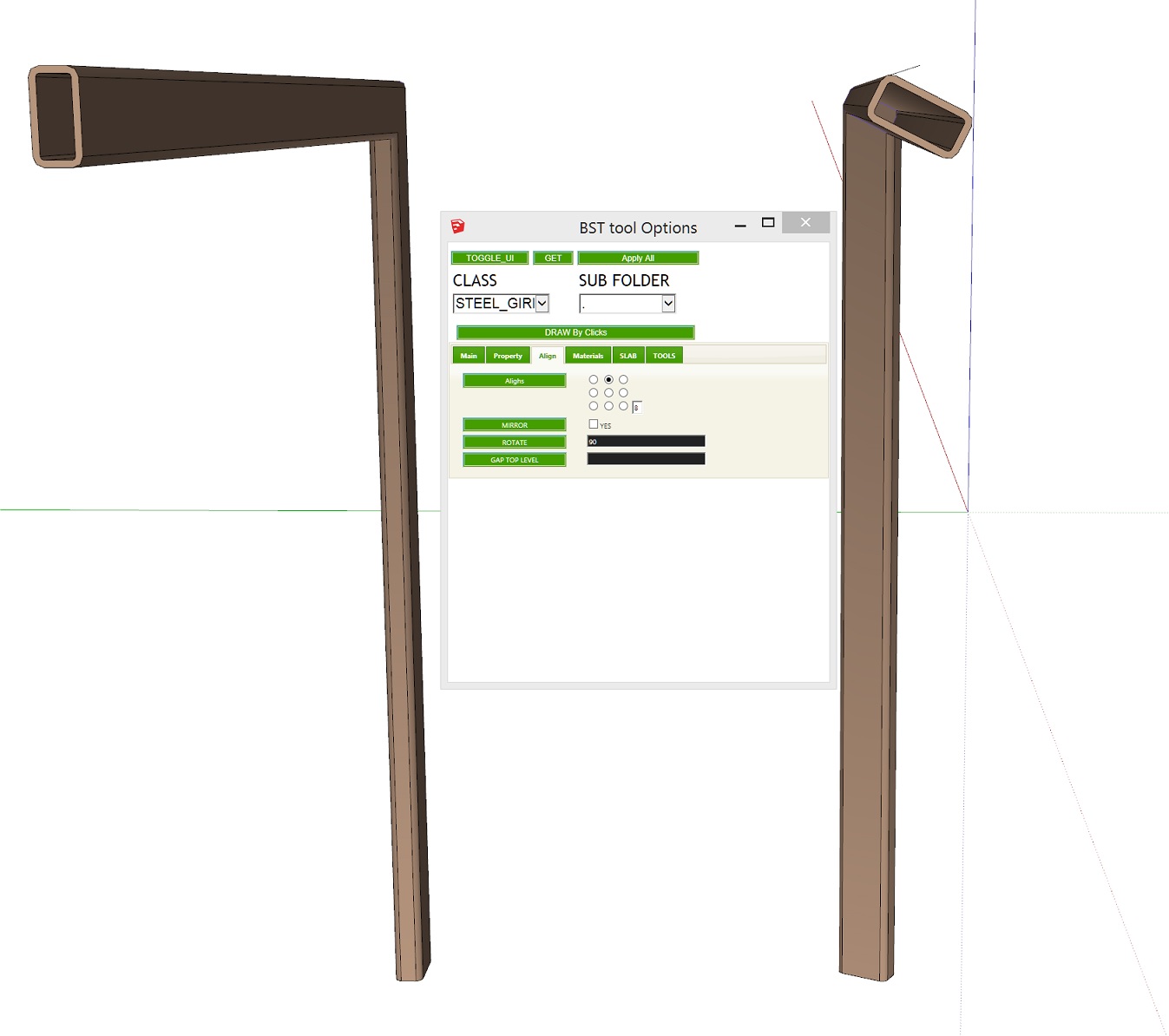
            When I have the rotation set to default (0) the member follows the line path fine (on the left in the picture).
            On the right, I wanted the RHS to be rotated about 90 degrees, so typed '90' in the rotation box but when I apply it I get something more like 35 degrees. I've tried with different inputs but the output never corresponds to the angle I have chosen. Any ideas?

            2.jpg

            1 Reply Last reply
            Reply Quote 0
            • C
              cadmunkey
              last edited by

              No one come across this issue before?

              1 Reply Last reply
              Reply Quote 0
              • R
                rodman100
                last edited by

                I noticed this happens in SU2015 also.

                1 Reply Last reply
                Reply Quote 0
                • D
                  driven
                  last edited by

                  I don't have it installed, but what happens if you enter radians?
                  1.57079633
                  john

                  learn from the mistakes of others, you may not live long enough to make them all yourself...

                  1 Reply Last reply
                  Reply Quote 0
                  • C
                    cadmunkey
                    last edited by

                    @driven said:

                    I don't have it installed, but what happens if you enter radians?
                    1.57079633
                    john

                    Great, that works! What's going on then?

                    1 Reply Last reply
                    Reply Quote 0
                    • D
                      driven
                      last edited by

                      the way ruby handles radians to degrees must have changed or you have another plugin that is changing the definition and it's effecting this one...

                      I'll see if I can find any thing...
                      john

                      learn from the mistakes of others, you may not live long enough to make them all yourself...

                      1 Reply Last reply
                      Reply Quote 0
                      • C
                        cadmunkey
                        last edited by

                        @driven said:

                        the way ruby handles radians to degrees must have changed or you have another plugin that is changing the definition and it's effecting this one...

                        I'll see if I can find any thing...
                        john

                        Cheers, really appreciate your help.

                        1 Reply Last reply
                        Reply Quote 0
                        • R
                          rodman100
                          last edited by

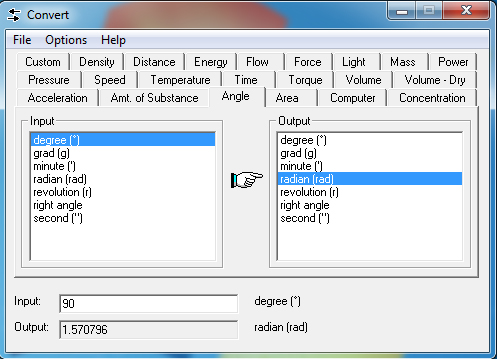
                          Thanks driven, I should have spotted that! (one radian = 180/π degrees). By the way Josh Madison has a great little free prog that everyone should have on their Desktop...
                          https://joshmadison.com/convert-for-windows/

                          Convert.jpg

                          1 Reply Last reply
                          Reply Quote 0
                          • C
                            cadmunkey
                            last edited by

                            @rodman100 said:

                            Thanks driven, I should have spotted that! (one radian = 180/π degrees). By the way Josh Madison has a great little free prog that everyone should have on their Desktop...

                            Wow, I still have the version from years ago that was named MConvert 😛
                            I keep it on a USB stick as I've always been afraid of losing it as I could never find it online anymore. Thanks for the link!

                            1 Reply Last reply
                            Reply Quote 0
                            • A
                              ahdims
                              last edited by

                              great tool and works well, however, when i produce a take off table I select the entity ID and there is no identification (highlighting) of the item within the model.
                              Do i need to have a particular switch turned on

                              1 Reply Last reply
                              Reply Quote 0
                              • S
                                Sir
                                last edited by

                                @krisidious said:

                                nice improvements... That wall tool looks nice. Can it possibly do curved walls? or transform lines into walls?

                                I would also like to draw curved walls with this - could we select a arc then apply the wall type?

                                1 Reply Last reply
                                Reply Quote 0
                                • D
                                  diredjo
                                  last edited by

                                  @cadmunkey said:

                                  Hi,
                                  run into a problem, not sure if its 2105 specific as I no longer have 14 and before installed.
                                  When I have the rotation set to default (0) the member follows the line path fine (on the left in the picture).
                                  On the right, I wanted the RHS to be rotated about 90 degrees, so typed '90' in the rotation box but when I apply it I get something more like 35 degrees. I've tried with different inputs but the output never corresponds to the angle I have chosen. Any ideas?

                                  i had similar problem before, input required in radians not in degrees.

                                  90deg = 1.570796326795rad
                                  30deg = 0.610865238198

                                  it will works as expected,

                                  1 Reply Last reply
                                  Reply Quote 0
                                  • D
                                    diredjo
                                    last edited by

                                    hi all,

                                    is anyone has plugin files of early version (V0.56).

                                    helps are much appreciates

                                    1 Reply Last reply
                                    Reply Quote 0
                                    • D
                                      Dikshavarma
                                      last edited by

                                      I was facing the same issue thanks for the reply it has helped me a lot.

                                      1 Reply Last reply
                                      Reply Quote 0
                                      • C
                                        Conquer @tak2hata
                                        last edited by

                                        @tak2hata T2H_BuildingStructureTools2.2.4 plugin does not work in Sketchup 2025!!!!

                                        1 Reply Last reply
                                        Reply Quote 0
                                        • TIGT
                                          TIG Moderator
                                          last edited by

                                          His tools are no longer supported.
                                          Sadly he died some time ago...

                                          TIG

                                          1 Reply Last reply 😞
                                          Reply Quote 0
                                          • Rich O BrienR
                                            Rich O Brien Moderator
                                            last edited by

                                            @Conquer

                                            Building Structure Tools 2.2.5 is available with the error about File.exists resolved.

                                            Download the free D'oh Book for SketchUp 📖

                                            1 Reply Last reply
                                            Reply Quote 0

                                            Hello! It looks like you're interested in this conversation, but you don't have an account yet.

                                            Getting fed up of having to scroll through the same posts each visit? When you register for an account, you'll always come back to exactly where you were before, and choose to be notified of new replies (either via email, or push notification). You'll also be able to save bookmarks and upvote posts to show your appreciation to other community members.

                                            With your input, this post could be even better 💗

                                            Register Login
                                            • 1
                                            • 2
                                            • 3
                                            • 4
                                            • 5
                                            • 16
                                            • 17
                                            • 1 / 17
                                            • First post
                                              Last post
                                            Buy SketchPlus
                                            Buy SUbD
                                            Buy WrapR
                                            Buy eBook
                                            Buy Modelur
                                            Buy Vertex Tools
                                            Buy SketchCuisine
                                            Buy FormFonts

                                            Advertisement
