sketchucation logo sketchucation
    • 登入
    Oops, your profile's looking a bit empty! To help us tailor your experience, please fill in key details like your SketchUp version, skill level, operating system, and more. Update and save your info on your profile page today!
    🔌 Smart Spline | Fluid way to handle splines for furniture design and complex structures. Download

    [Plugin]T2H_BuildingStructureTools2.2.4 in20141207

    已排程 已置頂 已鎖定 已移動 Plugins
    337 貼文 108 Posters 476.6k 瀏覽 108 Watching
    正在載入更多貼文
    • 從舊到新
    • 從新到舊
    • 最多點贊
    回覆
    • 在新貼文中回覆
    登入後回覆
    此主題已被刪除。只有擁有主題管理權限的使用者可以查看。
    • T 離線
      tak2hata
      最後由 編輯

      Hi,Andy and Sumaster and vilcoyote57 and everyone.

      I update this to version 1.9.5.

      I am terribly sorry for keeping you waiting.
      I was too busy,So I can not test the problem.

      I guess the problem about showing dialogs in Sketchup2013.

      So This version is test release.

      Please try this.

      Thanks.


      by TAK2HATA

      1 條回覆 最後回覆 回覆 引用 0
      • sumasterS 離線
        sumaster
        最後由 編輯

        Hello Tak2hata sir,

        Thanks for this release . . . .
        I will check this release and update how it works . . . .

        Thanks

        Thank you,
        SUmaster

        1 條回覆 最後回覆 回覆 引用 0
        • sumasterS 離線
          sumaster
          最後由 編輯

          Hello tak2hata,

          the html is not load correctly like previous version different Tab in html . . . . .

          Thank you,
          SUmaster

          1 條回覆 最後回覆 回覆 引用 0
          • S 離線
            setyabudi73
            最後由 編輯

            tak2hata , how can i use your newest plugin bst 1.95. when i install in sketchup 2013, it can load data from pflist. what can i do to solve that problem. tks

            1 條回覆 最後回覆 回覆 引用 0
            • T 離線
              tak2hata
              最後由 編輯

              @setyabudi73 said:

              tak2hata , how can i use your newest plugin bst 1.95. when i install in sketchup 2013, it can load data from pflist. what can i do to solve that problem. tks

              Hi,setyabudi.
              Please download pflist csv file from top of this thread.
              http://sketchucation.com/forums/viewtopic.php?f=323&t=35798#p315482

              Hi,Sumaster.

              @sumaster said:

              the html is not load correctly like previous version different Tab in html . . . . .

              This image is difficult for me.

              I need the detail of your problem.
              Please show your ruby console.
              And start BST.
              Copy and paste the error message ,if there is any error message in ruby console.

              When there is no error,Please tell me your installed folder for this plugin.
              And capture the screen shot of the different tab.


              by TAK2HATA

              1 條回覆 最後回覆 回覆 引用 0
              • S 離線
                setyabudi73
                最後由 編輯

                Hallo tak2hata
                thank you for your attention in my problem loading pflist on BST 1.95, but that is not solve my problem. Still blank when i try load from BST. If you don't mind please help me . Like your plug in very much since BST 1.2. Thank you

                1 條回覆 最後回覆 回覆 引用 0
                • C 離線
                  cadmunkey
                  最後由 編輯

                  Hi tak2hata, do you have a donate button anywhere? I get a lot of use out of this great tool and feel you deserve a reward for your time and effort. Many thanks.

                  1 條回覆 最後回覆 回覆 引用 0
                  • T 離線
                    tak2hata
                    最後由 編輯

                    @setyabudi73 said:

                    Hallo tak2hata
                    thank you for your attention in my problem loading pflist on BST 1.95, but that is not solve my problem. Still blank when i try load from BST. If you don't mind please help me . Like your plug in very much since BST 1.2. Thank you

                    Hi,setyabudi73.
                    I can not watch your "Still blank".
                    You mean the Webdialog is blank? or Listbox is blank? or Table editor is blank.
                    Please capture the screen of the webdialog of your sketchup.

                    And please show ruby console from windows menu in sketchup.
                    And start the BST.
                    Please copy the message on the ruby console,if error message was shown in ruby console.
                    And post the paste here.

                    and I want to know your pflist file path if I could.
                    and your OS is Windows or Mac.

                    Please tell me.
                    I should consider well about your problem.

                    @cadmunkey said:

                    Hi tak2hata, do you have a donate button anywhere? I get a lot of use out of this great tool and feel you deserve a reward for your time and effort. Many thanks.

                    Hi,Cadmunkey.
                    Thanks for your thanks.
                    I do not have donate button.
                    I get a mug of beer each month from youtube and adsense.
                    It is my good reward.

                    Thanks!


                    by TAK2HATA

                    1 條回覆 最後回覆 回覆 引用 0
                    • fariborz110F 離線
                      fariborz110
                      最後由 編輯

                      It's Perfect!THX

                      1 條回覆 最後回覆 回覆 引用 0
                      • M 離線
                        manel_91
                        最後由 編輯

                        Thanks a lot! It's very useful!

                        1 條回覆 最後回覆 回覆 引用 0
                        • H 離線
                          hkbauing
                          最後由 編輯

                          a simple question: how to use the lang_de.txt?

                          1 條回覆 最後回覆 回覆 引用 0
                          • facerF 離線
                            facer
                            最後由 編輯

                            The UK_pflistAC file does not show list of steel

                            SketchupMaker 2014
                            W7 operating system

                            File location for UK_pflistAC is:
                            Documents\Sketchup_Maker_2014\UK_pflistAC
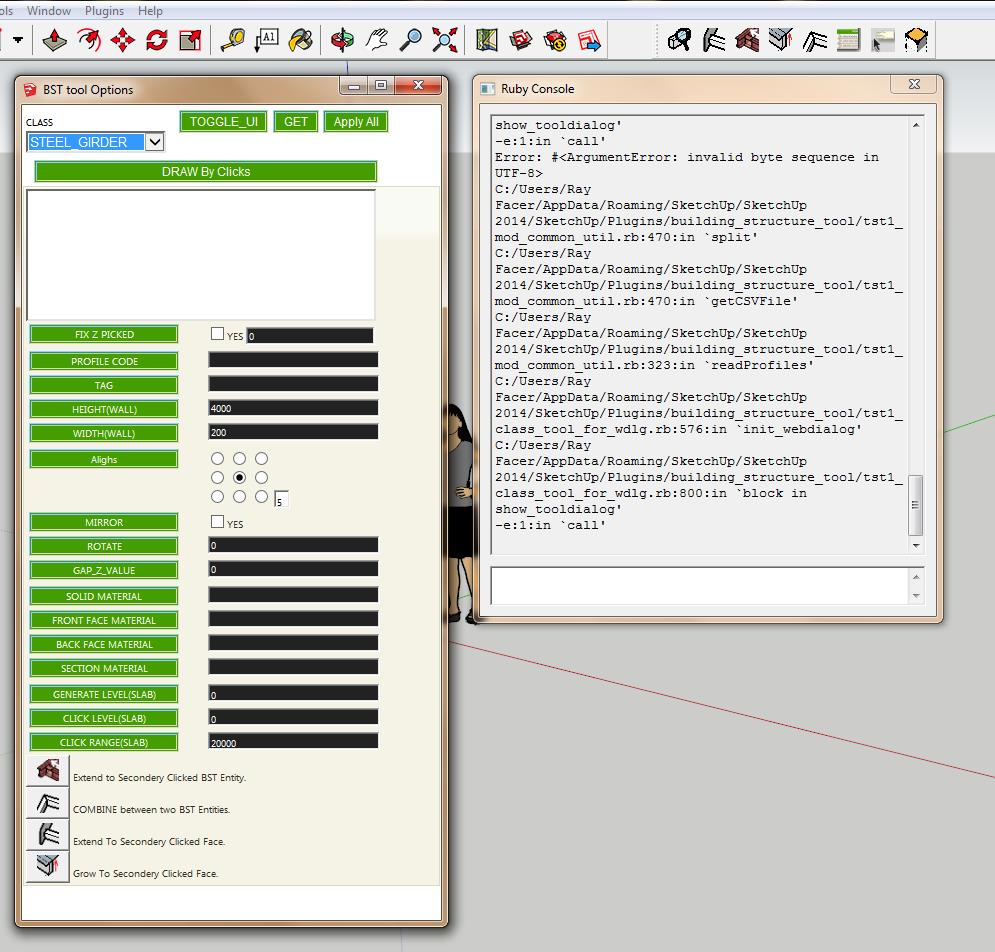

                            screen capture of attempted use of steel sections

                            1 條回覆 最後回覆 回覆 引用 0
                            • T 離線
                              tak2hata
                              最後由 編輯

                              @facer said:

                              The UK_pflistAC file does not show list of steel

                              SketchupMaker 2014
                              W7 operating system

                              File location for UK_pflistAC is:
                              Documents\Sketchup_Maker_2014\UK_pflistAC

                              Hi,facer.
                              I will test it later.
                              Please wait.


                              by TAK2HATA

                              1 條回覆 最後回覆 回覆 引用 0
                              • T 離線
                                tak2hata
                                最後由 編輯

                                Hi,facer and all.
                                I update this to v1.9.6. in 2014.05.25.
                                The problem of the read profile in sketchup2014 was fixed.

                                And add some improves.

                                HKBauing.
                                From the menubar ->"plugins"->"building structure tool"->"Change language file"
                                Select the lang file.
                                and It will complete with restart sketchup.

                                Thanks.

                                TAK2HATA


                                by TAK2HATA

                                1 條回覆 最後回覆 回覆 引用 0
                                • JQLJ 離線
                                  JQL
                                  最後由 編輯

                                  Hi Tak2hata,

                                  I just saw this new version coming up and even if I have no direct need for the plugin it, looks impressive indeed! Congratulations!

                                  As I was watching the video and I saw that you classify building elements by type and name I remembered the new SU2014 "classifier" feature and I thought that it would be truly useful for your users if your tool would classify strutural elements in a standard BIM way, like IFC using the 2014 "classifier".

                                  Probably it already does that and I missed that feature, but if it doesn't, with what you have right now, what a monster this might become...

                                  Congratulations once again and keep up your great work.

                                  PS: I saw in a post before, you had an accident, I hope your better now...

                                  www.casca.pt
                                  Visit us on facebook!

                                  1 條回覆 最後回覆 回覆 引用 0
                                  • sumasterS 離線
                                    sumaster
                                    最後由 編輯

                                    Hello Tak2hata,

                                    this is your new updated Bs Tools 1.9.6 getting error when opening Show Tools Option and Table Editor in Sketchup 2013 Version 13.0.4812

                                    Please check below . . . . . . .

                                    "show webdialog by CODE"
                                    Error; #<NoMethodError; undefined method `encode' for #<String;0xcd547a4>>
                                    C;/Program Files (x86)/SketchUp/SketchUp 2013/Plugins/building_structure_tool/tst1_mod_common_util.rb;518;in `split_csvline'
                                    C;/Program Files (x86)/SketchUp/SketchUp 2013/Plugins/building_structure_tool/tst1_mod_common_util.rb;480;in `getCSVFile'
                                    C;/Program Files (x86)/SketchUp/SketchUp 2013/Plugins/building_structure_tool/tst1_mod_common_util.rb;477;in `each_line'
                                    C;/Program Files (x86)/SketchUp/SketchUp 2013/Plugins/building_structure_tool/tst1_mod_common_util.rb;477;in `getCSVFile'
                                    C;/Program Files (x86)/SketchUp/SketchUp 2013/Plugins/building_structure_tool/tst1_mod_common_util.rb;326;in `readProfiles'
                                    C;/Program Files (x86)/SketchUp/SketchUp 2013/Plugins/building_structure_tool/tst1_class_tool_for_wdlg.rb;580;in `init_webdialog'
                                    C;/Program Files (x86)/SketchUp/SketchUp 2013/Plugins/building_structure_tool/tst1_class_tool_for_wdlg.rb;849;in `show_tooldialog'
                                    C;/Program Files (x86)/SketchUp/SketchUp 2013/Plugins/building_structure_tool/main.rb;421;in `call'
                                    C;/Program Files (x86)/SketchUp/SketchUp 2013/Plugins/building_structure_tool/main.rb;421
                                    Error; #<NoMethodError; undefined method `encode' for #<String;0xcee32a0>>
                                    C;/Program Files (x86)/SketchUp/SketchUp 2013/Plugins/building_structure_tool/main.rb;421;in `tst_menu_add'
                                    C;/Program Files (x86)/SketchUp/SketchUp 2013/Plugins/building_structure_tool/tst1_mod_common_util.rb;480;in `getCSVFile'
                                    C;/Program Files (x86)/SketchUp/SketchUp 2013/Plugins/building_structure_tool/tst1_mod_common_util.rb;477;in `each_line'
                                    C;/Program Files (x86)/SketchUp/SketchUp 2013/Plugins/building_structure_tool/tst1_mod_common_util.rb;477;in `getCSVFile'
                                    C;/Program Files (x86)/SketchUp/SketchUp 2013/Plugins/building_structure_tool/tst1_mod_common_util.rb;326;in `readProfiles'
                                    C;/Program Files (x86)/SketchUp/SketchUp 2013/Plugins/building_structure_tool/tst1_class_table_editor.rb;24;in `show_tooldialog'
                                    (eval);1;in `tst_menu_add'
                                    C;/Program Files (x86)/SketchUp/SketchUp 2013/Plugins/building_structure_tool/tst1_mod_common_util.rb;518;in `eval'
                                    C;/Program Files (x86)/SketchUp/SketchUp 2013/Plugins/building_structure_tool/main.rb;421;in `tst_menu_add'
                                    C;/Program Files (x86)/SketchUp/SketchUp 2013/Plugins/building_structure_tool/tst1_mod_common_util.rb;518;in `call'
                                    C;/Program Files (x86)/SketchUp/SketchUp 2013/Plugins/building_structure_tool/tst1_mod_common_util.rb;518


                                    Thank you,
                                    SUmaster

                                    1 條回覆 最後回覆 回覆 引用 0
                                    • T 離線
                                      tak2hata
                                      最後由 編輯

                                      Hi,
                                      I update this to v1.9.7.
                                      Fix the encoding code problem.

                                      Hi,JQL.
                                      I search the Sketchup ruby API,
                                      but there are no method for approaching to classifier.
                                      I will wait for future release.

                                      Thanks.


                                      by TAK2HATA

                                      1 條回覆 最後回覆 回覆 引用 0
                                      • sumasterS 離線
                                        sumaster
                                        最後由 編輯

                                        Hello Tak2hata Sir,

                                        NOW Its working . . . . . . . Thanks . . . . . 😍

                                        Thank you,
                                        SUmaster

                                        1 條回覆 最後回覆 回覆 引用 0
                                        • G 離線
                                          goga63
                                          最後由 編輯

                                          Good day !
                                          Found bug in versions of Sketchup 2013 and Sketchup2014.
                                          in Sketchup 2014 when you open the "Component Options" message on the error.
                                          If using the editor Attribute in the Directory "BEAM_SPECS" attribute "PATH" to change the value of " [Point3d(0, 0, 0), Point3d(0, 100, 0)] "
                                          to Point3d(0, 0, 0), Point3d(0, 100, 0) " , deleting the characters "[" and "]" ,
                                          the error message does not occur.

                                          http://ipic.su/img/img7/fs/error.1410935291.jpg

                                          1 條回覆 最後回覆 回覆 引用 0
                                          • T 離線
                                            tak2hata
                                            最後由 編輯

                                            @goga63 said:

                                            Good day !
                                            Found bug in versions of Sketchup 2013 and Sketchup2014.
                                            in Sketchup 2014 when you open the "Component Options" message on the error.
                                            If using the editor Attribute in the Directory "BEAM_SPECS" attribute "PATH" to change the value of " [Point3d(0, 0, 0), Point3d(0, 100, 0)] "
                                            to Point3d(0, 0, 0), Point3d(0, 100, 0) " , deleting the characters "[" and "]" ,
                                            the error message does not occur.

                                            http://ipic.su/img/img7/fs/error.1410935291.jpg

                                            Hi,goga63.
                                            I understand the problem.
                                            I try to fix it.
                                            Thanks.


                                            by TAK2HATA

                                            1 條回覆 最後回覆 回覆 引用 0
                                            • 1
                                            • 2
                                            • 3
                                            • 4
                                            • 5
                                            • 6
                                            • 7
                                            • 16
                                            • 17
                                            • 5 / 17
                                            • 第一個貼文
                                              最後的貼文
                                            Buy SketchPlus
                                            Buy SUbD
                                            Buy WrapR
                                            Buy eBook
                                            Buy Modelur
                                            Buy Vertex Tools
                                            Buy SketchCuisine
                                            Buy FormFonts

                                            Advertisement