sketchucation logo sketchucation
    • 登入
    Oops, your profile's looking a bit empty! To help us tailor your experience, please fill in key details like your SketchUp version, skill level, operating system, and more. Update and save your info on your profile page today!
    🔌 Smart Spline | Fluid way to handle splines for furniture design and complex structures. Download

    [Plugin]T2H_BuildingStructureTools2.2.4 in20141207

    已排程 已置頂 已鎖定 已移動 Plugins
    337 貼文 108 Posters 476.7k 瀏覽 108 Watching
    正在載入更多貼文
    • 從舊到新
    • 從新到舊
    • 最多點贊
    回覆
    • 在新貼文中回覆
    登入後回覆
    此主題已被刪除。只有擁有主題管理權限的使用者可以查看。
    • M 離線
      maxosmedia
      最後由 編輯

      Error Loading File building_structure_tool.rb
      no such file to load -- building_structure_tool\tst_main.rb
      

      MacOSX SU8

      1 條回覆 最後回覆 回覆 引用 0
      • M 離線
        maxosmedia
        最後由 編輯

        Cant click "Next point". Any tool. Tools dont work now on Mac

        MacOSX SU8

        1 條回覆 最後回覆 回覆 引用 0
        • TIGT 離線
          TIG Moderator
          最後由 編輯

          @maxosmedia said:

          Error Loading File building_structure_tool.rb
          > no such file to load -- building_structure_tool\tst_main.rb
          

          MacOSX SU8

          I suspect you have misinstalled from the zip file.
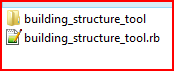
          When a script comes in a zip file you usually get one script [.rb] file and a folder containing everything else that the rb file 'loads' or needs to work.
          The 'loose' rb file and the folder MUST be put into your Plugins folder exactly as they are arranged in the zip file.
          Do not move files from the subfolder into the Plugins folder.
          This shows the only two additional things that you should have in your Plugins folder after the installation.Capture.PNG If you have put some of the files in Plugins that should actually be in the subfolder then please move/remove as needed...
          TIG

          1 條回覆 最後回覆 回覆 引用 0
          • G 離線
            gistman
            最後由 編輯

            Seems like a fantastic tool, although I can't get it to work- "Can`t click "Next point". Any tool." Same as maxosmedia. I'm using windows XP with SU v7 and reloaded it as TIG suggested. I was wondering if there is conflict with another plug-in? Just a guess as I have no experience writing ruby.

            1 條回覆 最後回覆 回覆 引用 0
            • M 離線
              maxosmedia
              最後由 編輯

              @tig said:

              @maxosmedia said:

              Error Loading File building_structure_tool.rb
              > > no such file to load -- building_structure_tool\tst_main.rb
              

              MacOSX SU8

              I suspect you have misinstalled from the zip file.
              When a script comes in a zip file you usually get one script [.rb] file and a folder containing everything else that the rb file 'loads' or needs to work.
              The 'loose' rb file and the folder MUST be put into your Plugins folder exactly as they are arranged in the zip file.
              Do not move files from the subfolder into the Plugins folder.
              This shows the only two additional things that you should have in your Plugins folder after the installation.[attachment=0:3vlvifww]<!-- ia0 -->Capture.PNG<!-- ia0 -->[/attachment:3vlvifww] If you have put some of the files in Plugins that should actually be in the subfolder then please move/remove as needed...

              TIG, Thank you! I just did. Therefore, no error at this point. Error may be found in document building_structure_tool.rb strings 5—10:

              %(#FF0000)[require 'building_structure_tool\tst_main.rb'
              require 'building_structure_tool\tst_extend_to_face.rb'
              require 'building_structure_tool\tst_extend_to_structure.rb'
              require 'building_structure_tool\tst_chamfer_structures.rb'
              require 'building_structure_tool\tst_grow_to_structure.rb'
              require 'building_structure_tool\tst_grow_to_face.rb']

              These lines contain a "" instead of the "/" for macintosh file system.

              If I correct the document building_structure_tool.rb, the tool is loaded with no error messages, but the tool does not work!
              Can`t click "Next point"

              1 條回覆 最後回覆 回覆 引用 1
              • T 離線
                tak2hata
                最後由 編輯

                Hi, TIG and maxosmedia.
                Thank you for helping.
                I am out now.
                I will correct it after.
                I will investigate the cause.

                Please wait for a while.


                by TAK2HATA

                1 條回覆 最後回覆 回覆 引用 1
                • Bob JamesB 離線
                  Bob James
                  最後由 編輯

                  @gistman said:

                  Seems like a fantastic tool, although I can't get it to work- "Can`t click "Next point". Any tool."

                  Same for me.

                  i7-4930K 3.4Ghz, 2x GTX780 6GB, 32GB DDR3-1600 ECC, OCZ Vertex 4 500GB, WD Black 3TB, 32TB NAS, 4x 27" Monitors, SpaceMouse Pro, X-keys XK-60

                  1 條回覆 最後回覆 回覆 引用 0
                  • P 離線
                    paddyclown
                    最後由 編輯

                    @bob james said:

                    @gistman said:

                    Seems like a fantastic tool, although I can't get it to work- "Can`t click "Next point". Any tool."

                    Same for me.

                    yeh, me too 😞, no second click possible, (SU pro 8 on Vista platform)....

                    1 條回覆 最後回覆 回覆 引用 0
                    • TIGT 離線
                      TIG Moderator
                      最後由 編輯

                      I have now loaded the tool and get the same problems...
                      Here are two 'tweaked' files that work.
                      Replace one in Plugins and the other in the tool's own subfolder.
                      I have swapped the \ to / in the 'require' statements.
                      I have trapped a 'read_default' error. The author having used/tested the tool for some time won't have realized that his code crashed if a particular registry entry was missing [probably as he had written that entry ages ago in earlier tested code], but because it crashes at the start the entry never gets written ! In 'tst_main', at line #123, I've added a trap so there is no crash and it now works, writing the needed registry entry the first time you use the tool, and so all is now well...building_structure_tool.rbtst_main.rb

                      TIG

                      1 條回覆 最後回覆 回覆 引用 0
                      • M 離線
                        macannurc
                        最後由 編輯

                        thanks to both tak2hata & Tig 🤓

                        I can finally test it, and it seems a plugin with great potential

                        Google SketchUp Pro 7 (7.0.10248)
                        Mac OSX 10.4.11, old PPC G4

                        1 條回覆 最後回覆 回覆 引用 0
                        • T 離線
                          tak2hata
                          最後由 編輯

                          Thanks TIG!
                          Thank you for helping.
                          It was not hit on at all where I am necessary to put up the hand.
                          It was doubted that it was a problem of the inch in my conception.
                          Now It work with your help!

                          EDIT: by TIG - An updated version of all of the files is now available here...
                          http://forums.sketchucation.com/viewtopic.php?p=315482#p315482

                          Hi,howardhong!
                          I'm grad to see you.
                          Help from Korea and other countries will surely recovers Japan.
                          Therefore, we also work hard.

                          Thanks for all!
                          best regard.


                          by TAK2HATA

                          1 條回覆 最後回覆 回覆 引用 1
                          • HumpmetwiceH 離線
                            Humpmetwice
                            最後由 編輯

                            Is there anyway to add beam sizes to this?

                            1 條回覆 最後回覆 回覆 引用 0
                            • P 離線
                              paddyclown
                              最後由 編輯

                              just a word: thankyou ! 👍

                              well done guys, a nifty tool is born... maybe you should get together with Goh who does the 1001bit tools ? Between you you may just turn SU into the only fun BIM program out there 😄

                              all the best...

                              1 條回覆 最後回覆 回覆 引用 0
                              • TIGT 離線
                                TIG Moderator
                                最後由 編輯

                                @unknownuser said:

                                Is there anyway to add beam sizes to this?

                                In the folder 'building_structure_tool' there are two CSV files:

                                default_pflist.csv contains the steel sizes and standard sizes of other things used in the tool
                                You can edit those in plain text editor - e.g. around line #151
                                ##STEEL_BEAM,“Sœ¬—À,,,,,,
                                b15,H-150x75x5x7,,,,matSTEEL,BLACK,BLACK
                                b19,H-198x99x4.5x7,,,,matSTEEL,BLACK,BLACK

                                This 'b15' is one country's standard 'code', and the 4 relevant sizes in 'mm', 'material' etc... but you can add your own - just ensure that the ',' count is the same...

                                You could also add other things like additional items at the end...

                                Also default_pipelist.csv contains 'tube' code/sizes.

                                TIG

                                1 條回覆 最後回覆 回覆 引用 0
                                • Bob JamesB 離線
                                  Bob James
                                  最後由 編輯

                                  @tig said:

                                  This 'b15' is one country's standard 'code'

                                  Does anyone have a "Rosetta Stone" to convert these codes into USA codes?

                                  i7-4930K 3.4Ghz, 2x GTX780 6GB, 32GB DDR3-1600 ECC, OCZ Vertex 4 500GB, WD Black 3TB, 32TB NAS, 4x 27" Monitors, SpaceMouse Pro, X-keys XK-60

                                  1 條回覆 最後回覆 回覆 引用 0
                                  • W 離線
                                    watkins
                                    最後由 編輯

                                    Don't forget this:

                                    301 Moved Permanently

                                    favicon

                                    (www.cad-addict.com)

                                    and this:

                                    Link Preview Image
                                    Flange Beams and Columns

                                    Wide-flange and I-flange beams and columns

                                    favicon

                                    (sketchup.engineeringtoolbox.com)

                                    There is also beamtool.rb and Steels.rb which can be found here http://rld.crai.archi.fr/rld/plugins_list_az.php

                                    Regards,
                                    Bob

                                    1 條回覆 最後回覆 回覆 引用 0
                                    • TIGT 離線
                                      TIG Moderator
                                      最後由 編輯

                                      @bob james said:

                                      @tig said:

                                      This 'b15' is one country's standard 'code'

                                      Does anyone have a "Rosetta Stone" to convert these codes into USA codes?

                                      try this http://www.structural-drafting-net-expert.com/steel-beam.html ?
                                      My old SteelSections includes most UK/EU sizes... in the txt file...

                                      TIG

                                      1 條回覆 最後回覆 回覆 引用 0
                                      • W 離線
                                        watkins
                                        最後由 編輯

                                        Dear TIG,

                                        Where would one find 'ye olde SteelSection.rb'?

                                        Regards,
                                        Bob

                                        1 條回覆 最後回覆 回覆 引用 0
                                        • TIGT 離線
                                          TIG Moderator
                                          最後由 編輯

                                          @watkins said:

                                          ...Where would one find 'ye olde SteelSection.rb'?...
                                          Try here http://rhin.crai.archi.fr/rld/plugin_details.php?id=412 [all all good scripts go in the twilight of their years.........]

                                          TIG

                                          1 條回覆 最後回覆 回覆 引用 0
                                          • W 離線
                                            watkins
                                            最後由 編輯

                                            Ah, didn't realise that Steels was the same as SteelSection.

                                            Thanks, Bob

                                            1 條回覆 最後回覆 回覆 引用 0
                                            • 1
                                            • 2
                                            • 3
                                            • 4
                                            • 5
                                            • 16
                                            • 17
                                            • 2 / 17
                                            • 第一個貼文
                                              最後的貼文
                                            Buy SketchPlus
                                            Buy SUbD
                                            Buy WrapR
                                            Buy eBook
                                            Buy Modelur
                                            Buy Vertex Tools
                                            Buy SketchCuisine
                                            Buy FormFonts

                                            Advertisement


