sketchucation logo sketchucation
    • 登入
    Oops, your profile's looking a bit empty! To help us tailor your experience, please fill in key details like your SketchUp version, skill level, operating system, and more. Update and save your info on your profile page today!
    🔌 Smart Spline | Fluid way to handle splines for furniture design and complex structures. Download

    [Plugin]T2H_BuildingStructureTools2.2.4 in20141207

    已排程 已置頂 已鎖定 已移動 Plugins
    337 貼文 108 Posters 476.7k 瀏覽 108 Watching
    正在載入更多貼文
    • 從舊到新
    • 從新到舊
    • 最多點贊
    回覆
    • 在新貼文中回覆
    登入後回覆
    此主題已被刪除。只有擁有主題管理權限的使用者可以查看。
    • F 離線
      franki3
      最後由 編輯

      Excellent plug in will save me tons of time

      1 條回覆 最後回覆 回覆 引用 0
      • B 離線
        boilingsnow
        最後由 編輯

        Hello,tak2hata. Thanks for your tool.
        I failed to creat new mutiwall. I don't understand your sentence "the rule of the mutiwall is do not exist tha wall that hugo each other"...

        I tried to copy the planking of your existing Multi-wall and want to make it a new one, but by drawing it doesn't connect correctly.
        Can you tell me what I am doing wrong?
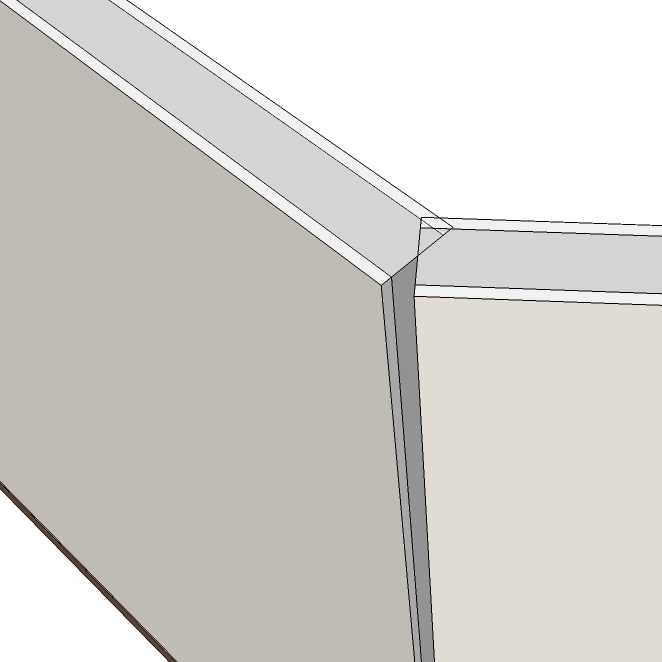

        Untitled.jpg

        1 條回覆 最後回覆 回覆 引用 0
        • T 離線
          tak2hata
          最後由 編輯

          @boilingsnow said:

          Hello,tak2hata. Thanks for your tool.
          I failed to creat new mutiwall. I don't understand your sentence "the rule of the mutiwall is do not exist tha wall that hugo each other"...

          I tried to copy the planking of your existing Multi-wall and want to make it a new one, but by drawing it doesn't connect correctly.
          Can you tell me what I am doing wrong?

          Hi,boilingsnow.
          "hugo" is like as "tag".
          This" multi wall tool" judges by "hugo" to combine the wall each other.
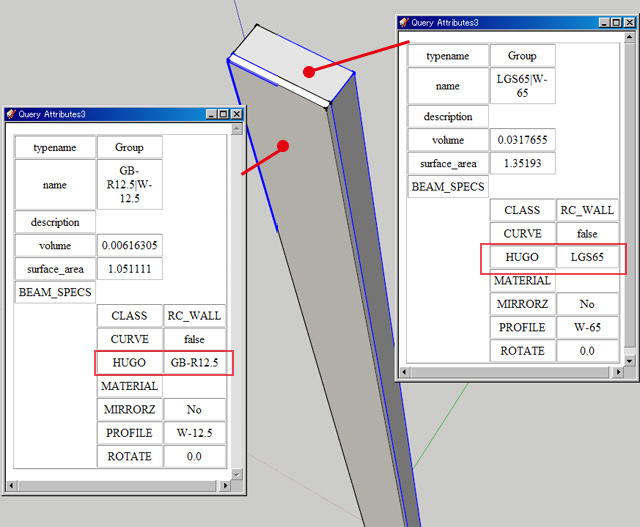
          walls-attributes-in-Mwall
          judge_combining_each_other
          If the walls have same "hugo",tool can not judge.

          So walls in multi wall must have different "hugo" each other.

          Thanks.


          queryattributes


          walltool


          by TAK2HATA

          1 條回覆 最後回覆 回覆 引用 0
          • B 離線
            boilingsnow
            最後由 編輯

            @tak2hata said:

            @boilingsnow said:

            Hello,tak2hata. Thanks for your tool.
            I failed to creat new mutiwall. I don't understand your sentence "the rule of the mutiwall is do not exist tha wall that hugo each other"...

            I tried to copy the planking of your existing Multi-wall and want to make it a new one, but by drawing it doesn't connect correctly.
            Can you tell me what I am doing wrong?

            Hi,boilingsnow.
            "hugo" is like as "tag".
            This" multi wall tool" judges by "hugo" to combine the wall each other.
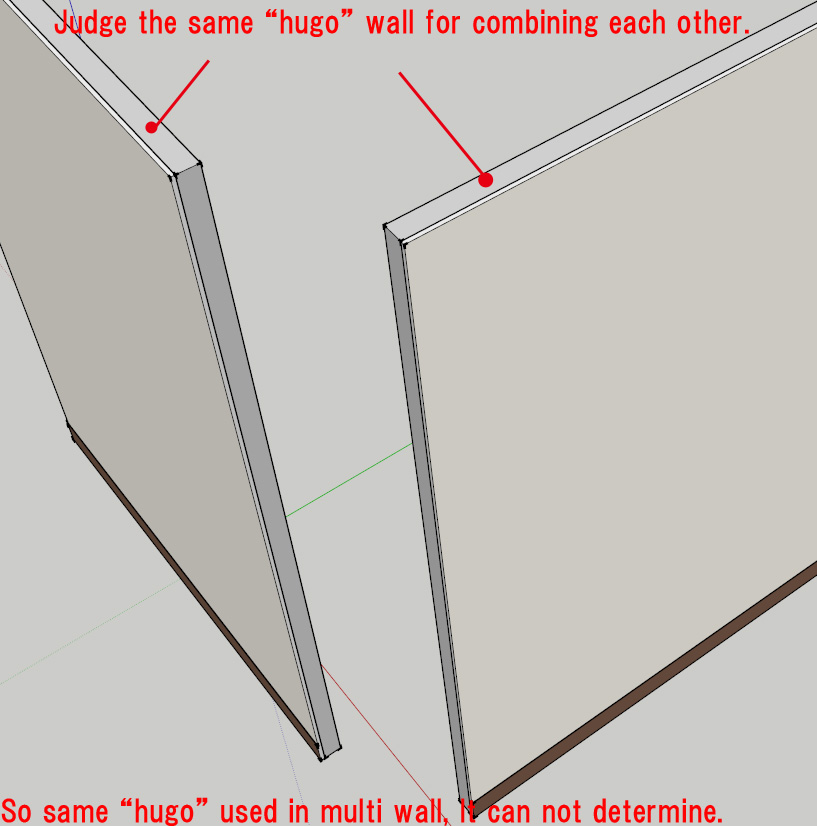
            [attachment=1:czfqhlvd]<!-- ia1 -->walls-attributes-in-Mwall.jpg<!-- ia1 -->[/attachment:czfqhlvd]
            [attachment=0:czfqhlvd]<!-- ia0 -->judge_combining_each_other.jpg<!-- ia0 -->[/attachment:czfqhlvd]
            If the walls have same "hugo",tool can not judge.

            So walls in multi wall must have different "hugo" each other.

            Thanks.
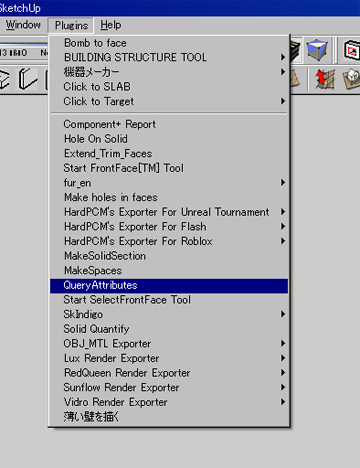
            Thank you for your explanation.
            But how can I define the "hugo" of an entity?
            Is "Query Attribute" another plugin which I have to install to check and change "hugo" of entities?

            1 條回覆 最後回覆 回覆 引用 0
            • T 離線
              tak2hata
              最後由 編輯

              @boilingsnow said:

              Thank you for your explanation.
              But how can I define the "hugo" of an entity?
              Is "Query Attribute" another plugin which I have to install to check and change "hugo" of entities?

              Hi,boilingsnow.
              "Query Attribute" is display the attributes of entity.
              It can be download in my homepage.

              But it can not change attributes.

              I will create editor for attribute of building structure tool.
              But this is too early alpha ,yet.

              Now,you open "default_pflist.csv" and add profiles with attaching attribute".
              or Use "Add New profile" in menu of building structure tool.

              And draw wall by using wall tool of building structure tool.

              Thanks.


              by TAK2HATA

              1 條回覆 最後回覆 回覆 引用 0
              • T 離線
                tewakul
                最後由 編輯

                godd

                1 條回覆 最後回覆 回覆 引用 0
                • Y 離線
                  ygcl
                  最後由 編輯

                  it looks very good

                  1 條回覆 最後回覆 回覆 引用 0
                  • V 離線
                    vilcoyote57
                    最後由 編輯

                    Hi, great plugin.. but I can't understand how EXCHANGE tool works. Can you help me? thanks

                    1 條回覆 最後回覆 回覆 引用 0
                    • T 離線
                      tak2hata
                      最後由 編輯

                      @vilcoyote57 said:

                      Hi, great plugin.. but I can't understand how EXCHANGE tool works. Can you help me? thanks

                      Hi,vilcoyote57.

                      "EXCHANGE" is not work well yet.

                      How to use.
                      1.Select the group / component that is solid.
                      2.Click "EXCHANGE".
                      3.Select "Type" in dialog.
                      It is all.
                      The longest edge of the group/ component is used to length about element of building structure.
                      Thanks.


                      by TAK2HATA

                      1 條回覆 最後回覆 回覆 引用 0
                      • S 離線
                        SUFractal
                        最後由 編輯

                        @millzye71 said:

                        Very good plug in indeed!!! Could this be modified so that you could use these steel sections as rafters, and be able to rotate them at a degree up or down on the axis that you have drawn. This would be great when modelling steel frames.

                        Cheers

                        Millzye

                        Couldn't you draw a 'wire frame' (for lack of a better way of saying it) then use the desired steel section tool to 'trace' along the wireframe line?

                        1 條回覆 最後回覆 回覆 引用 0
                        • S 離線
                          SUFractal
                          最後由 編輯

                          tak2hata:

                          I've been working with your wonderful BuildingStuctureTools plugin recently. Are you planning on creating any additional tools (and icons) for your plugin?

                          Although it appears relatively easy to add additional profiles to the existing tools you've created, I think it would be even more convenient if there were separate tools for things such as:

                          "flanged" steel columns the (H-shapes as you've named them)
                          round steel columns
                          steel angles (L-shapes)
                          steel channels ([-shape)
                          C-shape steel (these appear to be steel studs)
                          T-shaped steel
                          flat bars

                          By adding more tools, the list for each tool would not be quite so long in the window menu that pops up. For example, instead of just one "steel column" tool, having one (with its icon) for each shape "type" (H, round, square) would be easier/faster to find the structural member needed.

                          Thanks,

                          SUFractal

                          1 條回覆 最後回覆 回覆 引用 0
                          • T 離線
                            tak2hata
                            最後由 編輯

                            @sufractal said:

                            tak2hata:

                            I've been working with your wonderful BuildingStuctureTools plugin recently. Are you planning on creating any additional tools (and icons) for your plugin?

                            Although it appears relatively easy to add additional profiles to the existing tools you've created, I think it would be even more convenient if there were separate tools for things such as:

                            "flanged" steel columns the (H-shapes as you've named them)
                            round steel columns
                            steel angles (L-shapes)
                            steel channels ([-shape)
                            C-shape steel (these appear to be steel studs)
                            T-shaped steel
                            flat bars

                            By adding more tools, the list for each tool would not be quite so long in the window menu that pops up. For example, instead of just one "steel column" tool, having one (with its icon) for each shape "type" (H, round, square) would be easier/faster to find the structural member needed.

                            Thanks,

                            SUFractal

                            Hi,SUFractal.
                            I will create new dialog with WEBDIALOG.
                            It will be more convinient.
                            Please wait.

                            Now,Searching with word like "H-100" to use icon "Dialog ALL".
                            Click the icon ,InputBox"Search" will show.
                            It will show limiting items in listbox.

                            Thanks.


                            by TAK2HATA

                            1 條回覆 最後回覆 回覆 引用 0
                            • S 離線
                              SUFractal
                              最後由 編輯

                              @tak2hata said:

                              @sufractal said:

                              tak2hata:

                              I've been working with your wonderful BuildingStuctureTools plugin recently. Are you planning on creating any additional tools (and icons) for your plugin?

                              Although it appears relatively easy to add additional profiles to the existing tools you've created, I think it would be even more convenient if there were separate tools for things such as:

                              "flanged" steel columns the (H-shapes as you've named them)
                              round steel columns
                              steel angles (L-shapes)
                              steel channels ([-shape)
                              C-shape steel (these appear to be steel studs)
                              T-shaped steel
                              flat bars

                              By adding more tools, the list for each tool would not be quite so long in the window menu that pops up. For example, instead of just one "steel column" tool, having one (with its icon) for each shape "type" (H, round, square) would be easier/faster to find the structural member needed.

                              Thanks,

                              SUFractal

                              Hi,SUFractal.
                              I will create new dialog with WEBDIALOG.
                              It will be more convinient.
                              Please wait.

                              Now,Searching with word like "H-100" to use icon "Dialog ALL".
                              Click the icon ,InputBox"Search" will show.
                              It will show limiting items in listbox.

                              Thanks.

                              Sounds great! Thank you.

                              1 條回覆 最後回覆 回覆 引用 0
                              • guanjinG 離線
                                guanjin
                                最後由 編輯

                                The tool is very useful, language translation of documents, can not be displayed correctly

                                I come from China, is to learn

                                1 條回覆 最後回覆 回覆 引用 0
                                • beginnerB 離線
                                  beginner
                                  最後由 編輯

                                  Hi There,
                                  The plugin is great.
                                  I have only one problem with the 'default_pflist.csv' file.
                                  The editing of the file doesn't take any effect in SketchUP.
                                  Is anybody successfully added any new 'sizes'?
                                  I would appreciate your comments.
                                  Regards

                                  Regards, SU 'beginner'

                                  1 條回覆 最後回覆 回覆 引用 0
                                  • S 離線
                                    SUFractal
                                    最後由 編輯

                                    @beginner said:

                                    Hi There,
                                    The plugin is great.
                                    I have only one problem with the 'default_pflist.csv' file.
                                    The editing of the file doesn't take any effect in SketchUP.
                                    Is anybody successfully added any new 'sizes'?
                                    I would appreciate your comments.
                                    Regards

                                    Did you change the contents (sizes) within that file?

                                    1 條回覆 最後回覆 回覆 引用 0
                                    • beginnerB 離線
                                      beginner
                                      最後由 編輯

                                      @sufractal said:

                                      Did you change the contents (sizes) within that file?

                                      Hi There,
                                      I have seen the tutorial http://www.youtube.com/watch?v=oSVrbJMSSB0&feature=player_embedded and I have noticed that you can change the path to the *.csv file.
                                      I have created a new file, located on My Desktop and changed the path - it works! but... when I change to the plugins path it doesn't.
                                      Never mind, I like the fact that you can link own *.csv file and it can seat in my preferred location.
                                      Thank you
                                      Regards

                                      Regards, SU 'beginner'

                                      1 條回覆 最後回覆 回覆 引用 0
                                      • S 離線
                                        SUFractal
                                        最後由 編輯

                                        @beginner said:

                                        @sufractal said:

                                        Did you change the contents (sizes) within that file?

                                        Hi There,
                                        I have seen the tutorial http://www.youtube.com/watch?v=oSVrbJMSSB0&feature=player_embedded and I have noticed that you can change the path to the *.csv file.
                                        I have created a new file, located on My Desktop and changed the path - it works! but... when I change to the plugins path it doesn't.
                                        Never mind, I like the fact that you can link own *.csv file and it can seat in my preferred location.
                                        Thank you
                                        Regards

                                        I don't know this to be 100% true, but I suspect that file does not belong on your desktop, but probably within the "building_structure_tool" folder located inside your plugins folder. Give it a try and see if that corrects the problem.

                                        1 條回覆 最後回覆 回覆 引用 0
                                        • beginnerB 離線
                                          beginner
                                          最後由 編輯

                                          @sufractal said:

                                          @beginner said:

                                          @sufractal said:

                                          Did you change the contents (sizes) within that file?

                                          I don't know this to be 100% true, but I suspect that file does not belong on your desktop, but probably within the "building_structure_tool" folder located inside your plugins folder. Give it a try and see if that corrects the problem.

                                          Hi There,
                                          You are right the file does not belong to the Desktop - it is my copy of the file from ...\Plugins\building_structure_tool folder to play with.
                                          As I said - When I edit the file in the plugins folder I don't see any changes in SketchUP but...
                                          When I edit the file on my desktop (outside the plugin folder - you can keep the copy of the file anywhere you like) and change the path in SketchUP I can see the changes (picture attached).
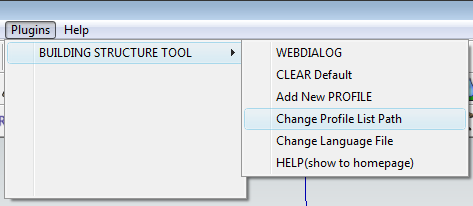

                                          Path to the default_pflist.csv - now I will change to my Desktop copy and I will see my new steel, walls etc. types

                                          Regards, SU 'beginner'

                                          1 條回覆 最後回覆 回覆 引用 0
                                          • G 離線
                                            go45454
                                            最後由 編輯

                                            thankkkkkkkk

                                            1 條回覆 最後回覆 回覆 引用 0
                                            • 1
                                            • 2
                                            • 3
                                            • 4
                                            • 5
                                            • 6
                                            • 16
                                            • 17
                                            • 4 / 17
                                            • 第一個貼文
                                              最後的貼文
                                            Buy SketchPlus
                                            Buy SUbD
                                            Buy WrapR
                                            Buy eBook
                                            Buy Modelur
                                            Buy Vertex Tools
                                            Buy SketchCuisine
                                            Buy FormFonts

                                            Advertisement