sketchucation logo sketchucation
    • Login
    Oops, your profile's looking a bit empty! To help us tailor your experience, please fill in key details like your SketchUp version, skill level, operating system, and more. Update and save your info on your profile page today!
    Mac User? | Join the Rayscaper Beta for Mac Learn More

    [Plugin] (TIG) Rotate Plan View v1.1 20110316

    Scheduled Pinned Locked Moved Plugins
    54 Posts 17 Posters 50.8k Views 17 Watching
    Loading More Posts
    • Oldest to Newest
    • Newest to Oldest
    • Most Votes
    Reply
    • Reply as topic
    Log in to reply
    This topic has been deleted. Only users with topic management privileges can see it.
    • the_slothT
      the_sloth
      last edited by

      Thank you. That was helpful. The reason I kept Rotate Plan View in its folder is that there are other ruby scripts that seem to operate fine from within folders (see image below). Anyway, thanks again for the response.
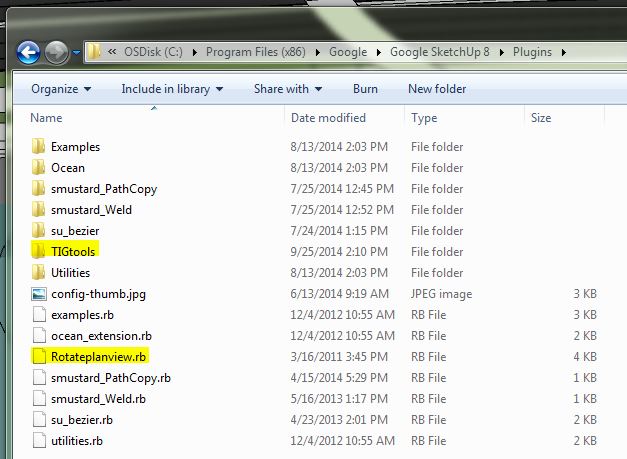
      correct install location

      1 Reply Last reply
      Reply Quote 0
      • Dave RD
        Dave R
        last edited by

        How are you going about installing plugins?

        Etaoin Shrdlu

        %

        (THERE'S NO PLACE LIKE)

        G28 X0.0 Y0.0 Z0.0

        M30

        %

        1 Reply Last reply
        Reply Quote 0
        • pbacotP
          pbacot
          last edited by

          It looks to me that these files should not be in a folder, but be in the "Plugins" folder itself.

          Edit: woops TIGtools is not file but folder, so I mean that folder should be in the Plugins folder. Sorry.

          MacOSX MojaveSketchUp Pro v19 Twilight v2 Thea v3 PowerCADD

          1 Reply Last reply
          Reply Quote 0
          • the_slothT
            the_sloth
            last edited by

            Typically I just drag the files into my plugins folder.

            1 Reply Last reply
            Reply Quote 0
            • BoxB
              Box
              last edited by

              You might find the pluginstore useful. And it would be nice if your profile version matched your problem version. SU2014 in your profile but SU8 in the question.

              1 Reply Last reply
              Reply Quote 0
              • Dave RD
                Dave R
                last edited by

                Ah, I see. It's no wonder, then. You should be using Install Extension, and the SCF plugin store.

                Etaoin Shrdlu

                %

                (THERE'S NO PLACE LIKE)

                G28 X0.0 Y0.0 Z0.0

                M30

                %

                1 Reply Last reply
                Reply Quote 0
                • the_slothT
                  the_sloth
                  last edited by

                  @box said:

                  You might find the pluginstore useful. And it would be nice if your profile version matched your problem version. SU2014 in your profile but SU8 in the question.

                  You bring up a good point. In profile you can only choose one version. I use SU 8 at work (network license), 2013 at home (personal license), and occasionally SU2014 Make when there are no licenses at work. I would bet there are others who use multiple version of SketchUp as well.

                  I will read this later today: http://sketchucation.com/resources/tutorials/108-installing-sketchup-plugins

                  Thanks for the help.

                  1 Reply Last reply
                  Reply Quote 0
                  • BoxB
                    Box
                    last edited by

                    I was referring to this
                    http://sketchucation.com/resources/plugin-store-download

                    1 Reply Last reply
                    Reply Quote 0
                    • the_slothT
                      the_sloth
                      last edited by

                      This is very cool. Thanks for sharing. I haven't used SU for some time in a serious fashion and am excited to be getting back into it

                      1 Reply Last reply
                      Reply Quote 0
                      • J
                        jimmylomax
                        last edited by

                        This is great! Many thanks. Is there a known way to achieve this from another perspective (e.g. I'd like to make an ISO image)?

                        1 Reply Last reply
                        Reply Quote 0
                        • TIGT
                          TIG Moderator
                          last edited by

                          Look up my iso axo script...
                          https://sketchucation.com/pluginstore?pln=axo_iso

                          TIG

                          1 Reply Last reply
                          Reply Quote 0
                          • D
                            db11
                            last edited by

                            A very useful little plugin.

                            @TIG: Is it possible to provide the same capability for the other ortho views? I'd like to be able to rotate front and side views in the same way.

                            I searched for another extension that could do it, but didn't locate one.

                            1 Reply Last reply
                            Reply Quote 0
                            • TIGT
                              TIG Moderator
                              last edited by

                              @db11 said:

                              @TIG: Is it possible to provide the same capability for the other ortho views? I'd like to be able to rotate front and side views in the same way.

                              It's a very very old, but [perhaps overly] simple script.
                              If you read the code it resets the Plan-view camera's 'UP' to be the Z_AXIS [Top view], and then transforms it around that axis by the specified angle.

                              To make a version to say look 'Front' along the green axis you'd use the Y_AXIS and so on...
                              Just try copying the RB file ../Plugins/Rotatefrontview.rb***, editing it and substituting the Y_AXIS for the Z_AXIS [in two places]...
                              Use a plain-text editor like Notepad++ on PC or TextWrangler on MAC.
                              ***Name these new RB files logically e.g. Rotateplanview.rb==> Rotatefrontview.rb and also remember to change the other parts of the code to match - e.g. ' Class' name and associated lines of code setting up the cmd to suit, each time replacing [Pp]lan with [Ff]ront etc.
                              Change the Toolbar [copied] PNG names too...
                              BUT don't worry about the Toolbar code otherwise, because it only kicks in when there PNG images for the buttons exist.
                              Unless you recreate the PNG files inside the ../Plugins/TIGtools subfolder there will be no matching Toolbar buttons made - but the View menu items will always get created...

                              To make all 5 other possible ortho views, just substitute the Z_AXIS [Top] for X_AXIS [Right], Y_AXIS [Front], and their .reverse equivalents [Left & Back] + Z_AXIS.reverse [Bottom]...

                              TIG

                              1 Reply Last reply
                              Reply Quote 0
                              • D
                                db11
                                last edited by

                                Thanks TIG for taking the time to describe the proper approach. Sounds fairly straightforward, so I'll give it a try this weekend.

                                1 Reply Last reply
                                Reply Quote 0
                                • D
                                  db11
                                  last edited by

                                  I made the modifications and produced 'Rotate____view' for the various views. Saved me a lot of trouble of rotating viewports in LayOut for a bunch of parts on a material list. So thanks for the directions β€” it was even simpler than I thought.

                                  But it did make me think: wouldn't it be possible to make a single plugin "RotateCurrentView"?

                                  If there a way to auto-poll for the current view, then wouldn't it be relatively simple to use a CASE statement to assign the correct axes relative to the current view?

                                  The produced versions do the trick fine, but it would be cool to consolidate multiple plugins (and their corresponding menu items) into a single one.

                                  1 Reply Last reply
                                  Reply Quote 0
                                  • D
                                    db11
                                    last edited by

                                    ...I should add that it would be fun to try to make those modifications myself (assuming the approach is valid).

                                    A fair while back I had started teaching myself Ruby and made a couple of super simple plugins for my own use. Then I got busy with paid work and dropped the effort. I've probably forgotten much of what I had learned, but I have been meaning to get back to it β€” and this might be a fun re-entry (especially since most of the work is already done).

                                    1 Reply Last reply
                                    Reply Quote 0

                                    Hello! It looks like you're interested in this conversation, but you don't have an account yet.

                                    Getting fed up of having to scroll through the same posts each visit? When you register for an account, you'll always come back to exactly where you were before, and choose to be notified of new replies (either via email, or push notification). You'll also be able to save bookmarks and upvote posts to show your appreciation to other community members.

                                    With your input, this post could be even better πŸ’—

                                    Register Login
                                    • 1
                                    • 2
                                    • 3
                                    • 3 / 3
                                    • First post
                                      Last post
                                    Buy SketchPlus
                                    Buy SUbD
                                    Buy WrapR
                                    Buy eBook
                                    Buy Modelur
                                    Buy Vertex Tools
                                    Buy SketchCuisine
                                    Buy FormFonts

                                    Advertisement


