sketchucation logo sketchucation
    • 登入
    Oops, your profile's looking a bit empty! To help us tailor your experience, please fill in key details like your SketchUp version, skill level, operating system, and more. Update and save your info on your profile page today!
    🔌 Smart Spline | Fluid way to handle splines for furniture design and complex structures. Download

    [Plugin] (TIG) Rotate Plan View v1.1 20110316

    已排程 已置頂 已鎖定 已移動 Plugins
    54 貼文 17 Posters 46.9k 瀏覽 17 Watching
    正在載入更多貼文
    • 從舊到新
    • 從新到舊
    • 最多點贊
    回覆
    • 在新貼文中回覆
    登入後回覆
    此主題已被刪除。只有擁有主題管理權限的使用者可以查看。
    • L 離線
      leminilab
      最後由 編輯

      %(#BF0000)[Admin edit:

      I have moved the topic to the Plugins folder and added the proper tag. The plugin can be found further down this page in this post.

      (Gai...)]


      Hi everyone,

      I'm trying to do something simple but... Can't figure out how... 😒
      I'd like to have this plan view rotated 45 degrees to better fit my screen...
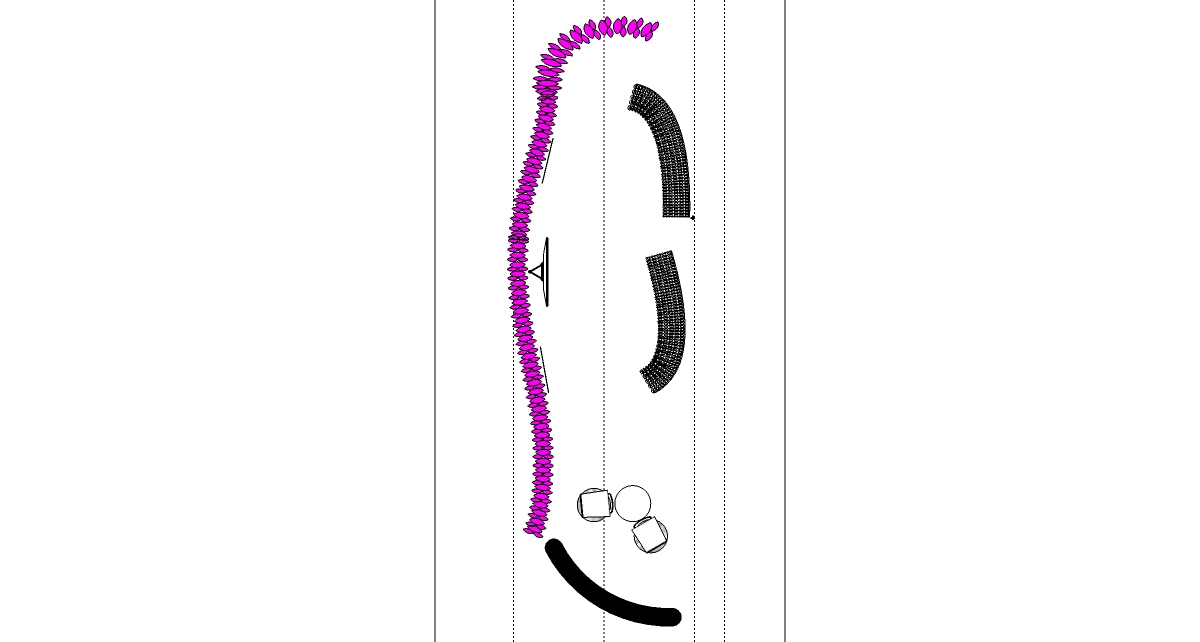
      sceno.jpg

      I don't have a clue how to do that... 😳

      • "Live every day as if it were your last and then some day you'll be right."
      • "ThomThom rules!!!"
      1 條回覆 最後回覆 回覆 引用 0
      • TIGT 離線
        TIG Moderator
        最後由 編輯

        Here some short code to do it

        require 'sketchup.rb'
        class Rotateplanview
         def initialize(angle=45.0)
          model=Sketchup.active_model
          view=model.active_view
          camera=view.camera
          up=camera.up
          return if up==Z_AXIS
          eye=camera.eye
          target=camera.target
          persp=false
          tr=Geom;;Transformation.rotation(target, Z_AXIS, angle.degrees)
          up.transform!(tr)
          newcamera=Sketchup;;Camera.new(eye, target, up, persp)
          view.camera=newcamera
          Sketchup.send_action("viewZoomExtents;")
         end
        end#class
        

        Copy/paste it into a file named Rotateplanview.rb in the Plugins folder.
        To use set up your Plan [Top] view, without Perspective and in the Ruby Console type Rotateplanview.new to rotate the camera 45 degrees clockwise, repeat to rotate it another 45 degrees etc. The extents are zoomed after each rotation.
        To do other angles provide an angle value in degrees - e.g. Rotateplanview.new 10 rotates the view 10 degrees clockwise or Rotateplanview.new -30 rotates the view 30 degrees counterclockwise.
        When you are happy with it save the view to a new Scene tab so you can return to it later.

        TIG

        1 條回覆 最後回覆 回覆 引用 0
        • L 離線
          leminilab
          最後由 編輯

          @tig said:

          Here some short code to do it

          require 'sketchup.rb'
          > class Rotateplanview
          >  def initialize(angle=45.0)
          >   model=Sketchup.active_model
          >   view=model.active_view
          >   camera=view.camera
          >   up=camera.up
          >   return if up==Z_AXIS
          >   eye=camera.eye
          >   target=camera.target
          >   persp=false
          >   tr=Geom;;Transformation.rotation(target, Z_AXIS, angle.degrees)
          >   up.transform!(tr)
          >   newcamera=Sketchup;;Camera.new(eye, target, up, persp)
          >   view.camera=newcamera
          >   Sketchup.send_action("viewZoomExtents;")
          >  end
          > end#class
          

          Copy/paste it into a file named Rotateplanview.rb in the Plugins folder.

          To use set up your Plan [Top] view, without Perspective and in the Ruby Console type Rotateplanview.new to rotate the camera 45 degrees clockwise, repeat to rotate it another 45 degrees etc. The extents are zoomed after each rotation.
          To do other angles provide an angle value in degrees - e.g. Rotateplanview.new 10 rotates the view 10 degrees clockwise or Rotateplanview.new -30 rotates the view 30 degrees counterclockwise.
          When you are happy with it save the view to a new Scene tab so you can return to it later.

          😲 TIG, Wow!
          To have you replying to one of my question is an honor! I really admire you coding gurus!
          You should all live together in a tiny house as a community along with ThomThom, Chris Fullmer, Whaaat (forgot how many A's...), Fredo6, Didier Bur...
          Seriously, Michael Jackson would have replied, I wouldn't have been more honored!

          I'll try this quickly! Thank you so much! (where's the worshipping smiley, the one that's on his knees... Whatever... You get the point! 😄 )
          Nicolas

          • "Live every day as if it were your last and then some day you'll be right."
          • "ThomThom rules!!!"
          1 條回覆 最後回覆 回覆 引用 0
          • L 離線
            leminilab
            最後由 編輯

            Errr... I got an error message saying :

            Rotateplanview.new
            Error: #<NameError: (eval):54: uninitialized constant Rotateplanview>
            (eval):54

            What I did is copy the code you wrote in a notepad file and saved it as Rotateplanview.rb and pasted it in the plugins Folder.
            Then I typed the trigger piece of code in the ruby console, hit enter and voilà!

            😕 <-- I have absolutely no idea what this error message mean...

            • "Live every day as if it were your last and then some day you'll be right."
            • "ThomThom rules!!!"
            1 條回覆 最後回覆 回覆 引用 0
            • TIGT 離線
              TIG Moderator
              最後由 編輯

              Did you restart Sketchup ?
              I suspect not 😕
              It should work after the script is auto-loaded - which is happens when Sketchup starts...

              TIG

              1 條回覆 最後回覆 回覆 引用 0
              • L 離線
                leminilab
                最後由 編輯

                @tig said:

                Did you restart Sketchup ?
                I suspect not 😕
                It should work after the script is auto-loaded - which is happens when Sketchup starts...

                Yes, I did restart Sketchup. Actually my computer froze a little bit and almost crashed while SU was open 😕

                • "Live every day as if it were your last and then some day you'll be right."
                • "ThomThom rules!!!"
                1 條回覆 最後回覆 回覆 引用 0
                • TIGT 離線
                  TIG Moderator
                  最後由 編輯

                  Have you tried running it with the Ruby Console open to see if there are errors ?
                  Did it rotate the plan view even if it was flaky ?
                  Did you have a plan view set BEFORE using it ?

                  TIG

                  1 條回覆 最後回覆 回覆 引用 0
                  • L 離線
                    leminilab
                    最後由 編輯

                    @tig said:

                    Have you tried running it with the Ruby Console open to see if there are errors ?
                    Did it rotate the plan view even if it was flaky ?
                    Did you have a plan view set BEFORE using it ?

                    It didn't rotate the view at all. 😢

                    The ruby console was open and it returned this error again:

                    Rotateplanview.new 10
                    Error: #<NameError: (eval):54: uninitialized constant Rotateplanview>
                    (eval):54
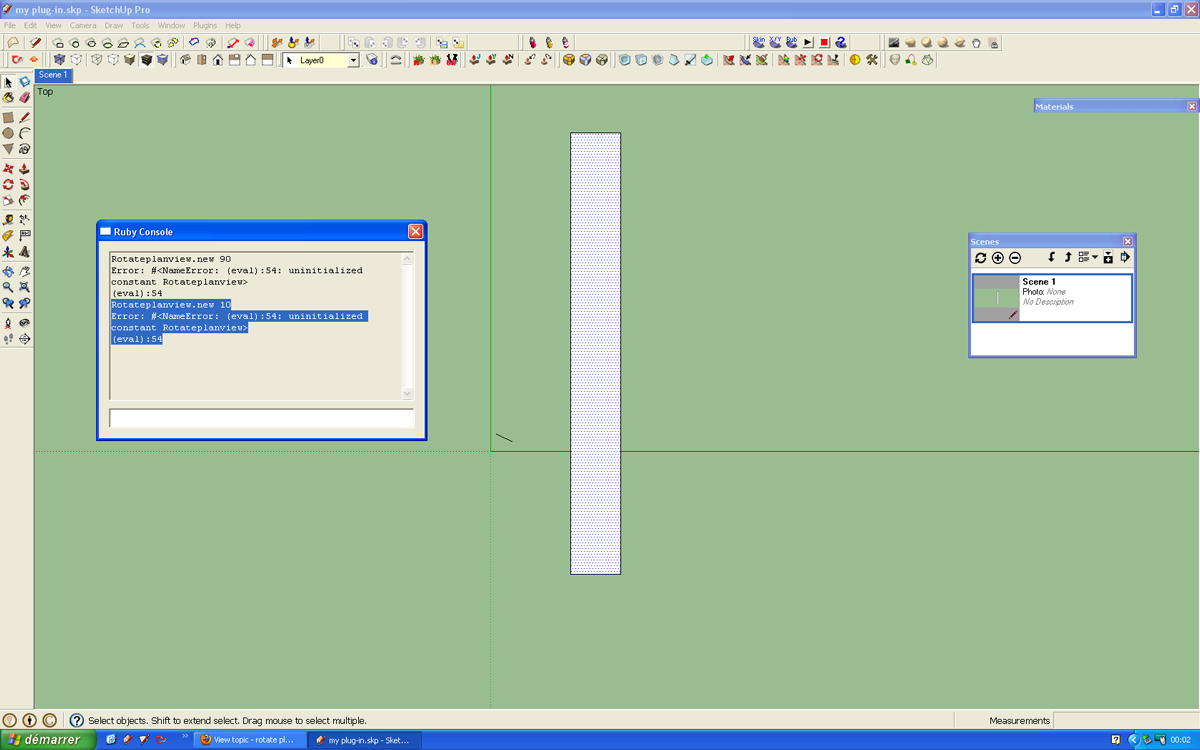
                    Untitled-1.png
                    As you can see I already had a plan scene saved.

                    • "Live every day as if it were your last and then some day you'll be right."
                    • "ThomThom rules!!!"
                    1 條回覆 最後回覆 回覆 引用 0
                    • TIGT 離線
                      TIG Moderator
                      最後由 編輯

                      Clearly the code isn't loading properly for some reason I can't ascertain at a distance...
                      Here's a ready-made rb file that should work... please remove your attempt...

                      Here' v1.1
                      (c) TIG 2011
                      Permission to use, copy, modify, and distribute this software for
                      any purpose and without fee is hereby granted, provided the above
                      copyright notice appear in all copies.
                      THIS SOFTWARE IS PROVIDED "AS IS" AND WITHOUT ANY EXPRESS OR
                      IMPLIED WARRANTIES, INCLUDING, WITHOUT LIMITATION, THE IMPLIED
                      WARRANTIES OF MERCHANTABILITY AND FITNESS FOR A PARTICULAR PURPOSE.
                      File:
                      Put the file Rotateplanview.rb in the Plugins folder.***
                      Usage:
                      To use set up your Plan [Top] view, without Perspective and
                      in the Ruby Console type Rotateplanview.new to rotate the camera 45 degrees
                      clockwise, repeat to rotate it another 45 degrees etc.
                      The extents are zoomed after each rotation.
                      To do other angles provide an angle value in degrees -
                      e.g. Rotateplanview.new 10 rotates the view 10 degrees clockwise or
                      Rotateplanview.new -30 rotates the view 30 degrees counterclockwise.
                      When you are happy with it save the view to a new Scene tab so you can
                      return to it later.
                      Note: v1.1 includes a View Menu > 'Rotate Plan View' item and there is
                      also a 'Rotate Plan View' toolbar that can be activated from the
                      View > Toolbar menu, ***this needs the icon Rotateplanview.png in the
                      ../Plugins/TIGtools subfolder.
                      If you use one of these tools this way you will get a dialog asking for
                      the angle, the default is +45 degrees. otherwise it works as above...
                      Donations: by PayPal to info @ revitrev.org PayPalButtonVersion:
                      1.0 20110304 First issue.
                      1.1 20110316 Menu/Dialog/Toolbar item added.


                      Download/install this Plugin's latest RBZ from the PluginStore...http://sketchucation.com/pluginstore?pln=Rotateplanview

                      TIG

                      1 條回覆 最後回覆 回覆 引用 0
                      • L 離線
                        leminilab
                        最後由 編輯

                        @tig said:

                        Clearly the code isn't loading properly for some reason I can't ascertain at a distance...
                        Here's a ready-made rb file that should work... please remove your attempt...[attachment=0:seezsr87]<!-- ia0 -->Rotateplanview.rb<!-- ia0 -->[/attachment:seezsr87]

                           :heart_eyes:  :sunglasses:  :tada:  :sunny:  :smile:  :laughing: 
                        

                        This is soooooooooooooooooooooooooooooooooooooooooooo great!

                        For your info and for the sake of my own public humiliation, I had pasted the rb file in my SKetchup 8 plugins folder... And was usin SU7! 😳 😳 😳 😳

                        Thank you so much! 👍

                        • "Live every day as if it were your last and then some day you'll be right."
                        • "ThomThom rules!!!"
                        1 條回覆 最後回覆 回覆 引用 0
                        • GaieusG 離線
                          Gaieus
                          最後由 編輯

                          🤣

                          Gai...

                          1 條回覆 最後回覆 回覆 引用 0
                          • L 離線
                            leminilab
                            最後由 編輯

                            TIG, this is really a must for me! Thank you so much! This should be a default option in Sketchup.

                            And it really saved my life on this :
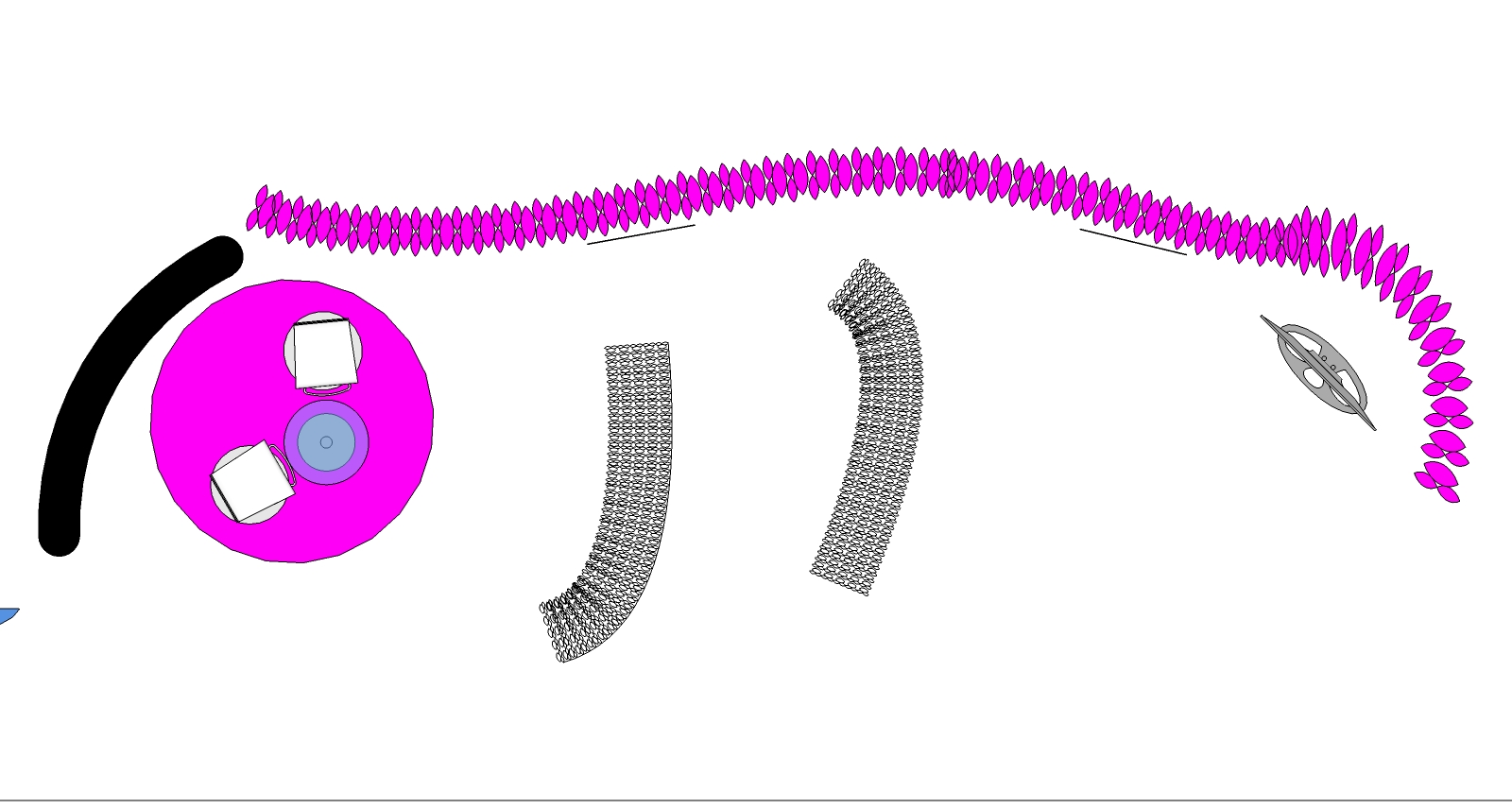
                            BTW it's also a nice new animation tool for Sketchup! To be continued...
                            and a not-so-well rendered view

                            Oh and by the way Gaieus, I had read one of your post on a google forum (http://www.google.com/support/forum/p/sketchup/thread?tid=6300098d9b1e63b7&hl=en) before posting my question but for some reason I couldn't make my head to apply your suggestions to my situation...
                            I just didn't understand if this post relates to my problem or not... (I know it's scary... I scare myself very often 😕)

                            Again, I wish my the world would be as effective and generous as this community... 😒
                            Thanks everyone!

                            Nicolas

                            • "Live every day as if it were your last and then some day you'll be right."
                            • "ThomThom rules!!!"
                            1 條回覆 最後回覆 回覆 引用 0
                            • C 離線
                              cobb89
                              最後由 編輯

                              how can i use this rotate plan view plugin??

                              1 條回覆 最後回覆 回覆 引用 0
                              • Rich O BrienR 離線
                                Rich O Brien Moderator
                                最後由 編輯

                                @unknownuser said:

                                Copy/paste it into a file named Rotateplanview.rb in the Plugins folder.
                                To use set up your Plan [Top] view, without Perspective and in the Ruby Console type Rotateplanview.new to rotate the camera 45 degrees clockwise, repeat to rotate it another 45 degrees etc. The extents are zoomed after each rotation.
                                To do other angles provide an angle value in degrees - e.g. Rotateplanview.new 10 rotates the view 10 degrees clockwise or Rotateplanview.new -30 rotates the view 30 degrees counterclockwise.
                                When you are happy with it save the view to a new Scene tab so you can return to it later.

                                Download the free D'oh Book for SketchUp 📖

                                1 條回覆 最後回覆 回覆 引用 0
                                • Dave RD 離線
                                  Dave R
                                  最後由 編輯

                                  Thank you, TIG. This offers some interesting options for scene creation.

                                  Etaoin Shrdlu

                                  %

                                  (THERE'S NO PLACE LIKE)

                                  G28 X0.0 Y0.0 Z0.0

                                  M30

                                  %

                                  1 條回覆 最後回覆 回覆 引用 0
                                  • Rich O BrienR 離線
                                    Rich O Brien Moderator
                                    最後由 編輯

                                    No problem Dave, glad I could help... 😎

                                    Download the free D'oh Book for SketchUp 📖

                                    1 條回覆 最後回覆 回覆 引用 0
                                    • C 離線
                                      cobb89
                                      最後由 編輯

                                      @unknownuser said:

                                      @unknownuser said:

                                      Copy/paste it into a file named Rotateplanview.rb in the Plugins folder.
                                      To use set up your Plan [Top] view, without Perspective and in the Ruby Console type Rotateplanview.new to rotate the camera 45 degrees clockwise, repeat to rotate it another 45 degrees etc. The extents are zoomed after each rotation.
                                      To do other angles provide an angle value in degrees - e.g. Rotateplanview.new 10 rotates the view 10 degrees clockwise or Rotateplanview.new -30 rotates the view 30 degrees counterclockwise.
                                      When you are happy with it save the view to a new Scene tab so you can return to it later.

                                      can anyone create a toolbar button for this plugin??

                                      1 條回覆 最後回覆 回覆 引用 0
                                      • TIGT 離線
                                        TIG Moderator
                                        最後由 編輯

                                        As well as a toolbar you'd need a dialog for the angle ?

                                        TIG

                                        1 條回覆 最後回覆 回覆 引用 0
                                        • Dave RD 離線
                                          Dave R
                                          最後由 編輯

                                          Seems to me entering the text into the console works very nicely. And I don't have to find room for another toolbar.

                                          Oh, and Rich, I very happy to have your assistance while your wife is ironing. 😉

                                          Etaoin Shrdlu

                                          %

                                          (THERE'S NO PLACE LIKE)

                                          G28 X0.0 Y0.0 Z0.0

                                          M30

                                          %

                                          1 條回覆 最後回覆 回覆 引用 0
                                          • Rich O BrienR 離線
                                            Rich O Brien Moderator
                                            最後由 編輯

                                            @unknownuser said:

                                            while your wife is ironing

                                            Prioritize Dave...Prioritize 😉

                                            Download the free D'oh Book for SketchUp 📖

                                            1 條回覆 最後回覆 回覆 引用 0
                                            • 1
                                            • 2
                                            • 3
                                            • 1 / 3
                                            • 第一個貼文
                                              最後的貼文
                                            Buy SketchPlus
                                            Buy SUbD
                                            Buy WrapR
                                            Buy eBook
                                            Buy Modelur
                                            Buy Vertex Tools
                                            Buy SketchCuisine
                                            Buy FormFonts

                                            Advertisement