sketchucation logo sketchucation
    • 登入
    Oops, your profile's looking a bit empty! To help us tailor your experience, please fill in key details like your SketchUp version, skill level, operating system, and more. Update and save your info on your profile page today!
    ⚠️ Important | Libfredo 15.6b introduces important bugfixes for Fredo's Extensions Update

    [Plugin] [$] Artisan (1.2.3) - Feb 28, 2014

    已排程 已置頂 已鎖定 已移動 Plugins
    296 貼文 95 Posters 113.5k 瀏覽 95 Watching
    正在載入更多貼文
    • 從舊到新
    • 從新到舊
    • 最多點贊
    回覆
    • 在新貼文中回覆
    登入後回覆
    此主題已被刪除。只有擁有主題管理權限的使用者可以查看。
    • JClementsJ 離線
      JClements
      最後由 編輯

      Dale:

      It would sure be nice if you could finish the videos on your site for the remaining tools.

      😄

      John

      John | Illustrator | Beaverton, Oregon

      1 條回覆 最後回覆 回覆 引用 0
      • F 離線
        fbartels
        最後由 編輯

        Dale,

        Thanks so much for Artisan! A brilliant update to SDS and a wonderful addition to SketchUp. You've provided us with an amazing new set of tools. Now if Google SketchUp would only get moving and modernize the drawing engine...

        You've single handedly reenergized my interest in SketchUp!

        With much gratitude for your amazing work.

        Fred

        PS Thanks also for the upgrade pricing for those who purchased SDS.

        1 條回覆 最後回覆 回覆 引用 0
        • W 離線
          Whaat
          最後由 編輯

          @rv1974 said:

          @Whaat:
          There must be some kind of 'shortcut override' mode- people use arrow keys extensevely for other tools shortcuts.The same with TAB by default it used to undo viewport operations. If I'm not mistaken Thomthom made it in vertex tools.
          Another thing: After sculpting\finetuning on subsuface level I'd like my gizmo proxy to get updated but it doesn't happen.What I'm doing wrong?

          Sorry, I didn't realize that the arrow keys would be used as short-cut keys. I thought people 'reserved' them for modifier keys 'inside' other tools (constraining axis movement for example). I will consider allowing overrides in a future update.

          About your other question, if you are sculpting a subsurface, the updates do not proprogate back up to the proxy. I'm afraid it doesn't work that way.

          SketchUp Plugins for Professionals

          1 條回覆 最後回覆 回覆 引用 0
          • W 離線
            Whaat
            最後由 編輯

            @jclements said:

            Dale:

            It would sure be nice if you could finish the videos on your site for the remaining tools.

            😄

            John

            Hi John,

            My day job has been killing me lately and I haven't had time to finish the tutorials. I am now hoping to have them all done by mid-April. I might have a new one out this weekend if all goes well.

            My apologies for the delay.

            SketchUp Plugins for Professionals

            1 條回覆 最後回覆 回覆 引用 0
            • JClementsJ 離線
              JClements
              最後由 編輯

              No problem Dale. I think a lot of us are getting killed by day jobs. 😄

              John | Illustrator | Beaverton, Oregon

              1 條回覆 最後回覆 回覆 引用 0
              • P 離線
                Phil Rader AIA
                最後由 編輯

                @jclements said:

                No problem Dale. I think a lot of us are getting killed by day jobs. 😄

                Having "a day job" is a good thing considering this economy.

                http://www.philrader.com

                1 條回覆 最後回覆 回覆 引用 0
                • JClementsJ 離線
                  JClements
                  最後由 編輯

                  27 March 11

                  Hey Dale:

                  I see you have a new video on the basic Subdivide processes. Thanks!

                  John | Illustrator | Beaverton, Oregon

                  1 條回覆 最後回覆 回覆 引用 0
                  • W 離線
                    Whaat
                    最後由 編輯

                    @jclements said:

                    27 March 11

                    Hey Dale:

                    I see you have a new video on the basic Subdivide processes. Thanks!

                    Yes, here it is:
                    http://artisan4sketchup.com/category/documentation/

                    Make sure you subscribe to the tutorials on Youtube! More are coming!

                    SketchUp Plugins for Professionals

                    1 條回覆 最後回覆 回覆 引用 0
                    • JClementsJ 離線
                      JClements
                      最後由 編輯

                      Hey Dale ... again:

                      I see you have added a couple more videos.

                      I found the creasing video particularly helpful.

                      Thanks!
                      John

                      John | Illustrator | Beaverton, Oregon

                      1 條回覆 最後回覆 回覆 引用 0
                      • S 離線
                        samtsham
                        最後由 編輯

                        Hello everyone,
                        I already posted this on the Artisan Support Forum six days ago, but I figure I've got better chances to get a response over here:

                        I really enjoy Artisan and bought it right away.
                        I ran into trouble, however. All the functions that get activated by "using the arrow keys" don't work. Unless the "arrow keys" are not the cursor keys with the arrows on them at the bottom right of my MacBook Pro keyboard, in which case I'd like to ask you to direct me to the correct keys, this makes several of Artisan's functions hard or impossible to use. I cannot sculpt "in", I can only add to the geometry, and the only option to subtract from it, apart from the inaccessible cursor control, which as of this moment does nothing, is typing "negative values +s" (-17s) in the VCB, (which I also have to use to change the radius). The convenient polarity switch by pressing both up and down arrow keys is also not available to me, leading to a lot of protracted typing, which really takes the fun out of sculpting. I also can't confine axes in Artisan, which works just fine in regular SU-use.

                        My specs:
                        MacBook Pro, 8GB RAM, Snow Leopard.
                        SketchUp 8.0.4810
                        Quite a number of essential plugins, amongst them LightUp, most of Fredo's, 1001bit, Soapskin and Bubble, Workplane Tools, Projections, Sketchy Physics and a couple more.
                        I use a German/Austrian keyboard layout, but I already tried switching it to English/American, to no avail.

                        Please advise. Thank you!
                        Regards, SAM from Vienna.

                        1 條回覆 最後回覆 回覆 引用 0
                        • W 離線
                          Whaat
                          最後由 編輯

                          @samtsham said:

                          Hello everyone,
                          I already posted this on the Artisan Support Forum six days ago, but I figure I've got better chances to get a response over here:

                          I really enjoy Artisan and bought it right away.
                          I ran into trouble, however. All the functions that get activated by "using the arrow keys" don't work. Unless the "arrow keys" are not the cursor keys with the arrows on them at the bottom right of my MacBook Pro keyboard, in which case I'd like to ask you to direct me to the correct keys, this makes several of Artisan's functions hard or impossible to use. I cannot sculpt "in", I can only add to the geometry, and the only option to subtract from it, apart from the inaccessible cursor control, which as of this moment does nothing, is typing "negative values +s" (-17s) in the VCB, (which I also have to use to change the radius). The convenient polarity switch by pressing both up and down arrow keys is also not available to me, leading to a lot of protracted typing, which really takes the fun out of sculpting. I also can't confine axes in Artisan, which works just fine in regular SU-use.

                          My specs:
                          MacBook Pro, 8GB RAM, Snow Leopard.
                          SketchUp 8.0.4810
                          Quite a number of essential plugins, amongst them LightUp, most of Fredo's, 1001bit, Soapskin and Bubble, Workplane Tools, Projections, Sketchy Physics and a couple more.
                          I use a German/Austrian keyboard layout, but I already tried switching it to English/American, to no avail.

                          Please advise. Thank you!
                          Regards, SAM from Vienna.

                          Hi Sam,

                          This is indeed strange. You say you are using the same arrow keys for Artisan that you are using to confine the axes for regular SketchUp use?

                          Can I ask a question? You say you have other 3rd party plugins installed? Do any of them employ the use of the arrow keys? If so, do they work for you?

                          Thanks (sorry for the slow reply).

                          The contact form on the Artisan website is the quickest way to get support for Artisan.

                          SketchUp Plugins for Professionals

                          1 條回覆 最後回覆 回覆 引用 0
                          • D 離線
                            deanlegg
                            最後由 編輯

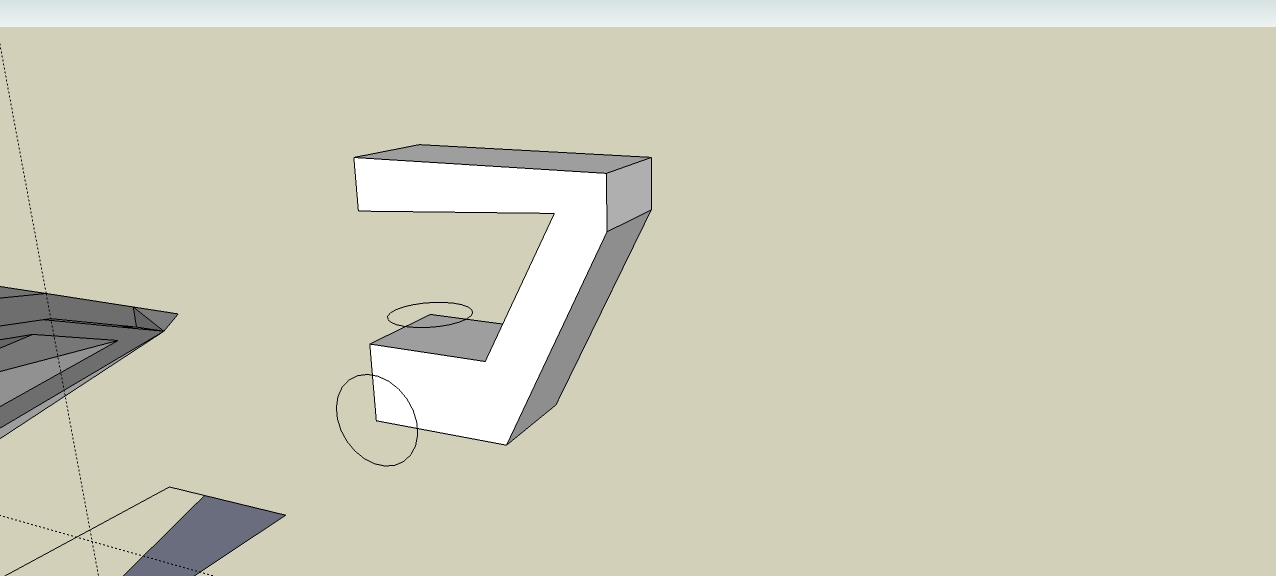
                            I've been trying the crease tool
                            If you look at the pic I want to keep the circled corners square, so I creased just the lines in the circle but it didnt work
                            Where have I gone wrong?

                            head.jpg

                            1 條回覆 最後回覆 回覆 引用 0
                            • boofredlayB 離線
                              boofredlay
                              最後由 編輯

                              Crease the corner, where the lines meet.

                              http://www.coroflot.com/boofredlay

                              1 條回覆 最後回覆 回覆 引用 0
                              • K 離線
                                kwistenbiebel
                                最後由 編輯

                                I bought it and love it. Thank you Whaat!

                                1 條回覆 最後回覆 回覆 引用 0
                                • D 離線
                                  dedmin
                                  最後由 編輯

                                  Why not!? 😒

                                  1 條回覆 最後回覆 回覆 引用 0
                                  • A 離線
                                    arthur87
                                    最後由 編輯

                                    downloaded Sculptris. It is much more advanced than artisan and moreover it's free . Wonder why artisan is $39 😒

                                    1 條回覆 最後回覆 回覆 引用 0
                                    • A 離線
                                      arthur87
                                      最後由 編輯

                                      @dedmin said:

                                      Why not!? 😒

                                      of course artisan should be free..if a more advanced thing is for free then a basic version shouldn't come at a price...

                                      1 條回覆 最後回覆 回覆 引用 0
                                      • D 離線
                                        dedmin
                                        最後由 編輯

                                        Of course only the developer decides what should be free - We, the fellow users can only be grateful. But of course You can make better plugin than Artisan and give it to us for free 🤣

                                        1 條回覆 最後回覆 回覆 引用 0
                                        • jason_marantoJ 離線
                                          jason_maranto
                                          最後由 編輯

                                          Enjoy it while you can, Sculptris won't be free very much longer -- oh, and the reason it is free is because it is a Beta.

                                          BTW, you have no right to determine the value of somebody else's hard work -- if you think it should be free then make your own Artisian and release it for free... yeah, I didn't think so.

                                          Best,
                                          Jason.

                                          I create video tutorial series about several 2D & 3D graphics programs.

                                          1 條回覆 最後回覆 回覆 引用 0
                                          • A 離線
                                            AZPilot
                                            最後由 編輯

                                            Correct me if I'm wrong but Isn't Artisan a plug-in for SU and Sculptris a stand alone program? If so we are talking about two different worlds.


                                            Todd
                                            Chandler, AZ

                                            1 條回覆 最後回覆 回覆 引用 0
                                            • 1
                                            • 2
                                            • 3
                                            • 4
                                            • 5
                                            • 14
                                            • 15
                                            • 1 / 15
                                            • 第一個貼文
                                              最後的貼文
                                            Buy SketchPlus
                                            Buy SUbD
                                            Buy WrapR
                                            Buy eBook
                                            Buy Modelur
                                            Buy Vertex Tools
                                            Buy SketchCuisine
                                            Buy FormFonts

                                            Advertisement
