sketchucation logo sketchucation
    • 登入
    Oops, your profile's looking a bit empty! To help us tailor your experience, please fill in key details like your SketchUp version, skill level, operating system, and more. Update and save your info on your profile page today!
    ⚠️ Important | Libfredo 15.6b introduces important bugfixes for Fredo's Extensions Update

    [Plugin] [$] Artisan (1.2.3) - Feb 28, 2014

    已排程 已置頂 已鎖定 已移動 Plugins
    296 貼文 95 Posters 113.5k 瀏覽 95 Watching
    正在載入更多貼文
    • 從舊到新
    • 從新到舊
    • 最多點贊
    回覆
    • 在新貼文中回覆
    登入後回覆
    此主題已被刪除。只有擁有主題管理權限的使用者可以查看。
    • V 離線
      Vicspa
      最後由 編輯

      Thank you,REGIS and Rich O'Brien, Great start for new users. 👍

      1 條回覆 最後回覆 回覆 引用 0
      • J 離線
        jchau2007
        最後由 編輯

        Hi all,
        Does anybody know if I can run the plugin in multiple computers with 1 purchase?

        Thanks,
        James

        1 條回覆 最後回覆 回覆 引用 0
        • K 離線
          krash88
          最後由 編輯

          @whaat said:

          @krash88 said:

          Great piece of work, thank you! However, while I can crease whole faces I can't un-crease whole faces. I have to do it one edge at a time. Any thoughts?

          hmmm....works fine for me. I just hold shift and click on the face while using the crease tool....

          I've tried on simple and complex models. Could it be because I'm using 7.1? I'll also try a complete restart also. Either way I'm happy to have the upgrade 😄

          1 條回覆 最後回覆 回覆 引用 0
          • W 離線
            Whaat
            最後由 編輯

            @jchau2007 said:

            Hi all,
            Does anybody know if I can run the plugin in multiple computers with 1 purchase?

            Thanks,
            James

            Hi James,

            I apologize that the license agreement that was included with the software was not very clear on this subject. I have revised the EULA and now included it on the website:

            Link Preview Image
            Page not found - Artisan

            favicon

            Artisan (artisan4sketchup.com)

            I hope this clears up any misunderstandings.

            Thanks!

            SketchUp Plugins for Professionals

            1 條回覆 最後回覆 回覆 引用 0
            • W 離線
              Whaat
              最後由 編輯

              @krash88 said:

              @whaat said:

              @krash88 said:

              Great piece of work, thank you! However, while I can crease whole faces I can't un-crease whole faces. I have to do it one edge at a time. Any thoughts?

              hmmm....works fine for me. I just hold shift and click on the face while using the crease tool....

              I've tried on simple and complex models. Could it be because I'm using 7.1? I'll also try a complete restart also. Either way I'm happy to have the upgrade 😄

              Do you get any error messages in the Ruby Console when you try to uncrease?

              SketchUp Plugins for Professionals

              1 條回覆 最後回覆 回覆 引用 0
              • mitcorbM 離線
                mitcorb
                最後由 編輯

                @Whaat: Thank you for posting the updated EULA. I was just about to look it up, as I had the same question as jchau2007, and I did not want to do anything inadvertently illegal. Congratulations on your release from production jail. 💚

                Also, thank you for definitively stating that you expect users to try before they buy.
                Best wishes,
                mitcorb

                I take the slow, deliberate approach in my aimless wandering.

                1 條回覆 最後回覆 回覆 引用 0
                • X 離線
                  xrok1
                  最後由 編輯

                  hey Whaat, just enjoying the new toy, Thanks.
                  i have however noticed the vertex tool has quirks, have you noticed this?

                  #1 ThomThom's tool with 24" soft select #2 artisan with 24" soft select both moving along green axis
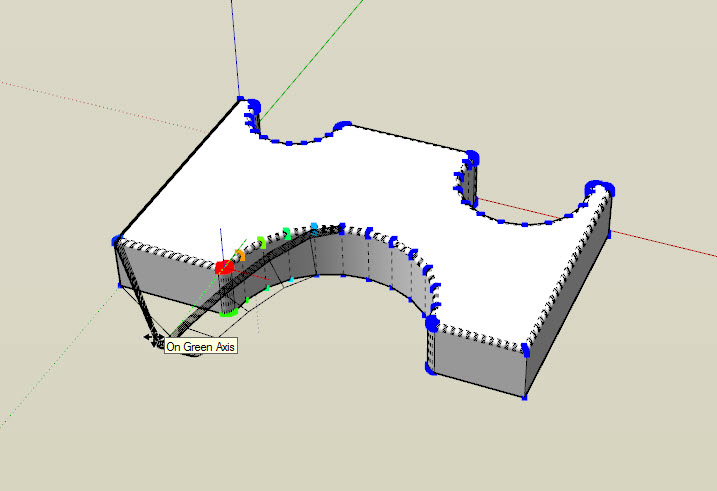
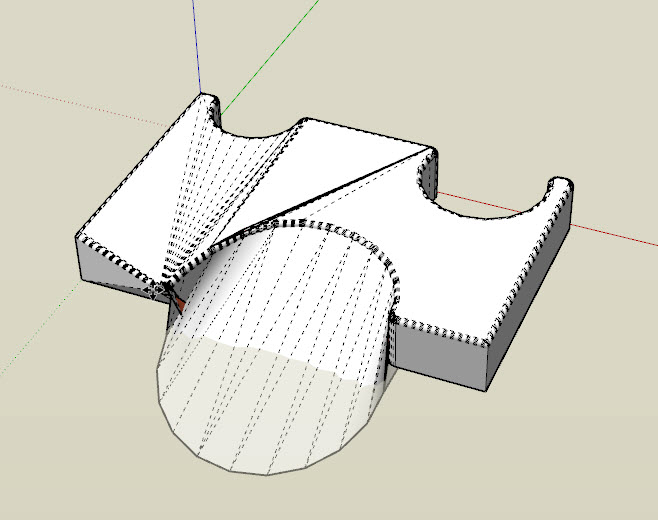
                  zCapture.JPG


                  zCapture2.JPG

                  “There are three classes of people: those who see. Those who see when they are shown. Those who do not see.”

                  http://www.Twilightrender.com try it!

                  1 條回覆 最後回覆 回覆 引用 0
                  • R 離線
                    reymond
                    最後由 編輯

                    Hello Su World

                    I bought yesterday morning artisan.
                    I have not received the mail with the license.

                    how long must I wait?

                    Thank you for your reply

                    Sketchup & Vray Trainer

                    1 條回覆 最後回覆 回覆 引用 0
                    • ely862meE 離線
                      ely862me
                      最後由 編輯

                      Make sure u have checked the spam folder too.

                      Elisei (sketchupper)


                      Before no life was done on Earth it was THE LIFE ITSELF...GOD
                      Come and See EliseiDesign

                      1 條回覆 最後回覆 回覆 引用 0
                      • R 離線
                        reymond
                        最後由 編輯

                        no mail in my spam folder 😕

                        Sketchup & Vray Trainer

                        1 條回覆 最後回覆 回覆 引用 0
                        • ely862meE 離線
                          ely862me
                          最後由 編輯

                          @xrok1 said:

                          i have however noticed the vertex tool has quirks, have you noticed this?

                          Explode those curves and it should work, also after the operation delete the coplanar lines.

                          @reymond said:

                          no mail in my spam folder

                          No worries things will sort out, u still have 13 days of use 😉 !

                          Elisei (sketchupper)


                          Before no life was done on Earth it was THE LIFE ITSELF...GOD
                          Come and See EliseiDesign

                          1 條回覆 最後回覆 回覆 引用 0
                          • K 離線
                            krash88
                            最後由 編輯

                            @whaat said:

                            @krash88 said:

                            @whaat said:

                            @krash88 said:

                            Great piece of work, thank you! However, while I can crease whole faces I can't un-crease whole faces. I have to do it one edge at a time. Any thoughts?

                            hmmm....works fine for me. I just hold shift and click on the face while using the crease tool....

                            I've tried on simple and complex models. Could it be because I'm using 7.1? I'll also try a complete restart also. Either way I'm happy to have the upgrade 😄

                            Do you get any error messages in the Ruby Console when you try to uncrease?

                            No errors. Ok, it all seems to depend on exactly where the cursor is when I un-crease. If I click on a place on the face that coincides with the smoothed mesh then it doesn't work. Just a quirk of Sketchup I guess. All is fine and thanks for the help!

                            1 條回覆 最後回覆 回覆 引用 0
                            • S 離線
                              Speaker
                              最後由 編輯

                              Could someone convert those proxies, so I could open them in SU 7 please.

                              http://www.youtube.com/user/latvietis1234

                              1 條回覆 最後回覆 回覆 引用 0
                              • boofredlayB 離線
                                boofredlay
                                最後由 編輯

                                Here you go.


                                Proxie Sample-1_SU6.skp


                                comparatif_SU6.zip

                                http://www.coroflot.com/boofredlay

                                1 條回覆 最後回覆 回覆 引用 0
                                • S 離線
                                  Speaker
                                  最後由 編輯

                                  Thanks!

                                  Just got into a problem- my laptop has a few broken arrow keys. That did not bother me before, becuse I don't use them almost never anyway, but how do I adjust the sculpt tools strenght now? 😕 It looks like only the radius is adjustable throught the VCB.

                                  http://www.youtube.com/user/latvietis1234

                                  1 條回覆 最後回覆 回覆 引用 0
                                  • W 離線
                                    Whaat
                                    最後由 編輯

                                    @speaker said:

                                    Thanks!

                                    Just got into a problem- my laptop has a few broken arrow keys. That did not bother me before, becuse I don't use them almost never anyway, but how do I adjust the sculpt tools strenght now? 😕 It looks like only the radius is adjustable throught the VCB.

                                    Actually you can type in 's' to adjust the strength. (eg. 10s) Did I not mention this in the Quick Reference guide? 😳

                                    SketchUp Plugins for Professionals

                                    1 條回覆 最後回覆 回覆 引用 0
                                    • N 離線
                                      nektares
                                      最後由 編輯

                                      yay! finally available! i bought it right away! thanks for the discount! now let´s try this amazing plugin!

                                      1 條回覆 最後回覆 回覆 引用 0
                                      • Dave RD 離線
                                        Dave R
                                        最後由 編輯

                                        From the web site: "Symmetrical sculpting mode using with user-defined work plane"

                                        Is this done by creating a component of half the model, copying and mirroring it? I can't seem to find any other way to do it.

                                        Etaoin Shrdlu

                                        %

                                        (THERE'S NO PLACE LIKE)

                                        G28 X0.0 Y0.0 Z0.0

                                        M30

                                        %

                                        1 條回覆 最後回覆 回覆 引用 0
                                        • soloS 離線
                                          solo
                                          最後由 編輯

                                          No, it's more like a cutting plane.

                                          http://www.solos-art.com

                                          If you see a toilet in your dreams do not use it.

                                          1 條回覆 最後回覆 回覆 引用 0
                                          • Dave RD 離線
                                            Dave R
                                            最後由 編輯

                                            I wish the tutorials were available.

                                            Ah. I see. Split it with the Zorro-like tool.

                                            Etaoin Shrdlu

                                            %

                                            (THERE'S NO PLACE LIKE)

                                            G28 X0.0 Y0.0 Z0.0

                                            M30

                                            %

                                            1 條回覆 最後回覆 回覆 引用 0
                                            • 1
                                            • 2
                                            • 7
                                            • 8
                                            • 9
                                            • 10
                                            • 11
                                            • 14
                                            • 15
                                            • 9 / 15
                                            • 第一個貼文
                                              最後的貼文
                                            Buy SketchPlus
                                            Buy SUbD
                                            Buy WrapR
                                            Buy eBook
                                            Buy Modelur
                                            Buy Vertex Tools
                                            Buy SketchCuisine
                                            Buy FormFonts

                                            Advertisement



