sketchucation logo sketchucation
    • Login
    Oops, your profile's looking a bit empty! To help us tailor your experience, please fill in key details like your SketchUp version, skill level, operating system, and more. Update and save your info on your profile page today!
    Mac User? | Join the Rayscaper Beta for Mac Learn More

    Try to make an Organic Shape?

    Scheduled Pinned Locked Moved Newbie Forum
    sketchup
    12 Posts 5 Posters 3.0k Views 5 Watching
    Loading More Posts
    • Oldest to Newest
    • Newest to Oldest
    • Most Votes
    Reply
    • Reply as topic
    Log in to reply
    This topic has been deleted. Only users with topic management privileges can see it.
    • Rich O BrienR
      Rich O Brien Moderator
      last edited by

      Have you explored the 'Follow Me' tool?

      [flash=800,600:92jeu5r0]http://www.youtube.com/v/GOxrFN7JbiQ[/flash:92jeu5r0]

      In fact check out all the videos...

      ...if you haven't seen them already?

      Download the free D'oh Book for SketchUp 📖

      1 Reply Last reply
      Reply Quote 0
      • M
        mingjae
        last edited by

        thank you very much!
        that's more than enough to learn sketchup for me.

        1 Reply Last reply
        Reply Quote 0
        • M
          mingjae
          last edited by

          hello it's me again,

          is it another way to create a more complex pillow than using follow me tool,
          I have use move tool+alt key but it didn't shape well.

          should I use some plugins maybe?free plugins?

          thx

          1 Reply Last reply
          Reply Quote 0
          • Rich O BrienR
            Rich O Brien Moderator
            last edited by

            I suppose the obvious choice is SDS (Subdivide and Smooth). Here's a quick example of what it does...
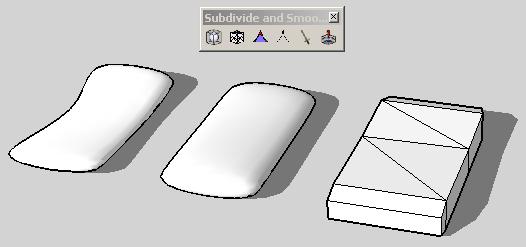
            SDS1.jpg

            I first created what's called a proxy, then subdivided and smoothed this using the plugin and you can then move points on the proxy that affect the pillow (called SubSurf)

            I know this isn't a great example of a pillow but it's just to give you the idea.

            Download the free D'oh Book for SketchUp 📖

            1 Reply Last reply
            Reply Quote 0
            • ely862meE
              ely862me
              last edited by

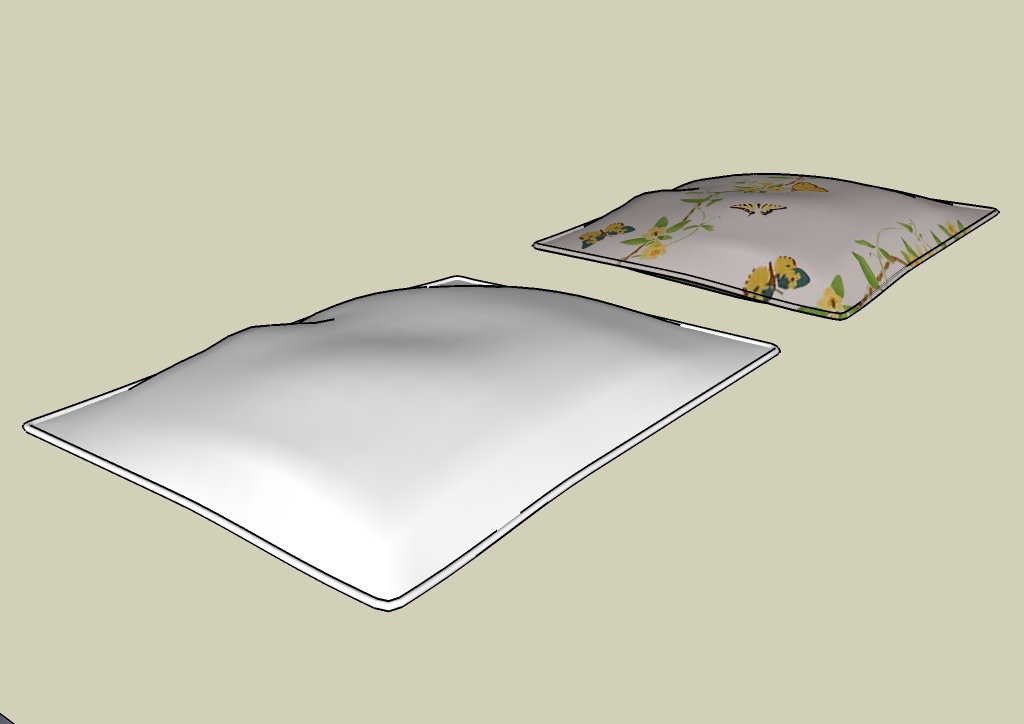
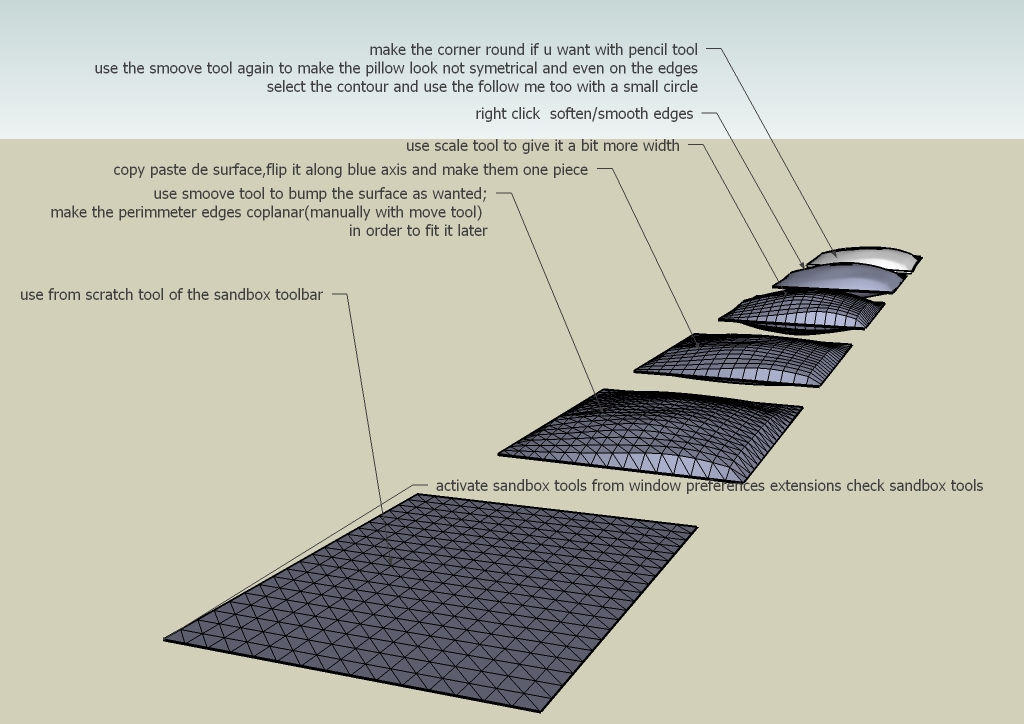
              No plugin needed !

              Pillow with sandbox tools     by EliseiDesign.jpg
              Pillow with sandbox tools    by EliseiDesign.jpg


              Pillow with sandbox tools by EliseiDesign.skp

              Elisei (sketchupper)


              Before no life was done on Earth it was THE LIFE ITSELF...GOD
              Come and See EliseiDesign

              1 Reply Last reply
              Reply Quote 0
              • M
                mingjae
                last edited by

                Where can I download SDS plugins? I've search in plugins index but none of SDS plugins there

                @ely862me said:

                No plugin needed !

                [attachment=0:1cx1je46]<!-- ia0 -->Pillow with sandbox tools by EliseiDesign.jpg<!-- ia0 -->[/attachment:1cx1je46]
                [attachment=1:1cx1je46]<!-- ia1 -->Pillow with sandbox tools by EliseiDesign.jpg<!-- ia1 -->[/attachment:1cx1je46]

                wow, interesting with no plugins needed,
                I have tried to use "from scratch" tool, but I can't make the first step,
                can you give the tutorial for the first step? is it left click?
                I'm confused..

                1 Reply Last reply
                Reply Quote 0
                • ely862meE
                  ely862me
                  last edited by

                  SDS aka Subdivide&Smooth it is a plugin but for sale .. u can buy it from here LINK.

                  As about the sandbox From scratch tool and also Smoove tool watch this.

                  [flash=700,550:s465wd0q]http://www.youtube.com/v/CcbIZFn6-mQ?fs=1&amp;hl=en_US&amp;color1=0x5d1719&amp;color2=0xcd311b[/flash:s465wd0q]

                  Elisei (sketchupper)


                  Before no life was done on Earth it was THE LIFE ITSELF...GOD
                  Come and See EliseiDesign

                  1 Reply Last reply
                  Reply Quote 0
                  • numbthumbN
                    numbthumb
                    last edited by

                    Just to add to this - if, for some reason, you can´t, or don´t want to buy it, you might consider this one, which is free ( it has its flaws, but anyway ) http://www.smustard.com/script/Subdivide.
                    However, learning SU in-built tools first would be a good idea IMO, so Elisei´s solution is worth giving a try.

                    Comfortably numb...

                    1 Reply Last reply
                    Reply Quote 0
                    • M
                      mingjae
                      last edited by

                      thanks guys, and thanks for the video,
                      but I still don't understand how to make the parameter to make circle border at the edge of the pillow, I always make it 2 edge lines after I duplicate and flip it 😒

                      nevermind, another suggest me to make a better organic shape using another software like 3Ds Max etc, but SU is more userfriendly for me,

                      this is another problem occur when I create a bottle using follow me tool,

                      http://img337.imageshack.us/img337/8153/bingungg.jpg

                      after I use follow me, some parts are missing, I don't know why,
                      but it won't happenned in creating bowl

                      1 Reply Last reply
                      Reply Quote 0
                      • D
                        d12dozr
                        last edited by

                        Regarding the bottle, it may be the faces are too small for SU...if that is the case, just scale up by 10 or 100, before follow me, then scale back down afterwards - and the faces will be kept.

                        3D Printing with SketchUp Book
                        http://goo.gl/f7ooYh

                        1 Reply Last reply
                        Reply Quote 0
                        • M
                          mingjae
                          last edited by

                          @d12dozr said:

                          Regarding the bottle, it may be the faces are too small for SU...if that is the case, just scale up by 10 or 100, before follow me, then scale back down afterwards - and the faces will be kept.

                          Scale? Great! It works!

                          by the way, have any idea to create these kind of bottle?

                          http://img714.imageshack.us/img714/4773/bingunge.jpg

                          I have no idea 😕
                          maybe a product designer is better than an architect in shaping things 😄

                          1 Reply Last reply
                          Reply Quote 0

                          Hello! It looks like you're interested in this conversation, but you don't have an account yet.

                          Getting fed up of having to scroll through the same posts each visit? When you register for an account, you'll always come back to exactly where you were before, and choose to be notified of new replies (either via email, or push notification). You'll also be able to save bookmarks and upvote posts to show your appreciation to other community members.

                          With your input, this post could be even better 💗

                          Register Login
                          • 1 / 1
                          • First post
                            Last post
                          Buy SketchPlus
                          Buy SUbD
                          Buy WrapR
                          Buy eBook
                          Buy Modelur
                          Buy Vertex Tools
                          Buy SketchCuisine
                          Buy FormFonts

                          Advertisement