sketchucation logo sketchucation
    • 登入
    Oops, your profile's looking a bit empty! To help us tailor your experience, please fill in key details like your SketchUp version, skill level, operating system, and more. Update and save your info on your profile page today!
    🔌 Easy Offset | Offset selected faces in SketchUp in positive and negative offsets. Download

    [Plugin] Compo Spray 1.4.2 Updated

    已排程 已置頂 已鎖定 已移動 Plugins
    271 貼文 89 Posters 311.3k 瀏覽 89 Watching
    正在載入更多貼文
    • 從舊到新
    • 從新到舊
    • 最多點贊
    回覆
    • 在新貼文中回覆
    登入後回覆
    此主題已被刪除。只有擁有主題管理權限的使用者可以查看。
    • Didier BurD 離線
      Didier Bur
      最後由 編輯

      Weird.
      There shouldn't be any conflict with another plugin because all is wrapped in a Ruby Module, and there are also no redefinition of standard methods or classes. A workaround would be to empty your Plugins folder except compoSpray, see if it works, and then add other scripts one by one and check when it makes SU close.
      Hope this helps,

      DB

      1 條回覆 最後回覆 回覆 引用 0
      • Didier BurD 離線
        Didier Bur
        最後由 編輯

        @nickchun:

        @unknownuser said:

        Components need to be placed in model outside of the selection right?

        Components must have been imported in your model (you can see such components when clicking on the "house" icon of the components windows) prior to using the tool, otherwise they won't appear in the dropdown lists.
        When you select faces before launching the tool, the shapes dropdown list is replaced by 2 options: insert a component at each vertex of each selected face, or use the selected faces as the area to spray on.

        DB

        1 條回覆 最後回覆 回覆 引用 0
        • simon le bonS 離線
          simon le bon
          最後由 編輯

          Hi Didier
          Sorry to come back with a new problem!
          (It seems that I'm the only one to encounter this : )
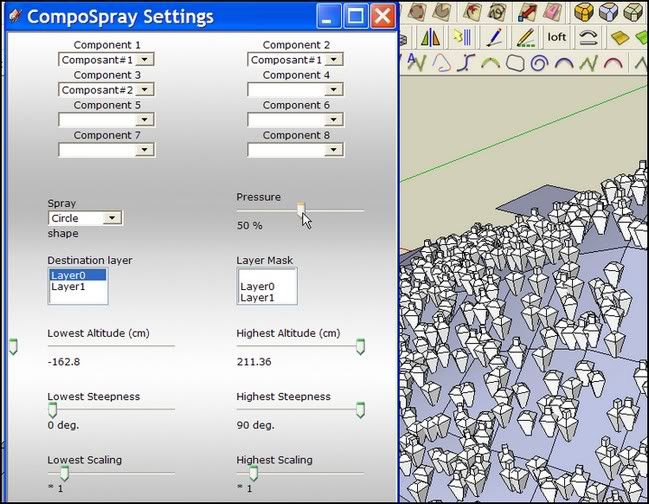
          Su6 and Su7 , I can't make any slider activ ❓ 😕

          http://i274.photobucket.com/albums/jj245/Spendauballet/SketchUp/thDBCompSpray14c.jpg

          any suggestion?
          simon

          1 條回覆 最後回覆 回覆 引用 0
          • Bob JamesB 離線
            Bob James
            最後由 編輯

            I created a flat inclined plane, centered it at the origin, and put a yucca bush on it.

            Under "Spray" I had two choices as expected:

            Selected Faces
            Vertices of Faces

            I clicked on the plane, chose my yucca plant and selected "Selected Faces", then pressed "Spray"

            Nothing happens.

            i7-4930K 3.4Ghz, 2x GTX780 6GB, 32GB DDR3-1600 ECC, OCZ Vertex 4 500GB, WD Black 3TB, 32TB NAS, 4x 27" Monitors, SpaceMouse Pro, X-keys XK-60

            1 條回覆 最後回覆 回覆 引用 0
            • Didier BurD 離線
              Didier Bur
              最後由 編輯

              @bob james:
              Bug found ! 😳
              Will fix that asap

              DB

              1 條回覆 最後回覆 回覆 引用 0
              • pilouP 離線
                pilou
                最後由 編輯

                hello
                Same problem than Simon for the cursors in V6 : they don't move 😢

                But I have also a more difficult problem! 😮
                I can't see the total dialog box!!! and it can't be resized! 😒
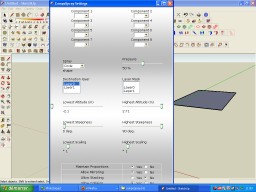

                humhum.jpg

                Frenchy Pilou
                Is beautiful that please without concept!
                My Little site :)

                1 條回覆 最後回覆 回覆 引用 0
                • FrederikF 離線
                  Frederik
                  最後由 編輯

                  Haven't had any chance to play with this... 😐
                  But the bug I reported previously is identical to what Bob James have reported above...

                  @didier bur said:

                  Bug found ! 😳
                  Will fix that asap

                  Cheers
                  Kim Frederik

                  1 條回覆 最後回覆 回覆 引用 0
                  • Didier BurD 離線
                    Didier Bur
                    最後由 編輯

                    @Pilou: what a bunch of toolbars you have there !
                    compoSpray dialog box is 900 pixels (height) without scrollbars, that's right.
                    Isn't your screen more than 900 in height ?

                    DB

                    1 條回覆 最後回覆 回覆 引用 0
                    • TIGT 離線
                      TIG Moderator
                      最後由 編輯

                      @unknownuser said:

                      @unknownuser said:

                      compoSpray dialog box is 900 pixels (height) without scrollbars

                      Yes but
                      I have my screen 1024*768 !!! 😒 (15 inch)
                      You have some free lines empty in your dialog box 😉

                      How do you see everything at such a small size?2349098787_2cd660c18c.jpg 😲 😉

                      TIG

                      1 條回覆 最後回覆 回覆 引用 0
                      • pilouP 離線
                        pilou
                        最後由 編輯

                        @unknownuser said:

                        what a bunch of toolbars you have there !

                        I have hidden some many other! 💚

                        @unknownuser said:

                        compoSpray dialog box is 900 pixels (height) without scrollbars

                        Yes but
                        I have my screen 1024*768 !!! 😒 (15 inch) so 😮

                        You have some free lines empty in your dialog box 😉

                        Frenchy Pilou
                        Is beautiful that please without concept!
                        My Little site :)

                        1 條回覆 最後回覆 回覆 引用 0
                        • thomthomT 離線
                          thomthom
                          最後由 編輯

                          @unknownuser said:

                          @unknownuser said:

                          what a bunch of toolbars you have there !

                          I have hidden some many other! 💚

                          @unknownuser said:

                          compoSpray dialog box is 900 pixels (height) without scrollbars

                          Yes but
                          I have my screen 1024*768 !!! 😒 (15 inch) so 😮

                          You have some free lines empty in your dialog box 😉

                          1024x768 screen with IE6 and SU6? 😲

                          Thomas Thomassen — SketchUp Monkey & Coding addict
                          List of my plugins and link to the CookieWare fund

                          1 條回覆 最後回覆 回覆 引用 0
                          • pilouP 離線
                            pilou
                            最後由 編輯

                            @unknownuser said:

                            1024x768 screen with IE6 and SU6?

                            Most time with Firefox, Opera... but also IE6 rarely 🤓
                            Why? That is forbidden? 💚
                            I have no case where I can't see a Su Project! 😎
                            (saved in SU6 of course)
                            Scrolling and zoom are my friends 😄

                            Frenchy Pilou
                            Is beautiful that please without concept!
                            My Little site :)

                            1 條回覆 最後回覆 回覆 引用 0
                            • thomthomT 離線
                              thomthom
                              最後由 編輯

                              @unknownuser said:

                              @unknownuser said:

                              1024x768 screen with IE6 and SU6?

                              But also IE6 rarely 🤓
                              Why? That is forbidden? 💚

                              Internet Explorer 6 - yes - it's forbidden. 😉
                              Webdialogs under Windows makes use of the Internet Explorer installed on the computer. So Webdialog issues with IE6 is quite probable to occur.
                              You had problems with Vertex Tools's dialogs due to that, didn't you?

                              Thomas Thomassen — SketchUp Monkey & Coding addict
                              List of my plugins and link to the CookieWare fund

                              1 條回覆 最後回覆 回覆 引用 0
                              • pilouP 離線
                                pilou
                                最後由 編輯

                                I make some mouse scroll (if possible 💚 ) and zoom when necessary 😉
                                Generally is some sufficient 😎

                                Frenchy Pilou
                                Is beautiful that please without concept!
                                My Little site :)

                                1 條回覆 最後回覆 回覆 引用 0
                                • pilouP 離線
                                  pilou
                                  最後由 編輯

                                  yes, so in this extrem case I take an another computer, but only for the modern plugins like yours ☀

                                  Frenchy Pilou
                                  Is beautiful that please without concept!
                                  My Little site :)

                                  1 條回覆 最後回覆 回覆 引用 0
                                  • F 離線
                                    fjb80
                                    最後由 編輯

                                    Hi Again,

                                    Is there any way to get this plugin working for me? As you can see I've got a lot of trees, so it'd be great to avoid doing this manually again in the future.

                                    Thanks for all your help so far.

                                    Below is ThomThom's assessment of the issue.

                                    Fraser

                                    @thomthom said:

                                    @didier bur said:

                                    Does this not work on a Mac the same way than on a PC ??

                                    As you see in his error report, the plugin is trying to look for the file at:
                                    /Users/Fraser/Library/Application Support/Google SketchUp 8/SketchUp/Plugins/CompoSpray
                                    while the plugin itself is located under:
                                    /Library/Application Support/Google SketchUp 8/SketchUp/Plugins/compoSprayToolbar.rb:14

                                    OSX has a system Library folder and a User Library folder that looks very similar, and some users end up adding plugins to User Library. And I think Podium installs there.
                                    And then you can get issues with Sketchup.find_support_file

                                    The best way to determine the base path of your supporting folders are:
                                    File.dirname(__FILE__)

                                    In your case it'd be:
                                    @path_cs = File.dirname(__FILE__) + "/CompoSpray/"

                                    However, that won't work in .rbs files.
                                    In Vertex Tools I made the uncrypted loader, which was a regular .rb file, determine the paths and assign it to constants which the .rbs files could use.

                                    I've never had any path issues that way, and the plugins can be installed anywhere on the system. (if the user prefers to install in a custom location.)

                                    1 條回覆 最後回覆 回覆 引用 0
                                    • U 離線
                                      unclex
                                      最後由 編輯

                                      if { mx_hidemanager.rb (C) 2010 by Henry Schorradt } this plugin was loaded,
                                      when set [Allow Collision] no, run CompoSpray
                                      SU8Pro crashed.....

                                      1 條回覆 最後回覆 回覆 引用 0
                                      • D 離線
                                        dcrites
                                        最後由 編輯

                                        Does anyone have a solution for the problem which Pilou posted earlier? I have a 15" HP Laptop running windows 7, with Google Sketchup 8 -

                                        I'm a Landscape Architecture student, so spraying trees rather than placing them individually would be an absolute godsend. But if I can't get to the bottom of the screen, I can't do much. I've tried using the 'tab' key to get to the 'spray' icon, but it doesn't seem to work (though tabbing over to the 'close' icon does. Arg.

                                        768 pixels is the maximum height on my monitor.

                                        1 條回覆 最後回覆 回覆 引用 0
                                        • Didier BurD 離線
                                          Didier Bur
                                          最後由 編輯

                                          Hi,
                                          I'll release an update soon with settings for low res screen that will set up scrollbars and modal/non modal dialogs. Easy and quick translation files will be supported as well.
                                          Regards

                                          DB

                                          1 條回覆 最後回覆 回覆 引用 0
                                          • charly2008C 離線
                                            charly2008
                                            最後由 編輯

                                            Hi Didier,

                                            Thank you for this plugin.

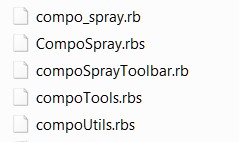
                                            I have a question. I have two entries in the Draw menu, Components and Component Spray. But I do not know what I can delete in the plugins folder. Can you help me please.

                                            Charly
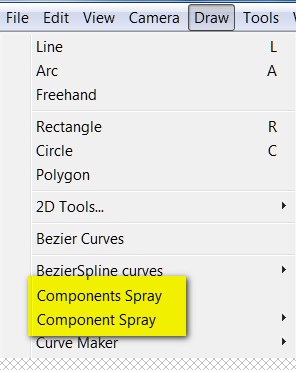

                                            Draw Menue


                                            Plugins Folder

                                            He who makes no mistakes, makes nothing

                                            1 條回覆 最後回覆 回覆 引用 0
                                            • 1
                                            • 2
                                            • 3
                                            • 4
                                            • 5
                                            • 6
                                            • 7
                                            • 13
                                            • 14
                                            • 5 / 14
                                            • 第一個貼文
                                              最後的貼文
                                            Buy SketchPlus
                                            Buy SUbD
                                            Buy WrapR
                                            Buy eBook
                                            Buy Modelur
                                            Buy Vertex Tools
                                            Buy SketchCuisine
                                            Buy FormFonts

                                            Advertisement