sketchucation logo sketchucation
    • Login
    Oops, your profile's looking a bit empty! To help us tailor your experience, please fill in key details like your SketchUp version, skill level, operating system, and more. Update and save your info on your profile page today!
    Mac User? | Join the Rayscaper Beta for Mac Learn More

    [Plugin] Compo Spray 1.4.2 Updated

    Scheduled Pinned Locked Moved Plugins
    271 Posts 89 Posters 368.5k Views 89 Watching
    Loading More Posts
    • Oldest to Newest
    • Newest to Oldest
    • Most Votes
    Reply
    • Reply as topic
    Log in to reply
    This topic has been deleted. Only users with topic management privileges can see it.
    • OxerO
      Oxer
      last edited by

      On Mac & SU2014 you have to place the compoSprayToolbar.rb file and ComproSpray folder is this path:
      /Applications/SketchUp 2014/SketchUp.app/Contents/Resources/Content/Tools
      Go to Applications folder select SketchUp app and right click Show package content

      "The result is the end what is important is the process" by Oxer
      http://www.oxervision.blogspot.com/

      1 Reply Last reply
      Reply Quote 0
      • K
        keithswd
        last edited by

        Thanks Oxer. I have just tried putting the file & folder as you suggest but still get the error. I have double checked that there is no longer a copy in either user Application Support../Sketchup subfolders, or in the system support folder, but up pops the error when I start up.
        The error has changed to the updated path for the script, so maybe something else is wrong:

        Error: #<SyntaxError: /applications/sketchup 2014/sketchup.app/contents/resources/content/tools/compospray/compoutils.rbs:511: Invalid break
        /applications/sketchup 2014/sketchup.app/contents/resources/content/tools/compospray/compoutils.rbs:520: Invalid break>
        /applications/sketchup 2014/sketchup.app/contents/resources/content/tools/compospray/compoutils.rbs
        Error Loading File compoSprayToolbar.rb
        Error: #<NoMethodError: undefined method compSpray_env' for main:Object> /Applications/SketchUp 2014/SketchUp.app/Contents/Resources/Content/Tools/compoSprayToolbar.rb:7:in <top (required)>'

        1 Reply Last reply
        Reply Quote 0
        • soloS
          solo
          last edited by

          So, any solution? I tried downloading it with the SCF plugin store but that did not work well, in fact it installs but nothing, no tool bar not in plugin menu, anyone?

          http://www.solos-art.com

          If you see a toilet in your dreams do not use it.

          1 Reply Last reply
          Reply Quote 0
          • OxerO
            Oxer
            last edited by

            KeithSWD and Solo, try with this version updated by MTriple, it works fine for me on Mac OS X & SU2014, remember the path on OS X:
            /Applications/SketchUp 2014/SketchUp.app/Contents/Resources/Content/Tools

            CompoSpray

            "The result is the end what is important is the process" by Oxer
            http://www.oxervision.blogspot.com/

            1 Reply Last reply
            Reply Quote 0
            • K
              keithswd
              last edited by

              Many thanks Oxer (and MTriple) this version is working for me too!

              Glad to have this very useful tool back in operation.

              1 Reply Last reply
              Reply Quote 0
              • R
                ruriglen
                last edited by

                The file MTriple uploaded to dropbox is offline, does anyone else has it, that kindly could uploaded again for sharing? Thanks!

                1 Reply Last reply
                Reply Quote 0
                • P
                  penumbra
                  last edited by

                  I give up on this plugin. Does not work on 2013 even the Mtriple fix. It won't accept a second point on the shapes (circle, square you name it). The developer has gone MIA...

                  1 Reply Last reply
                  Reply Quote 0
                  • BoxB
                    Box
                    last edited by

                    It does work on 2013 and 2014 with some tweaks.

                    Make sure you have the properties set to what you need and remember it needs a surface to spray on.

                    As for the developer being MIA, Didier has never said he supports this free plugin in perpetuity.
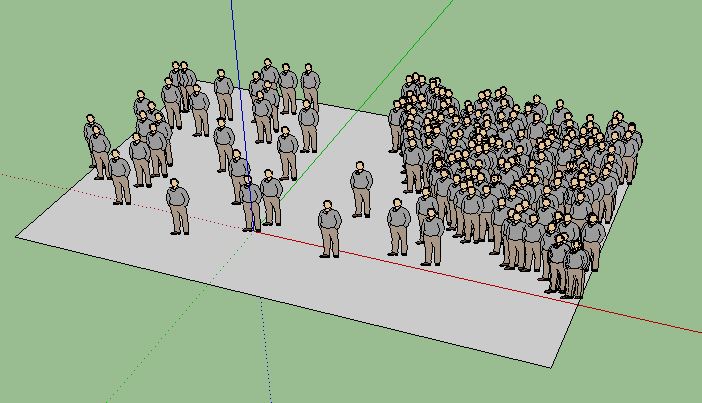

                    2013.JPG

                    1 Reply Last reply
                    Reply Quote 0
                    • chonC
                      chon
                      last edited by

                      Hello,

                      no match for me with CS modified and given by Oxer few posts above. I've tried to install the plugin in "C:\Program Files (x86)\SketchUp\SketchUp 2014\Tools" (even then we should'nt use this folder as explained by TIG) and in "C:\Users\XX\AppData\Roaming\SketchUp\SketchUp 2014\SketchUp\Plugins" but no success.

                      Cherry on the cake, i would like to install this plugin in an additional plugin folder using the Fredo6 tool (doesn't work in this folder neither of course).

                      Any one to help me ?

                      Thanks a lot !! πŸ˜‰

                      SU2019 pro 19.3.253 + VRay 4.00.02 (Next) on Win10-64Bits

                      1 Reply Last reply
                      Reply Quote 0
                      • nghminh81N
                        nghminh81
                        last edited by

                        Thanks so much Oxer and MTriple. Your file works perfectly with my sketchup 2014!

                        To anyone who using Windows and still can't install it: Please extract files(ComposprayToolbar.rb and 1 folder Compospray) to "C:\Program Files (x86)\SketchUp\SketchUp 2014\Tools".

                        DON'T EXTRACT FILES TO "C:\Users\XX\AppData\Roaming\SketchUp\SketchUp 2014\SketchUp\Plugins"
                        AND IF THEY WERE THERE (Because you tried to install it) Just DELETE.

                        1 Reply Last reply
                        Reply Quote 0
                        • V
                          valerostudio
                          last edited by

                          Agreed. This works in 2014! Thanks!!!

                          1 Reply Last reply
                          Reply Quote 0
                          • faBcnF
                            faBcn
                            last edited by

                            Hi there,
                            I do not see any window when clicking on Draw / Compo spray (SU 2013)...
                            Any idea ?
                            Thanx

                            1 Reply Last reply
                            Reply Quote 0
                            • faBcnF
                              faBcn
                              last edited by

                              How I manage to make it work on SU 2013, here in Spain (with bloody accents everywhere...)

                              1- Copy/Paste CompoSpray folder + .rb in Plugins file as usual
                              2- Remove all .lingvo but CompoSprayUS.lingvo

                              and it works perfectly ! Nada mΓ‘s....

                              😍

                              1 Reply Last reply
                              Reply Quote 0
                              • chonC
                                chon
                                last edited by

                                Not for me in France ! 😞

                                Still not working with my config...

                                SU2019 pro 19.3.253 + VRay 4.00.02 (Next) on Win10-64Bits

                                1 Reply Last reply
                                Reply Quote 0
                                • V
                                  valerostudio
                                  last edited by

                                  Broken again in 2015!!!

                                  1 Reply Last reply
                                  Reply Quote 0
                                  • soloS
                                    solo
                                    last edited by

                                    @valerostudio said:

                                    Broken again in 2015!!!

                                    Confirmed

                                    http://www.solos-art.com

                                    If you see a toilet in your dreams do not use it.

                                    1 Reply Last reply
                                    Reply Quote 0
                                    • TIGT
                                      TIG Moderator
                                      last edited by

                                      Didier has agreed to allow me to update some of his Plugins that are in in the PluginStore.
                                      I have already done of few of the easier ones... πŸ˜•
                                      I'll try and have a look at this one sometime this year !

                                      TIG

                                      1 Reply Last reply
                                      Reply Quote 0
                                      • TIGT
                                        TIG Moderator
                                        last edited by

                                        I have now updated 'Compo Spray' for Didier - it is now v2014/2015 compatible, and also works from any custom Plugins folder.
                                        Please get the latest version from the PluginStore http://sketchucation.com/pluginstore?pln=compoSpray
                                        If you have messed on installing it in Tools etc please remove it manually and get/install the latest version...

                                        TIG

                                        1 Reply Last reply
                                        Reply Quote 0
                                        • OxerO
                                          Oxer
                                          last edited by

                                          Thanks TIG, tested in SU2014 & SU2015 on Mac OSX 10.9.5 and the plugin works fine. πŸ‘

                                          "The result is the end what is important is the process" by Oxer
                                          http://www.oxervision.blogspot.com/

                                          1 Reply Last reply
                                          Reply Quote 0
                                          • P
                                            Pherim
                                            last edited by

                                            Thanks for the update!

                                            1 Reply Last reply
                                            Reply Quote 0

                                            Hello! It looks like you're interested in this conversation, but you don't have an account yet.

                                            Getting fed up of having to scroll through the same posts each visit? When you register for an account, you'll always come back to exactly where you were before, and choose to be notified of new replies (either via email, or push notification). You'll also be able to save bookmarks and upvote posts to show your appreciation to other community members.

                                            With your input, this post could be even better πŸ’—

                                            Register Login
                                            • 1
                                            • 2
                                            • 3
                                            • 4
                                            • 5
                                            • 13
                                            • 14
                                            • 1 / 14
                                            • First post
                                              Last post
                                            Buy SketchPlus
                                            Buy SUbD
                                            Buy WrapR
                                            Buy eBook
                                            Buy Modelur
                                            Buy Vertex Tools
                                            Buy SketchCuisine
                                            Buy FormFonts

                                            Advertisement