[Plugin] Compo Spray 1.4.2 Updated
-
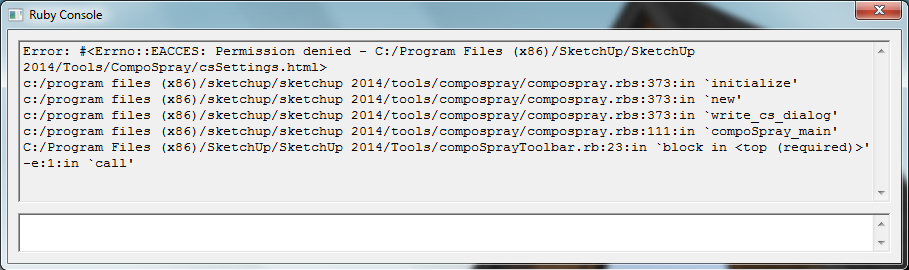
It was a permissions error for me, but it is working now. I also didn't know much about using the ruby console. Thanks!
-
@tig said:
Permissions to folders within the Programs Files tree is limited by default.
As has been said before... you should never need to put ANYTHING into the Tools folder.
The default 'User' Plugin folder for v2014 has suitable permissions...
I am still at a loss as to see what is improved by this fiasco...
I assumed that the permissions were changed by the company I work for. I didn't realize it is like that by default. To fix it I actually downloaded the latest link and installed it the correct way. I didn't realize that mtriples other link was a bad fix, and I'm still confused to how dtarch got it to work..
The reason I said that I fixed it by fixing the permissions issue is because I assumed it wasn't like that by default and assumed it could be just changed to get it to work for people that were having that same issue. I was trying to be helpful but it ended up being wrong and more confusing
 sorry
sorry -
I tried placing the files into Tools and Plugins without success
However when I placed them in Tools and ShippedExtensions folders, where the tools folder is it fired up. But not in the plugins folder.Paul J
-
Does anyone know how to get this plugin working on a Mac install of SU2014? I get this error after installation:
@unknownuser said:
Error: #<SyntaxError: /users/keithpocock/library/application support/sketchup 2014/sketchup/plugins/compospray/compoutils.rbs:511: Invalid break
/users/keithpocock/library/application support/sketchup 2014/sketchup/plugins/compospray/compoutils.rbs:520: Invalid break>
/users/keithpocock/library/application support/sketchup 2014/sketchup/plugins/compospray/compoutils.rbs
Error Loading File compoSprayToolbar.rb
Error: #<NoMethodError: undefined methodcompSpray_env' for main:Object> /Users/keithpocock/Library/Application Support/SketchUp 2014/SketchUp/Plugins/compoSprayToolbar.rb:7:in<top (required)>' -
On Mac & SU2014 you have to place the compoSprayToolbar.rb file and ComproSpray folder is this path:
/Applications/SketchUp 2014/SketchUp.app/Contents/Resources/Content/Tools
Go to Applications folder select SketchUp app and right click Show package content -
Thanks Oxer. I have just tried putting the file & folder as you suggest but still get the error. I have double checked that there is no longer a copy in either user Application Support../Sketchup subfolders, or in the system support folder, but up pops the error when I start up.
The error has changed to the updated path for the script, so maybe something else is wrong:Error: #<SyntaxError: /applications/sketchup 2014/sketchup.app/contents/resources/content/tools/compospray/compoutils.rbs:511: Invalid break
/applications/sketchup 2014/sketchup.app/contents/resources/content/tools/compospray/compoutils.rbs:520: Invalid break>
/applications/sketchup 2014/sketchup.app/contents/resources/content/tools/compospray/compoutils.rbs
Error Loading File compoSprayToolbar.rb
Error: #<NoMethodError: undefined methodcompSpray_env' for main:Object> /Applications/SketchUp 2014/SketchUp.app/Contents/Resources/Content/Tools/compoSprayToolbar.rb:7:in<top (required)>' -
So, any solution? I tried downloading it with the SCF plugin store but that did not work well, in fact it installs but nothing, no tool bar not in plugin menu, anyone?
-
KeithSWD and Solo, try with this version updated by MTriple, it works fine for me on Mac OS X & SU2014, remember the path on OS X:
/Applications/SketchUp 2014/SketchUp.app/Contents/Resources/Content/Tools -
Many thanks Oxer (and MTriple) this version is working for me too!
Glad to have this very useful tool back in operation.
-
The file MTriple uploaded to dropbox is offline, does anyone else has it, that kindly could uploaded again for sharing? Thanks!
-
I give up on this plugin. Does not work on 2013 even the Mtriple fix. It won't accept a second point on the shapes (circle, square you name it). The developer has gone MIA...
-
It does work on 2013 and 2014 with some tweaks.
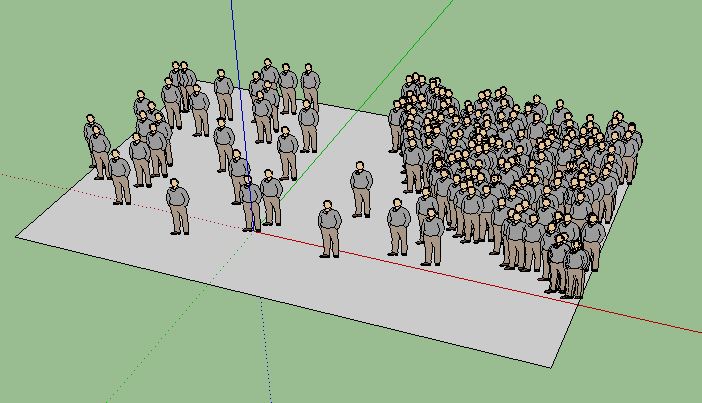
Make sure you have the properties set to what you need and remember it needs a surface to spray on.
As for the developer being MIA, Didier has never said he supports this free plugin in perpetuity.
-
Hello,
no match for me with CS modified and given by Oxer few posts above. I've tried to install the plugin in "C:\Program Files (x86)\SketchUp\SketchUp 2014\Tools" (even then we should'nt use this folder as explained by TIG) and in "C:\Users\XX\AppData\Roaming\SketchUp\SketchUp 2014\SketchUp\Plugins" but no success.
Cherry on the cake, i would like to install this plugin in an additional plugin folder using the Fredo6 tool (doesn't work in this folder neither of course).
Any one to help me ?
Thanks a lot !!

-
Thanks so much Oxer and MTriple. Your file works perfectly with my sketchup 2014!
To anyone who using Windows and still can't install it: Please extract files(ComposprayToolbar.rb and 1 folder Compospray) to "C:\Program Files (x86)\SketchUp\SketchUp 2014\Tools".
DON'T EXTRACT FILES TO "C:\Users\XX\AppData\Roaming\SketchUp\SketchUp 2014\SketchUp\Plugins"
AND IF THEY WERE THERE (Because you tried to install it) Just DELETE. -
Agreed. This works in 2014! Thanks!!!
-
Hi there,
I do not see any window when clicking on Draw / Compo spray (SU 2013)...
Any idea ?
Thanx -
How I manage to make it work on SU 2013, here in Spain (with bloody accents everywhere...)
1- Copy/Paste CompoSpray folder + .rb in Plugins file as usual
2- Remove all .lingvo but CompoSprayUS.lingvoand it works perfectly ! Nada más....

-
Not for me in France !

Still not working with my config...
-
Broken again in 2015!!!
-






Hello! It looks like you're interested in this conversation, but you don't have an account yet.
Getting fed up of having to scroll through the same posts each visit? When you register for an account, you'll always come back to exactly where you were before, and choose to be notified of new replies (either via email, or push notification). You'll also be able to save bookmarks and upvote posts to show your appreciation to other community members.
With your input, this post could be even better 💗
Register Login


Advertisement