[Plugin] ImageTrimmer
-
Works fine for me on two PCs and my Mac.
-
@picky1958 said:
@elacid said:
@tig said:
The only difference I have is the last item Java Quick Starter is unchecked in my version, BUT I'd not expect that to be an issue...
Can you run Sketchup as an Admin and see if it helps...
Nothing new.... same old story

I tried once again and got just basic file in TrimmedImages folder.
Then, as you can see, I tried with input in RC, but TrimmedImages folder stay unchanged still only basic image.
[attachment=0:2sef8osi]<!-- ia0 -->RC3.png<!-- ia0 -->[/attachment:2sef8osi]
I had exactly the same problems. I never got it to work either
But somewhere there must be a Catch. I hope so

-
@dave r said:
Works fine for me on two PCs and my Mac.
Yes, but the problem is not noticeable when running than when not working
-
@elacid said:
@picky1958 said:
@elacid said:
@tig said:
The only difference I have is the last item Java Quick Starter is unchecked in my version, BUT I'd not expect that to be an issue...
Can you run Sketchup as an Admin and see if it helps...
Nothing new.... same old story
I tried once again and got just basic file in TrimmedImages folder.
Then, as you can see, I tried with input in RC, but TrimmedImages folder stay unchanged still only basic image.
[attachment=0:2de0bzyz]<!-- ia0 -->RC3.png<!-- ia0 -->[/attachment:2de0bzyz]
I had exactly the same problems. I never got it to work either
But somewhere there must be a Catch. I hope so
I gave up on it. I am good with computers but when it comes up to some terms, there is also a language barrier. Some things are hard to find when you get instructions in english and you are hanging around with a PC that only speaks german!

-
@picky1958 said:
I gave up on it. I am good with computers but when it comes up to some terms, there is also a language barrier. Some things are hard to find when you get instructions in english and you are hanging around with a PC that only speaks german!
Yes it is a problem. Most people I know have Windows upgrade on its own local language.
My knowledge of English is poor, but there's no way for me to upgrade Windows on my PC to local language just for the reason you mention.As someone said, Hope dies last.
To give up is not an option -
I've been thinking a bit about this problem and the conclusion is as follows
When I start Image trimer from SU as I can see in status line

there appears one by one dot indicating that Image Trimer works.
In folder TrimmedImage shows up a copy of basic image.
Contents of files from.ini and to.ini are created with rigt paths what all indicates this part work fine.But after this point, after minute or minute and a half it stops.
In folder TrimmedImage there is no files image[Edges].dat and image[Edges].pngThe main question is, what heppens in that minute, according status line ImageTrimer works something.
Does it produce this two files image[Edges].dat and image[Edges].png or not.
We have two options
1.)
Files are produced but sometning has gone wrong and files can not be saved in TrimmerdImage folder
2)
Files are not produced which brings us back to the question of what then happens in that minute, minute and half.On the other side when EdgeDetector.jar is triggered manualy it produce this two files in folder.
When EdgeDetector.jar is trigered inside RC nothing happens. -
If you try this in the RC
UI.openURL("file:///"+"../full/path/to/EdgeDetector.jar")
what happens ? -
@tig said:
If you try this in the RC
UI.openURL("file:///"+"../full/path/to/EdgeDetector.jar")
what happens ?Full path to EdgeDetector.jar is :
C:/Program Files/Google/Google SketchUp 8/Plugins/SKMtools/EdgeDetector.jarIn this case if this is correct
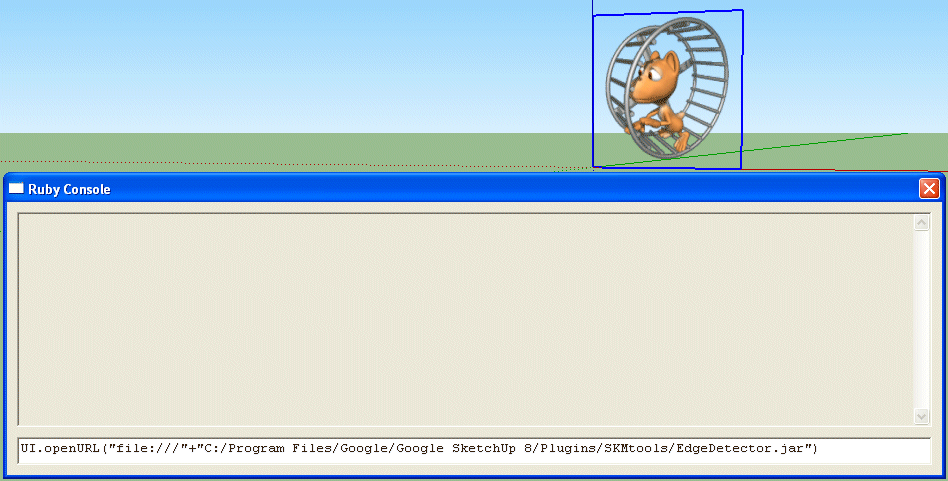
after enter and few seconds I got just this
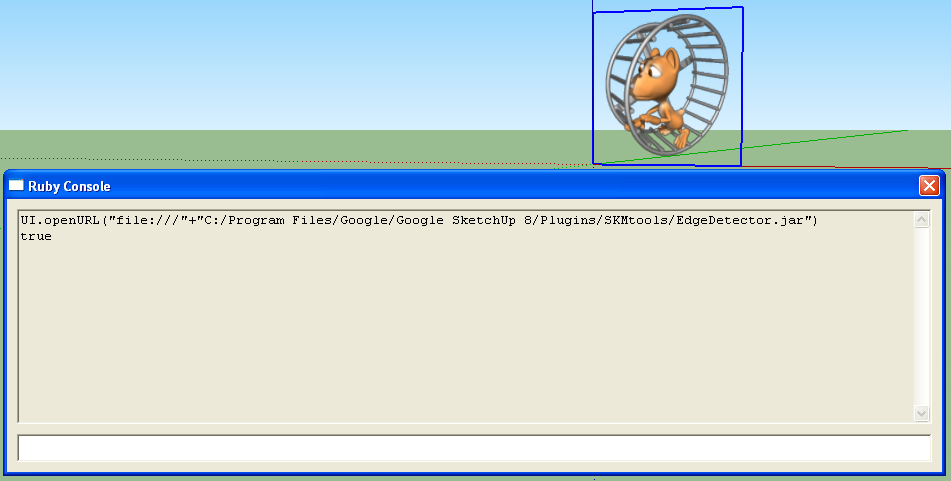
and nothing more
Folder TrimmedImage is unchanged. -
Has it then made the other files in the 'Trimmed' folder ?
If so we know it's both runnable and working...
Is there a .dat file?
This tells Ruby where to draw the edges that are the image's 'perimeter' ?
Can you PM a zip of the Trimmed folder including any .dat file to me ?
So why isn't it then reading the .dat file?
-
@tig said:
Has it then made the other files in the 'Trimmed' folder ?
If so we know it's both runnable and working...
Is there a .dat file?
This tells Ruby where to draw the edges that are the image's 'perimeter' ?
Can you PM a zip of the Trimmed folder including any .dat file to me ?
So why isn't it then reading the .dat file?Well, we have three situations..
1.)
When I start ImageTrimer from SU then
in files from.ini and to.iniappears correct path
in folder TrimmedImages appears copy od image.png
And nothing more.2.)
When I start manualy by click EdgeDetector.jar
with the condition - there is corect path in files from.ini and to.ini
and condtition - there is image.png inTrimmedImagesfolderIn folder TrimmedImages next to image.pngappears image[Edges].datand image[Edges].png
3.)
When I start EdgeDetector.jarinside RC nothing happens.
Files image[Edges].datand image[Edges].png doesn't appear in b] TrimmedImages [/b] folderZip of TrimmedImage folder is sent over PM
-
A .jar file won't execute through the RC unless you use UI.openURL("file:///"+full_path_to_jar), which we know works... I think - please retry and confirm this if there's any doubt...
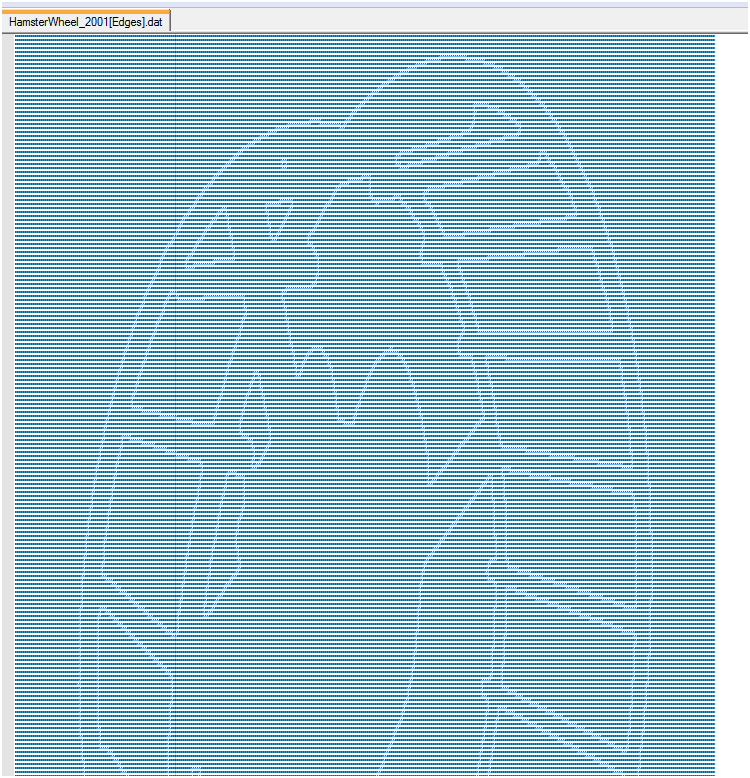
The edges dat file that is necessary is made in the set you PM'd, and it is fine - here's a zoomed out view of the 'text' - you can clearly see the 0/1 pattern matching the image outline !
So why isn't it working through the main ruby code ?
The .jar isn't 'executing' in the code...
So there must be something wrong with either your permissions - are you an admin ?
OR perhaps the Java settings are not right for some reason???
Do you AND ALL others have FULL access to the TrimmedImages folder ?
Perhaps you do but others like Java/Sketchup don't ???
Is there FULL rights for ALL to the SKMtools folder/files and subfolders ???
It's as if something is stopping the one step needed with the jar file 'opening' and making the dat file...
-
@tig said:
A .jar file won't execute through the RC unless you use UI.openURL("file:///"+full_path_to_jar), which we know works... I think - please retry and confirm this if there's any doubt...
The edges dat file that is necessary is made in the set you PM'd, and it is fine - here's a zoomed out view of the 'text' - you can clearly see the 0/1 pattern matching the image outline !
So why isn't it working through the main ruby code ?
The .jar isn't 'executing' in the code...
So there must be something wrong with either your permissions - are you an admin ?
OR perhaps the Java settings are not right for some reason???
Do you AND ALL others have FULL access to the TrimmedImages folder ?
Perhaps you do but others like Java/Sketchup don't ???
Is there FULL rights for ALL to the SKMtools folder/files and subfolders ???
It's as if something is stopping the one step needed with the jar file 'opening' and making the dat file...On this computer is only one user acount - my, with description computer administrator.
Full Java sattings I posted here before.
All folder with subfolder and files in that folders have full rights for ALL
The catch is somewhere here :
EdgeDetector.jar works if is started manualy by click
EdgeDetector.jar doesn't work from RCWhen it would be?
-
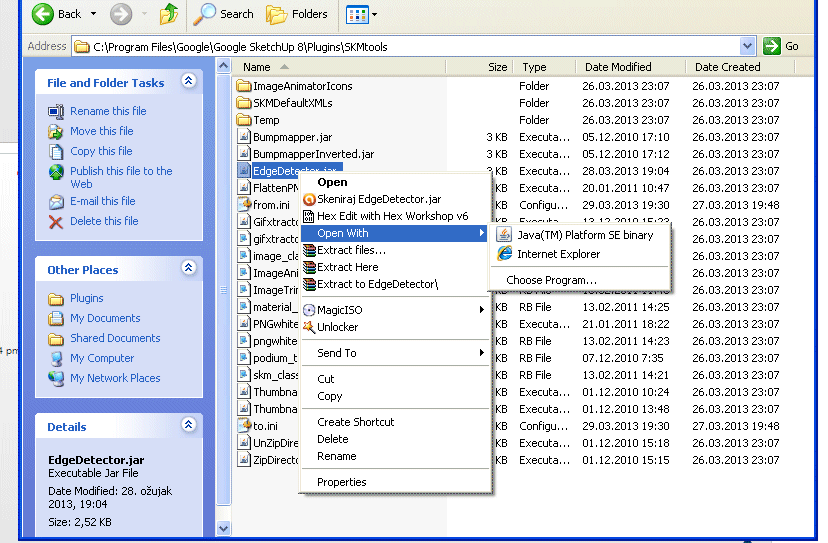
If you right-click a jar file and use 'open with...' what does it say ?
Try execute with Java ?
The one difference in the Java Advanced settings between me/you - mentioned earlier - can you try the alternative 'off'... -
@tig said:
If you right-click a jar file and use 'open with...' what does it say ?
Try execute with Java ?
The one difference in the Java Advanced settings between me/you - mentioned earlier - can you try the alternative 'off'...I got this
-
Conclusion - Chapter 2
After many attempts, I came up with something that could lead to a solution.
As I am not friendly with Ruby I tried the followingFirst. I saw that when I run ImageTrimmer from SU in TrimmedImages folder only get copy of bacic image - someimage.png
Then I saw if I directly run EdgeDetector.jar in TrimmedImages folder I get two files someimage[Edges].dat and someimage[Edges].png
Next I saw when I run ImageTrimmer from SU at start all existing files in TrimmedImages folder are deleted.
Well then I do next :
I start directly EdgeDetector.jar and I get necessery files someimage[Edges].dat and someimage[Edges].png and I copy them out from TrimmedImagesfolder.
Then I start ImageTrimmer from SU (of course ImageTrimer at start delete this two files from TrimmedImages folder but I have copy of them)
When ImageTrimmer are working I copy back someimage[Edges].dat and someimage[Edges].png in TrimmedImages folder
And on this way plugin works.

As I said before Hope dies last and surrender is not an option.
TIG, now is your turn

My grandad who died many years ago and never seen computor know to say something that might be in translation :
You dont have to know everything, but you need to know how to handle -
Another thought...
Please check your permissions for the SKMtools folder/contents are FULL for EVERYONE...
If you right-click a jar file and use 'Open with...' and choose 'Set default program...'
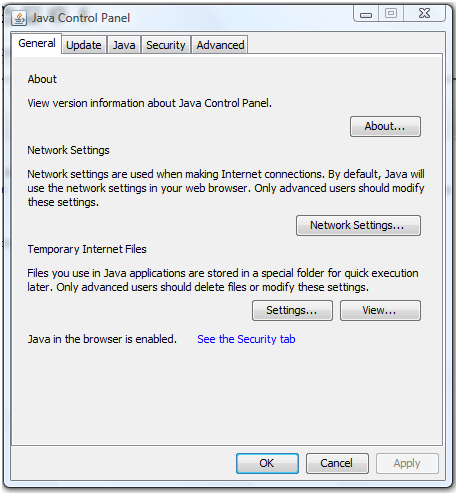
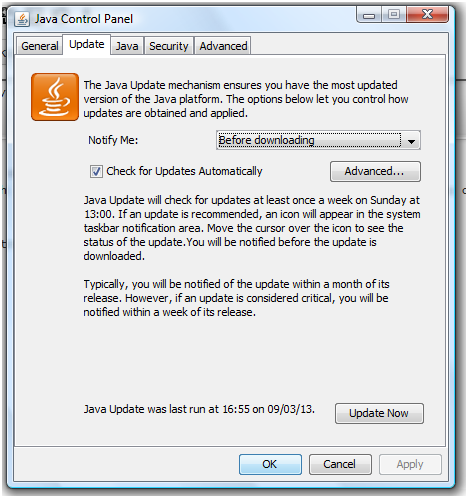
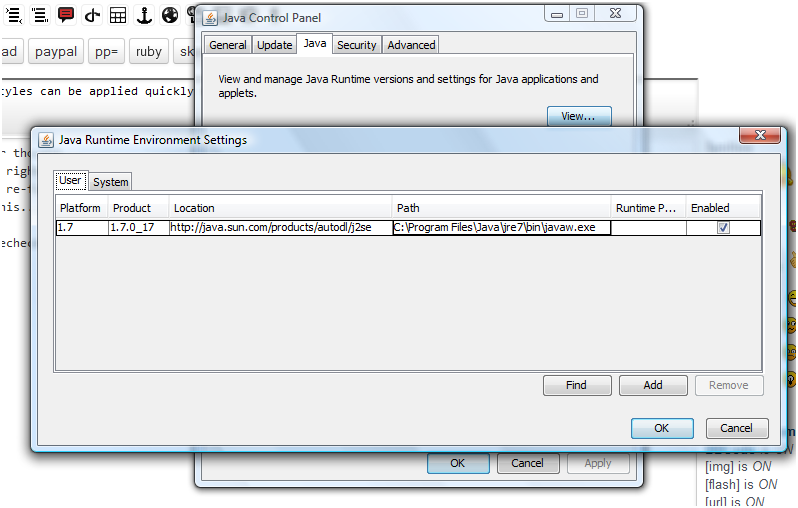
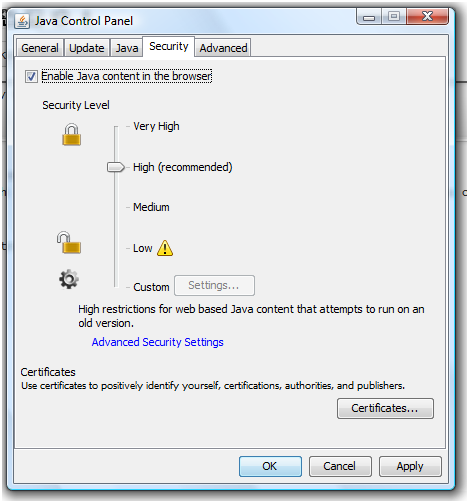
Try to re-force it to execute with Java, by re-choosing the Java .exe and checking the box 'Always open with this...'Also recheck each of the Java Control Panel settings match these, which work for me:
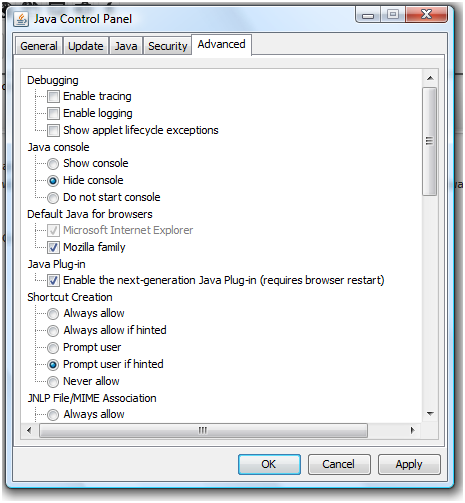
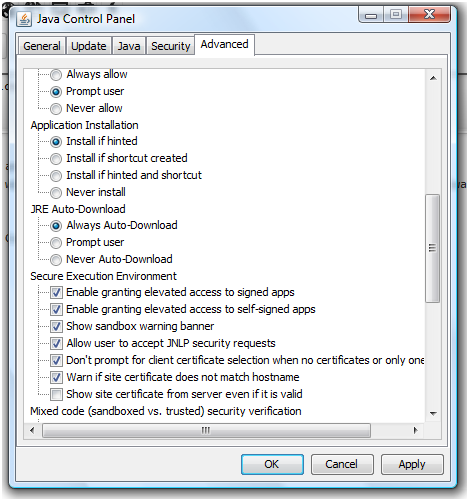
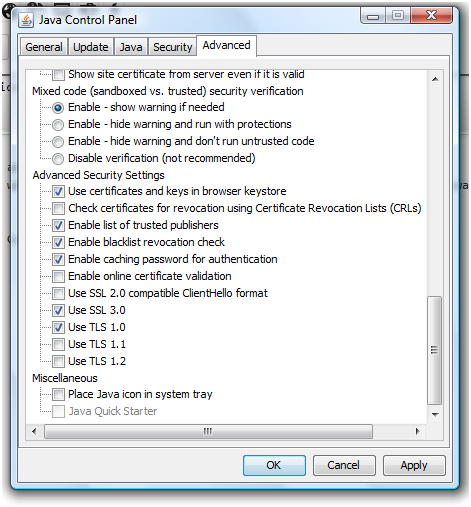
-
@tig said:
Another thought...
Please check your permissions for the SKMtools folder/contents are FULL for EVERYONE...
If you right-click a jar file and use 'Open with...' and choose 'Set default program...'
Try to re-force it to execute with Java, by re-choosing the Java .exe and checking the box 'Always open with this...'Also recheck each of the Java Control Panel settings match these, which work for me:
I did like you said.
SKMtools folder/contents are FULL for EVERYONE (it was before)
Java 'Open with' - re-choosing the Java .exe - 'Always open with this...'
It was done.Java settings is like you post here except I can't mark Mozilla family box then only IE box.
If I mark MF box after click on OK and re-open it shosw again only IE box marked.But unfortunately it did not bring anything new.
-
I can't see how to do anything more
At least you have a work around... -
@tig said:
I can't see how to do anything more
At least you have a work around...Maybe you can't maybe you can
I am not friendly with Ruby but as I can see with this type of error "No such file or directory" I am not alone.
It seems on some PC configuration for some reason proces is not able to save image[Edges].dat and image[Edges].png in TrimmedImages folder.There is possibility of syntax in code perhaps?
In this moment I can't see other reason.Anyway thank you for your time
-
I have used many images successfully but this one seem to crash as soon as it jumps to the part where it should trace the outlines, however - it makes an image in the folder before it crashes. it crashes the entire sketchup.


Any ideas?
On a sidenote - many of the images I had would not trim on my work computer using the newest sketchup - but my home computer with the last google version of sketchup seem to run most fine - except this one.






Advertisement