sketchucation logo sketchucation
    • 登入
    Oops, your profile's looking a bit empty! To help us tailor your experience, please fill in key details like your SketchUp version, skill level, operating system, and more. Update and save your info on your profile page today!
    🔌 Smart Spline | Fluid way to handle splines for furniture design and complex structures. Download

    [Plugin] ImageTrimmer

    已排程 已置頂 已鎖定 已移動 Plugins
    364 貼文 58 Posters 256.5k 瀏覽 58 Watching
    正在載入更多貼文
    • 從舊到新
    • 從新到舊
    • 最多點贊
    回覆
    • 在新貼文中回覆
    登入後回覆
    此主題已被刪除。只有擁有主題管理權限的使用者可以查看。
    • TIGT 離線
      TIG Moderator
      最後由 編輯

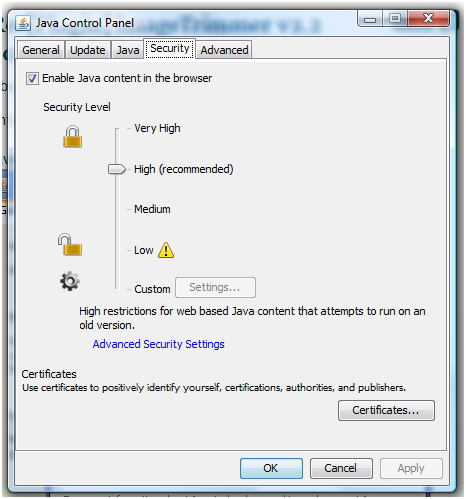
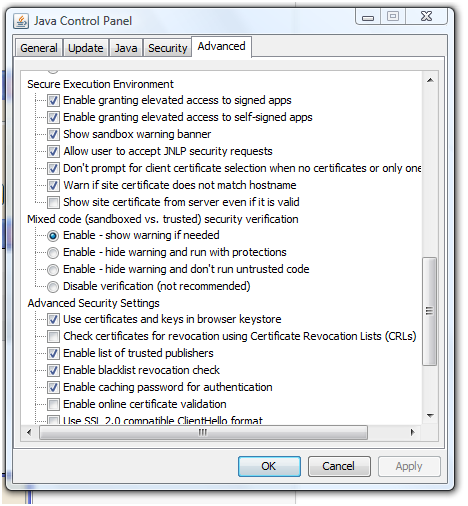
      These Java Control Panel settings work for me - see the screen-shots attached...
      Windows XP permissions work slightly differently from more recent Windows versions... BUT you can still make sure that you have unrestricted access-rights to the Plugins folder and its contents...
      http://www.microsoft.com/resources/documentation/windows/xp/all/proddocs/en-us/sag_seconceptsunobject.mspx?mfr=true
      http://www.microsoft.com/resources/documentation/windows/xp/all/proddocs/en-us/sag_seconceptsunobject.mspx?mfr=true

      JSec.PNG


      JCP.PNG

      TIG

      1 條回覆 最後回覆 回覆 引用 0
      • eLaCiDE 離線
        eLaCiD
        最後由 編輯

        My Java Control Panel settings are same as yours.

        This made help abut how to put security tab 😄
        http://www.microsoft.com/resources/documentation/windows/xp/all/proddocs/en-us/sag_seconceptsunobject.mspx?mfr=true

        Then with rigt_click

        Plugins>Properties>Security
        and in Plugins Folder
        SKMgtools>Properties>Security

        for all Group and user names all permission are marked - Allowe

        Then I triggered ImageTrimmer.
        Unfortunately 😞 situation ia same like before.

        1 條回覆 最後回覆 回覆 引用 0
        • TIGT 離線
          TIG Moderator
          最後由 編輯

          😕
          Can you post the PNG you are trying to Trim...
          At least if I can ImageTrim it we know it ought to work...
          PM it if it's confidential...

          TIG

          1 條回覆 最後回覆 回覆 引用 0
          • eLaCiDE 離線
            eLaCiD
            最後由 編輯

            @tig said:

            :?
            Can you post the PNG you are trying to Trim...
            At least if I can ImageTrim it we know it ought to work...
            PM it if it's confidential...

            I think is not conected with images because I tried a few different PNG among other and this (downloaded from here)with no result.

            HamsterWheel%2001.png

            1 條回覆 最後回覆 回覆 引用 0
            • TIGT 離線
              TIG Moderator
              最後由 編輯

              Works fine for me, so please post all of your Java settings and double-check that JAR files are set to open [execute] with Java...
              The ZIP contains the input/skp/output...
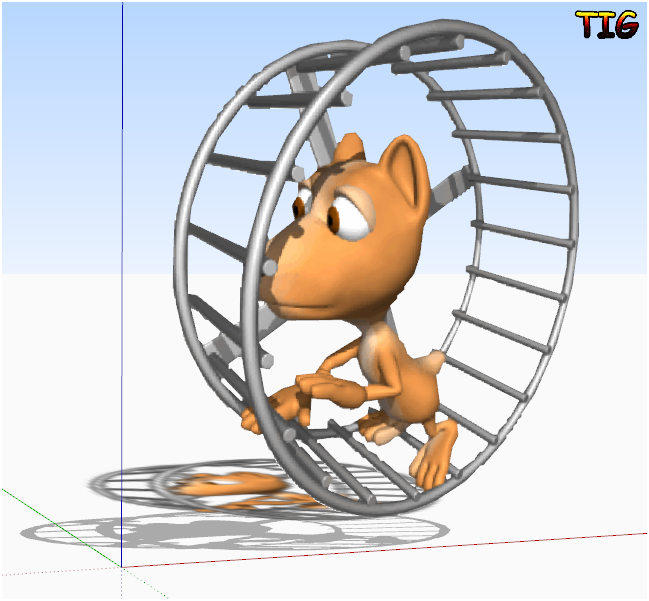

              HamsterWheel%2001.zip


              HamsterWheel%2001Capture.PNG

              TIG

              1 條回覆 最後回覆 回覆 引用 0
              • eLaCiDE 離線
                eLaCiD
                最後由 編輯

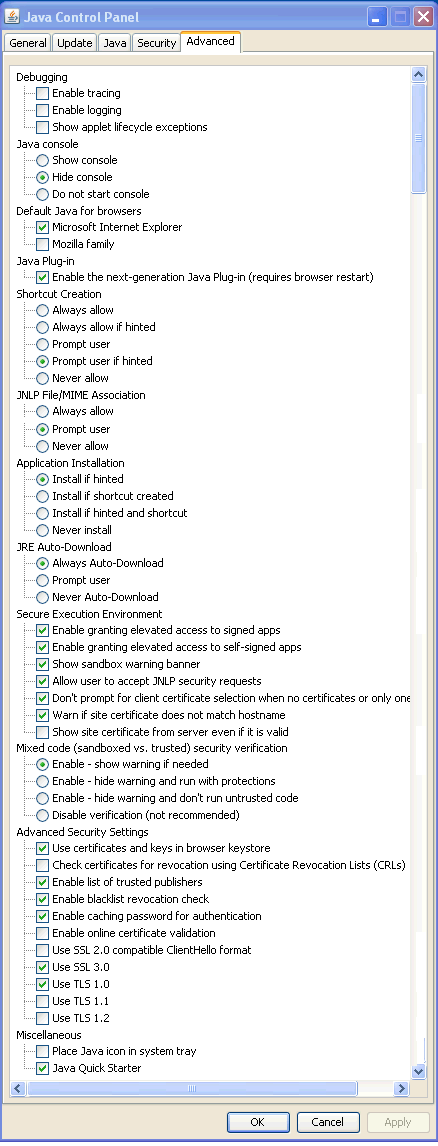
                Java settings :

                JavaSettings.png

                1 條回覆 最後回覆 回覆 引用 0
                • TIGT 離線
                  TIG Moderator
                  最後由 編輯

                  The only difference I have is the last item Java Quick Starter is unchecked in my version, BUT I'd not expect that to be an issue...

                  Can you run Sketchup as an Admin and see if it helps...

                  TIG

                  1 條回覆 最後回覆 回覆 引用 0
                  • eLaCiDE 離線
                    eLaCiD
                    最後由 編輯

                    @tig said:

                    The only difference I have is the last item Java Quick Starter is unchecked in my version, BUT I'd not expect that to be an issue...

                    Can you run Sketchup as an Admin and see if it helps...

                    Nothing new.... same old story 😞

                    I tried once again and got just basic file in TrimmedImages folder.

                    Then, as you can see, I tried with input in RC, but TrimmedImages folder stay unchanged still only basic image.
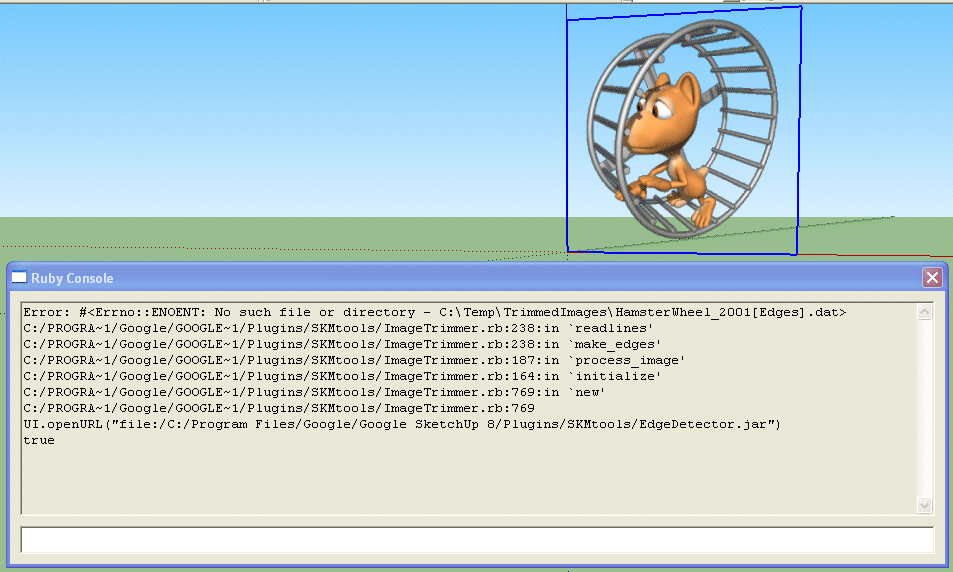
                    RC3.png

                    1 條回覆 最後回覆 回覆 引用 0
                    • picky1958P 離線
                      picky1958
                      最後由 編輯

                      @elacid said:

                      @tig said:

                      The only difference I have is the last item Java Quick Starter is unchecked in my version, BUT I'd not expect that to be an issue...

                      Can you run Sketchup as an Admin and see if it helps...

                      Nothing new.... same old story 😞

                      I tried once again and got just basic file in TrimmedImages folder.

                      Then, as you can see, I tried with input in RC, but TrimmedImages folder stay unchanged still only basic image.

                      [attachment=0:26ynthtl]<!-- ia0 -->RC3.png<!-- ia0 -->[/attachment:26ynthtl]

                      I had exactly the same problems. I never got it to work either 😞

                      1 條回覆 最後回覆 回覆 引用 0
                      • Dave RD 離線
                        Dave R
                        最後由 編輯

                        Works fine for me on two PCs and my Mac.

                        Etaoin Shrdlu

                        %

                        (THERE'S NO PLACE LIKE)

                        G28 X0.0 Y0.0 Z0.0

                        M30

                        %

                        1 條回覆 最後回覆 回覆 引用 0
                        • eLaCiDE 離線
                          eLaCiD
                          最後由 編輯

                          @picky1958 said:

                          @elacid said:

                          @tig said:

                          The only difference I have is the last item Java Quick Starter is unchecked in my version, BUT I'd not expect that to be an issue...

                          Can you run Sketchup as an Admin and see if it helps...

                          Nothing new.... same old story 😞

                          I tried once again and got just basic file in TrimmedImages folder.

                          Then, as you can see, I tried with input in RC, but TrimmedImages folder stay unchanged still only basic image.

                          [attachment=0:2sef8osi]<!-- ia0 -->RC3.png<!-- ia0 -->[/attachment:2sef8osi]

                          I had exactly the same problems. I never got it to work either 😞

                          But somewhere there must be a Catch. I hope so 😄

                          1 條回覆 最後回覆 回覆 引用 0
                          • eLaCiDE 離線
                            eLaCiD
                            最後由 編輯

                            @dave r said:

                            Works fine for me on two PCs and my Mac.

                            Yes, but the problem is not noticeable when running than when not working 😄

                            1 條回覆 最後回覆 回覆 引用 0
                            • picky1958P 離線
                              picky1958
                              最後由 編輯

                              @elacid said:

                              @picky1958 said:

                              @elacid said:

                              @tig said:

                              The only difference I have is the last item Java Quick Starter is unchecked in my version, BUT I'd not expect that to be an issue...

                              Can you run Sketchup as an Admin and see if it helps...

                              Nothing new.... same old story 😞

                              I tried once again and got just basic file in TrimmedImages folder.

                              Then, as you can see, I tried with input in RC, but TrimmedImages folder stay unchanged still only basic image.

                              [attachment=0:2de0bzyz]<!-- ia0 -->RC3.png<!-- ia0 -->[/attachment:2de0bzyz]

                              I had exactly the same problems. I never got it to work either 😞

                              But somewhere there must be a Catch. I hope so 😄

                              I gave up on it. I am good with computers but when it comes up to some terms, there is also a language barrier. Some things are hard to find when you get instructions in english and you are hanging around with a PC that only speaks german! 😉

                              1 條回覆 最後回覆 回覆 引用 0
                              • eLaCiDE 離線
                                eLaCiD
                                最後由 編輯

                                @picky1958 said:

                                I gave up on it. I am good with computers but when it comes up to some terms, there is also a language barrier. Some things are hard to find when you get instructions in english and you are hanging around with a PC that only speaks german! 😉

                                Yes it is a problem. Most people I know have Windows upgrade on its own local language.
                                My knowledge of English is poor, but there's no way for me to upgrade Windows on my PC to local language just for the reason you mention. 😄

                                As someone said, Hope dies last.
                                To give up is not an option 😄

                                1 條回覆 最後回覆 回覆 引用 0
                                • eLaCiDE 離線
                                  eLaCiD
                                  最後由 編輯

                                  I've been thinking a bit about this problem and the conclusion is as follows

                                  When I start Image trimer from SU as I can see in status line

                                  StatusLine.png

                                  there appears one by one dot indicating that Image Trimer works.
                                  In folder TrimmedImage shows up a copy of basic image.
                                  Contents of files from.ini and to.ini are created with rigt paths what all indicates this part work fine.

                                  But after this point, after minute or minute and a half it stops.
                                  In folder TrimmedImage there is no files image[Edges].dat and image[Edges].png

                                  The main question is, what heppens in that minute, according status line ImageTrimer works something.
                                  Does it produce this two files image[Edges].dat and image[Edges].png or not.
                                  We have two options
                                  1.)
                                  Files are produced but sometning has gone wrong and files can not be saved in TrimmerdImage folder
                                  2)
                                  Files are not produced which brings us back to the question of what then happens in that minute, minute and half.

                                  On the other side when EdgeDetector.jar is triggered manualy it produce this two files in folder.
                                  When EdgeDetector.jar is trigered inside RC nothing happens.

                                  1 條回覆 最後回覆 回覆 引用 0
                                  • TIGT 離線
                                    TIG Moderator
                                    最後由 編輯

                                    If you try this in the RC
                                    UI.openURL("file:///"+"../full/path/to/EdgeDetector.jar")
                                    what happens ?

                                    TIG

                                    1 條回覆 最後回覆 回覆 引用 0
                                    • eLaCiDE 離線
                                      eLaCiD
                                      最後由 編輯

                                      @tig said:

                                      If you try this in the RC
                                      UI.openURL("file:///"+"../full/path/to/EdgeDetector.jar")
                                      what happens ?

                                      Full path to EdgeDetector.jar is :
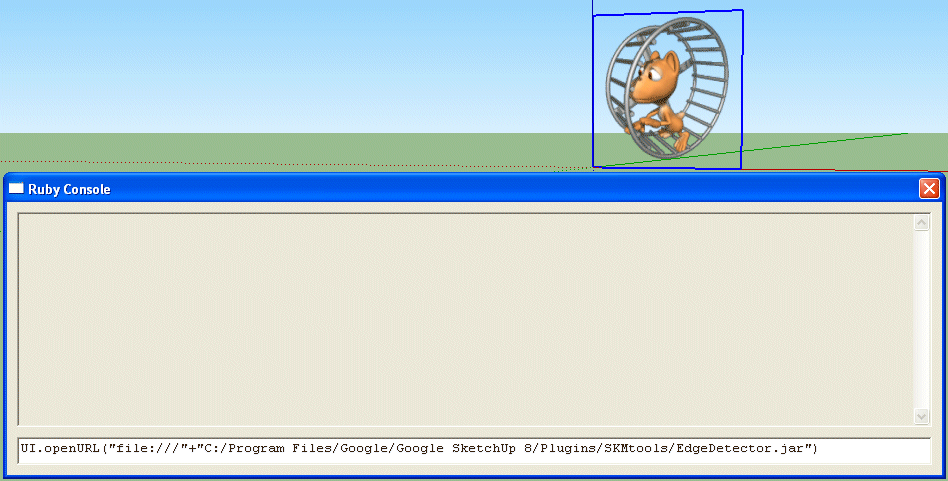
                                      C:/Program Files/Google/Google SketchUp 8/Plugins/SKMtools/EdgeDetector.jar

                                      In this case if this is correct

                                      RC4.png

                                      after enter and few seconds I got just this
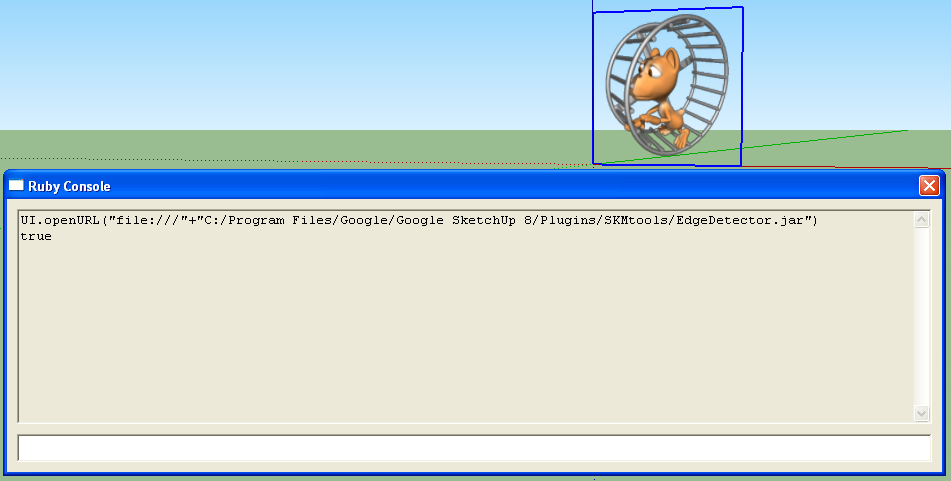
                                      RC5.png

                                      and nothing more
                                      Folder TrimmedImage is unchanged.

                                      1 條回覆 最後回覆 回覆 引用 0
                                      • TIGT 離線
                                        TIG Moderator
                                        最後由 編輯

                                        Has it then made the other files in the 'Trimmed' folder ?
                                        If so we know it's both runnable and working...
                                        Is there a .dat file?
                                        This tells Ruby where to draw the edges that are the image's 'perimeter' ?
                                        Can you PM a zip of the Trimmed folder including any .dat file to me ?
                                        So why isn't it then reading the .dat file? 😕

                                        TIG

                                        1 條回覆 最後回覆 回覆 引用 0
                                        • eLaCiDE 離線
                                          eLaCiD
                                          最後由 編輯

                                          @tig said:

                                          Has it then made the other files in the 'Trimmed' folder ?
                                          If so we know it's both runnable and working...
                                          Is there a .dat file?
                                          This tells Ruby where to draw the edges that are the image's 'perimeter' ?
                                          Can you PM a zip of the Trimmed folder including any .dat file to me ?
                                          So why isn't it then reading the .dat file? 😕

                                          Well, we have three situations..

                                          1.)
                                          When I start ImageTrimer from SU then
                                          in files from.ini and to.iniappears correct path
                                          in folder TrimmedImages appears copy od image.png
                                          And nothing more.

                                          2.)
                                          When I start manualy by click EdgeDetector.jar
                                          with the condition - there is corect path in files from.ini and to.ini
                                          and condtition - there is image.png inTrimmedImagesfolder

                                          In folder TrimmedImages next to image.pngappears image[Edges].datand image[Edges].png

                                          3.)
                                          When I start EdgeDetector.jarinside RC nothing happens.
                                          Files image[Edges].datand image[Edges].png doesn't appear in b] TrimmedImages [/b] folder

                                          Zip of TrimmedImage folder is sent over PM

                                          1 條回覆 最後回覆 回覆 引用 0
                                          • TIGT 離線
                                            TIG Moderator
                                            最後由 編輯

                                            A .jar file won't execute through the RC unless you use UI.openURL("file:///"+full_path_to_jar), which we know works... I think - please retry and confirm this if there's any doubt...

                                            The edges dat file that is necessary is made in the set you PM'd, and it is fine - here's a zoomed out view of the 'text' - you can clearly see the 0/1 pattern matching the image outline !

                                            So why isn't it working through the main ruby code ?

                                            The .jar isn't 'executing' in the code...
                                            So there must be something wrong with either your permissions - are you an admin ?
                                            OR perhaps the Java settings are not right for some reason???
                                            Do you AND ALL others have FULL access to the TrimmedImages folder ?
                                            Perhaps you do but others like Java/Sketchup don't ???
                                            Is there FULL rights for ALL to the SKMtools folder/files and subfolders ???
                                            It's as if something is stopping the one step needed with the jar file 'opening' and making the dat file...
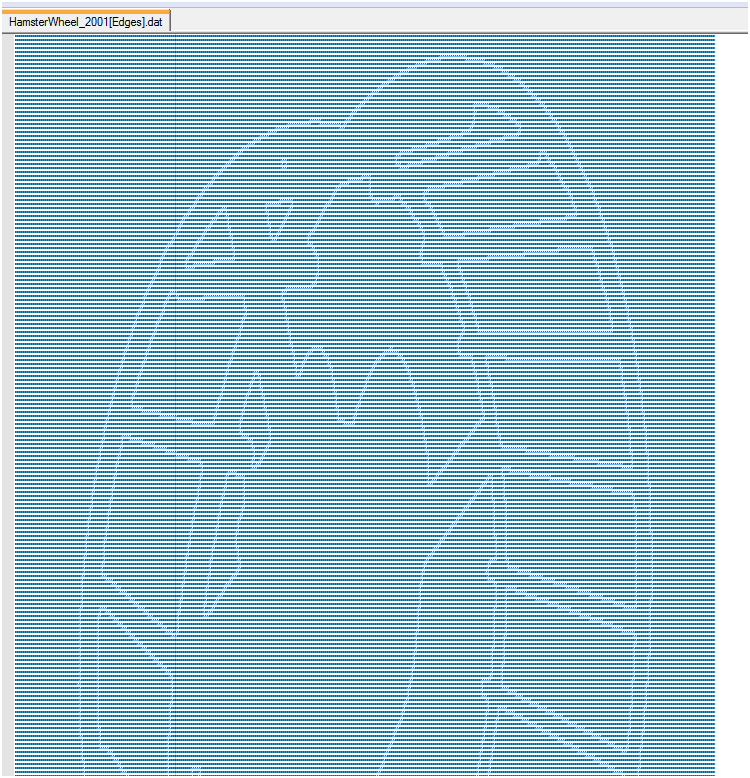


                                            Capture.PNG

                                            TIG

                                            1 條回覆 最後回覆 回覆 引用 0
                                            • 1
                                            • 2
                                            • 15
                                            • 16
                                            • 17
                                            • 18
                                            • 19
                                            • 18 / 19
                                            • 第一個貼文
                                              最後的貼文
                                            Buy SketchPlus
                                            Buy SUbD
                                            Buy WrapR
                                            Buy eBook
                                            Buy Modelur
                                            Buy Vertex Tools
                                            Buy SketchCuisine
                                            Buy FormFonts

                                            Advertisement