sketchucation logo sketchucation
    • 登入
    Oops, your profile's looking a bit empty! To help us tailor your experience, please fill in key details like your SketchUp version, skill level, operating system, and more. Update and save your info on your profile page today!
    🔌 Smart Spline | Fluid way to handle splines for furniture design and complex structures. Download

    [Plugin] Model Info

    已排程 已置頂 已鎖定 已移動 Plugins
    24 貼文 10 Posters 28.0k 瀏覽 10 Watching
    正在載入更多貼文
    • 從舊到新
    • 從新到舊
    • 最多點贊
    回覆
    • 在新貼文中回覆
    登入後回覆
    此主題已被刪除。只有擁有主題管理權限的使用者可以查看。
    • thomthomT 離線
      thomthom
      最後由 thomthom 編輯

      Overview
      Outputs the model statistics to either console or file.
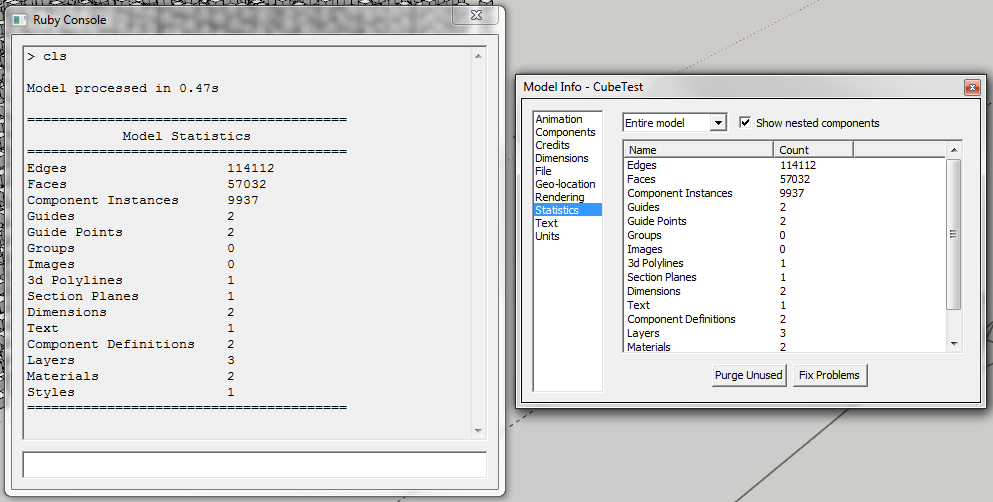
      Model Info

      Version 1.1.0
      Count the triangles of each face. In tests this is more than three times slower - so it has been made into an extended function.
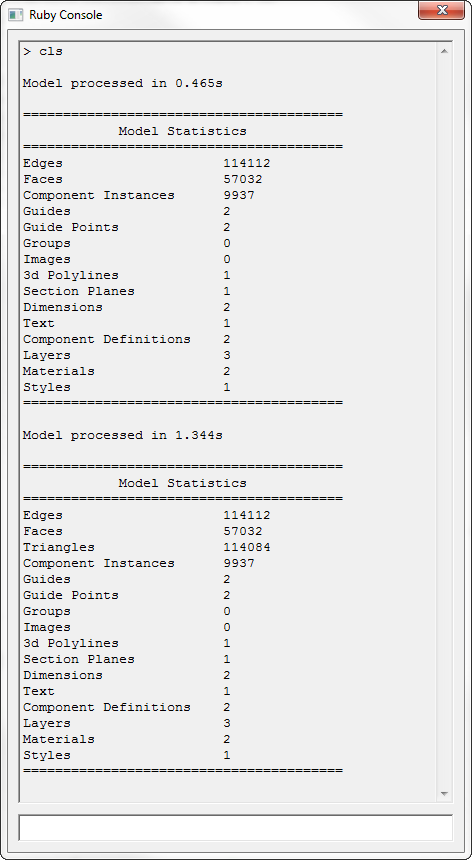
      Extended Model Info

      Counting triangles is more accurate indication to how complex the model is. As the following screenshot illustrate - the two scenes has identical number of faces, but the number of triangles required to generate the faces is significantly different due to the inner holes in the upper example.
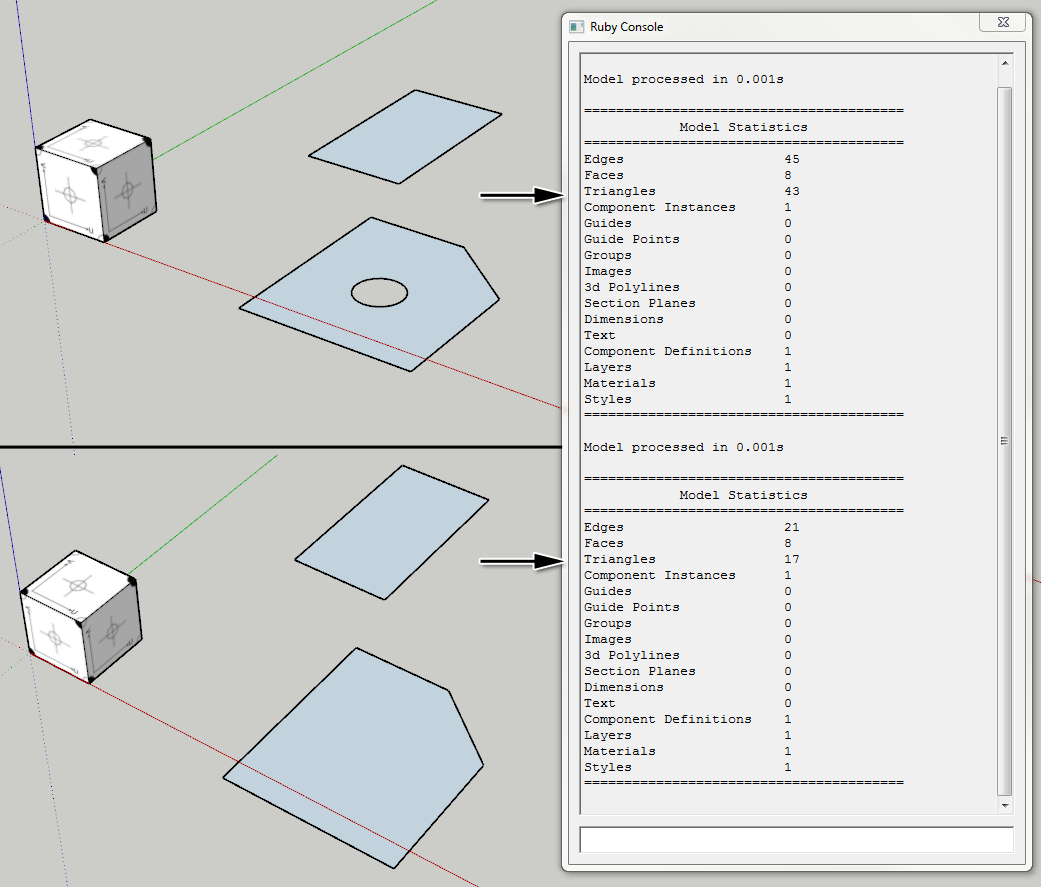
      Face count vs Triangle count

      Version 1.2.0
      Outputs the component statistics.
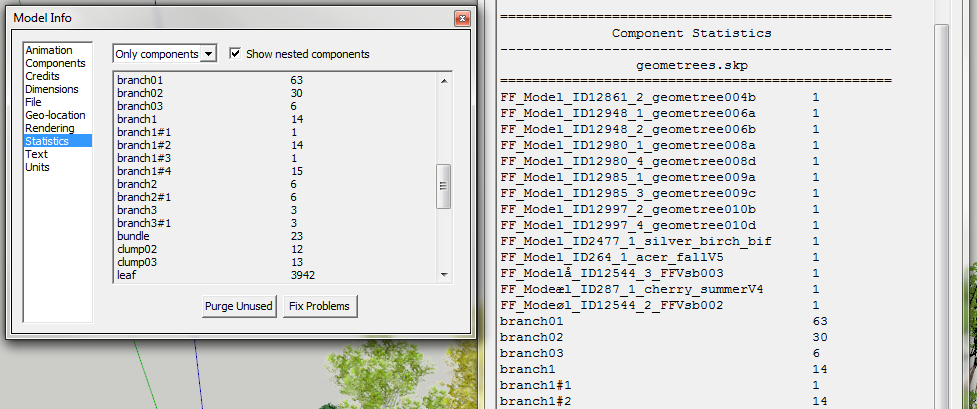
      ModelInfoCompStat.png

      Access
      Plugins > Model Info

      Features

      • Statistics to File
      • Statistics to Console
      • Extended Statistics to File (1.1.0)
      • Extended Statistics to Console (1.1.0)

      Requirements

      • SketchUp 6 or newer - ( Other versions untested )
      • TT_Lib2 (v2.4.0)

      Link Preview Image
      SketchUp Plugins | PluginStore | SketchUcation

      SketchUp Plugin and Extension Store by SketchUcation provides free downloads of hundreds of SketchUp extensions and plugins

      favicon

      (sketchucation.com)

      Footprint

      http://forums.sketchucation.com/download/file.php?id=53762
      <Sketchup>/Plugins/
      +-
      http://forums.sketchucation.com/download/file.php?id=53763
      tt_model_info.rb

      http://forums.sketchucation.com/download/file.php?id=53761

      Thomas Thomassen — SketchUp Monkey & Coding addict
      List of my plugins and link to the CookieWare fund

      1 條回覆 最後回覆 回覆 引用 0
      • GaieusG 離線
        Gaieus
        最後由 編輯

        Nifty! 👍

        Gai...

        1 條回覆 最後回覆 回覆 引用 0
        • soloS 離線
          solo
          最後由 編輯

          Thom, how about a call out on how many poly's have been used?

          http://www.solos-art.com

          If you see a toilet in your dreams do not use it.

          1 條回覆 最後回覆 回覆 引用 0
          • thomthomT 離線
            thomthom
            最後由 編輯

            You mean triangles?

            Thomas Thomassen — SketchUp Monkey & Coding addict
            List of my plugins and link to the CookieWare fund

            1 條回覆 最後回覆 回覆 引用 0
            • Rich O BrienR 離線
              Rich O Brien Moderator
              最後由 編輯

              Doesn't Fredo have this?

              http://forums.sketchucation.com/viewtopic.php?t=30976

              Download the free D'oh Book for SketchUp 📖

              1 條回覆 最後回覆 回覆 引用 0
              • soloS 離線
                solo
                最後由 編輯

                Ah, cool one, never seen that before, thanks Rich.

                Thom, I guess there is a lot more to it than just reporting amount of faces as SU does not use triangles, they are n-gons.
                Kinda hard to figure out SU's limit due to this inconsistency, had it been triangle based one could get a clearer idea.

                http://www.solos-art.com

                If you see a toilet in your dreams do not use it.

                1 條回覆 最後回覆 回覆 引用 0
                • GaieusG 離線
                  Gaieus
                  最後由 編輯

                  If you export your model to 3ds or dae, it will get triangulated. When re-importing without merging co-planar faces, you get a clearer poly count with triangles.

                  Gai...

                  1 條回覆 最後回覆 回覆 引用 0
                  • thomthomT 離線
                    thomthom
                    最後由 編輯

                    @solo said:

                    Thom, I guess there is a lot more to it than just reporting amount of faces as SU does not use triangles, they are n-gons.
                    Kinda hard to figure out SU's limit due to this inconsistency, had it been triangle based one could get a clearer idea.

                    Can extract the internal triangulation. SU makes that available to the API. My Probe plugin lets you inspect how SU triangulates faces.

                    Thomas Thomassen — SketchUp Monkey & Coding addict
                    List of my plugins and link to the CookieWare fund

                    1 條回覆 最後回覆 回覆 引用 0
                    • thomthomT 離線
                      thomthom
                      最後由 編輯

                      Ok. Did a quick update - added triangle count if you choose Extended Model Info. (Note it's at least three times slower.)

                      Thomas Thomassen — SketchUp Monkey & Coding addict
                      List of my plugins and link to the CookieWare fund

                      1 條回覆 最後回覆 回覆 引用 0
                      • G 離線
                        glro
                        最後由 編輯

                        @thomthom said:

                        Overview
                        Outputs the model statistics to either console or file.
                        ...

                        http://forums.sketchucation.com/download/file.php?id=53761

                        this is interesting...

                        when you choose statistics, you have 2 options:

                        entire model (that's what you exported)
                        components

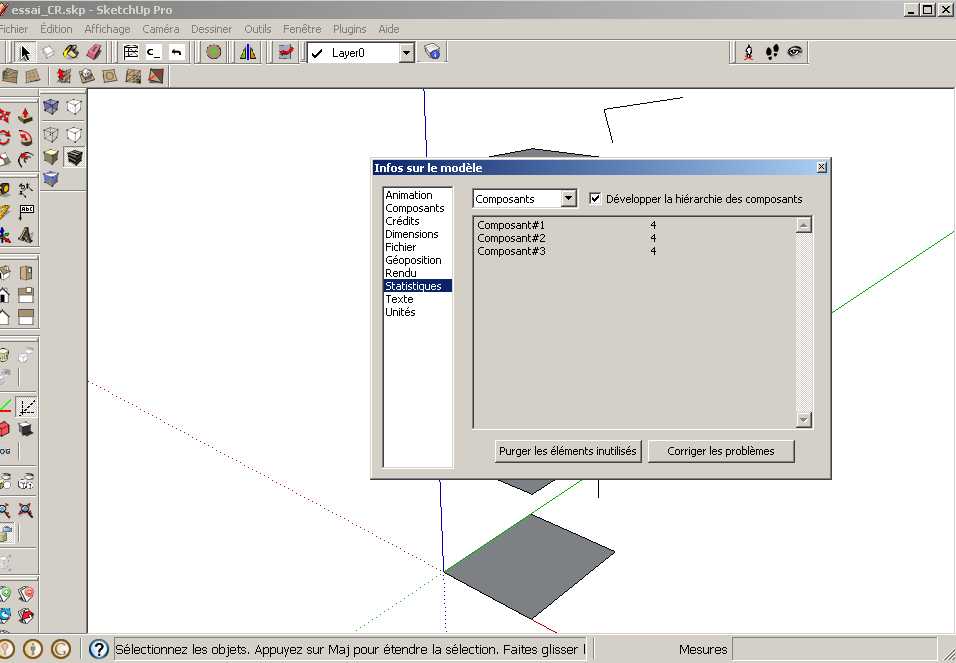
                        could you do the same job, but for "components" instead, and precisely with the developped hierarchy?

                        1 條回覆 最後回覆 回覆 引用 0
                        • thomthomT 離線
                          thomthom
                          最後由 編輯

                          @glro said:

                          could you do the same job, but for "components" instead, and precisely with the developped hierarchy?

                          You mean the stats for a selected component?

                          What do you mean by the "developed hierachy"?

                          Thomas Thomassen — SketchUp Monkey & Coding addict
                          List of my plugins and link to the CookieWare fund

                          1 條回覆 最後回覆 回覆 引用 0
                          • G 離線
                            glro
                            最後由 編輯

                            @thomthom said:

                            @glro said:

                            could you do the same job, but for "components" instead, and precisely with the developped hierarchy?

                            You mean the stats for a selected component?

                            What do you mean by the "developed hierachy"?

                            the stats for components, instead of "for the whole model"

                            this...


                            essai_CR.jpg

                            1 條回覆 最後回覆 回覆 引用 0
                            • thomthomT 離線
                              thomthom
                              最後由 編輯

                              Oooh... I never noticed that option before! 😲

                              Thomas Thomassen — SketchUp Monkey & Coding addict
                              List of my plugins and link to the CookieWare fund

                              1 條回覆 最後回覆 回覆 引用 0
                              • G 離線
                                glro
                                最後由 編輯

                                @thomthom said:

                                Oooh... I never noticed that option before! 😲

                                if you choose this option, the statistics include the nestled components
                                the whole problem is: how to retrieve this information?

                                i think i might have a solution coming, but since it is not finished, i have to wait

                                1 條回覆 最後回覆 回覆 引用 0
                                • thomthomT 離線
                                  thomthom
                                  最後由 編輯

                                  I can make it produce that info - just got to wait until next week. Moving apartment this weekend.

                                  Thomas Thomassen — SketchUp Monkey & Coding addict
                                  List of my plugins and link to the CookieWare fund

                                  1 條回覆 最後回覆 回覆 引用 0
                                  • thomthomT 離線
                                    thomthom
                                    最後由 編輯

                                    @glro said:

                                    @thomthom said:

                                    Oooh... I never noticed that option before! 😲

                                    if you choose this option, the statistics include the nestled components
                                    the whole problem is: how to retrieve this information?

                                    i think i might have a solution coming, but since it is not finished, i have to wait

                                    Version 1.2.0
                                    Outputs the component statistics.

                                    Thomas Thomassen — SketchUp Monkey & Coding addict
                                    List of my plugins and link to the CookieWare fund

                                    1 條回覆 最後回覆 回覆 引用 0
                                    • Dave RD 離線
                                      Dave R
                                      最後由 編輯


                                      http://farm6.static.flickr.com/5209/5257263915_2ab6ebeda3_z.jpg

                                      Thomthom, thank you for this cool plugin. I have noticed an odd thing, though. I copied and pasted a few components from a file called "spinet desk" to a new file and saved it as a new file. Evidently the plugin is still looking at the other, closed original file and giving the stats for that as well. Or is it possible the console isn't cleared when switching to a different SKP file? Is it possible to clear the contents of the console before processing and displaying a new run of the plugin?

                                      Etaoin Shrdlu

                                      %

                                      (THERE'S NO PLACE LIKE)

                                      G28 X0.0 Y0.0 Z0.0

                                      M30

                                      %

                                      1 條回覆 最後回覆 回覆 引用 0
                                      • thomthomT 離線
                                        thomthom
                                        最後由 編輯

                                        @dave r said:

                                        vidently the plugin is still looking at the other, closed original file and giving the stats for that as well. Or is it possible the console isn't cleared when switching to a different SKP file?

                                        The console output is not interactive. Just a history of the output. You find the latest output at the bottom. Notice that in your screenshot it says "Drawer.skp" further down.

                                        @dave r said:

                                        Is it possible to clear the contents of the console before processing and displaying a new run of the plugin?

                                        I have a Windows hack I could add. Don't know how to do it for OSX. ...but you might have some that don't want it cleared... I'd rather not add too many options to this. It's just a quick and dirty plugin.

                                        Thomas Thomassen — SketchUp Monkey & Coding addict
                                        List of my plugins and link to the CookieWare fund

                                        1 條回覆 最後回覆 回覆 引用 0
                                        • Dave RD 離線
                                          Dave R
                                          最後由 編輯

                                          Understood. Thank you for this.

                                          Etaoin Shrdlu

                                          %

                                          (THERE'S NO PLACE LIKE)

                                          G28 X0.0 Y0.0 Z0.0

                                          M30

                                          %

                                          1 條回覆 最後回覆 回覆 引用 0
                                          • B 離線
                                            Ben Ritter
                                            最後由 編輯

                                            Thank you again TIG.

                                            1 條回覆 最後回覆 回覆 引用 0
                                            • 1
                                            • 2
                                            • 2 / 2
                                            • 第一個貼文
                                              最後的貼文
                                            Buy SketchPlus
                                            Buy SUbD
                                            Buy WrapR
                                            Buy eBook
                                            Buy Modelur
                                            Buy Vertex Tools
                                            Buy SketchCuisine
                                            Buy FormFonts

                                            Advertisement