sketchucation logo sketchucation
    • 登入
    Oops, your profile's looking a bit empty! To help us tailor your experience, please fill in key details like your SketchUp version, skill level, operating system, and more. Update and save your info on your profile page today!
    🔌 Smart Spline | Fluid way to handle splines for furniture design and complex structures. Download

    [Plugin] Silhouette to Plane v1.1

    已排程 已置頂 已鎖定 已移動 Plugins
    32 貼文 17 Posters 33.1k 瀏覽 17 Watching
    正在載入更多貼文
    • 從舊到新
    • 從新到舊
    • 最多點贊
    回覆
    • 在新貼文中回覆
    登入後回覆
    此主題已被刪除。只有擁有主題管理權限的使用者可以查看。
    • TIGT 離線
      TIG Moderator
      最後由 編輯

      (c) TIG 2010
      Permission to use, copy, modify, and distribute this software for
      any purpose and without fee is hereby granted, provided that the above
      copyright notice appear in all copies.
      THIS SOFTWARE IS PROVIDED "AS IS" AND WITHOUT ANY EXPRESS OR
      IMPLIED WARRANTIES, INCLUDING, WITHOUT LIMITATION, THE IMPLIED
      WARRANTIES OF MERCHANTABILITY AND FITNESS FOR A PARTICULAR PURPOSE.


      You need this file
      #SilhouetteToPlane.rb >>> Plugins Folder
      You must also have this file
      #WorkPlane.rb >>> Plugins Folder


      Usage:
      Make or choose a 'WorkPlane' that is located on the 'plane' onto which
      you want to project your 'flattened' Geometry.
      Select the 'WorkPlane' and the required Geometry [Edges etc, note that
      Faces etc will be ignored], and/or Groups, and/or Component_Instances.
      Run this Tool from the menu 'Plugins' > 'Silhouette to Plane'
      or type 'silhouettetoplane' in the Ruby Console.
      If there is no 'WorkPlane' and/or other objects in the Selection you get an
      error message.
      Assuming it runs...
      All Edges in the Selection that are not 'hidden' or not on 'off layers' are
      projected onto that 'plane'.
      The new 'flattened' Edges are put into a new Group named 'SIL_123456.789'
      [it has a 'date/time' suffix].
      Each new Edge takes the original Edge's layer.
      The new Edges are inspected and only those that are needed to form a fully
      faced 'silhouette' WITHOUT cut-outs are retained.
      With this version internal 'hole' cut-outs in silhouettes are NOT formed.
      On completion the new Group ['SIL_123456.789'] is left highlighted.


      Donations:
      by PayPal to info @ revitrev.org PayPalButton ___________________________________________________________________________
      Version:
      1.0 20101022 First release.
      1.1 20101023 The correct Plane of a 'WorkPlane' is now used even if it has
      been Transformed inside its own Group.
      Speed and reliability improved. Title fixed.
      ___________________________________________________________________________#SilhouetteToPlane.rb

      TIG

      1 條回覆 最後回覆 回覆 引用 0
      • shuraS 離線
        shura
        最後由 編輯

        very good idea TIG! Although, I am getting some errors here - with a single loop of edges it works fine, but for several faces it gets messed up:
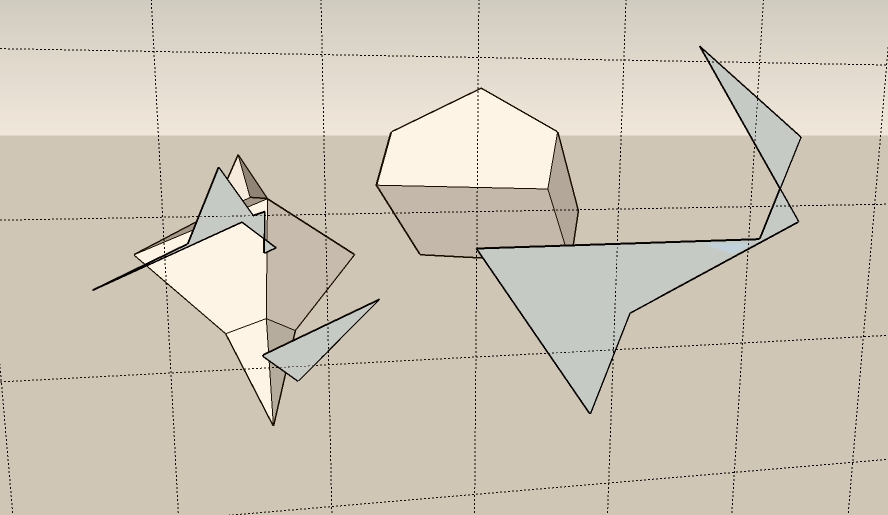
        silhouetteError.jpg

        btw, would it be possible to have the projection lines run all to the same focal point, similar to Radial Lines plugin? Like this we could also have a flattened picture of a perspective view.

        1 條回覆 最後回覆 回覆 引用 0
        • TIGT 離線
          TIG Moderator
          最後由 編輯

          This is the first [buggy] release!
          Can you post and example SKP so that I can see the errors...

          TIG

          1 條回覆 最後回覆 回覆 引用 0
          • shuraS 離線
            shura
            最後由 編輯

            SU 7.1 on Vista, have tons of plugins but only one error so far (wxfsu) ...


            silhouetteError.skp

            1 條回覆 最後回覆 回覆 引用 0
            • honoluludesktopH 離線
              honoluludesktop
              最後由 編輯

              TIG, How many plugin, and point releases are you currently averaging? 1 a week?-)

              And, you still find time to help us. Thanks!!!!!

              1 條回覆 最後回覆 回覆 引用 0
              • pilouP 離線
                pilou
                最後由 編輯

                @unknownuser said:

                1 a week?

                1 a day is more appropriated 😉

                Frenchy Pilou
                Is beautiful that please without concept!
                My Little site :)

                1 條回覆 最後回覆 回覆 引用 0
                • Didier BurD 離線
                  Didier Bur
                  最後由 編輯

                  Hi TIG,
                  I suggest you change line #63 to: @model.start_operation("Silhouette to Plane") 😎
                  Thanks for all your hard work !

                  DB

                  1 條回覆 最後回覆 回覆 引用 0
                  • TIGT 離線
                    TIG Moderator
                    最後由 編輯

                    Here's v1.1 http://forums.sketchucation.com/viewtopic.php?p=281445#p281445
                    The correct Plane of a 'WorkPlane' is now used even if it has been Transformed inside its own Group.
                    Speed and reliability improved.
                    Title fixed.

                    TIG

                    1 條回覆 最後回覆 回覆 引用 0
                    • EarthMoverE 離線
                      EarthMover
                      最後由 編輯

                      Great Script! 👍 Perfect for sorting out faces that have trouble closing. Could you possibly have it so that if no work plane is selected, that it will default to a placing the silhouette on the 0 z plane? Similar to ThomThoms Flatten script in his "Plan Tools", except yours automagically creates the face and groups it.

                      3D Artist at Clearstory 3D Imaging
                      Guide Tool at Winning With Sketchup
                      Content Creator at Skapeup

                      1 條回覆 最後回覆 回覆 引用 0
                      • TIGT 離線
                        TIG Moderator
                        最後由 編輯

                        @earthmover said:

                        Great Script! 👍 Perfect for sorting out faces that have trouble closing. Could you possibly have it so that if no work plane is selected, that it will default to a placing the silhouette on the 0 z plane? Similar to ThomThoms Flatten script in his "Plan Tools", except yours automagically creates the face and groups it.

                        You could always make a quick WorkPlane on the ground...

                        TIG

                        1 條回覆 最後回覆 回覆 引用 0
                        • shuraS 離線
                          shura
                          最後由 編輯

                          Just great! You are a hero, hats off to thee!

                          hats_off.jpg

                          1 條回覆 最後回覆 回覆 引用 0
                          • TIGT 離線
                            TIG Moderator
                            最後由 編輯

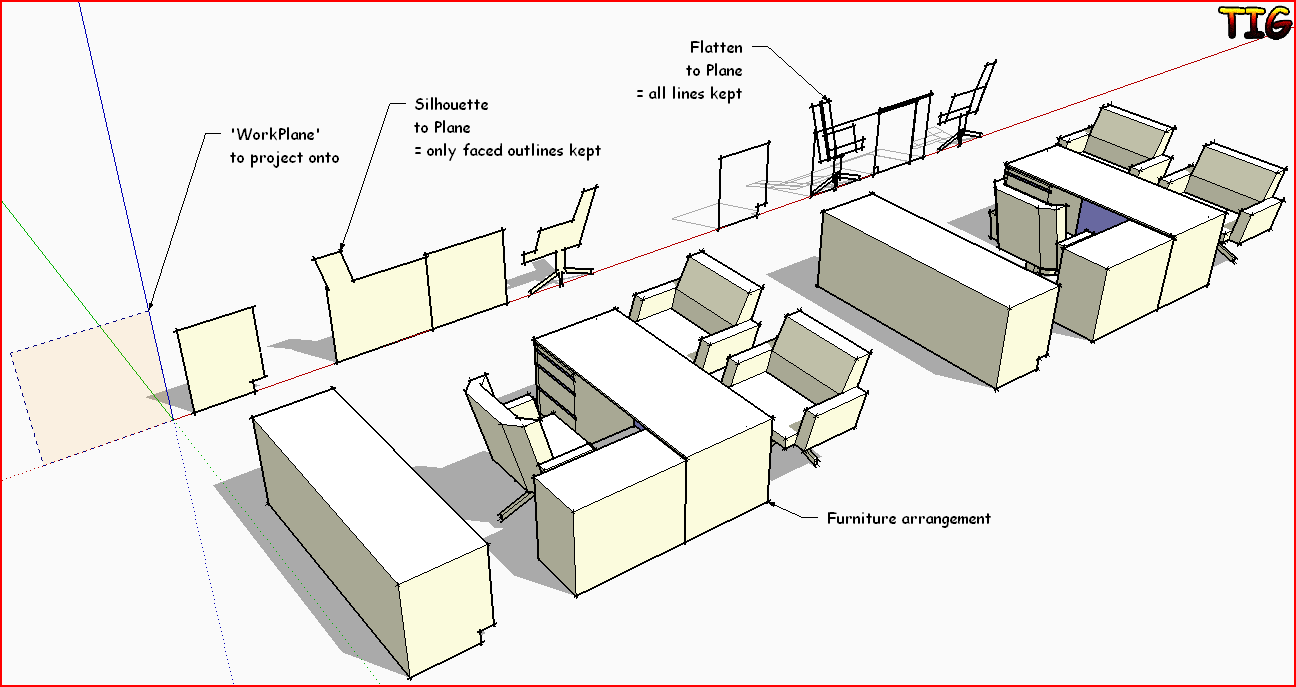
                            Here's an example...Capture.PNG

                            TIG

                            1 條回覆 最後回覆 回覆 引用 0
                            • pilouP 離線
                              pilou
                              最後由 編輯

                              This sort of image must be at each first post 😄

                              Frenchy Pilou
                              Is beautiful that please without concept!
                              My Little site :)

                              1 條回覆 最後回覆 回覆 引用 0
                              • EarthMoverE 離線
                                EarthMover
                                最後由 編輯

                                Here's another example.

                                Silhouette to plane is also great for flattening a set of looped edges you want to be planar to form a face, but cant seem to find the vert that's out of whack.
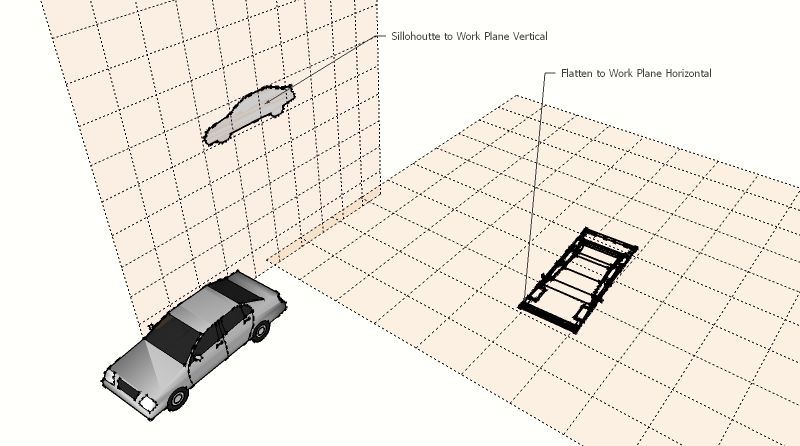

                                Flatten to plan.jpg

                                3D Artist at Clearstory 3D Imaging
                                Guide Tool at Winning With Sketchup
                                Content Creator at Skapeup

                                1 條回覆 最後回覆 回覆 引用 0
                                • X 離線
                                  xrok1
                                  最後由 編輯

                                  this could be great for making face me components! render the 3d version then apply as texture to the 2d. 😄

                                  “There are three classes of people: those who see. Those who see when they are shown. Those who do not see.”

                                  http://www.Twilightrender.com try it!

                                  1 條回覆 最後回覆 回覆 引用 0
                                  • B 離線
                                    Ben Ritter
                                    最後由 編輯

                                    TIG, fabulous! Thank you for the flatten to plane script as well. You are very generous, and gifted.

                                    1 條回覆 最後回覆 回覆 引用 0
                                    • C 離線
                                      caleidos4d
                                      最後由 編輯

                                      TIG!!!

                                      http://www.caleidos4d.it

                                      1 條回覆 最後回覆 回覆 引用 0
                                      • D 離線
                                        danbig
                                        最後由 編輯

                                        Thanks, TIG. Amazing script.

                                        Does this plugin do the flatten to plane, or is that a separate plugin? I can't seem to find the command for flatten to plane. (Silhouette to Plane is working great)

                                        1 條回覆 最後回覆 回覆 引用 0
                                        • shuraS 離線
                                          shura
                                          最後由 編輯

                                          Flatten to Plane:

                                          http://forums.sketchucation.com/viewtopic.php?f=323&t=31895

                                          1 條回覆 最後回覆 回覆 引用 0
                                          • shuraS 離線
                                            shura
                                            最後由 編輯

                                            Just to point out again what Adam already said, Silhouette to Workplane makes closing difficult outlines sooo easy. Brought back the faith in freehand tool to me.
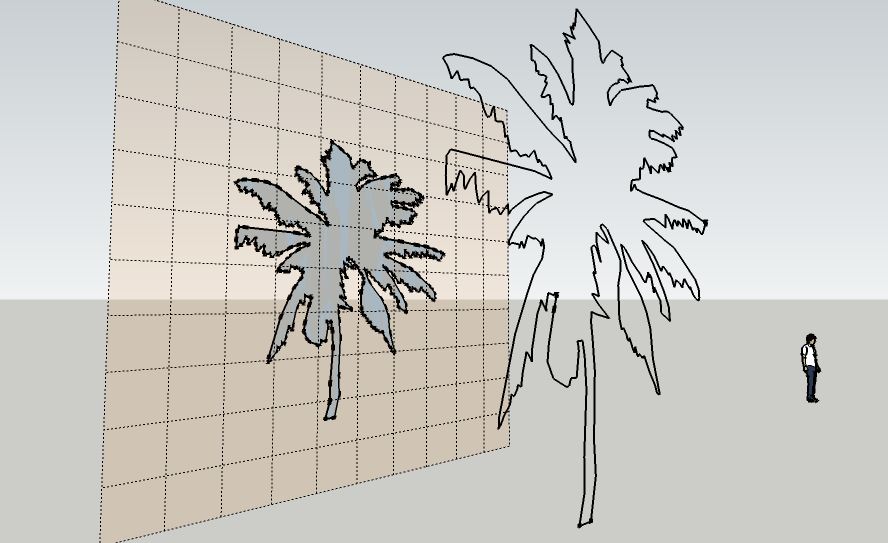
                                            with freehand tool quickly drawn outlines often do not close. solved with silhouettes to workplane.

                                            Rocky, that is a pretty smart idea. I am having thoughts about this kind of matte painting tricks all the time.
                                            (like here: http://forums.sketchucation.com/viewtopic.php?f=79&t=31069)

                                            thanks again for your generosity TIG!

                                            1 條回覆 最後回覆 回覆 引用 0
                                            • 1
                                            • 2
                                            • 1 / 2
                                            • 第一個貼文
                                              最後的貼文
                                            Buy SketchPlus
                                            Buy SUbD
                                            Buy WrapR
                                            Buy eBook
                                            Buy Modelur
                                            Buy Vertex Tools
                                            Buy SketchCuisine
                                            Buy FormFonts

                                            Advertisement